


'/%3E%3Cpath%20fill='%23b2b2b2'%20d='M241%20382q0%2016%2017%2026%2017%2011%2042%2011t42-11q16-11%2017-26V269H241'/%3E%3Cpath%20fill='%239f7e00'%20d='M241%20379q0%2014%208%2023%209%209%2021%209%2014%200%2021-9%209-9%209-23V269h-59'/%3E%3Cpath%20d='M241%20339v-70h59v110q0%2014-9%2023l-6%205v-68h-15v72q-8%200-14-4v-68zm59%2040c0%2022%2015%2032%2029%2032%2021%200%2030-18%2030-32v-40h-59'/%3E%3Cpath%20fill='%239f7e00'%20d='M266%20277v5h2v12h-3v-5h2v-5h-9v5h2v5h-4v9h3v18h-5v10h34v-10h-5v-18h3v-9h-4v-5h2v-5h-9v5h2v5h-3v-12h2v-5zm42%20101q0%2010%206%2017%206%206%2015%207%2010-1%2016-7%206-7%206-17v-29h-43'/%3E%3Ccircle%20fill='%230044ad'%20cx='329.5'%20cy='372'%20r='6'/%3E%3Cellipse%20fill='%230044ad'%20cx='300'%20cy='340'%20rx='16'%20ry='21'/%3E%3C/svg%3E)

'/%3E%3C/g%3E%3Cuse%20href='%23c'%20transform='matrix(-1%200%200%201%20720%200)'/%3E%3C/svg%3E)


'%3E%3Cpath%20stroke='%23000'%20stroke-width='4'%20d='m-35-37-13%2020m5%203%2013-20m5%203-13%2020m63%2042%206-9m1-2%206-9m5%203-6%209m-1%202-6%209m5%203%206-9m1-2%206-9m-96%200%2013%2020m5-3-6-9m-1-2-6-9m5-3%2013%2020m63-42-6-9m-1-2-6-9m5-3%2013%2020m5-3-6-9m-1-2-6-9'/%3E%3Ccircle%20r='24'%20fill='%23cd2e3a'/%3E%3Cpath%20fill='%230047a0'%20d='M0%200a12%2012%200%201%201%2020%2013%2024%2024%200%201%201-40-26A12%2012%200%201%200%200%200'/%3E%3C/g%3E%3C/svg%3E)


Résumer cet article :
There are concepts that seem a bit experimental at their launch, but then make complete sense over the generations. That’s exactly what’s happening with the Khadas Mind ecosystem.
When I tested the first Mind, I really liked the idea of a tiny computer serving as the “brain” of our computing environment. You carry it with you, and then simply place it on different accessories to adapt to the situation: dock at the office, screen/keyboard with the Mind xPlay to turn it into a laptop, or a graphics station to regain the power of a big machine.
I had just tested the first Mind Graphics, equipped with an NVIDIA GeForce RTX 4060 Ti. More recently, during my test of the Khadas Mind 2, I used this same first-generation Graphics again to see how the new mini PC performed with a real graphics card. And the result was quite spectacular already.
But one phrase concluded this part of my test: “The arrival of the Mind Graphics 2 should further reinforce this logic.” Well, this time, it has arrived on my desk!
The Mind Graphics 2 almost identically follows the formula of its predecessor but replaces the RTX 4060 Ti with an entirely new GeForce RTX 5060 Ti 16 GB based on the Blackwell architecture. And since I still had exactly the same Khadas Mind 2 equipped with the Core Ultra 7 155H, 32 GB of RAM, and a 1 TB SSD on hand, the conditions were ideal for precisely measuring what this second generation brings.
And while the physical differences are subtle, under the hood, it’s a different story.
Khadas Mind: the computer that follows you everywhere
Before we get into the Graphics 2 itself, a small reminder of the concept is in order.
Khadas does not consider the Mind to be just a simple mini PC. The small box is rather the computing heart of an ecosystem. It contains the processor, memory, storage, and thus all your applications and data.

Instead of owning a laptop for travel, a desktop machine, and possibly a gaming tower, the idea is to transport this small computing brain from one environment to another.
The system relies on the Mind Link for this, a connector located underneath the mini PC. You simply place the Mind on a compatible accessory, and the connection is established immediately.
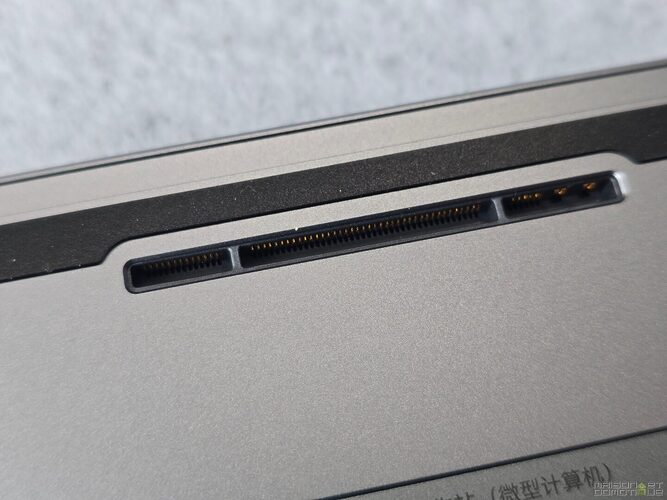
With the Mind Graphics 2, Khadas utilizes a native PCI Express 4.0 x8 connection, announced at 128 GT/s. So we are far from a traditional eGPU connected via Thunderbolt 4, limited to 32 GT/s. There is no protocol conversion between the PC and the graphics card here, which helps limit performance losses and latency issues.
This is probably one of the most interesting aspects of the concept. I arrive at the office with the Mind 2 in my bag, I place it on the Mind Graphics 2, and a few seconds later I have my screens, network, peripherals, and most importantly, a GeForce RTX 5060 Ti.

In the evening, I remove the Mind and leave with exactly the same PC: Windows, software, files, settings, everything remains the same.
There’s nothing to sync between two computers, no projects to transfer, and especially no gaming machine weighing several kilos to carry around.
Mind Graphics 2: difficult to distinguish the two generations
At first glance, those who know the first Mind Graphics may feel a sense of déjà vu. And for good reason: Khadas didn’t seek to disrupt a design that was already performing very well.
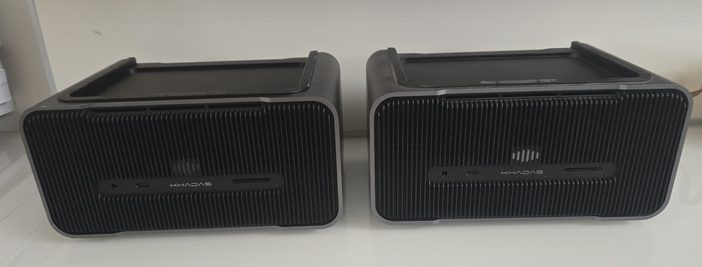
We find this compact anodized aluminum case, with its very sleek lines and rounded corners. The finish remains excellent, and the Mind Graphics 2 retains that very premium look that characterizes the entire Mind range.
It’s quite amusing: when looking at the whole Mind 2 + Mind Graphics 2 setup on a desk, it’s hard to imagine that a true RTX 5060 Ti is hidden inside.
And yet! The case is only about 2.5 liters, featuring a multichannel active cooling system. Khadas announces a maximum exterior temperature of 43°C and a noise level reaching 47 dB at full load.
In office use, the station manages to remain discreet. As soon as a game or a benchmark is launched that pushes the RTX to 100%, the ventilation can be heard, but nothing abnormal given the power confined in such a small volume.

The installation remains as pleasant as ever: the Mind is positioned on top using the magnetic system and aligns naturally with the Mind Link connector. It’s hard to make it simpler.
A button at the back then allows you to release the mini PC when you wish to take it with you.
A graphics station… but also a very complete dock
It would actually be quite reductive to present the Mind Graphics 2 as just a simple eGPU case. Like its predecessor, it also serves as a full-fledged docking station.
At the front, we find:
- a 4.0 SD card reader capable of reaching 200 MB/s;
- a 3.5 mm headphone/microphone jack;
- a 10 Gbit/s USB-C port.
At the back are placed a 40 Gbit/s USB-C, two 10 Gbit/s USB-A, a 2.5 Gbit/s Ethernet, two HDMI 2.1b, and one DisplayPort 2.1b.

Moreover, there are a few improvements compared to the Graphics 1. The first version had three USB-A ports, while the new one has two, but the Graphics 2 gains a 10 Gbit/s USB-C. The video outputs also upgrade from HDMI 2.1a to 2.1b, and especially from DisplayPort 1.4a to DisplayPort 2.1b.
The station can thus support displays up to 8K; Khadas even announces support for up to 8K at 165 Hz depending on the configuration.
On the side, we also find the fingerprint reader compatible with Windows Hello, as well as volume controls. The fingerprint reader can also be used to quickly mute the microphone.
And Khadas retains another excellent idea from the first generation: the speakers and microphones are directly integrated into the station.
In other words, when the Mind 2 is placed on top, you effectively have a complete workstation. A screen, keyboard, and mouse are all that’s needed.
The 40 Gbit/s USB-C port even allows using the Mind Graphics 2 as an eGPU with another machine compatible with Thunderbolt 3/4 or USB4. The interest remains, of course, maximized in combination with a Mind via the Mind Link, but the accessory is not entirely locked to the Khadas ecosystem.
RTX 5060 Ti: the real change lies within
The big novelty is obviously the graphics card.
The first-generation Mind Graphics used an RTX 4060 Ti, based on the Ada Lovelace architecture, with 8 or 16 GB of GDDR6 depending on the version.
We now switch to a GeForce RTX 5060 Ti 16 GB with Blackwell architecture, accompanied by GDDR7 memory.
On my machine, the NVIDIA drivers indicate:
- 4,608 CUDA cores;
- 16,311 MB of dedicated GDDR7 video memory;
- 128-bit memory bus;
- 448.032 GB/s memory bandwidth;
- Graphics frequency of 2,572 MHz;
- PCI Express x8 Gen4 link;
- Resizable BAR enabled.
Khadas allows up to 180 W for the GPU here, compared to a maximum of 165 W on the 16 GB version of the previous Graphics.
But the generational change mainly brings Blackwell technologies, including DLSS 4, the new Tensor Cores, and improvements in ray tracing and AI computations.
The 16 GB of VRAM are also significant. It’s not only interesting for playing in high definition: Blender, DaVinci Resolve, local AI models, or Stable Diffusion can quickly consume several gigabytes of video memory.
Khadas strongly emphasizes this AI usage. The brand announces, for example, 70.7 tokens/s with Llama 3.1 8B compared to 48.9 tokens/s for the RTX 4060 Ti in its own benchmark data.
But rather than just relying on manufacturer numbers, let’s look at the ones I obtained.
Benchmarks: Mind Graphics 1 vs. Mind Graphics 2
This is where this test becomes particularly interesting.
I used exactly the same Khadas Mind 2 as during my previous test: Core Ultra 7 155H, 32 GB of RAM, and 1 TB SSD. Only the Graphics changes. We can therefore compare the two generations quite cleanly.
Geekbench 6: logically very little change on the CPU side
Let’s start with Geekbench CPU.

With the Graphics 1, I obtained: 2,207 points in Single Core and 12,507 points in Multi Core.
With the Graphics 2: 2,328 points in Single Core and 12,645 points in Multi Core.
The results are very close, and that’s perfectly normal. In both cases, it’s always the same Core Ultra 7 155H that’s working. The small gap observed can easily be explained by testing conditions, background tasks, drivers, or temperature.
This is a good confirmation: the Graphics 2 is not meant to make the processor faster. Its playground is the GPU. And there, it becomes much more interesting.
Geekbench Compute: 142,887 points!
With its integrated Intel Arc, remember that the Mind 2 had already scored a nice 35,238 points.
With the Mind Graphics 1 and its RTX 4060 Ti, we moved to: 127,982 points.
The Mind Graphics 2 now reaches: 142,887 points.

This represents about 11.6% better than the Graphics 1. And above all, more than four times the score of the integrated Intel Arc GPU!
To put things into perspective, my gaming setup equipped with an RTX 3090 reaches 197,773 points in the same ranking. It’s quite impressive to see this tiny Mind 2 + Graphics 2 setup get so close!
This gain is directly felt in applications that utilize CUDA: 3D rendering, video editing, accelerated photo processing, scientific calculation, or even local AI.
3DMark Time Spy: nearly 14,000 points
The observation is confirmed with 3DMark Time Spy.

The Mind 2 alone got: 3,835 points.
With the Mind Graphics 1: 12,426 points, including 13,475 points for the graphics part.
With the Mind Graphics 2, I currently measure: 13,966 points, with a graphics score of 15,676 points and a CPU score of 8,631 points.
We thus gain about 12.4% on the overall score compared to the Graphics 1. And if we look only at the graphics score, the jump from 13,475 to 15,676 represents a gain of about 16%.
3DMark even estimates performance on Battlefield V at 1440p Ultra to over 145 fps.
We are clearly no longer in the realm of the “little mini PC that can maybe run a few games.” The Mind 2 placed on the Graphics 2 becomes a real gaming machine.
PCMark 10: virtually no difference, and it’s logical
PCMark 10 gives an interesting result for another reason.
The Mind 2 paired with the Graphics 1 obtained 7,874 points. With the Graphics 2: 7,833 points. In other words: no significant difference.

And that’s exactly the result one could expect. PCMark essentially simulates everyday usage: launching applications, web browsing, video conferencing, word processing, spreadsheets, photo editing, and content creation.
My test results notably include:
- Essentials: 8,531;
- Productivity: 12,592;
- Digital Content Creation: 12,143;
- Photo Editing: 16,402;
- Rendering and Visualization: 14,811;
- Video Editing: 7,372.
For Word, Chrome, or Excel, going from an RTX 4060 Ti to an RTX 5060 Ti doesn’t change much, unsurprisingly. However, the content creation scores clearly show the machine’s potential once the application starts to stress the GPU.
VRMark: performance always very sufficient
The same observation applies to VRMark Orange Room.

With the Graphics 1, I obtained 11,945 points, with an average of 260.4 fps. The Graphics 2 scores: 11,814 points and 257.54 fps.
Again, the 1% gap is negligible and results more from variation between two runs than from a real difference in performance.
Moreover, let’s remember that the target for VRMark Orange Room is 109 fps. We are above 257 fps! The Graphics 2 is therefore very well sized for this VR benchmark. To further highlight the gap between the two GPUs, we’d now need to switch to much more demanding VR scenarios.
A gain that doesn’t just boil down to benchmarks
The numbers are interesting, but after having successively used the Graphics 1 and 2, it’s ultimately not the aspect that I remember the most.
The real strength of this second generation is that it completely modernizes the graphics station without questioning the concept.
The Graphics 1 was already very powerful. An RTX 4060 Ti 16 GB is still far from being ridiculous today.
With the Graphics 2, we generally gain about 15% in raw graphics performance in my benchmarks, but we also gain Blackwell architecture, GDDR7, DLSS 4, better support for AI processing, and updated video connectivity.
In a recent game that supports DLSS 4 and Multi Frame Generation, the gap can indeed become much larger than what Time Spy suggests, which obviously doesn’t measure all these new technologies. The same goes for artificial intelligence: the new Tensor Cores and the calculation formats supported by Blackwell can deliver gains that absolutely do not show up in a standard gaming benchmark.
So it’s more than just an RTX 4060 Ti that is simply “a bit faster.”
In gaming, the Mind 2 becomes a true living room console
In real-life situations, the experience is quite astounding.
You place the Mind 2 on the Graphics 2, NVIDIA immediately detects the RTX 5060 Ti, and the small computer that I was using just minutes ago as a work machine becomes capable of running AAA games in excellent conditions.
Full HD poses no problem for it. 1440p is probably the resolution that best suits this RTX 5060 Ti, with high or even Ultra settings depending on the games.
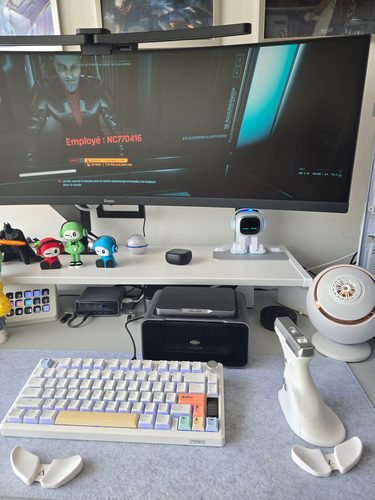
Khadas also announces that most AAA titles remain smooth at 1440p with high settings and DLSS 4. And the 16 GB of VRAM provide a comfortable margin for high definition textures and future games.
What I continue to enjoy is the contrast between the footprint and the performance. There’s no 40-liter tower sitting under the desk. It’s an extremely compact, almost discreet setup, where the Mind simply rests on top.
And when I finish, I grab the small Mind 2 and leave with my computer in my pocket.
Content creation and AI: perhaps even more interesting than gaming
The Graphics 2 is not solely aimed at gamers. For someone using Premiere Pro, DaVinci Resolve, Blender, or software utilizing CUDA, the benefit is likely even more obvious.
The 16 GB of GDDR7 allow handling relatively heavy projects without immediately saturating the video memory. Khadas, for example, announces a Blender score of 4,327 against 3,834 for the RTX 4060 Ti, and an OctaneBench of 469 against 388.
The same logic applies to local AI. Stable Diffusion, image generation, local LLMs, CUDA, TensorRT, PyTorch: we have a true modern NVIDIA GPU here without needing a huge workstation.
This is also a domain where this generation should age better than the previous one. The 16 GB of VRAM are particularly appreciated in an era when AI models are becoming increasingly demanding.
A Mind ecosystem that is really beginning to take shape
When Khadas launched the first Mind, I found the idea excellent, but the ecosystem needed to catch up.
A few years later, the situation is different. I have now used the Mind 1, the Mind 2, both generations of Mind Graphics, and I also received the Mind xPlay, which will soon have its own test.
And the logic is becoming increasingly evident.
In the morning, the Mind can be a laptop. Arriving at the office, you take out its small module and place it on the Graphics 2: it instantly becomes a workstation with an RTX 5060 Ti, 2.5 Gbit/s Ethernet connection, multiple screens, keyboard, mouse, SD card reader, speakers, and microphones. In the evening, you remove the Mind and leave. Still with the same computer.
It’s this continuity that makes the ecosystem more interesting than simply an eGPU.
Conclusion: a discreet evolution externally, much less so internally
The Khadas Mind Graphics 2 does not try to reinvent its predecessor. And ultimately, that’s a good thing.
The first model already had an excellent chassis, an extremely practical connection system, complete connectivity, and effective cooling. Khadas has thus retained the recipe while modernizing what truly needed to be updated.
The RTX 4060 Ti makes way for an RTX 5060 Ti 16 GB GDDR7, the GPU now has 180 W, the DisplayPort moves to 2.1b, HDMI to 2.1b, and the Blackwell architecture opens the door to DLSS 4 as well as significantly better AI performance.
My own measurements confirm the evolution: 142,887 points in Geekbench Compute against 127,982 previously, and 13,966 points in Time Spy against 12,426 with the Graphics 1. On the graphics part of Time Spy, the gain even reaches around 16%.
PCMark and VRMark evolve little, but for perfectly logical reasons: the former relies heavily on the processor and office tasks, while the latter is already largely saturated by the performance of the Graphics 1.
Ultimately, this Mind Graphics 2 perfectly illustrates what Khadas aims to build from the start. The Mind 2 alone is an excellent mini PC, extremely compact and powerful enough for the vast majority of uses. But when I need more power, I don’t change computers: I simply place it on the Graphics 2.
And there I have a 16 GB RTX 5060 Ti. It’s simple, immediate, and incredibly effective.
The Graphics 1 had already convinced me of the concept’s relevance. With this second generation and the upcoming arrival of the Mind xPlay in my tests, the Mind ecosystem is proving that it was not just an original idea: Khadas is genuinely building another way of envisioning personal computing.




Please remain courteous: a hello and a thank you cost nothing! We're here to exchange ideas in a constructive way. Trolls will be deleted.