


'/%3E%3Cpath%20fill='%23b2b2b2'%20d='M241%20382q0%2016%2017%2026%2017%2011%2042%2011t42-11q16-11%2017-26V269H241'/%3E%3Cpath%20fill='%239f7e00'%20d='M241%20379q0%2014%208%2023%209%209%2021%209%2014%200%2021-9%209-9%209-23V269h-59'/%3E%3Cpath%20d='M241%20339v-70h59v110q0%2014-9%2023l-6%205v-68h-15v72q-8%200-14-4v-68zm59%2040c0%2022%2015%2032%2029%2032%2021%200%2030-18%2030-32v-40h-59'/%3E%3Cpath%20fill='%239f7e00'%20d='M266%20277v5h2v12h-3v-5h2v-5h-9v5h2v5h-4v9h3v18h-5v10h34v-10h-5v-18h3v-9h-4v-5h2v-5h-9v5h2v5h-3v-12h2v-5zm42%20101q0%2010%206%2017%206%206%2015%207%2010-1%2016-7%206-7%206-17v-29h-43'/%3E%3Ccircle%20fill='%230044ad'%20cx='329.5'%20cy='372'%20r='6'/%3E%3Cellipse%20fill='%230044ad'%20cx='300'%20cy='340'%20rx='16'%20ry='21'/%3E%3C/svg%3E)

'/%3E%3C/g%3E%3Cuse%20href='%23c'%20transform='matrix(-1%200%200%201%20720%200)'/%3E%3C/svg%3E)


'%3E%3Cpath%20stroke='%23000'%20stroke-width='4'%20d='m-35-37-13%2020m5%203%2013-20m5%203-13%2020m63%2042%206-9m1-2%206-9m5%203-6%209m-1%202-6%209m5%203%206-9m1-2%206-9m-96%200%2013%2020m5-3-6-9m-1-2-6-9m5-3%2013%2020m63-42-6-9m-1-2-6-9m5-3%2013%2020m5-3-6-9m-1-2-6-9'/%3E%3Ccircle%20r='24'%20fill='%23cd2e3a'/%3E%3Cpath%20fill='%230047a0'%20d='M0%200a12%2012%200%201%201%2020%2013%2024%2024%200%201%201-40-26A12%2012%200%201%200%200%200'/%3E%3C/g%3E%3C/svg%3E)


Résumer cet article :
Several months ago, I introduced you to the GMKtec NucBox M3 Pro at its launch. On paper, the recipe had enough to capture attention: a Core i5-13500H with 12 cores in a tiny case, expandable memory, two SSD slots, 2.5 GbE networking, and the capability to drive three 4K displays. It’s suitable for both a desktop PC as well as a nice machine for Home Assistant, Docker, or Proxmox.
This time, there’s no need to read a technical sheet: the M3 Pro has made its way to my desk, and I put it through my usual battery of benchmarks, as well as some less conventional experiments around local artificial intelligence.
And this last point holds some surprises. Because the Core i5-13500H dates back to 2023. No NPU, no ultra-fast DDR5 memory, and even less of a dedicated graphics card. Yet, I managed to have it summarize PDFs locally, use several LLMs, and even analyze and generate images. Slowly at times, sure, but without sending my documents to the cloud. All in all, for a small PC sold for a few hundred euros, it’s starting to get interesting!
Unboxing and Presentation of the GMKtec M3 Pro
The M3 Pro stays true to what makes mini PCs charming: it takes up ridiculously little space. It measures 114 x 106 x 42.5 mm and weighs about 430 g. The manufacturer provides the machine with a 100W power supply, an HDMI cable, a VESA mount, and the necessary documentation.
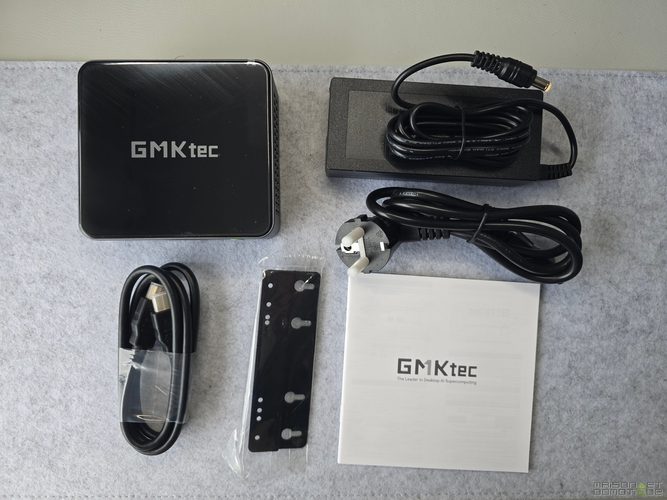
The VESA mount will allow you to completely hide the PC behind a monitor. On a desk, it already takes up so little space that you quickly forget about it.

The finish is quite successful. The chassis uses metal on its sides, and the machine gives a significantly more qualitative impression than some entry-level mini PCs.

But what matters more is obviously found inside.
My version comes with an Intel Core i5-13500H, 16 GB of DDR4-3200, and a 512 GB NVMe SSD. The Raptor Lake processor has 12 cores, split between 4 P-Cores and 8 E-Cores, for a total of 16 threads. Its Turbo frequency can reach 4.7 GHz, and its cache reaches 18 MB. The graphics part is handled by the Intel Iris Xe with 80 execution units that can climb to 1.45 GHz.
Yes, the processor is starting to feel dated compared to current Core Ultra and Ryzen AI. But “old” definitely doesn’t mean slow!
A Particularly Complete Connectivity
GMKtec has made good use of the small case. At the front, there are two USB 3.2 Gen2 ports at 10 Gbit/s and the power button.

The back has another USB 3.2 Gen2, a USB 2.0, two HDMI 2.0 ports capable of outputting 4K at 60 Hz, a USB-C compatible with DisplayPort, a 3.5 mm audio jack, the power input, and especially a 2.5 GbE Ethernet relying on an Intel i226 controller. Wi-Fi 6 and Bluetooth 5.2 complete the set. The M3 Pro can thus handle three 4K displays simultaneously.

However, there’s still something that becomes difficult to ignore in 2026: the USB4/Thunderbolt.
The USB-C port tops out at USB 3.2 and therefore does not offer the possibilities of recent machines equipped with USB4, especially for easily connecting an external GPU. This is one of the compromises associated with this previous generation Intel platform.
For a desktop PC, a Home Assistant machine, or a home server, this is absolutely not a concern. For someone who hoped to later transform this small case into a gaming machine with an eGPU, it’s more of a hassle.
A Machine That Remains Really Upgradeable
Good news: unlike many modern machines where everything ends up soldered onto the motherboard, the M3 Pro remains easily upgradeable.
The two SO-DIMM slots accept up to 64 GB of DDR4-3200. The main SSD is located in an M.2 2280 slot that can leverage PCIe 4.0 x4, even though the SSD delivered in current configurations is PCIe 3.0.
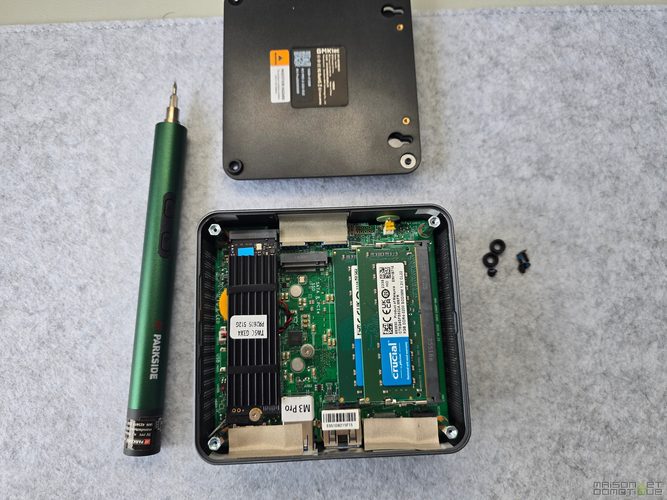
A second M.2 2242 slot accepts PCIe 3.0 x4 NVMe SSDs as well as SATA models. GMKtec announces up to 8 TB per slot.
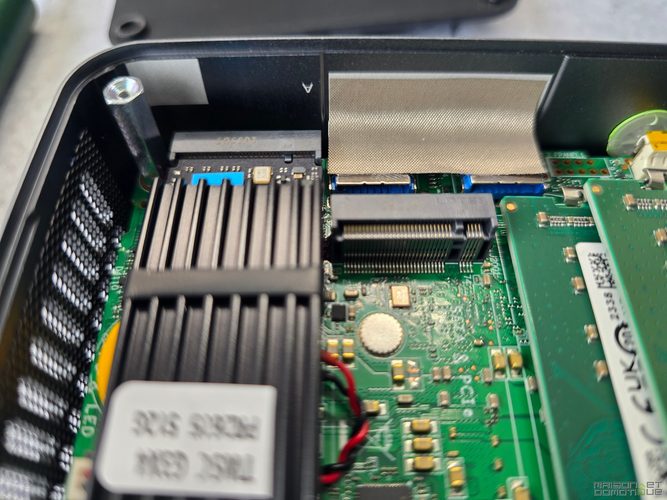
The 2242 format of the second slot inevitably reduces the options compared to the much more common 2280, but having two SSDs in a machine of this size remains appreciated.
For a Proxmox server, one could, for example, keep one SSD for the system and use the second for virtual machines. The same goes for Docker or a small media server.
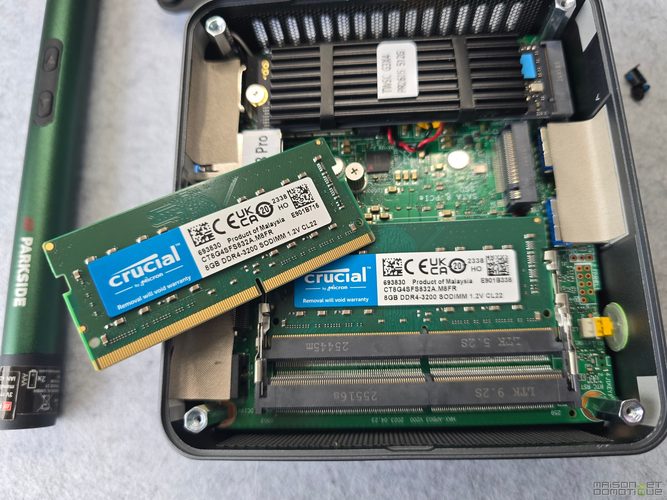
And if the 16 GB of my model end up becoming just a bit tight, nothing prevents upgrading later to 32 or 64 GB.
Windows 11 Pro and a Surprise Named AI
Windows 11 Pro is installed by default and activated. That’s already appreciated on a machine in this range.
But one detail quickly stands out: unlike the G11 that I previously tested, the desktop is not completely blank.

GMKtec pre-installs this time a suite dedicated to local artificial intelligence. It includes an interface for downloading and launching different language models, as well as tools oriented towards image, voice transcription, translation, summarization, and RAG.
And there, of course, my curiosity took over :)
The choice offered is quite impressive, ranging from small models of about 1 billion parameters to monsters that far exceed what the machine can actually load.

One thing to keep in mind before going further: the M3 Pro is not an AI PC in the modern sense of the term.
Its Core i5-13500H does not have a dedicated NPU, and its Iris Xe shares the RAM with the processor. The DDR4-3200 is also a bottleneck compared to modern architectures equipped with much faster DDR5 or LPDDR5X.
This obviously didn’t stop me from trying!
CPU Performance That Is Anything But A Small PC
Let’s get to the numbers.
On Geekbench, my M3 Pro scores 2,352 points in single-core and 9,296 points in multi-core.

This is a particularly interesting result when I place it among the machines that have previously passed through my hands. My old GMKtec G11 scored only 1,074 and 2,766 points. The M3 Pro is therefore about 2.2 times faster in single-core and 3.4 times faster in multi-core in this benchmark.
It also surpasses the Khadas Mind equipped with a Core i7-1360P, which obtained 1,654 / 4,420 points in my tests.
We are starting to talk about a machine that is genuinely comfortable for work.
The Geekbench OpenCL score reaches 13,517 points. Again, this is significantly higher than the 8,487 points of the G11, but still far from modern or dedicated graphics solutions.

PCMark 10 gives an even more interesting picture of daily usage. I get 5,999 points overall, with 9,125 points in Essentials, 9,398 in Productivity, and 6,833 in Digital Content Creation.

In detail, the score reaches 10,972 in web browsing, 10,635 in writing, 10,884 in photo retouching, and 6,191 in video editing.
And that perfectly matches my feeling. Windows is extremely responsive. Applications open immediately, you can multiply browser tabs and work on several applications simultaneously without feeling the machine struggle.
For comparison, my G11 scored only 3,514 points on PCMark 10. We’re clearly no longer in the same category.
The Core i5 Is Solid, The Iris Xe Much Less So
3DMark Time Spy summarizes the M3 Pro’s personality quite well. The machine scores 1,630 points, including 1,431 graphics points and 7,831 CPU points. The processor performs quite well. It’s the Iris Xe that quickly limits the whole.

And VRMark leaves little room for doubt: 2,196 points and 47.87 FPS, while the Orange Room test aims for 109 FPS and the Oculus Rift’s reference minimum is set at 81 FPS.

Virtual reality is clearly not its playground.
The same goes for recent games. Cyberpunk 2077 runs around 20 FPS at 1080p with minimum settings. I get around 45 FPS in GTA V at high 1080p and about 30 FPS in Shadow of the Tomb Raider at minimum 1080p. However, Fortnite runs quite well :p
In short, this is not a gaming PC. But for some older games, emulation, indie games, or occasional gameplay with reasonable settings, it can manage.
Temperatures and Cooling: It Gets Hot, But It Holds Up
Getting a Core i5 H-series into such a small case inevitably imposes some constraints.
During my benchmarks, CPU and GPU temperatures generally hover around 70 to 85 °C when the machine is heavily stressed. Nothing abnormal considering the format and the processor used.

GMKtec primarily allows you to adapt the behavior of the M3 Pro from the BIOS with three power profiles: Silent around 28 W, Balanced at 35 W, and Performance which can reach about 45 W.
This is a great idea.
For a desktop machine or a home server running 24/7, the balanced or silent profile will generally suffice. For rendering, compiling, or another occasionally heavy processing task, the Performance mode allows you to free up the Core i5 more.
Other readings I’ve come across measure around 10 to 11 W at idle and up to 75 W at the socket under heavy load. The cooling remains relatively discreet, even when the processor is heavily working.
This is important because nothing is more annoying than a mini PC whose tiny fan turns into a hair dryer as soon as you open three applications!
Local AI: Can the M3 Pro Really Hold Its Own?
This is probably the part that amused me the most.
GMKtec clearly highlights the AI possibilities of its software platform, so I wanted to test something concrete rather than a simple question like “What is the capital of Germany?”.
I provided it with a five-page PDF press release and asked:
Summarize this press release in about 150 words in English, keeping the important technical characteristics and removing the marketing speech. Don’t count the words and don’t check the length after writing.
In other words, a task that I could realistically perform daily in my job. And the results are quite astonishing.

Gemma 3 1B finished the summary in just 13 seconds. Qwen2.5 1.5B took 18 seconds, and Llama 3.2 1B took 20 seconds. When moving to Qwen2.5 3B, the processing rises to 27 seconds.
These are perfectly usable delays.
And above all, everything happens locally. The document is not sent to ChatGPT, Gemini, or any other cloud service. For confidential documents, this is far from trivial.
Phi-4: More Ambitious, But Still Usable
I then increased the difficulty with Phi-4. The initial model loading takes about a minute, then my summary of the same PDF is generated in 45 seconds.
Clearly, we lose the immediacy of the small 1B or 3B models, but it’s still usable for occasional processing.
Even more interesting, I tested its multimodal capabilities by asking it to analyze an image.

It took about 1 minute and 28 seconds to produce a detailed and coherent scene description.
Again, this is obviously not as fast as a big AI cloud service, but the result comes from a small box sitting on the desk, without a dedicated GPU. Viewed from this angle, it’s quite impressive!
And Even Image Generation!
Since we were on a roll, why not go all the way. I also tested local image generation.
Result: about 7 minutes.
Let’s just say that we’re not going to produce fifty illustrations a day with this machine. But the image obtained was quite acceptable.
It ultimately serves as an excellent demonstration of the difference between “possible” and “comfortable”.
The M3 Pro can run local generative AI. For small LLMs, it can even do so surprisingly comfortably. However, as soon as we tackle image generation or large multimodal models, the absence of a dedicated GPU and fast memory becomes quite evident.
There Is Still a Physical Limit: Memory
I also attempted Mistral Small 3.1 24B.
This time, curtains: it’s impossible to load the model correctly due to lack of available GPU memory.
This puts things into context.
The Iris Xe does not have dedicated VRAM: it uses some of the system RAM. With only 16 GB installed on my machine, Windows and applications already consume some before even loading the model.
During certain AI tests, I’ve seen memory usage exceed 13.5 GB on 15.7 GB available, which is about 87%.
The 32 GB version thus becomes much more relevant if local AI is expected to be part of the intended uses. And since the M3 Pro supports up to 64 GB, it remains possible to upgrade it later.
However, caution is in order: adding RAM will allow for loading larger models, but it will not turn the Iris Xe into an RTX 5090. The bandwidth of the DDR4-3200 and the GPU performance will remain the main bottlenecks.
According to figures I have seen circulating, Gemma 4 26B A4B reaches about 12 tokens/s on this platform, while recent AMD mini PCs equipped with fast DDR5 memory can exceed 20 to 25 tokens/s on such tasks.
For experimenting, summarizing documents, translating, or locally querying some private data, it’s very good. For building an intensive AI station, you need to look elsewhere.
An Excellent PC for Everyday Work
Putting AI aside, the M3 Pro ultimately shows its interest best in classic uses.
Heavy web browsing, Office, photo processing, video conferencing, programming, 4K video playback, multitasking… nothing seems to really be a problem for it.
The Iris Xe also features efficient hardware video decoding. Tests with 4K60 YouTube playback showed no frame loss.
Light video editing remains feasible. DaVinci Resolve can handle 4K60 to assemble sequences, make cuts, or add a few simple transitions. However, once we accumulate effects and GPU processing, the Iris Xe quickly reminds us of its limits.
This is exactly the type of PC that I could use without issue for several days for my daily work: writing, web browsing, emails, light photo editing, site administration, and some multimedia processing.
And for Home Assistant, Docker, or Proxmox?
Of course, it’s hard to test a mini PC on Maison et Domotique without asking THE question :)
The previous GMKtec G11 pleased me a lot for Home Assistant, Jeedom, and small home servers. Its Ryzen Embedded was not powerful, but it was efficient and accompanied by two 2.5 GbE Ethernet interfaces. I had managed to run Home Assistant, Mosquitto, Zigbee2MQTT, Node-RED, Frigate, and several Docker containers simultaneously on it.
The M3 Pro completely scales up on the processor side.
With its 12 cores, 16 threads, 16 GB of RAM expandable to 64 GB, and two SSD slots, it provides an excellent base for Proxmox.
You can easily imagine Home Assistant OS in a VM, a few Docker containers alongside, MQTT, Zigbee2MQTT, Node-RED, AdGuard Home, a VPN server, Jellyfin or Plex, or even a small additional Windows or Linux VM.
The Intel 2.5 GbE Ethernet controller is also a very good point.
However, unlike the G11, the M3 Pro only has one Ethernet port. To set up an OPNsense/pfSense router or to physically separate LAN and IoT, the G11 still retains a very concrete advantage.
The M3 Pro is more of a versatile little virtualization machine, where the G11 was almost naturally tailored to become a network/domotics appliance.
Conclusion: An “Old” Processor That Still Has Much to Offer
The GMKtec M3 Pro quite well illustrates a trend that I really like in the mini PC world right now: taking a platform that is no longer brand new and using it to build a performant machine at a more accessible price.
The Core i5-13500H has neither NPU nor cutting-edge iGPU. The DDR4 also betrays its age. And against the latest Ryzen AI or Core Ultra, the gap is evident as soon as we heavily tax the GPU or the artificial intelligence.
But is that really a concern in everyday use? Not so much.
With 5,999 points on PCMark 10 and 9,296 points in multi-core Geekbench, this small machine has more than enough response to serve as the main PC for many users. It can handle three 4K displays, 2.5 GbE networking, two SSDs, and up to 64 GB of RAM. All in a case that you can practically hide in one hand.

And my local AI tests ultimately provide a nice cherry on the cake.
Being able to summarize a five-page PDF in 13 to 27 seconds with small fully local models is already quite usable. Phi-4 requires more patience, image analysis exceeds a minute, and image generation takes about seven minutes. It very clearly shows where the limits of the Iris Xe and DDR4 lie, but you can already do a lot of things.
For intensive AI or AAA gaming, look elsewhere.
For robust office work, development, multimedia, Home Assistant, Docker, Proxmox, a homelab, or simply a compact and highly responsive family PC, the M3 Pro is much more convincing.
And when I compare it to the previously tested G11, GMKtec ultimately offers two quite complementary machines: the G11 remains my economical network/domotics Swiss Army knife, while the M3 Pro can truly replace a traditional PC while retaining that server and tinkering dimension that particularly interests us here.
The platform dates back to 2023? Yes. But apparently, it still has something to say. And at less than €450 (on the manufacturer’s website), it offers excellent value for money! Amazon also offers it, but at a generally higher price (currently €569).


Please remain courteous: a hello and a thank you cost nothing! We're here to exchange ideas in a constructive way. Trolls will be deleted.