


Résumer cet article :
Just look around you. A television, a game console, a few speakers, a laptop, a smartphone charging on the coffee table… There can easily be several thousand euros’ worth of equipment in the living room alone. And I haven’t even mentioned the kitchen, the garage, or that famous cupboard where we’ve been piling things up for ten years!
The problem is, we rarely know the real value of all this stuff. Even worse: could you put together an accurate list of your belongings tomorrow morning, including their brand, model, purchase price, serial number, and a receipt for the more expensive items?
As long as everything is fine, it’s hardly a priority. But after a burglary, a fire, or significant water damage, you may well regret not having spent a few hours making an inventory. The good news is that with a smartphone and a few digital tools, the process is now much less tedious than it sounds.
Home insurance: knowing what belongings are in your home
Making an inventory of your belongings first gives you a much more realistic picture of what your home contains. It’s also a good opportunity to take a look at your home insurance policy and check whether your coverage still matches your current situation.
A home can change much faster than you might think. The television has been replaced, a NAS has been added to the home office, the kids now each have their own computer, a robot vacuum takes care of the cleaning, and the workshop has gradually filled up with tools. Taken individually, each purchase seems reasonable. Added up over several years, the total can become much more substantial.
So this is a good time to review the coverage offered by your insurer and the terms of your policy. Cardif home insurance for your home, for example, lets you tailor protection for your home and belongings to your situation. As with any insurance policy, it’s important to focus on the coverage, limits, deductibles, and terms that meet your own needs rather than looking only at the premium.
An inventory has another benefit too: it lets you keep information about the things you own. Photos, receipts, product details, and serial numbers are all documents you can quickly retrieve if needed. The supporting documents required and the terms of compensation will, of course, depend on the policy and the nature of the incident.
Start your inventory with your smartphone, one room at a time
Put like that, taking inventory of an entire home makes you want to put it off until next weekend. And then the weekend after that. The trick is not to try to do everything at once.
Start with just one room. The living room, for example. Take one or more general photos, then focus on the belongings that have some value. For each one, record at least its description, brand, model, and, if accessible, serial number. Add a photo and the approximate or actual price of the item. If you still have the receipt, attach it to the item’s record.
A photo of the serial number can save you time, too. There’s no need to immediately copy down the 18 microscopic characters on the back of the television while contorting yourself with a flashlight.
Then move on to the home office, bedrooms, kitchen, garage…
Recent purchases are generally easy to document, since electronic receipts can often be found in your emails or in your accounts with retailers. For older items, a photo along with the product details is already useful information.
This little exercise can sometimes bring a few surprises. Between computers, appliances, audio-video equipment, tools, bikes, and everything else we accumulate over the years, the total value of a household’s belongings can be very different from what you might estimate off the top of your head.
HomeBox: an open-source, self-hosted home inventory
A spreadsheet can work perfectly well to get started. But fans of NAS devices, Docker, and self-hosted solutions can take things much further.
HomeBox is an open-source project designed to manage a home inventory. The application can be installed on your own server, such as a NAS or a small home server, and then accessed through a web interface.

Its advantage is that you can organize your belongings much more neatly than with a succession of photos in a folder.
You can create different rooms or areas of the home and assign the relevant items to each one. Each record can include plenty of useful information: description, manufacturer, model, serial number, purchase price, purchase date, warranty, photos, and associated documents. Custom fields let you tailor the inventory to your needs.

Here’s a simple example. In “Home Office,” I can record my NAS with its exact model, serial number, purchase date and price, a photo, and the corresponding receipt. A few months later, there’s no need to dig through emails to find out when I bought it or whether it’s still under warranty.
HomeBox uses SQLite for its database and can be deployed with Docker. It’s therefore a particularly interesting solution for readers who already have a NAS or a small server at home.
And since it’s free and open-source software, you can explore the project and its source code directly on GitHub.
Other open-source solutions for keeping track of your belongings
HomeBox isn’t the only option. HomeAsset follows a similar approach, with local operation and a well-designed way to organize locations.
For example, you can create a hierarchy like “Home > Garage > Shelf > Bin.” Anyone who’s already spent an hour looking for a cable, a tool, or a spare part will immediately see the appeal!

Items can have photos, documents, categories, tags, notes, and various custom fields. You can also export the inventory in CSV format, which is always reassuring when entrusting an application with several years’ worth of data.
Home OS takes the concept further toward a personal catalog. The goal is a little different: it’s mainly about knowing where things are, not just how much they’re worth. Books, clothes, documents, devices, and miscellaneous items can all be cataloged and found using search. It can also manage to-do lists and chore lists.
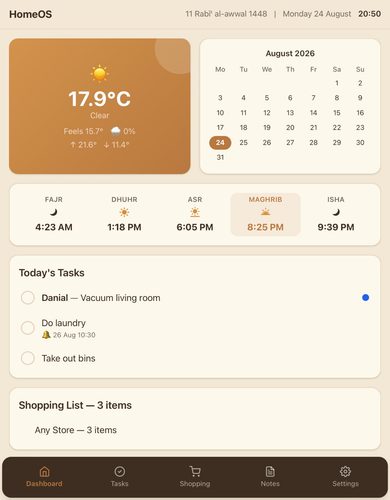
These solutions make it clear that a home inventory is useful for much more than preparing an insurance claim. Finding a receipt, checking a purchase date, looking up the exact model of a device, or discovering where you put that adapter you bought three years ago are much more everyday uses.
Receipts and photos: remember your digital documents, too
Receipts deserve special attention. These days, many arrive by email and are never printed. It’s convenient—until the day you need to track down a receipt from five years ago.
When you make an important purchase, get into the habit of saving the receipt to your inventory right away to avoid this problem. Taking a photo of the item and its serial number only takes a few seconds, too.
It can also be useful to keep a few general photos of each room. They provide an overview of your home at a given point in time and keep a record of the equipment you had.
Your inventory then becomes a kind of digital memory of your home. And, like any digital memory, it needs to be backed up.
Above all, don’t store your only inventory… in your home
Here’s the trap!
Installing HomeBox on the NAS in your home office, storing all your receipts and photos on it, and then considering the job done would be a real shame. If the inventory is meant to be useful after a major theft, fire, or other serious incident, its only copy shouldn’t disappear along with everything else.
That’s where the good old 3-2-1 backup rule really comes into its own: multiple copies of your data, on different types of media, with at least one copy stored elsewhere.
For example, you could automatically back up the database and documents to remote storage. This could be a properly secured cloud service, a second NAS located in another home, or an external drive kept elsewhere. For documents containing receipts and personal information, encrypting the backup is obviously an excellent idea.
This advice goes well beyond home inventories. Family photos and administrative documents stored on a NAS deserve exactly the same precautions.
When digital tools also make things easier after an incident
Insurance has also been going digital for several years. Online claims, submitting photos and documents, tracking claims: many processes can now be handled remotely.
We’ve already explained how instant compensation systems work here at Maison et Domotique.
Having your documents well organized makes all the difference at that point. When you need to find a receipt, product detail, or photo, it’s much better to open a fully completed record than to sift through ten years of emails and a few thousand photos on your smartphone.
Ultimately, creating a digital inventory of your home is one of those tasks that’s easy to put off because it never seems urgent. But all you need to do is tackle it gradually. One room this weekend, another the following week, then get into the habit of adding every important new purchase.
With an open-source solution like HomeBox installed on a NAS and properly backed up, the process can even be pretty fun. And with a bit of luck, you’ll never need the inventory to document the aftermath of an incident. It’ll still come in handy for finding a receipt, managing warranties, and finally answering that great existential question: “Where on earth did I put that darn adapter?”
Please remain courteous: a hello and a thank you cost nothing! We're here to exchange ideas in a constructive way. Trolls will be deleted.