


'/%3E%3Cpath%20fill='%23b2b2b2'%20d='M241%20382q0%2016%2017%2026%2017%2011%2042%2011t42-11q16-11%2017-26V269H241'/%3E%3Cpath%20fill='%239f7e00'%20d='M241%20379q0%2014%208%2023%209%209%2021%209%2014%200%2021-9%209-9%209-23V269h-59'/%3E%3Cpath%20d='M241%20339v-70h59v110q0%2014-9%2023l-6%205v-68h-15v72q-8%200-14-4v-68zm59%2040c0%2022%2015%2032%2029%2032%2021%200%2030-18%2030-32v-40h-59'/%3E%3Cpath%20fill='%239f7e00'%20d='M266%20277v5h2v12h-3v-5h2v-5h-9v5h2v5h-4v9h3v18h-5v10h34v-10h-5v-18h3v-9h-4v-5h2v-5h-9v5h2v5h-3v-12h2v-5zm42%20101q0%2010%206%2017%206%206%2015%207%2010-1%2016-7%206-7%206-17v-29h-43'/%3E%3Ccircle%20fill='%230044ad'%20cx='329.5'%20cy='372'%20r='6'/%3E%3Cellipse%20fill='%230044ad'%20cx='300'%20cy='340'%20rx='16'%20ry='21'/%3E%3C/svg%3E)

'/%3E%3C/g%3E%3Cuse%20href='%23c'%20transform='matrix(-1%200%200%201%20720%200)'/%3E%3C/svg%3E)


'%3E%3Cpath%20stroke='%23000'%20stroke-width='4'%20d='m-35-37-13%2020m5%203%2013-20m5%203-13%2020m63%2042%206-9m1-2%206-9m5%203-6%209m-1%202-6%209m5%203%206-9m1-2%206-9m-96%200%2013%2020m5-3-6-9m-1-2-6-9m5-3%2013%2020m63-42-6-9m-1-2-6-9m5-3%2013%2020m5-3-6-9m-1-2-6-9'/%3E%3Ccircle%20r='24'%20fill='%23cd2e3a'/%3E%3Cpath%20fill='%230047a0'%20d='M0%200a12%2012%200%201%201%2020%2013%2024%2024%200%201%201-40-26A12%2012%200%201%200%200%200'/%3E%3C/g%3E%3C/svg%3E)


Résumer cet article :
There are products we try because they’ve just come out, and others that become part of our daily routine without us really deciding to. The Boya Notra Neo belongs to the second category.
I first told you about it at the end of August, before its official launch, when it was available for pre-order at €78. A few days later, it came with me to Berlin for IFA 2026. Not exactly a gentle trial run: press conferences, meetings with manufacturers, interviews, technical discussions… For several days, it recorded hours of conversations, sometimes in fairly challenging conditions. Two months later, the little device is still in my pocket.
On paper, the Notra Neo looks like many of the AI recorders released in recent months. It records, transcribes, summarizes, identifies tasks to follow up on, and lets you ask AI questions about your notes afterward. Nothing new, then. What I wanted to find out was whether it made a difference in everyday use. After two months, I have my answer.
Boya Notra Neo: a little square you quickly forget about
Let’s start with the hardware. The Notra Neo measures 63 x 63 mm and is 8 mm thick, and it weighs 34.5 g—less than a bunch of keys. You forget it’s in your pocket.

That matters more than you might think. A recorder that stays at the bottom of your bag because it’s bulky is no use to anyone. I really do carry this one with me all the time.
The casing is plastic, whereas the standard Notra gets an aluminum body. That didn’t bother me: after two months in my pockets, including several days at IFA, it doesn’t feel fragile at all.

The design couldn’t be simpler: no screen, no menu, just one physical button and a few LEDs. Press it once to start recording, and that’s all I want from this kind of device. When a conference or interview starts, I don’t want to pull out my phone, open an app, choose an audio source, and check ten different settings. I press the button, and it records.
The same button lets you mark a point during a recording. It’s handy when someone mentions a figure you already know you’ll want to find again.

It charges via USB-C. It’s a small thing, but I much prefer that to yet another proprietary magnetic charger I’d have to remember to bring when traveling (yes, I speak from experience…).
The back is magnetic: the Notra Neo attaches to a MagSafe-compatible smartphone, or to the included ring, which you simply stick to the back of your smartphone. This is mainly for recording calls; I’ll come back to that below.

Just 8 GB… but around 1,000 hours of recording
The Notra Neo has 8 GB of internal memory. Compared with the 64 GB of the standard Notra, that seems ridiculous. In practice, Boya estimates that it’s enough for around 1,000 hours of audio, and I’ve never had to keep an eye on the free space. Compressed audio doesn’t take up much room.
Internal storage has another advantage: you don’t need your phone to record. I can head to a conference with just the Notra Neo, press the button, and retrieve the recording later. The app is only needed when it’s time to work with the files. That’s much more convenient than a device that simply acts as a Bluetooth microphone.
Three recording modes, nothing to select
This is one of the Notra Neo’s most interesting features. It records in three situations:
- a conversation taking place around it;
- a phone call;
- a conversation over Bluetooth.
Unlike the standard Notra, there’s no selector to switch between modes: the Neo detects the situation on its own.
On paper, it sounds like the kind of automation manufacturers are very proud of and we could happily do without. After two months, I think the opposite. I never wonder which mode it’s in. I just use it.
Ambient recording: the mode I use most
This is the mode I used most at IFA. The Notra Neo has two MEMS microphones and a vibration sensor (VCS). Boya claims 360° pickup up to 5 meters away and AI noise reduction of up to -30 dB.

That 5-meter range is a maximum under good conditions, not the ideal distance. In a quiet room, it records several people around a table well. In a noisy place, it’s better to move the device closer to the speakers. Boya says so itself in its documentation: room acoustics, background noise, and the device’s position all directly affect the results.
And IFA is pretty much the worst environment possible: hundreds of people, announcements over loudspeakers, music at some booths, and conversations coming from every direction. The Notra Neo doesn’t work miracles. Distant voices lose clarity, and the hubbub of the hall comes through in the recording.
But I’m not trying to make a podcast. What matters to me is that the AI understands enough of what was said to produce a usable transcript, and on that front, I was impressed. The audio quality is good for this purpose. It won’t replace a proper microphone for voice-over work or professional recording, but that’s not what it’s designed for.
At IFA, I changed the way I work
That’s when I made up my mind.
At press conferences, I usually have four things to do at once: listen to the speaker, understand what they’re saying (usually in English), photograph the slides, and take note of what matters. Inevitably, something gets missed.
With the Notra Neo, I gradually stopped trying to write everything down. I start the recording and listen. I still jot down a few notes about my impressions or ideas that come to me, but I no longer try to copy down every feature or figure mentioned. It’s surprisingly relaxing.

That evening at the hotel, I can go back over the entire conference, its transcript, and, most importantly, its summary. Over several days at a trade show, the time saved really adds up. I’d already written about it after a few days in Berlin (read more here). Two months later, I’m even more convinced.
Calls and Bluetooth: where it goes beyond a voice recorder
For calls, the Notra Neo attaches to the back of your smartphone. Thanks to its vibration sensor, it picks up the entire conversation, not just your voice. That’s already a real difference compared with your phone’s voice recorder.
Bluetooth is the mode I’m most interested in. Imagine doing an interview with earbuds: my interviewee’s voice goes straight into my ears, and a voice recorder sitting on the desk barely picks it up. The Notra Neo, on the other hand, can handle this scenario and record both sides of the conversation.
For me, that’s what sets it apart most from an entry-level AI recorder. When you’re juggling calls, Teams, Zoom, or remote interviews, it’s no small thing.
Boya OS: the real work starts after recording
A two-hour audio file, by itself, isn’t worth much. Nobody wants to listen to an entire conference again just to find the thirty seconds when a date was mentioned.
The files are therefore transferred to Boya OS, on a smartphone or through a web interface, where you can start the transcription. Boya claims support for more than 140 languages and dialects, with speaker identification. I mainly worked in French and English, and a little in German for some IFA conferences.

The transcription isn’t perfect. Less common brand names, some proper names, and highly technical terms are sometimes misheard, and mistakes multiply in a noisy room. But it’s still reliable enough to find what was said.
In any case, I almost never use it as a final document. It’s the raw material the AI works on.
The AI summary is more useful than the transcript
Once the text has been generated, Boya OS turns it into structured notes. It offers more than 60 templates for different types of content: meetings, conversations, classes, interviews, and so on. The AI extracts the topics discussed, decisions made, and actions to take. It can also create a mind map.
This is where I save time. After a one-hour conference, I start with the summary: in just a few minutes, I have the key announcements in front of me. If something catches my interest, I look up the exact passage in the transcript.

I hardly use the mind maps. They look nice, and students will probably find them useful for organizing their notes, but in my line of work I almost never open them.

One more criticism: the summaries sometimes have that very “AI” tendency to overdo it. I’d like to be able to create my own templates, for example to require much shorter summaries, but that isn’t possible yet. Nothing deal-breaking, but Boya OS still has room to improve.
Ask AI: “what did that brand say about Matter?”
As your recordings pile up, another feature becomes useful: Ask AI. Instead of opening a transcript, you ask a question about its content, such as “What price was announced during this presentation?” or “What new Matter features were mentioned?” The AI searches all your recordings for the answer.
This takes you well beyond a voice recorder. After two months, I have a history of conferences, meetings, and interviews where I can find a piece of information without knowing when it was mentioned. For my work, that’s incredibly useful.
One limitation to be aware of: Ask AI isn’t included in the free Starter plan. For now, Boya only makes it available with Pro and Ultimate subscriptions.
ChatGPT, Claude, Gemini, and Grok behind the summaries
Boya isn’t relying on an in-house model. Depending on the feature and subscription, the platform uses ChatGPT, Gemini, Claude, or Grok. I find that quite reassuring: Boya knows how to make microphones, and I’d rather language understanding be handled by models designed for the job.
These features use the cloud. According to Boya, recordings and transcripts remain local by default. Audio is only sent to the cloud when a summary is requested, and it’s deleted once processing is complete.
For a conference or a standard interview, I have no problem with that. For a meeting involving highly confidential information (medical, legal, or strategic), it’s worth asking the question before enabling AI. This isn’t unique to Boya: it applies to any service that processes your recordings in the cloud.
Plenty of export formats, including SRT
You’re not locked into Boya OS. Results can be exported as DOCX, PDF, TXT, Markdown, or JPEG, and you can also download the audio.
SRT will be useful for content creators: a recorded interview gives you a ready-made set of subtitles.

I mainly use Markdown and DOCX to transfer information into the tools I usually work with.
And what about battery life?
Boya claims 20 hours of continuous recording from its 610 mAh battery. I haven’t run it for twenty hours straight to check (there wouldn’t be much point), but battery life has never been an issue over two months. It easily lasts through a full day of conferences.
The manufacturer also claims up to 365 days on standby. I’ll let you know in a year ;-)
Most importantly, I’ve never had to keep an eye on the battery. When it needs charging, Boya says it takes around 1 hour and 30 minutes.
Boya OS is good, but still has room to grow
Not everything is perfect. The hardware feels very polished; it’s the software where Boya has the most room to improve.
Boya OS handles the essentials well: syncing, transcription, summaries, templates, search, and exports. Compared with some longer-established competitors, its ecosystem is a little less developed. Still, we’re lucky to have a web interface too, which not all competitors offer. And it’s starting to offer integrations with other tools such as Notion and Google Drive.
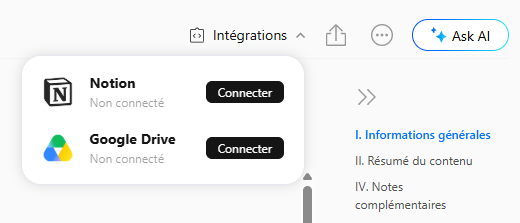
Processing isn’t instant either. For a long conference, you have to wait for the transfer and then the processing, which can take several minutes. No big deal—I do something else in the meantime, like process my photos :) But don’t expect a complete report two seconds after you stop recording. The AI does the work, but transferring the file, transcribing it, translating it if necessary, and producing a summary still takes a little time. Doing all that by hand could sometimes take us several hours.
These are minor software shortcomings, which is actually good news. Boya can fix them with updates without changing the hardware. In fact, the Neo has already received several updates since I got it.
320 free minutes… and 600 minutes a month for a year right now
That leaves the sticking point with AI recorders: the subscription. Buying the device doesn’t give you unlimited AI processing for life.
The free Starter plan normally includes 320 minutes of transcription per month. Until December 31, 2026, Boya is giving eligible new users 600 minutes a month for twelve months from activation—ten hours of transcription per month.

That may be enough for a few meetings or classes now and then. For a trade show like IFA, it’s nowhere near enough!
There are two plans above that. At the time of writing, Pro gives you 1,280 minutes per month and unlocks Ask AI, while Ultimate offers unlimited transcription with all the advanced features.

You should take this cost into account before buying. The device is affordable, but heavy users will probably end up subscribing.
Why not just use your smartphone?
That’s the most legitimate question raised by this review. My phone already has several microphones, a voice recorder, and more than enough power to run ChatGPT. Why carry another device?
I thought the difference would be small too. I was wrong.
First, the Notra Neo is always ready: I put it down, press the button, and forget about it. Meanwhile, my phone is free to take photos, reply to a message, check a document, or scan an exhibitor’s QR code. It also handles calls and, above all, Bluetooth conversations—something a standard voice recorder can’t necessarily do. And it has its own storage and battery.
Then there’s the actual experience: the Neo picks up what the people I’m talking to say much better than my Samsung S24 Ultra. The transcription quality is also clearly better.
After two months, I don’t really think of it as a voice recorder anymore. It’s more like a notebook that listens for me.
Conclusion: is the Boya Notra Neo really useful?
When I received the Notra Neo before IFA, I knew the concept might appeal to me. I was already using this kind of tool, and Berlin was an ideal testing ground. I didn’t expect it to stay in my pocket for so long after the show. It’s still there.
What I appreciate most, really, is no longer having to choose between listening to someone and taking notes. At a conference, I can finally watch the presentation. In an interview, I look at the person in front of me instead of my notebook. In a meeting, I take part in the discussion instead of writing up the minutes as it happens. And afterward, I can find everything that was said.
Put like that, it sounds ordinary. But once you get used to it, it’s hard to go back.
The Notra Neo isn’t perfect. Boya OS still needs to mature, the transcription struggles with some technical terms, large files require a little patience, and heavy users will need to factor in the subscription cost. I wouldn’t buy it for a podcast or voice-over work either; that’s not what it’s made for.
As a note-taking tool, though, it does its job remarkably well. And its price makes quite a difference. Some AI recorders cost €150 or more just to try, whereas the Notra Neo lets you explore the concept for much less. That’s also how Boya positions it against the standard Notra.
I can easily see who it could be useful for: students who want to turn classes into notes, salespeople who go from one appointment to the next, anyone who spends their days in meetings, journalists conducting interviews, and content creators. If you attend two meetings a year, much less so.
For me, the verdict is simple: the review ended several weeks ago, and I’m still using the Boya Notra Neo. That’s usually a pretty good sign.
If you’re interested in getting one, the Boya Notra Neo is available in several colors for €80 on the manufacturer’s website, with the code MAISON12. It’s the best price.
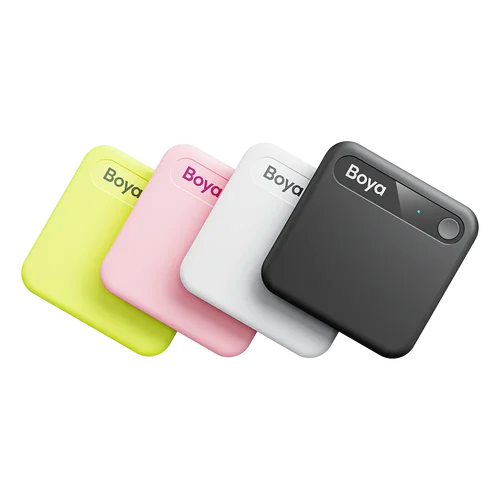
Boya Notra Neo
For those who prefer Amazon, it’s also available there for €85 (make sure to check the coupon below the price to activate the 15% discount).



Please remain courteous: a hello and a thank you cost nothing! We're here to exchange ideas in a constructive way. Trolls will be deleted.