


Résumer cet article :
Home Assistant 2026.11 was released on November 4, 2026, and the team describes it as the biggest update in the project’s history. Given the numbers, it’s hard to disagree: 5,827 contributions merged, 557 contributors, and 38 new integrations. It’ll take a few evenings to explore everything.
The first thing that jumps out is the Marketplace—in other words, HACS built right into Home Assistant. But it would be a shame to stop there. Automations are easier to build, dashboards can populate themselves, the history finally helps you understand why a light turned on, and cameras are getting long-awaited two-way audio.
Add native LoRaWAN support, battery-free Zigbee switches, simpler energy monitoring, and more convenient backups, and you have a very feature-packed release.
HACS becomes Marketplace: community extensions come to Home Assistant
This is the announcement that will get the most attention. HACS (Home Assistant Community Store) officially becomes the Home Assistant Marketplace, built right into the system.
If you’re not familiar with HACS, it’s the tool for installing community-developed integrations, custom dashboard cards, and themes. For many advanced users, it’s the first thing they install after Home Assistant itself.
Until now, you had to install it separately. That step is gone: the Marketplace is available from Settings, including on a Home Assistant Container installation running under Docker. It includes a space for discovering new projects, the full catalog, and a list of installed extensions. Custom repositories are still supported, and now all you have to do to add one is paste in its GitHub address.

Installing a community integration is also quicker. When compatible, Home Assistant installs it and opens its configuration right away, without a restart. Updates and removals may still require a restart.
If you were already using HACS, there’s nothing you need to do: the migration is automatic, including installed extensions and custom repositories.
One thing to keep in mind, though: being officially integrated doesn’t make these extensions certified integrations. They’re still developed and maintained by third parties, with all that entails for the security and stability of your installation.
We’ve published a full feature on this change (migration, security, limitations): Home Assistant turns HACS into the Marketplace: here’s everything that will change.
Entities are getting renamed: a redesign that may surprise longtime users
On paper, it’s less dramatic. Still, this is the change to take a close look at before installing the update.
After more than four years of work, Home Assistant is completely changing how it displays the names of devices and their entities.
To keep track of everything, we’d gotten used to long names. A smart plug might have a sensor called “Living Room TV Plug Power Consumption.” Not very elegant, but at least you knew what it was.
With 2026.11, each item has its own name, and Home Assistant adds the missing context depending on where it displays it. Take a plug installed in the living room. The device can simply be called “TV,” with two entities, “Power” and “Energy.” That’s enough on the device page. In a list that groups every electrical sensor in the house, Home Assistant will instead show “TV Power,” with the room listed alongside it. No more repeating the same information everywhere.
This applies to dashboards, settings, automations, history, voice commands, and mobile apps.
The good news is that the technical entity IDs aren’t changing. Automations and scripts that rely on them will keep working. However, some names displayed in dashboards may change, and custom cards may show unexpected labels. You may sometimes need to specify the name manually. For voice assistants, the old names are kept as aliases, so your usual commands won’t break.
Another new feature: complex devices can be split into child devices. A smart power strip, for example, can present each of its outlets as a separate device, with its own name and room. ESPHome, MQTT, and Z-Wave are already starting to use this.
If you write templates, note that the friendly_name attribute will eventually be removed. The entity_name(), device_name(), and area_name() functions take its place for retrieving names and context.
The transition will probably require a few tweaks, but on a large installation, the result should be much more consistent.
Dashboards practically build themselves now
Creating a beautiful dashboard in Home Assistant has become easier and easier with each release. One drawback remained: you had to add every card by hand, then remember to update the dashboard whenever you added a new device.
2026.11 fixes that with automatic sections. When you add a section, you can now choose between a manual section and an automatic one, with three ways to populate it.

The first option uses the controls you use most, following the same principle as Home Assistant’s Overview. The second is built around a specific device: select your robot vacuum, and its controls and information appear automatically.
The third is, in my opinion, the most useful: a section built from entities that meet certain criteria. For example, a dashboard for the ground-floor lighting. Select the lights in the rooms you want, and Home Assistant builds the section. If you install a new Zigbee bulb in the living room three weeks later, it will show up on its own because it meets the criteria. You can also exclude specific entities.
A preview shows you the result before you confirm. If you want to customize the cards freely, you can also convert the automatic section into a manual one, but it will no longer update itself.

For an installation that changes often, the time savings are real. When you test a lot of connected devices, adding and removing their cards across multiple dashboards quickly becomes a chore. I won’t miss it.
Copy entire sections and customize cards even more
Dashboards also get several small improvements.
You can now copy, cut, and paste an entire section. No more recreating a dozen cards one by one to reproduce a group of controls elsewhere: your heating section can be duplicated on the main page, the wall display, or the smartphone view.

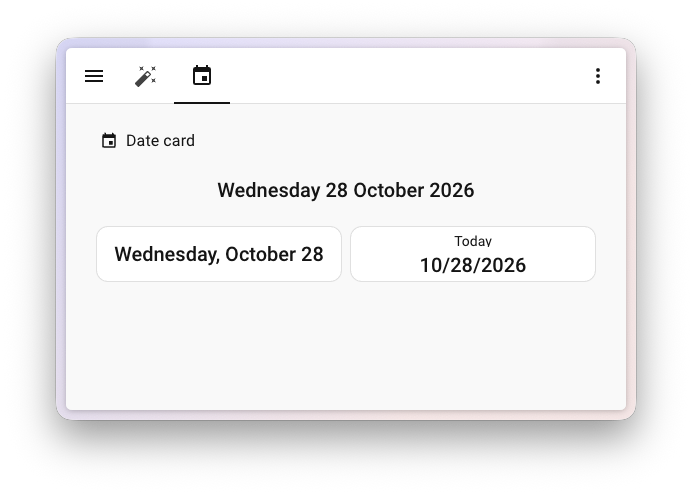
A new Date card displays the current date, with several formats to choose from.
Alert cards are improving too. Their visual editor lets you choose a color based on the device’s state and make the alert pulse. An unlocked front door can appear red, then change color once it’s closed. So you can build a clear security dashboard without writing a single line of YAML.

The Sensor card supports a custom color, applied to the icon and graph. Temperature controls offer a choice of buttons or a slider, and light cards have a color strip for changing a bulb’s color directly, with an optional saturation control.

On their own, these are just details. Taken together, they make the interface noticeably more pleasant to use every day.
Automations: you can finally exclude specific devices!
This is probably my favorite new feature in this release.
Home Assistant has long been able to dynamically target all devices in a room, on a floor, or with a label. It’s very convenient: a device added later joins the automation without you having to touch it. Only one thing was missing: the ability to make exceptions.

A simple example: you want to turn off the ground-floor lights when you go to bed, but keep the outdoor lighting and a night-light on. Until now, you had to either select entities one by one or cobble something together with templates.
Now, a setting lets you exclude targets directly in the automation. Choose the group of devices to control, then specify what to ignore: entities, devices, areas, or labels.
And it remains dynamic. If you exclude an entire room and add a bulb there the following month, that bulb will be excluded too.
Exclusions also work in triggers and conditions when they support targets. You could create a scenario that turns off all the lights on a floor except in occupied bedrooms, or an away scenario that switches off all smart plugs except those for the fridge, NAS, and network equipment.
On a large installation, this will simplify quite a few automations.
The automation editor is becoming much less of a pain
The visual editor keeps improving, with a series of small enhancements that will delight anyone who spends their evenings building scenarios.
The most useful one, in my view, is replacing a step. You’ve set up an action to turn on a light, chosen several entities, adjusted a few settings… then realize you should have turned it off. Before, you had to delete the action and start again. Now, the step menu has a Replace command that changes the action while keeping compatible settings. This also works for triggers and conditions.
Recently used items now appear at the top of selectors, saving time when you’re always working with the same devices and actions.
Some state triggers have a new “Is not” option: the automation runs when the entity takes any value except one, without needing a template. Person selectors are also better integrated, which is handy for presence scenarios.
You can also edit a trigger’s ID directly, undo some accidental changes, and switch between the visual editor and YAML with Ctrl + Shift + Y (Cmd + Shift + Y on Mac).
One last addition: a trigger that runs after Home Assistant is updated. It provides the old and new versions, and doesn’t react to a simple restart. Perfect for getting a notification when the update is complete.
Why did that light turn on? Home Assistant finally helps you find the culprit
A light that turns on by itself, a blind that closes at the wrong time, an automation that has a mind of its own: it’s happened to everyone. And when several scenarios, voice assistants, and integrations control the same devices, tracking down the source of an action can quickly turn into detective work.
2026.11 brings several tools to help with that.
The Activity panel now has a filter by source: user action, automation, script, or integration. Instead of scrolling through dozens of unrelated events, you can go straight to the ones that may have caused the problem.

The most interesting feature is under Settings > Tools > Action history. This page records Home Assistant action calls: what was executed, when, which targets it applied to, and what data it used. Open an entry to see its context, the user involved, and the associated trace, if one exists. You can also copy the action data as YAML or run it again.
Be careful with that last button. Replaying a command to turn on a light is no problem. Replaying a command to open a gate, disable an alarm, or control an electrical device is another matter.
Traces for scripts called by automations are also better linked to the corresponding runs.
If you have dozens, or even hundreds, of automations, you may find you can’t live without this.
Live diagnostic logs, without hunting through files
Sticking with diagnostics, log viewing is getting better.
When an integration caused problems, the routine was familiar: enable debug logging, reproduce the problem, then go and read or download the files. That still works, but there’s now a more direct option.
Once debug logging is enabled for an integration, a button opens its logs in real time. Lines appear as they come in, and you can filter, search, and download everything to investigate later. Handy for figuring out why MQTT is losing its connection, why a device has stopped responding, or why authentication is failing.
The general log also gets a filter by integration, so you can display only what’s relevant to the components you’re interested in.
One tip: remember to turn off debug logging once you’ve found the problem. Some integrations produce an impressive amount of data when you leave it on.
Incorrect statistics? You can now clean up just the bad data
This one will resonate with everyone who tracks their electricity consumption or solar production in Home Assistant.
A sensor suddenly reports 15,000 kWh instead of 15 kWh because of a measurement error, and the whole graph gets flattened. The statistics become unusable.
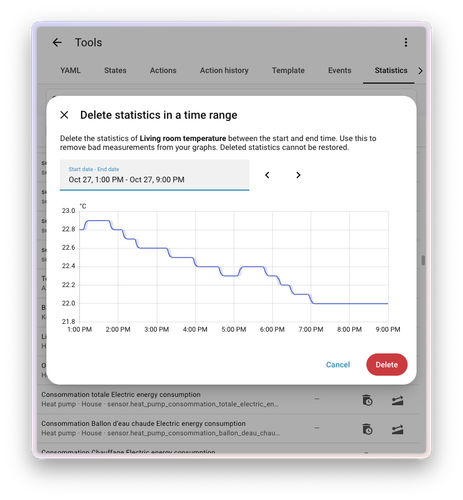
Home Assistant could already correct some cumulative statistics, but deleting specific measurements was more complicated, especially for temperatures.
With 2026.11, you can delete statistics for a specific period. In the statistics tools, select the sensor and a date and time range, and a preview shows you what will be deleted. No more clearing a sensor’s entire history because of a few outliers.
This is invaluable for energy monitoring, where a faulty sensor can skew months of analysis. But the deletion is permanent if you don’t have a backup, so check the period carefully before confirming.
Energy monitoring: Home Assistant now converts watts to kWh more easily
The Energy dashboard also gets a very practical improvement. First, a quick refresher to explain it.
Power is measured in watts: it’s what a device consumes at a given moment. Energy is measured in watt-hours or kilowatt-hours: it’s what the device has consumed over a period of time. So a smart plug that only reports “250 W” can’t always be used as an energy meter as-is.
Until now, you had to create an integration sensor to convert that power into energy consumed, then use the new sensor in the Energy dashboard.
With 2026.11, when you add a device that only has a compatible power sensor, Home Assistant can offer to create the energy sensor itself. The same applies to water and gas, with a total calculated from a flow sensor.
In practice, a Shelly plug that only measures a device’s power can now be added much more easily to a complete energy monitoring setup.
The Energy dashboard also has an option to display totals for the whole household. Useful for spotting major sources of consumption and seeing where you can cut your electricity bill.
Matter cameras arrive in Home Assistant, with two-way audio thrown in
Video surveillance is the other major area of work in this release.
Home Assistant 2026.11 supports cameras defined by Matter 1.5. That’s no small thing: the first versions of Matter stuck to simple devices (lights, plugs, sensors, thermostats). A camera requires much more, with video and audio streams to handle.
Compatible Matter cameras now appear as Home Assistant cameras, with live feeds and still images. Video is delivered over WebRTC, a real-time streaming technology, and the stream can be established directly between the browser and the camera. The integration also takes certain camera states into account, such as privacy mode when available.
Obviously, you’ll need a compatible camera and a recent enough Matter Server. And just because a feature is included in the standard doesn’t mean all existing devices will support it right away.
We’ve also published a detailed feature on the changes to Matter and matter.js: Home Assistant shifts into high gear with Matter 1.6.1 and matter.js.
The other big camera feature is two-way audio. Until now, you could often see and hear what was happening in front of a camera from Home Assistant, but you couldn’t talk through its speaker.
The feature is coming to Home Assistant Labs, accessible from the system settings. Once enabled, a conversation button appears on the feed of compatible cameras. Someone rings the gatebell: from the wall-mounted tablet, you can see them and talk to them without opening the manufacturer’s app.
For now, this applies to compatible Matter cameras and Reolink devices supported by their integration. For Reolink, the stream has to use RTSP: RTMP and FLV modes can’t send audio back to the camera. Another limitation: in a browser, the microphone only works when accessing Home Assistant over HTTPS. Support in mobile apps is still in development.
The feature is still experimental, but it opens up exciting possibilities for a wall-mounted tablet used as a control center.
LoRaWAN officially joins the protocols supported by Home Assistant
After Zigbee, Z-Wave, Thread, and Matter, Home Assistant is adding LoRaWAN to its protocols.
LoRaWAN is a radio technology designed to send small amounts of data over long distances while using very little power. Where Wi-Fi or Zigbee quickly reach their limits, LoRaWAN can cover several kilometers in good conditions.
It becomes useful as soon as you head outdoors. A large property with soil moisture sensors, a greenhouse at the far end of the garden, a pond, outbuildings: getting Wi-Fi out there isn’t always easy, especially when there’s no electricity. LoRaWAN sensors can send data from a distance and run for a long time on a single battery.
A dedicated page appears under Settings > Connectivity > LoRaWAN. It brings together connections, associated devices, and radio information, with a network view showing which gateways receive data from each sensor.

It all runs through network servers like ChirpStack or The Things Network, while integrations like SenseCAP then make use of data from compatible sensors.
Note that Home Assistant doesn’t become a LoRaWAN gateway all by itself: you still need the associated radio and network infrastructure. But if you have a home in the country, a farm, or a large garden, it’s worth looking into.
Zigbee Green Power: switches that work without batteries
Staying with protocols, ZHA (Zigbee Home Automation) now supports Zigbee Green Power.
This protocol lets certain Zigbee devices operate without a battery or power supply. The clearest example is a switch whose mechanical press generates enough energy to send a radio message. You press it, a small mechanism converts the movement into electricity, and the message goes out. No battery to replace, no cable to run. Some Friends of Hue switches work this way.
With ZHA, these switches are easier to use in Home Assistant, with a dedicated display. Since they aren’t organized quite like standard Zigbee devices, their appearance in the network map and some of their settings are different.
If you want to add controls without doing any renovation, it’s an option worth exploring. Just make sure to check the exact compatibility of your models and Zigbee coordinator.
Backups: USB drives and SSDs are easier to put to use
Home Assistant OS could already use SMB or NFS network shares to store backups and media. With this release, you can also add an extra local drive from the interface.
A compatible USB SSD or internal drive can be selected in the storage settings, then assigned to backups, media, or shared files. It must be formatted beforehand with a supported file system: Home Assistant won’t do that for you. Handy on a mini PC, a Home Assistant Green, or a virtual machine with an extra drive.
Restoration is improving too. Home Assistant no longer creates a full temporary copy of the archive before restoring it, which requires less free space and can speed up the process.
Upload tracking is clearer, with better visibility into progress to different destinations: Dropbox, Azure Storage, SFTP, Synology DSM, or Backblaze B2.
A new sensor finally reports the size of the most recent successful automatic backup. That lets you set up an automation to alert you if the size changes suddenly, which could indicate a problem.
One reminder: a backup on a second drive connected to the same server is no substitute for a proper off-site backup. If there’s a theft, power surge, or hardware failure, both copies are gone.
Artificial intelligence gets new tools to diagnose and control Home Assistant
Home Assistant is also continuing to open up the platform to language models.
AI assistants compatible with Home Assistant’s LLM API have new tools to understand your installation: checking system information, finding available actions, reading logs, and getting more details about integrations. A well-configured assistant can even be allowed to run certain actions or reload an integration.
For example, you could ask it why an automation hasn’t been working since the last update. If it has the necessary permissions, it can look for an error in the logs, check the relevant devices, or identify a broken integration.
The MCP (Model Context Protocol) integration, which lets external assistants and tools communicate with compatible systems, is also being expanded.
All of this calls for careful attention to security. An assistant that reads logs doesn’t have the same powers as one that sends commands to your home. Home Assistant lets you limit an MCP server to read-only tools, and more advanced capabilities have to be explicitly granted by an administrator. That’s the least you’d expect when an AI could potentially interact with a lock or the heating system.
For advanced users, 2026.11 also adds a Python diagnostic console, reserved for developers and experienced administrators. It has to be explicitly enabled, and it’s not an everyday tool.
38 new integrations: energy, vehicles, heating, security, and much more
With 38 new official integrations, 2026.11 sets a record for a monthly release. I’m not going to go through all of them—otherwise this article would become a directory—but several are worth a closer look.
In energy, BLUETTI Modbus communicates with certain compatible power stations over their Modbus TCP interface, locally, without an account or cloud server. Interesting for monitoring a home battery, if your equipment is supported. ENGIE Belgium retrieves electricity and gas tariff information, including market data for some dynamic tariffs.
For electric cars, A Better Routeplanner retrieves information about vehicles linked to an ABRP account: battery level, range, temperature, and charge status. A Škoda integration is also available for checking certain vehicles through Škoda Connect.
On the security front, Grandstream Home lets you monitor compatible access control systems.
Flic 2, Flic Duo, and Flic Twist buttons now have a direct Bluetooth integration. Good news for creating physical controls without going through a cloud service.
AnyList syncs its shopping lists with Home Assistant task entities.
For heating and ventilation, aerosmart monitors certain Modbus installations, and Hase iQ retrieves combustion information from compatible wood-burning stoves.
There are also integrations for HP printers on your local network, HAVEN IAQ ventilation, Foreca weather forecasts, Nature Remo controllers, LibreSync audio, and Seafile servers. Not to mention LoRaWAN, ChirpStack, The Things Network, and SenseCAP, which accompany the arrival of the new protocol.
We’re a long way from the days when Home Assistant was mainly used to turn on three light bulbs.
Many existing integrations are improving too
Existing integrations aren’t being left out.
For Shelly, a new sensor indicates the source of the last command on certain devices. Very useful for figuring out why a device changed state. The integration also gets features specific to certain models: electrical measurements for compatible power strips and additional lighting controls.
ESPHome adds a serial proxy: a serial peripheral connected to an ESPHome device becomes accessible over the network. A USB Zigbee dongle plugged into a compatible ESPHome device can therefore be used remotely by ZHA, without being connected to the Home Assistant machine.
UniFi Protect supports the UniFi Protect Alarm Hub and adds several controls, depending on the devices and authentication method. In ZHA, Zigbee groups can now be represented as devices, with their own area.
Bosch Smart Home Controller, HomematicIP Cloud, Midea, SwitchBot Bluetooth, Renault, and WLED are also getting new features. For solar and storage, Teslemetry, local Powerwall support, and some inverters and energy systems are making progress.
Nothing spectacular, but additions like these often save you from installing a custom integration just to retrieve a data point or control.
A few more useful new features to discover
2026.11 also includes a series of more subtle improvements.
The group helper can now group calendars, which is useful for dashboards and certain automations.
When exposing entities to voice assistants, you can finally select multiple entities at once instead of editing each device one by one.
New radon-related triggers and conditions make it easier to create ventilation scenarios for those with compatible sensors.
Configuration forms only display certain fields when they’re relevant based on your previous choices.
Finally, five integrations that were mainly configured in YAML are moving to the graphical interface: Bitcoin, Folder, Keyboard Remote, OpenWrt (ubus), and Sky Hub.
Home Assistant is becoming more accessible without taking anything away from its advanced capabilities.
Watch out for compatibility changes before installing Home Assistant 2026.11
For an update this big, it’s best to take a few precautions.
The new entity naming is the most visible change on an existing installation. Technical IDs aren’t changing, but some custom dashboards and templates may need tweaking.
If you use Z-Wave, check your Z-Wave JS Server version: you need at least 3.11.0 (schema 51). With the official Z-Wave JS app on Home Assistant OS, you need version 1.9.0 or later. With Z-Wave JS UI under Docker, you need at least version 11.24.2.
Other integrations have their own changes. AdGuard Home requires at least version 0.107.30 for certain features, and Uptime Kuma requires version 2.0.0. Several older UniFi Protect entities are being removed after their deprecation period. Some Matter heating and cooling devices are changing their behavior, especially when restarting. And the Flipr integration is being removed following the company’s liquidation; a minimal component remains to notify affected installations.
As always, make a full backup before updating, ideally downloaded to storage separate from the Home Assistant machine. Also check that your community integrations and custom cards are compatible, especially if you have a lot of them.
After installing, a quick look at the logs, repairs, and your main dashboards should help you spot any problems quickly.
And if your smart home manages essential things like heating or security, waiting for one or two patch releases is still a wise decision.
Home Assistant 2026.11: an update that mostly makes everyday life better
What I like about this release is that it does more than just pile on compatibility.
The built-in Marketplace is a big deal for the community ecosystem, and LoRaWAN, Matter cameras, and Zigbee Green Power expand the range of hardware you can use. But day to day, I think we’ll appreciate other features even more: excluding a room from an automation, having dashboards update themselves, finding out where a command came from, and cleaning up a few corrupted statistics without losing the entire history. You’ll see the benefits in the first week.
Home Assistant requires less and less tinkering for the little things, while retaining its flexibility for those who want to go further. 2026.11 is a good example: there’s plenty here for beginners as well as the most advanced installations.
Almost 6,000 contributions in a single development cycle: the pace is still impressive. And the year isn’t over yet. 2026.12 is expected on December 2, 2026, with Home Assistant Cloud set to officially become Home Assistant Link, as we explained in our article about the change.
Until then, 2026.11 gives us plenty to explore.
And you—which feature are you most excited about: exclusions in automations, automatic dashboards, two-way audio, or the new Marketplace?


Please remain courteous: a hello and a thank you cost nothing! We're here to exchange ideas in a constructive way. Trolls will be deleted.