


Résumer cet article :
Even though I don’t have much time to play, I enjoy a good gaming session from time to time. And after building my Hyte gaming PC, I was looking for a nice controller. The problem is, there are controllers everywhere these days. But I wanted one that ticked a lot of boxes: precise, comfortable to hold, customizable, wireless on PC and Xbox, and, if possible, usable with my Android smartphone. That immediately narrowed down the list. That’s how I came across the GameSir G7 Pro Zenless Zone Zero Edition. It’s a collector’s edition of a controller that already has a great reputation, and it comes in a really well-stocked box.
On paper: TMR magnetic sticks, dual-mode triggers, four extra buttons, wireless connectivity on Xbox and PC, a charging dock, and interchangeable faceplates. And in the box, enough accessories to make it a great gift for an enthusiast.
I gave in, I admit it. But let’s see if it’s worth the price.
A collector’s edition that pays attention to detail
It’s hard not to start with the design. This G7 Pro was born out of an official collaboration with Zenless Zone Zero, HoYoverse’s action game.
But you don’t need to be a fan of the game to think it’s beautiful. That’s actually what caught my eye first.

Black base, orange accents around the sticks, geometric patterns on the grips. The top of the shell combines opaque and translucent sections that reveal a little of the inside, and the D-pad is silver.

It’s a great look. GameSir hasn’t just slapped a couple of illustrations onto a standard controller to sell it for more: this version has an identity of its own. The look is futuristic, a little sporty, a little industrial, and the mix of black, orange, and metallic gray goes very well with a carefully put-together setup.
Most importantly, it’s understated enough for everyday use. It doesn’t feel like you’re handling a display piece, and you can appreciate it without knowing anything about the game’s universe.
A box that gives you plenty for your money
No little box with a controller and a USB cable here. The packaging is a large compartmentalized box, nothing like the minimalist packaging you find even with expensive peripherals.

Inside: the controller, its matching charging dock, a 2.4 GHz USB receiver, a three-meter USB-C cable, and a hard carrying case.

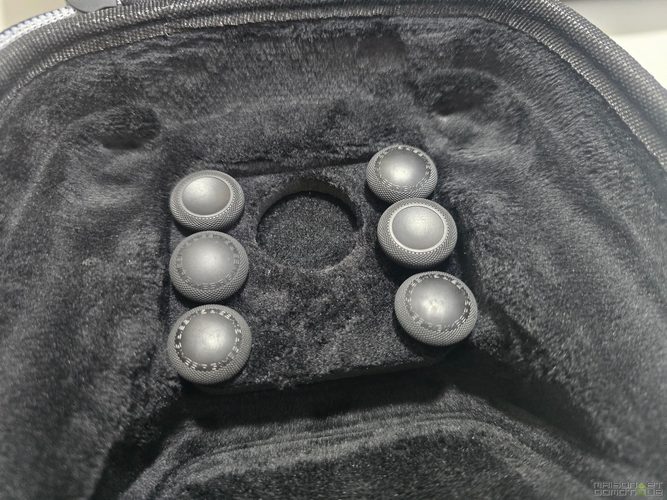
For customization: an extra faceplate that gives it a mostly white/silver look, two D-pads, eight stick caps in different sizes and shapes, and four silicone covers.

There are also a few Zenless Zone Zero goodies: an acrylic keychain, decorative items, and a code for an in-game item.

There’s also one month of Xbox Game Pass Ultimate, but read the terms: according to GameSir, the code is for eligible new subscribers only. If you’re already subscribed, or have been in the past, you probably won’t be able to use it.

The case deserves a mention. It’s sturdy enough for worry-free travel, stores all the accessories, and even lets you run a USB-C cable through it to charge the controller inside. It’s the kind of detail that makes all the difference.
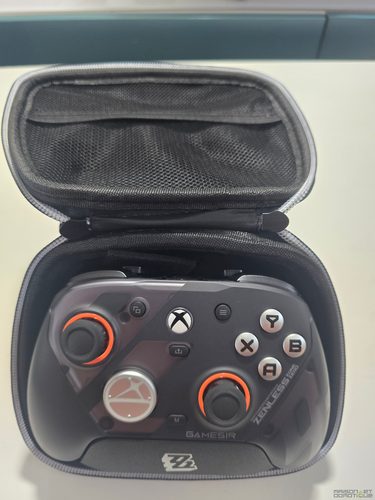
My only regret: the USB-C cable. Three meters is generous, but it isn’t braided. For such a carefully designed edition, a paracord-style cable would have been the icing on the cake. Still, given everything in the box, it’s hard to accuse GameSir of being stingy!
Familiar ergonomics, with plenty of customization
In your hands, it’s very similar to an Xbox controller: asymmetrical sticks, triggers, and button layout. You feel right at home straight away, which is handy when switching between PC and console.

It measures 152 × 103 × 58 mm and weighs around 272 g, which is standard for this category. The grips have a textured rubber coating that provides a good hold, even during long sessions when your hands start to sweat.

GameSir adds four controls: two rear buttons, L4 and R4, positioned under your fingers as they rest on the grips, and two small L5 and R5 buttons near the upper triggers. They’re all customizable, and their usefulness is immediately obvious in-game: you can trigger an action without letting go of the sticks. In an FPS, mapping jump or slide to the rear buttons lets you keep your hand on the camera while moving around.

L4 and R4 even have a small physical lock to disable them. A good way to prevent accidental presses.
Magnetic faceplates for a change of look
The front shell is made up of three pieces held in place by magnets. You can remove them by hand, without tools, and swap them for the pieces in the box. You can keep the original black and orange look, go for a more transparent finish, or mix and match the pieces.


The stick caps can be swapped too: taller, shorter, concave, or convex. This changes how they feel: in theory, a taller stick gives you more finesse with small movements, while a shorter stick makes it easier to move your thumb quickly. FPS and racing game players have plenty of options to find the right setup. The same goes for the D-pad, with several shapes to choose from.

A tip if you’re planning to buy other GameSir faceplates later: check compatibility carefully. Some faceplates from previous generations only work with a specific D-pad.
This modularity goes a long way toward making the controller appealing. It makes you want to keep customizing it over time.
TMR sticks for precision and to prevent drift
Underneath the collector’s edition looks, the specs are serious. The sticks are Mag-Res TMR (Tunnel Magnetoresistance), a technology that’s becoming increasingly common in high-end controllers.
A standard stick uses mechanical potentiometers, with contacts that wear out. A TMR stick measures its position using magnetic sensors. The result: finer detection and less wear, which means a lower risk of stick drift, the issue that makes your character or camera move even when you’re not touching anything.
Lower risk, not zero risk. A TMR controller isn’t indestructible: mechanical, calibration, or electronic problems can still occur. The technology mainly eliminates one of the leading causes of drift.
GameSir claims a 12-bit resolution (4,096 levels) and a lifespan of five million cycles for the joystick module, based on its own tests. In practical terms, you get smooth control that picks up small movements well: useful for adjusting your line in a racing game or fine-tuning your aim in an FPS.
The stick isn’t everything, though. Dead zones, response curves, and latency matter too, and GameSir lets you adjust several of these settings.
1,000 Hz on PC: what difference does it make?
On PC, the controller reaches a 1,000 Hz polling rate over both USB and 2.4 GHz wireless. That means it can send updates up to 1,000 times per second, or one millisecond between updates, compared with four milliseconds at 250 Hz.
On paper, that reduces latency. But 1,000 Hz doesn’t mean one millisecond of total delay: the connection, Windows, the game engine, and the screen each add their own contribution. And that 1,000 Hz rate only applies to PC, so don’t expect the same on Xbox or over Bluetooth on Android.
For a well-equipped gaming PC, it’s still a good selling point.
Triggers that switch from racing games to FPS
This is probably what I like most about this G7 Pro: the LT and RT triggers have two modes.
By default, they use Hall effect sensors (so no potentiometers here either). The travel is long and progressive, perfect for driving. In Forza Horizon, you can finely control the accelerator and brake: a light press and a full press produce completely different results.
Now switch to Call of Duty. Long trigger travel becomes more of a hindrance; you want your shot to fire instantly. A small physical switch changes each trigger to microswitch mode: the travel becomes very short and pressing it produces a crisp click, similar to a gaming mouse. No menus to dig through; you can adjust it directly on the controller. Clever.

The ABXY buttons use optical microswitches, with no mechanical electrical contact, for crisp activation and a long lifespan. The D-pad, meanwhile, has mechanical microswitches.
You have to like clicky controls. If you’re used to the softer, quieter feel of a standard controller, allow yourself a little time to adjust.
True wireless on Xbox, PC, and Android: its biggest selling point
This is what made me choose this controller.
Many multiplatform controllers involve compromises, especially when it comes to wireless gaming on Xbox. The standard G7 Pro is a good example: wireless on PC, but you have to use a cable on Xbox.
That limitation doesn’t apply to the Zenless Zone Zero version. It offers three connection modes (USB-C, 2.4 GHz wireless, and Bluetooth 5.3), and its 2.4 GHz receiver is officially compatible with Xbox. For me, that changes everything.
On PC: use the 2.4 GHz receiver
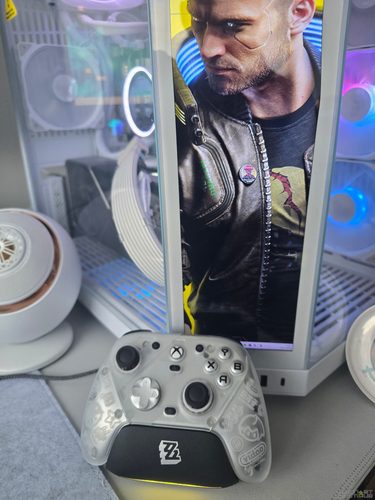
For my PC in its HYTE case, this is exactly what I was looking for: launch a game on Steam, Game Pass, or elsewhere on Windows without having to plug in a cable every time.
The included USB receiver provides the 2.4 GHz connection. The controller is compatible with Windows 10 and 11, and also works wired over USB-C.
Bluetooth is available on Windows, but it uses an HID mode originally designed for Android. Depending on the game, you’ll need a compatibility layer such as Steam Input. The simplest and best-performing option is the dongle, which maintains the 1,000 Hz wireless polling rate.
One thing to note: if you use the same receiver for your PC and console, you’ll need to move it between them. No dongle, no Xbox connection.
On Xbox: finally, wireless!
The controller is officially licensed for Xbox and works with Xbox Series X, Series S, and Xbox One. To play wirelessly, plug the receiver into the console and switch the controller to 2.4 GHz mode.
The connection therefore goes through this receiver, not Microsoft’s proprietary wireless protocol for its controllers. Keep that in mind if you want to keep a USB port free on your console.

The three-meter USB-C cable is there if you need it. You have a choice: wireless from the couch, or wired if you don’t want to rely on a wireless connection.
On Android: a welcome bonus
On Android, the G7 Pro ZZZ uses Bluetooth 5.3 and is compatible with Android 8.0 and later. Pairing is straightforward: select Bluetooth mode on the back of the controller, turn it on, and select it in your phone’s Bluetooth settings. If it doesn’t show up, a dedicated button restarts pairing.
It then works with Android games that support controllers and some game-streaming apps. For me, it’s a bonus, not a priority.
The G7 Pro isn’t telescopic: it can’t hold your smartphone between its grips. You’ll need a stand, a compatible mount, or you can simply set your phone down in front of you.
And Bluetooth doesn’t mean it’s compatible with everything. PlayStation 5, Nintendo Switch, and iOS aren’t among the platforms listed for this edition.
GameSir Nexus: set up the controller your way
With so many buttons and modes, you need software to support them. That’s where GameSir Nexus comes in. On Windows, it lets you create profiles for each game, remap buttons, adjust the sticks’ dead zones and response curves, and customize the triggers, vibration, and extra controls.

A quick word about dead zones: this is the part of the stick’s travel that doesn’t trigger anything in the game. If it’s too large, you lose precision with small movements. If it’s too small, your character may move on its own if the stick isn’t perfectly calibrated. With TMR sticks this precise, being able to adjust it makes sense.

You can save different settings for an FPS, a racing game, or a platformer. The documentation provides for four configurations, which you select by combining the M button with the ABXY buttons.

A gyroscope, but only on PC
GameSir has also built in a six-axis gyroscope. On PC, you can link the controller’s tilt to mouse or stick movement, for example to fine-tune your aim. Not all games support it natively; it depends on your settings and button mapping. And it’s officially limited to PC.
Nexus offers a lot of options, but it takes a little time to get the most out of them. There’s no need to configure everything on day one: the G7 Pro works perfectly well as a standard controller, and you can tweak it gradually.
A charging dock you’ll never want to give up
On a spec sheet, a charging dock looks like a gimmick. In practice, I wouldn’t want to be without it.
It picks up the ZZZ edition’s design and holds the controller on an angled stand. Charging happens through contacts underneath the controller: set it down and it charges, with no cable to plug in. A small light bar shows the charging status, and the power cuts off automatically when the battery is full.

Another nice touch: the 2.4 GHz receiver can be stored and plugged into a slot underneath the stand. No more leaving it lying around on your desk.

The real benefit, for me, is the habit it creates. When I’m done playing, I put the controller back on its dock, and that’s it. No more looking for a cable, no more dead battery when I’m ready to start a game.
Decent battery life, but nothing more
The battery has a capacity of 1,200 mAh. GameSir claims around 10 hours of battery life with typical use and a 2.5-hour charging time, based on lab testing. In real life, it all depends on vibration, connection mode, and the games you play.
Ten hours is enough for several sessions. Compared with controllers that last several dozen hours, it’s just average, and it’s one of the G7 Pro’s compromises. The dock largely makes up for it: if the controller goes back on its stand after every session, you stop thinking about it. Still, I would have liked a little more battery at this price.
Four vibration motors and a headset jack
The G7 Pro has four independent vibration motors: two in the grips, as usual, and two in the triggers. In a racing game, the latter can provide feedback for braking or accelerating; in an action game, for certain impacts. The results obviously depend on how each game uses them.
These aren’t adaptive triggers like those on Sony’s DualSense: the trigger resistance doesn’t change; they’re simply motors that vibrate.
There’s also a 3.5 mm jack for a wired headset, with a control to mute the microphone. GameSir says audio works over USB and 2.4 GHz, which is handy for playing on Xbox from the couch with your headset plugged into the controller.

A controller for every kind of game
What I like is that it’s not aimed only at competitive players. The extra controls, precise sticks, and short-travel triggers will appeal to FPS fans, but it has plenty to offer elsewhere too.

In racing games, you can use the analog triggers to control the throttle and brake, and the TMR sticks for steering. In platformers, the mechanical D-pad and optical buttons feel quite different from those on a standard Xbox controller. In adventure games, you can map frequently used actions to the rear buttons without letting go of the camera. And for retro gaming, on an emulator like RetroArch, the Xbox layout and interchangeable D-pads make old games a pleasure to play.
You can use it as-is or spend hours fine-tuning every control. Both work.
The only downside: the microswitches click much more loudly than membrane buttons. They’re responsive, but you can hear them in a quiet room.
Standard G7 Pro, Wuchang, or ZZZ: which one should you choose?
There are several G7 Pro models. They don’t all do the same things, so it’s worth taking a closer look.
The standard G7 Pro is the cheapest. It already has TMR sticks, Hall effect triggers with stops, customizable buttons, a charging dock, and wireless connectivity on PC. But on Xbox, you need a cable. If you absolutely want to play wirelessly on Microsoft’s console, that’s a deal-breaker.
The G7 Pro Wuchang: Fallen Feathers Edition, like the ZZZ, offers wireless Xbox connectivity with a dedicated receiver. The two are almost identical in terms of core features. The difference is in the presentation and what’s included in the box: the ZZZ adds more cosmetic customization, lots of accessories, a premium case, and collector’s items. I think it looks gorgeous too.
When it launched in France, the ZZZ was priced at around €149.99, compared with around €119.99 for the Wuchang. The standard version is considerably cheaper at certain times and during sales. So with the ZZZ, you’re paying for the box and the collector’s item, not extra performance.
If you just want a good wireless Xbox controller at the best price, get the Wuchang. If the presentation, accessories, and pleasure of owning a beautiful object matter to you, the ZZZ becomes a much more tempting option.
A great Christmas gift idea
Christmas is coming, and this edition has one advantage that no spec sheet mentions: the unboxing experience. The compartments, the accessories, the dock, the case, the little exclusive items… It makes a great impression under the tree!
It’ll suit a PC or Xbox player, and even more so a Zenless Zone Zero fan. But the licensed theme isn’t everything: its high-end features will keep being useful long after the box has been opened.
Just make sure the recipient plays on a compatible platform. It would be a shame to give this box to someone who only plays on PlayStation or Switch.
My verdict: a real favorite, with a few caveats
I wanted a single controller for my PC, my Xbox, and, occasionally, my Android phone. The G7 Pro Zenless Zone Zero ticks all those boxes, which is far from true of every controller.
Wireless connectivity on Xbox and PC is its biggest advantage in my eyes. Next come the TMR sticks, dual-mode triggers, extra buttons, and extensive customization.
And then there’s the controller itself. It’s beautiful, the box is generous, I like being able to change its look and controls, and the charging dock really does make everyday use easier.
As for drawbacks: average battery life for a high-end controller, a collector’s-edition price, and the need to use the USB receiver for wireless play on Xbox.
The ZZZ edition isn’t essential if you want to enjoy the G7 Pro’s performance. If you’re mainly looking for an effective wireless Xbox controller, the Wuchang costs less. But if, like me, you appreciate well-designed peripherals that are as enjoyable to look at as they are to use, this collector’s edition has that little something extra. You choose it for its specs, and keep it because you love seeing it on your desk.
For Christmas, it’s a beautiful gift for a discerning gamer.


Please remain courteous: a hello and a thank you cost nothing! We're here to exchange ideas in a constructive way. Trolls will be deleted.