


Résumer cet article :
A Hi-Fi amplifier that works very well but has no streaming capabilities. A TV you’d like to keep off the Internet. A solar inverter that keeps its data locked away in its proprietary app, or a Z-Wave controller relegated to the back of a utility closet. All these devices could do so much more if they communicated directly with Home Assistant.
That’s the idea behind the Home Assistant Connect AUX-2, unveiled on November 11, 2026, by Nabu Casa, the company that makes official Home Assistant hardware. For €59, this little box brings together features rarely seen in one device: multiroom audio streaming, RS-232 and RS-485 serial control, Modbus, a Z-Wave gateway, a Bluetooth proxy, and PoE power. And it can do all of that at the same time.
The reasoning will resonate with anyone who uses Home Assistant: why replace a device that’s still working just because it doesn’t have Wi-Fi or its manufacturer has abandoned the app? Nabu Casa wants to give this hardware a new purpose. And after more than an hour of launch presentations, one thing is clear: this is much more than a simple adapter for an old Hi-Fi system.
Home Assistant Connect AUX-2: a smart home Swiss Army knife
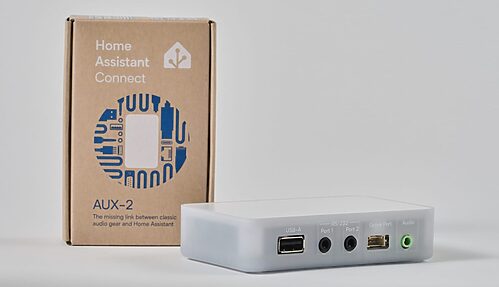
At a glance, the Connect AUX-2 looks like a small network adapter. The semi-transparent white enclosure measures 106 × 63 × 25 mm and weighs 104 g. It can easily be tucked away behind an amplifier, in a TV cabinet, or in a server rack.

The connectivity, on the other hand, is extensive: a 3.5 mm jack output that combines analog and digital optical audio, two RS-232 serial ports (also in 3.5 mm jack format), a USB-A port, a Grove connector for connecting sensors or modules, a PoE-compatible Ethernet port, and a USB-C power socket. It also has 2.4 GHz Wi-Fi and Bluetooth 5 Low Energy.
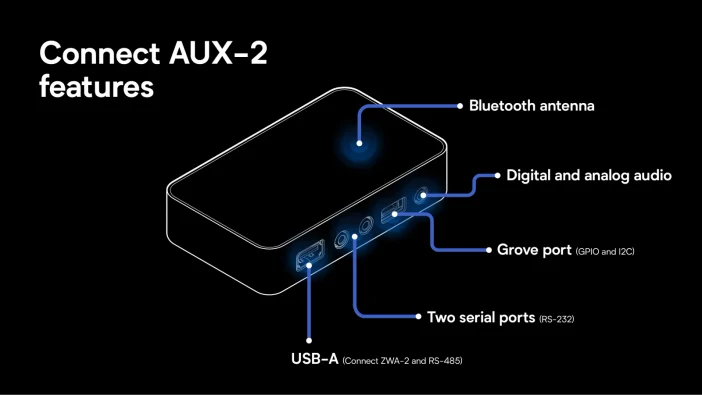
Inside, there’s an ESP32-S3R8 with 8 MB of PSRAM and 8 MB of flash, a W5500 Ethernet controller, and a Texas Instruments PCM5122 audio converter.

The ESP32 wasn’t chosen by chance: the device runs ESPHome, which is already widely used in the Home Assistant ecosystem to integrate electronic hardware and connected devices. So there’s no need to reinvent a software layer, as a proprietary gateway would. The Connect AUX-2 builds directly on what’s already available in Home Assistant and ESPHome.
One thing to keep in mind: it doesn’t replace a Home Assistant server. It complements an existing setup, whether it runs on a Home Assistant Green, a Raspberry Pi, a mini PC, or a virtual machine.
Bring an old Hi-Fi system back to life without sacrificing audio quality
Audio is one of the box’s two main functions. The name says it all: AUX stands for Audio and USB, with the X referring to serial connectivity.
Take a somewhat older Hi-Fi system with a good amplifier and good speakers, but no Spotify Connect, no AirPlay, nothing modern. Until now, you’d need to add a network player, a Raspberry Pi, or a connected audio adapter. The Connect AUX-2 does the job.
Its 3.5 mm jack output has a special feature: it combines two outputs in the same connector. The first is a standard analog output that you can connect to an amplifier’s AUX input or to powered speakers (a jack-to-RCA cable will work with most traditional amplifiers). The second is a mini-TOSLINK S/PDIF optical output, which sends the digital signal as is to an amplifier or external DAC without converting it to analog.
The box detects which cable is connected and selects the corresponding output. Only one can be used at a time.

For the analog output, Nabu Casa chose a Texas Instruments PCM5122 DAC, rated at a 112 dB signal-to-noise ratio, with fine-grained hardware volume control. The specifications list 16-bit / 48 kHz stereo output, both analog and digital, with uncompressed PCM on the optical output. FLAC, MP3, and WAV are supported.
One detail picked up during the presentation: the developers say they recently added 24-bit transmission, provided the software in use supports it. The product documentation still lists 16-bit / 48 kHz, so we’ll check this during our review.
The appeal is obvious: turn a good conventional audio system into a network player without touching the amplifier or speakers. Just bear in mind that the Connect AUX-2 doesn’t have a power amplifier. It can’t drive passive speakers directly.
Music Assistant and Sendspin: a much more open multiroom experience
Connecting an old Hi-Fi system to Home Assistant is already great. Syncing it with connected speakers in other rooms is another matter. That’s where Music Assistant and Sendspin come in.
Music Assistant is an open-source project that brings your music library, local files, and many streaming services together in a single interface. No more jumping between multiple apps: everything is controlled from Home Assistant. The Connect AUX-2 is automatically recognized as a Sendspin player. Connect it to the Hi-Fi system, and you’re ready to play music.
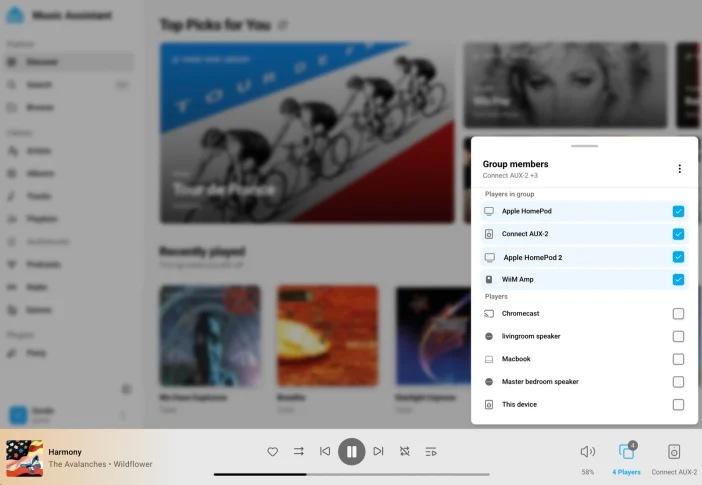
Sendspin, meanwhile, is an open protocol for synchronized audio streaming, designed to break free from closed ecosystems. Today, multiroom works very well—as long as all your speakers come from the same ecosystem. Sonos has its system, Apple has AirPlay, and Google has Cast. Getting all of them to work together while keeping playback in sync is another story.
During the presentation, the developers grouped AUX-2 units with HomePods and some Sonos products, thanks to AirPlay compatibility. So you can picture an old Hi-Fi system in the living room, HomePods in the kitchen, and another amplifier with an AUX-2 in the office, all playing in sync, with Music Assistant conducting the whole setup.
There’s an important caveat: not every audio device on the market can be synchronized. It all depends on each player’s protocols and features. The developers also discussed their experiments with Google Cast, but that avenue is still hampered by changes imposed by Google. For now, this isn’t a universal solution.
Sendspin isn’t limited to sound, either. The protocol allows other devices to take part: a screen displaying the album cover, custom physical controls, or lights that react to the music. For example, a Home Assistant scene could match your Philips Hue lights to the current album cover, while a wall-mounted screen displays the track title and lets you skip to the next one. The Connect AUX-2 is another gateway into this ecosystem.
Two RS-232 ports for controlling TVs, amplifiers, and projectors
For smart home enthusiasts, this is probably the box’s most interesting feature.
The Connect AUX-2 has two independent RS-232 ports. RS-232 is an old technology, but it’s still found throughout professional equipment and some consumer devices: TVs, projectors, home theater amplifiers, professional audiovisual equipment, and some air conditioners. LG, Samsung, Sony, Denon, Marantz, and NAD offer a serial interface on certain models.
These connections often let you control a device much more precisely than an infrared remote. With a compatible amplifier, Home Assistant can manage power on and off, volume, input selection, and different audio zones. The connection can also work in both directions: Home Assistant can receive information from the device too. If you turn up the volume manually on the amplifier, Home Assistant sees the change straight away.
With two ports, you can connect two devices, for example, the TV to the first and the home theater amplifier to the second.
One detail from the presentation stood out to me. Manufacturers don’t all wire the transmit and receive lines (TX and RX) the same way, which often means having to find a crossover cable or adapter. Nabu Casa has put two small switches on the underside of the box to swap TX and RX on each port. It’s a simple touch, and it will probably save hours of troubleshooting.
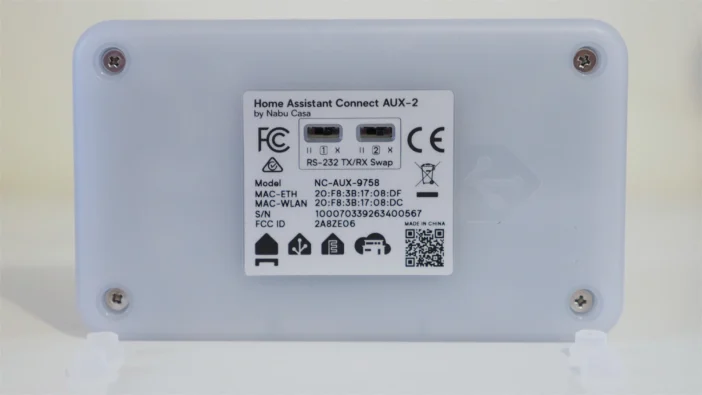
A few precautions. The ports use 3.5 mm jacks, while the devices you want to control often have DB9, RJ11, or mini-DIN connectors: you’ll need the right cable, and should check the pinout and electrical standard. Also, don’t confuse these serial ports with the actual audio output. They use RS-232 electrical levels (rated at ±5 V), not standard TTL serial levels. Finally, an RS-232 port alone isn’t enough: the device’s protocol must be supported by a Home Assistant integration.
Control a TV without Internet: a win for privacy
During the presentation, Paulus Schoutsen, the creator of Home Assistant, showed how he controls an LG TV from Home Assistant through its serial port.
Why bother, when modern TVs are already connected to the network? Because that connection often comes with online services, data collection, and features that depend on the manufacturer. With a serial connection, some TVs can be controlled without Internet access: Home Assistant can turn them on, switch HDMI inputs, or adjust certain settings without going through the manufacturer’s cloud. For anyone who cares about privacy, that’s a compelling argument.
Of course, a TV disconnected from the Internet loses its streaming apps. There’s nothing to stop you from connecting an external player via HDMI.
There’s also standby power consumption to consider. Some TVs keep part of their electronics and network connection active so they remain reachable. The Home Assistant team cited cases where disabling these features significantly reduced standby power consumption, including one extreme example of around 45 W. We shouldn’t assume that figure applies to all TVs, but the idea makes sense: keep local smart home control while disabling unnecessary network features.
Another advantage is that the serial connection can remain available when the TV is in deep standby, whereas some network commands stop responding as soon as the Ethernet interface shuts down. That makes it possible to build a home theater that no longer depends on the cloud.
RS-485 and Modbus: a gateway built for energy management
RS-232 is a great fit for audiovisual equipment. RS-485 opens up other possibilities, especially for energy management.
This standard is found throughout industry, but also in many residential devices: solar inverters, batteries, heat pumps, air conditioners, ventilation systems, and energy meters. These devices very often communicate over RS-485 using Modbus RTU.
The Connect AUX-2 doesn’t have an RS-485 terminal block. You’ll need to add a USB-to-RS-485 adapter, plugged into the USB-A port—for example, a Waveshare model explicitly supported by the firmware. It’s sold separately and costs around $15, according to Nabu Casa. Once connected, data is made available in Home Assistant through the serial proxy and compatible integrations.
This is where solar power gets interesting. Depending on the model and protocol, an inverter can report its energy production, instantaneous power, voltages, and other operating parameters. A battery can report its state of charge, input and output power, and diagnostic information. The protocol sometimes provides access to data that the manufacturer’s official app doesn’t even display.
Once this information is in Home Assistant, the house can track solar production, consumption, and battery charging at the same time, and act accordingly. When production exceeds consumption and the battery reaches a certain level, Home Assistant could start charging the electric car or slightly increase the setpoint on a compatible hot water tank. Conversely, during a consumption peak or when electricity gets expensive, certain devices could be adjusted automatically to reduce the amount of power purchased. This is exactly the kind of use case that makes sense with variable-rate tariffs, solar power, and home energy storage.
Of course, these controls are only available if the device and its integration support them. Plugging in a Modbus cable doesn’t magically give you access to every inverter function. You’ll need the register and command documentation, if only to avoid changing sensitive settings. But there’s plenty of potential to make Home Assistant a real home energy manager.
Multiple devices on the same RS-485 bus
The presentation also showed several projects built by community members. One of them connected three inverters in a daisy chain on an RS-485 bus, which was then connected to the Connect AUX-2 and Home Assistant.
That’s one of the advantages of RS-485: while an RS-232 connection generally links two devices, RS-485 lets multiple devices communicate on the same bus, provided their protocol, addressing, and configuration are compatible.
In this example, the inverters weren’t even using Modbus. That’s a useful distinction: RS-485 refers to the electrical connection, while Modbus is just one of the protocols that can run over it.
The team also showed examples involving heat pumps and ventilation systems. For anyone who wants to monitor a complete solar installation without going through the manufacturers’ servers, this feature alone could justify the purchase.
Extend your Z-Wave controller with USB and PoE
The Connect AUX-2 isn’t just for repurposing old hardware. It also solves a problem familiar to many Home Assistant users: where to put the radio controller.
The server often ends up in a server rack, garage, basement, or utility closet. That’s convenient for networking, but much less so for radio: thick walls, metal structures, and electronic equipment can all degrade the Z-Wave network.

With the Connect AUX-2, you plug a Home Assistant Connect ZWA-2 controller into the USB-A port and place the box where the radio signal is strongest. Communication with Home Assistant happens over the local network, preferably via Ethernet. The server stays in its rack, while the AUX-2 goes in a central room, on a shelf, or somewhere unobstructed. With PoE, a single Ethernet cable provides both power and network connectivity.
Nabu Casa says it tested this Z-Wave setup for several months, with good results. Wi-Fi works too, but a cable is recommended to reduce disconnections and provide more predictable performance.
The AUX-2 doesn’t become a Z-Wave controller on its own, though: the ZWA-2 is still essential and must be purchased separately.
What about Zigbee and Thread?
The question comes up straight away: if you can extend a Z-Wave controller, why not the Connect ZBT-2 Zigbee controller?
Technically, it’s already possible. During the launch, a live demo showed a ZBT-2 being unplugged from its server and then reconnected to the Connect AUX-2. After a brief reconnection, the Zigbee network was back up, and the team even controlled a light during the presentation.
But the feature is experimental at launch. Nabu Casa wants more feedback before considering it reliable enough for everyday use. The documentation specifies that Home Assistant 2026.11 or newer is required, and that it works with ZHA, not Zigbee2MQTT. If your Zigbee network has a lot of devices and you rely on it, wait until there’s more real-world experience.
For Thread, the answer is no for now. The ZBT-2 can operate as either a Zigbee or Thread controller, depending on its configuration, but the Connect AUX-2 can’t extend a Thread network. The developers explain that the protocol’s latency and frequency of communication make it difficult to stabilize. They mentioned the idea of turning an AUX-2 + ZBT-2 pair into a standalone Thread border router, but nothing has been announced officially.
So don’t buy the AUX-2 expecting to get a universal Zigbee, Z-Wave, and Thread gateway right away.
Built-in Bluetooth proxy to extend coverage
The Connect AUX-2 can also act as a Bluetooth Low Energy proxy. The idea is that Home Assistant communicates with Bluetooth devices near the box without the server itself needing to be within range. This is useful for temperature sensors, smart locks, energy monitoring devices, or certain Bluetooth e-paper displays.
The box has a dedicated antenna and can handle up to three simultaneous active Bluetooth connections. The proxy is enabled by default as soon as it’s added to Home Assistant, so it immediately starts detecting compatible nearby devices. You can also distribute several around the house to improve coverage.
Nabu Casa recommends Ethernet for this use. Over Wi-Fi, the ESP32 shares its radio between the network and Bluetooth, which can degrade Bluetooth performance. With Ethernet and PoE, the radio is dedicated entirely to Bluetooth, while communication with Home Assistant runs over the cable. This matters for devices that need a reliable connection, such as some smart locks.
This proxy is for Bluetooth Low Energy devices that are compatible with Home Assistant. It can’t send music to a Bluetooth headset or speaker.
A Grove connector for adding your own sensors
The Grove connector will mainly appeal to DIY enthusiasts and experienced ESPHome users. Grove is a connector system for hooking up electronic modules, most often without soldering.
On the AUX-2, it provides access to two GPIO pins, 5 V, and ground. You can connect certain I²C sensors, such as temperature, humidity, or light sensors, or a custom control interface.
One use case: you install the AUX-2 in a server rack to monitor a UPS and a power distribution unit. With a temperature sensor on the Grove port, Home Assistant can also monitor the temperature in the rack and start a fan or send an alert when needed.
The engineers also talked about controlling addressable LEDs with these pins or using them for other serial connections. These uses generally require modifying the ESPHome firmware: plugging in a Grove module isn’t enough to make it work. But for those who like customizing their hardware, that’s good news.
PoE makes installation much easier
This is probably the feature advanced users have been waiting for most, so it’s worth taking a closer look.
The Connect AUX-2 supports Power over Ethernet, IEEE 802.3af or higher. A single Ethernet cable carries both power and network connectivity, provided you have a PoE switch or injector. A UniFi PoE switch, for example, will power it directly while providing a wired connection. That’s one less power adapter, which is handy when you want to place a gateway in a specific location: an extended Z-Wave controller, a Bluetooth proxy, or a serial gateway next to a piece of technical equipment.
PoE also makes maintenance easier: with a managed switch, you can turn the power off and back on remotely.
No PoE at home? The box also accepts 5 V / 2 A USB-C power, and you can then choose between 2.4 GHz Wi-Fi and Ethernet for the network connection. The documentation specifies that only one power source should be used at a time.
Nabu Casa says the box itself typically draws less than 1 W. That’s reasonable for a device that’s on all the time, although actual power consumption will depend on the connected accessories and the power supply used.
Guided setup from Home Assistant
A device this versatile could quickly become a pain to set up if every function required manual configuration. Nabu Casa worked with the Home Assistant and ESPHome teams on a dedicated setup wizard.
Home Assistant 2026.9 or newer is required to configure and manage the Connect AUX-2 (and a newer version for some experimental features, such as extending Zigbee). Once it’s on the network, Home Assistant discovers the box and adds it through the ESPHome integration. The demo also showed Wi-Fi pairing over Bluetooth: Home Assistant sends the network credentials to the box.
The interface then presents the different features and guides you to the ones you need. The Bluetooth proxy and Sendspin audio features are enabled by default. If Music Assistant is already installed, the AUX-2 appears as an audio player; otherwise, Home Assistant offers to help you discover and install it. For Z-Wave, the wizard lets you connect a ZWA-2. For serial devices, you select the integration you need and the RS-232 port in use. ESPHome’s new serial proxy mechanisms make these interfaces more transparent to Home Assistant.
According to the team, communication between the AUX-2 and Home Assistant is encrypted by the ESPHome API. It follows the ecosystem’s principles: local control, automatic discovery, and no third-party cloud required for smart home features.
A few smart home scenarios
Taken one at a time, these features may seem unrelated. It’s when you combine them that the Connect AUX-2 gets interesting.
An automated home theater
A home theater amplifier is connected to the AUX-2 via RS-232 and the optical output. A “Music Night” scene turns on the amplifier, selects the right input, adjusts the volume, and starts a playlist in Music Assistant. The living room lights dim, and the system joins the home’s multiroom group. With a compatible TV or projector connected to the second serial port, another scene can get the room ready for a movie.
A home that makes better use of its solar power
In a solar installation, the AUX-2 links RS-485 equipment to Home Assistant. The data can then be cross-referenced with consumption, production, and the electricity provider’s rates. With EDF Tempo, for example, automations can take the day’s color, solar production, and battery charge into account to shift certain energy uses. And if the devices support the necessary local commands, this can all be done without relying on the manufacturers’ cloud apps.
A better-distributed smart home network
In an older house with thick walls, the server stays in its rack while an AUX-2 installed in a central room hosts the Z-Wave controller. The same box acts as a Bluetooth proxy for devices in that area. This can improve radio coverage without moving the server.
Local monitoring of technical equipment
The AUX-2 can also be placed near a UPS, a power distribution unit, or compatible heating equipment. The serial connection retrieves certain statuses and measurements, a Grove sensor monitors the temperature, and Home Assistant sends notifications, updates its dashboards, or triggers actions. Naturally, what’s possible will depend on the equipment and available integrations.
Open hardware, built for tinkerers
Like other official Home Assistant products, the Connect AUX-2 is designed to be modified. Its firmware is based on ESPHome and the bootloader is unlocked, so you can develop or install your own firmware. The enclosure opens with four Phillips screws, with no clips or glue. Nabu Casa also plans to publish the circuit board design files and resources for hardware modifications.

Several ideas came up during the presentation. One developer connected a Sound Blaster USB sound card to add audio features, using custom firmware and disabling a few memory-intensive features. Others are considering turning the box into a dedicated Squeezelite or Snapcast player, or making other use of USB and Grove.
It’s important to distinguish officially supported features from experimental ones. The ESP32-S3 is still a microcontroller with limited resources, and the team had to optimize the firmware extensively to make audio, Bluetooth, and the various proxies work together. The USB-A port also has its limitations: it’s not a universal USB port, so you can’t just plug in any peripheral or a bunch of accessories through a hub. Custom firmware offers more freedom, but requires compromises on what can run at the same time. For normal home use, stick to the documented configurations.
What to know about the limitations before you buy
The Connect AUX-2 does a lot, but it’s not a universal smart home gateway.
It has no built-in Zigbee, Thread, or Z-Wave radio. Z-Wave requires a Connect ZWA-2 controller, Zigbee via the ZBT-2 is still experimental, and Thread isn’t available in this configuration. There’s no infrared transmitter or 433 MHz radio either, although the Home Assistant and ESPHome teams are working on these.
As for audio, it’s a player, nothing more: the original box has no analog or digital input. So it can’t capture audio from a turntable or TV and stream it around the house. Nor can it send audio over Bluetooth to a headset or speaker.
With RS-232 and Modbus, everything depends on the device and what Home Assistant can handle. Some equipment will require digging into its protocol or technical documentation.
Finally, no cables are included: audio, serial, USB-C, Ethernet—you’ll need to provide the ones that suit your setup.
None of this detracts from the product’s appeal. It simply avoids attributing features to it that it doesn’t yet have.
Home Assistant Connect AUX-2 specifications
- Model number: NC-AUX-9758
- Microcontroller: ESP32-S3R8, 8 MB PSRAM, 8 MB flash
- Wired networking: W5500 controller, 802.3af PoE or higher
- Alternative power: USB-C 5 V / 2 A
- Wireless: 2.4 GHz Wi-Fi 802.11 b/g/n, Bluetooth 5 Low Energy
- Audio: Texas Instruments PCM5122 converter (112 dB signal-to-noise ratio), combined analog and S/PDIF optical output, 16-bit / 48 kHz stereo, multiroom synchronization via Sendspin and Music Assistant
- Serial: two 3.5 mm jack RS-232 ports, with TX/RX swap switches
- USB-A: supports the Z-Wave ZWA-2 controller and certain USB-to-RS-485 adapters
- Grove connector for custom ESPHome projects
- Dimensions and weight: 106 × 63 × 25 mm, 104 g
- Indoor use, 0 to 65 °C, non-condensing
- Firmware based on ESPHome, replaceable thanks to the unlocked bootloader
Price and availability: €59 for all this
The Home Assistant Connect AUX-2 has been on sale since November 11, 2026, at a recommended price of €59 in Europe and $69 in the United States. It’s available from official Home Assistant distributors, including in France. Availability will vary depending on stock and country.
All the main hardware features are included in the price, but accessories needed for certain uses are sold separately: a ZWA-2 for Z-Wave, and a USB-to-RS-485 adapter for devices that use this standard.
As with all official Nabu Casa hardware, a portion of sales funds the Open Home Foundation, which supports Home Assistant, ESPHome, and Music Assistant. Buying this box also helps fund the open-source software used by the whole community.
The official Home Assistant Connect AUX-2 page details all the specifications and links to retailers.
Our verdict: a very promising product for Home Assistant
The Connect AUX-2 is a product in a class of its own. On paper, combining an audio output, two serial ports, USB, a Bluetooth proxy, and a Grove connector in one box may seem surprising. But take a closer look and you’ll see that each component addresses a real need.
Modernizing a Hi-Fi system without replacing a good amplifier is tempting enough, and multiroom synchronization with Music Assistant and Sendspin makes it even more appealing. The serial features seem just as promising to me: TVs, amplifiers, solar inverters, and heating systems sometimes have extensive communication interfaces that their consumer apps barely make use of. And even if you don’t need any of those features, extending a Z-Wave controller or having a wired, PoE-powered Bluetooth proxy could be reason enough to buy it.
All for €59, in an open enclosure with native Home Assistant integration.
We still need to see how it performs in the real world: serial connection stability, audio quality, multiroom synchronization accuracy, Bluetooth proxy performance, and Z-Wave reliability over the network. We’ll also take a close look at experimental Zigbee and what the RS-485 adapters can do. We’re waiting for our unit so we can bring you a full review on Maison et Domotique.
In the meantime, this announcement points in a direction I really like for smart home technology. Rather than piling on new connected devices and proprietary apps, Home Assistant is looking to get more out of the devices we already own. With the Connect AUX-2, that idea becomes very tangible.


Please remain courteous: a hello and a thank you cost nothing! We're here to exchange ideas in a constructive way. Trolls will be deleted.