



Résumer cet article :
When I tested the first Khadas Mind a little over a year ago, I was charmed by its atypical concept. Mini PCs are plentiful on the market: between Geekom, GMKtec, Beelink, Minisforum, or NiPoGi, the options are vast. Khadas managed to stand out with a simple idea: to treat the mini PC not as a fixed computer, but as the heart of an evolving ecosystem.
The manufacturer returns with the Khadas Mind 2, a second generation that goes beyond just a hardware update. New Intel Core Ultra processor, much more powerful Intel Arc GPU, faster memory, Wi-Fi 7, PCIe Gen4 SSD… the technical specifications evolve in depth while maintaining what makes the product unique: its modularity.
For this test, Khadas entrusted me with the version equipped with the Core Ultra 7 155H, 32 GB of LPDDR5x memory, and a 1 TB NVMe SSD. I was also able to test it with the Mind Graphics v1, the external graphics module already presented during my review of the first Mind. The latter is starting to give way to the Mind Graphics 2, but it already completely transforms the capabilities of the machine, both in content creation and gaming.
Over the weeks, the Mind 2 has become my work computer during several trips, but also my desktop machine connected to different screens. The perfect opportunity to check if this new generation lives up to its promises.
The Khadas Mind: a concept still as unique
Let’s first revisit what makes the Khadas Mind different from other mini PCs on the market, before delving into performance.
Most manufacturers aim to design the most compact computer possible. Khadas started from a different idea: why carry an entire laptop when only its computing part is truly necessary? This is how the Mind was born.
The principle is simple. The small aluminum box you hold in your hand contains all the computing power: processor, memory, storage, network, connectors – everything that constitutes a modern computer.
But instead of permanently integrating a keyboard, a screen, or a powerful graphics card, Khadas makes them optional. The computer becomes a central module to which various accessories connect according to needs.
In the office, it connects to an external display and a dock. At home, it connects to the Mind Graphics to enjoy a dedicated Nvidia graphics card. On the go, it will soon transform into a laptop or tablet thanks to the Mind xPlay (which I have already received and will be the subject of a complete test on Maison & Domotique).
This approach has two concrete advantages.
First, portability: just a few hundred grams in a bag, and you carry your entire computing environment without juggling multiple machines.
Then there’s longevity. Need more graphics power? You add a module. Need a desktop setup? You connect a dock. Need a laptop? The Mind xPlay takes over. You evolve your setup without replacing the whole computer.
Everything relies on the proprietary Mind Link connector located under the mini PC. Unlike a simple USB4 or Thunderbolt connection, it offers a bandwidth that can reach 256 Gb/s — more than enough to power a dedicated graphics card without the bottleneck experienced with some traditional eGPU solutions. The connection between modules is almost instant, without additional cables or multiple power supplies.
This is what distinguishes the Khadas Mind most from the competition. A traditional mini PC will remain a mini PC for its entire life. The Mind, on the other hand, evolves with needs. With this second generation, Khadas pushes even further in that direction.
Unboxing and presentation of the Khadas Mind 2
Knowing the Mind 1 already, there weren’t really any surprises when opening the box.

The Khadas Mind 2 is still very small: it fits in a hand, measures just about fifteen centimeters long and 20 mm thick, and weighs less than 450 grams. It slips easily into a laptop bag or a backpack compartment.

The packaging is neat, reflecting the premium image that Khadas aims to convey. Inside: the Mind 2 well protected, its USB-C power supply, a high-quality braided USB-C cable, and quick start documentation. Nothing extravagant, but the whole inspires confidence.
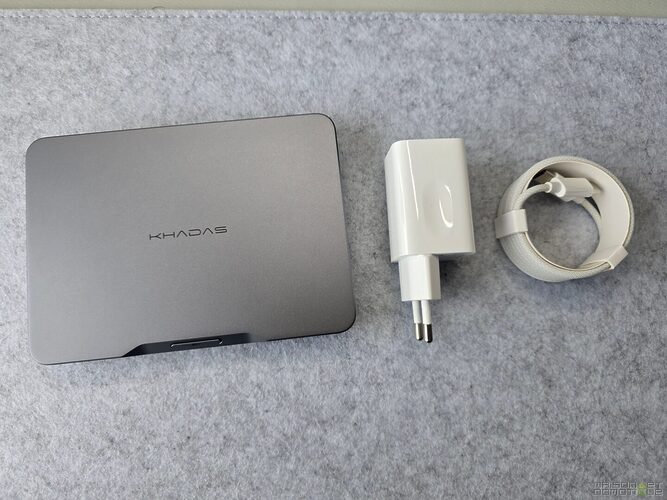
The quality of construction is immediately visible. The chassis is made of CNC machined aluminum, successfully finished in dark gray. No creaking, no play, no visible plastic: this is a high-end product.
The design is very minimalist. On the front, just the power button with its LED.

On the sides, the ventilation grills, well integrated into the chassis.

On the back, a complete set of connections for its format:
- a Thunderbolt 4 port
- a USB4 port
- two USB 3.2 Type-A ports
- a full-size HDMI 2.1 output

No adapters needed here. The real HDMI connector is appreciated, especially in a meeting room.
Under the device, a silicone cover protects the Mind Link connector, the backbone of the entire Khadas ecosystem. Thanks to it, the Mind 2 connects directly to the various brand modules. No cables lying around, no complicated handling: place the mini PC, it locks mechanically, and it’s operational.

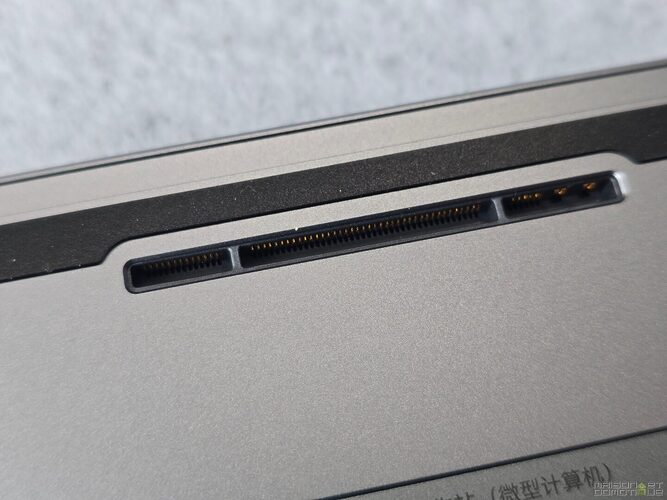
Khadas has retained a rare feature in a mini PC: an internal battery of 5.55 Wh. This is not for portable autonomy: a few dozen minutes at best. Its role lies elsewhere: in case of a power outage or when unplugging the power to move the machine, the battery takes over. Depending on the mode chosen in the Mind application, it can keep the PC in hibernation for several hours without data loss. It’s a detail that ends up being appreciated more than one might have thought, especially when regularly moving the computer between different workspaces.
Another point to note: it is possible to add a second NVMe SSD, accessible through the hatch on the bottom, and easily replaceable.

The RAM, however, is soldered. A common choice in very compact machines.
In the end, the first impression does not at all feel like an entry-level mini PC. The Mind 2 plays in the same court as the best premium ultraportables, with a build quality that holds up well in comparison.
A high-end configuration designed to last
The model received for this test includes an Intel Core Ultra 7 155H, 32 GB of LPDDR5x memory, and a 1 TB PCIe Gen4 NVMe SSD. A balanced configuration aimed at both professionals and content creators.
The Core Ultra 7 155H is a significant leap forward compared to the Core i7 of the first generation. Meteor Lake architecture, 16 cores (6 Performance, 8 Efficient, 2 Low Power Efficient), 22 threads, Turbo frequency up to 4.8 GHz.
Beyond raw power, this generation includes a dedicated NPU for AI processing. Windows and software are just beginning to exploit it, but it opens up concrete optimizations: noise cancellation in video conferences, assisted photo editing, voice transcription, some Copilot functions.

The other important evolution is the integrated GPU. Goodbye to the Intel Iris Xe from the first Mind, and hello to the much more capable Intel Arc GPU. It doesn’t replace a dedicated card for AAA games on Ultra, but it allows for much more ambitious uses: 4K video editing, hardware acceleration under Premiere Pro, Lightroom, or DaVinci Resolve, AV1 decoding, advanced photo editing, AI image generation – without necessarily needing the Mind Graphics.
The 32 GB of LPDDR5x at 7,467 MT/s is also a strong point of this configuration. The bandwidth is high, useful with Core Ultra processors whose GPU shares system memory. The memory is soldered, but it’s hard to imagine being limited for several years with this capacity.
The 1 TB PCIe Gen4 NVMe SSD ensures excellent speeds, nearly instant startups, and consistent responsiveness.
On the connectivity side: Wi-Fi 7 (still rare on mini PCs) and Bluetooth 5.4. Users equipped with a compatible router will enjoy high speeds and low latency. The dual Thunderbolt 4 / USB4 port allows connecting high-resolution displays, docks, fast storage, or professional peripherals without difficulty.
On paper, this configuration places the Mind 2 among the premium mini PCs available right now. The experience remains to be seen.
Installation and setup: ready to work in minutes
No technical skills are required to install the Khadas Mind 2. You connect the USB-C power supply, a screen, a keyboard, and a mouse, press the button: Windows 11, pre-installed, starts up. Within minutes, the desktop is there.
Good point: Khadas did not succumb to the temptation of unnecessary pre-installed software. The system is clean, with only the necessary applications.

Among them, Mind: the in-house utility to control the specific functions of the machine. Clear interface, practical features. The management of the built-in battery is configurable: sleep, hibernation, or temporary battery usage in case of sudden disconnection. The Smart Charging function limits the maximum charge when the Mind remains plugged in permanently, which prolongs the battery life over the long term (the same behavior as seen in recent professional laptops). The application also centrally manages updates: drivers, BIOS, Mind-specific components: everything detects automatically. From the first startup, several updates were proposed, and they installed smoothly.
I then installed my entire usual environment: Microsoft Office suite, Photoshop, Lightroom, Premiere Pro, DaVinci Resolve, several browsers, Visual Studio Code, Home Assistant, a few light virtualization tools, my benchmarking software. Even with several dozen installed applications, the Mind 2 remains perfectly responsive. Windows runs well, and startups are quick.

A detail I appreciate: the noise. In normal office use, the fan is almost inaudible. You have to push the processor hard — video rendering, benchmark looping — to hear it speed up. And even in these conditions, the noise level remains well below that of a similarly powered ultraportable.
The installation of the Mind Graphics is just as straightforward. You position the Mind 2 above the Mind Link connector, the magnets guide the mini PC, and it locks into place. Windows detects the new hardware, you install the Nvidia drivers, and the GeForce RTX 4060 Ti is available.

This is undoubtedly one of the big advantages of the concept. Where a traditional eGPU requires an external box connected via Thunderbolt, a dedicated power supply, and sometimes cumbersome software manipulations, here everything is done in seconds. You place the Mind on its support, turn it on, and switch from a compact mini PC to a workstation without the impression of using an external peripheral. This is probably what differentiates the Mind 2 the most from its competitors.
In usage: a mini PC that can do almost everything
The technical specifications are good. But some mini PCs quickly show their limits as soon as you start to multiply applications or ask for a bit more than simple office tasks. With the Khadas Mind 2, I hardly ever felt that.
For several weeks, it replaced my desktop computer during trips but also on my main desk. I used it like any PC: writing articles, photo editing, video editing, video conferencing, browsing with dozens of tabs open, managing social networks, Photoshop, administering my smart home setups via Home Assistant.
And that’s where you can truly appreciate the advancements Intel has made with this Core Ultra generation. With about twenty Chrome tabs open, Photoshop in the background, Lightroom exporting, and several messaging apps active: the system remains fluid. The 32 GB of memory contribute to it, of course, but the processor handles this type of load effortlessly. For someone whose activities are limited to office tasks, web browsing, or development, the Mind 2 is frankly overkill.
An ideal work companion on the go
Mobility is the central argument for the Mind 2. Several times, I simply slipped it into my photo bag alongside the camera and a few accessories. Less than 500 grams, you almost forget it’s there. It even fits easily into a pants pocket :p

At the destination, just connect it to a screen, a TV, or a USB-C monitor to get back to your working environment. It’s a different approach to laptops. With a laptop, you always carry the screen, the battery, the keyboard, and the trackpad, even when they aren’t needed. Here, only the computing part travels. If a screen is available on-site (office, meeting room, hotel with an HDMI TV), you’re operational in seconds. You get used to it quickly, and the bag you carry all day at a trade show becomes much lighter :)
Office tasks pose no challenge
Microsoft Office runs perfectly: Word, Excel, Outlook, PowerPoint launch instantly and remain responsive, even on large Excel files with thousands of rows or complex tables.
Video conferencing also benefits from the Core Ultra enhancements. Thanks to the integrated NPU, Windows Studio Effects automatically handles background blur, framing, or noise reduction, without taxing the main processor. Not yet essential, but it shows that this generation is already designed for AI uses that are gradually becoming part of daily life.
Content creation: quite capable without the Mind Graphics
I spend a lot of time in Lightroom, Photoshop, and Premiere Pro for my activities. The Mind 2 performs well.
In Photoshop, RAW files of several dozen megapixels open quickly, corrections apply without delay, and AI tools work properly. In Lightroom Classic, importing several hundred photos goes smoothly, generating previews is fast, and JPEG exports are also quick. The Intel Arc GPU contributes significantly to hardware acceleration: you can feel the difference compared to older Intel UHD or Iris Xe.
Premiere Pro is more demanding. For simple Full HD or 4K H.264, the Mind 2 does well: fluid timeline, correct transitions, reasonable exports. However, as soon as you add several video tracks, heavy effects, or advanced color grading over lengthy 4K sequences, you hit the limits of the integrated GPU. This is where the Mind Graphics makes sense (we’ll cover that later).
Video playback and multimedia: no difficulties
The Mind 2 plays 4K high-bitrate files without issue, including videos that exceed 300 Mb/s, without stuttering. Hardware decoding of recent codecs is well-managed, and playback remains smooth even with other active applications. YouTube 4K HDR, Netflix, Prime Video, no problem. Thanks to HDMI 2.1, you can also connect it to a recent TV to make it a home multimedia PC.
And for gaming?
Even without the Mind Graphics, the Intel Arc GPU offers some pleasant surprises. Let’s be clear: it will not replace a dedicated card for AAA games on Ultra. But it allows playing various titles reasonably with moderate settings. Competitive games (Rocket League, Fortnite, Valorant, League of Legends) run smoothly. Older titles are very enjoyable at 1080p. In GTA V or Assassin’s Creed Mirage, the Arc GPU holds its own for an integrated graphic solution in a mini PC of this size.
For occasional use, the Mind 2 is sufficient. But that’s only part of the story: the philosophy of the Khadas Mind is precisely based on the ability to add a dedicated Nvidia GPU when the need arises. The following benchmarks illustrate this, with the Mind 2 alone and then paired with the Mind Graphics.
Benchmarks: the Khadas Mind 2 changes category
User impressions are helpful. But to objectively compare a machine with others, nothing beats benchmarks. I subjected the mini PC to a whole series of tests, as I systematically do.
Double objective: measure the performance of the Mind 2 alone, then observe the actual gain brought by the Mind Graphics equipped with a GeForce RTX 4060 Ti.
The results quickly show that we are not facing a simple, performant mini PC: it’s a machine that changes category depending on the associated module.
Geekbench 6: excellent computing power
Geekbench measures the raw performance of the processor.
Mind 2 alone:
- Single Core: 2,232
- Multi Core: 11,735
With the Mind Graphics:
- Single Core: 2,207
- Multi Core: 12,507
The Mind Graphics does not add any power to the CPU itself. It simply offloads certain graphical tasks from the processor, which explains the slight gain in multicore. The essence remains linked to the Core Ultra 7.

In comparison with other mini PCs tested in the past, the Mind 2 ranks among the best Intel machines available today. Even my big gaming tower Hyte is outperformed by this mini dynamo.

For advanced office tasks, development, light virtualization, or content creation, this power is more than sufficient.
Geekbench Compute: the Intel Arc GPU flexes its muscles… until the arrival of the RTX 4060 Ti
Geekbench also measures graphics performance via OpenCL. This is probably the benchmark that best illustrates the benefits of the Mind Graphics.
Integrated Intel Arc GPU: 35,238 points. A nice improvement over the older Intel Iris Xe, which sometimes struggled against AMD iGPUs.
With the Mind Graphics connected: 127,982 points.

Almost four times more powerful. In practice, AI processing is much faster, Premiere Pro or DaVinci Resolve exports benefit from CUDA acceleration, Blender 3D rendering is done in a fraction of the time. Applications like Stable Diffusion or local AI models also gain significantly in responsiveness. This benchmark best explains why Khadas opted for a modular approach.
3DMark: graphic performance tripled
The Time Spy benchmark from 3DMark is revealing.
Without Mind Graphics: 3,835 points – respectable for an integrated GPU, allowing for play on less demanding titles and competitive games.

With the Mind Graphics: 12,426 points.
+320% graphic performance. Essentially, you go from a mini PC that performs well in Full HD to a machine capable of running the latest games at high settings. This improvement benefits all GPU-intensive software: video editing, 3D rendering, simulation, photogrammetry, AI.

PCMark 10: a machine designed for productivity
PCMark measures performance in real usage: browsing, video conferencing, Office suite, content creation, photo editing, video editing.
Mind 2 alone: 7,384 points. With the Mind Graphics: 7,874 points.


The gain is logically lower than under 3DMark: office tasks mainly tax the processor. However, in content creation scenarios, the dedicated GPU makes a noticeable difference. If you primarily work in Word, Excel, or a browser, the Mind Graphics won’t change your daily life. For a photographer, videographer, or graphic designer, the difference is very real.
VRMark: ready for virtual reality
Mind 2 alone: 3,218 points. With the Mind Graphics: 11,945 points.


Once again, nearly four times more powerful. The Arc GPU can already handle some simple VR experiences, but the RTX 4060 Ti makes modern VR headsets fully exploitable, as well as 3D visualization applications. I plugged in my Quest 3 to play Half Life Ajax without any problems.
Numbers… but above all, a real evolution in usage
What struck me most during these tests: the Mind Graphics doesn’t just improve scores. It truly changes the profile of the machine.
Without it, you have an extremely capable mini PC for daily use, advanced office tasks, development, light photo editing, and light video editing. With the graphics module, the same computer becomes a workstation geared towards 3D rendering, intensive video encoding, AI model training, and recent AAA games.
Instead of buying a mini PC for mobility and a tower for heavy tasks, here we have a single computer that adapts its power according to the environment. This approach is still rare on the market. After several weeks of use, it seems much more relevant to me than at the time of the first Mind’s release. The arrival of the Mind Graphics 2 should further strengthen this logic: I have not been able to test it yet, but judging by the specifications, it should push the limits of the ecosystem even further.
The Mind Graphics: much more than an external graphics card
When Khadas presented the first Mind, many compared the Mind Graphics to a classic eGPU enclosure. After several weeks of use, I can say that this is reductive.
Yes, the Mind Graphics features a GeForce RTX 4060 Ti. Yes, it skyrockets graphics performance. But it brings much more than that: it changes the way the machine is used.
Unlike a Thunderbolt eGPU, which remains a large external enclosure connected by cable, the Mind Graphics genuinely belongs to the ecosystem. The Mind 2 clips directly onto its Mind Link connector. No data cables cluttering the desk, no additional power supply to plug into the mini PC, no manipulation after the initial driver installation. You place the Mind 2, it magnetizes, you turn it on: Windows detects the RTX 4060 Ti in seconds. This simplicity changes the way you use the machine.

And thanks to the Display Port, my Iiyama Ultra wide screen is perfectly supported.
A complete docking station
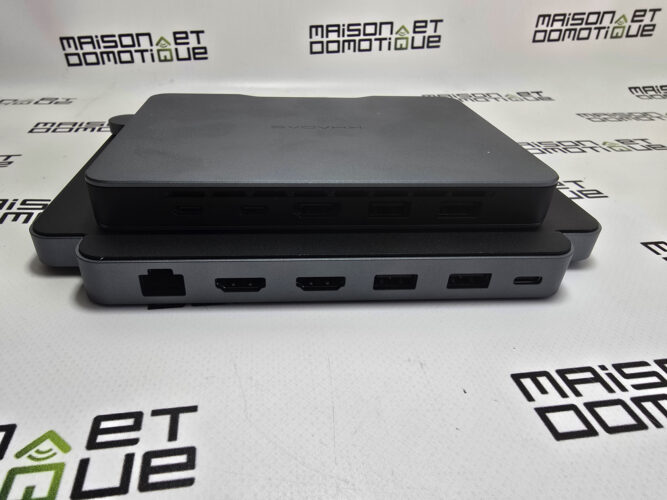
The Mind Graphics also complements the connectivity of the Mind 2. At the front: 3.5 mm headphone jack, USB-C port, full-size SD card reader. At the back: 2.5 Gb/s Ethernet port, two HDMI 2.1 outputs, one DisplayPort 1.4, several additional USB ports.
Once installed on the desk, the Mind Graphics acts as a docking station. All peripherals remain connected all the time. When coming back from a trip, you place the Mind 2, and you regain your complete environment: the same comfort as a professional laptop docking station, with cleaner integration.
In which cases does the Mind Graphics become necessary?
It all depends on the profile. For office work, development, home automation, occasional photo editing, or simple editing, the Mind 2 alone is very convincing. The Core Ultra 7 and the Arc GPU are more than sufficient for the majority of users.
Things really change with the RTX 4060 Ti for content creators. In Premiere Pro, DaVinci Resolve, or After Effects, exports are significantly faster thanks to CUDA. Complex effects, color correction, AI processing – everything runs more smoothly. The same is true in Blender: CPU rendering works, but requires several minutes depending on the complexity of the scenes. With the Mind Graphics, GPU acceleration greatly reduces rendering times.
For local AI, the difference is also striking. Many tools directly leverage Nvidia cards: Stable Diffusion, Flux, ComfyUI, Ollama with optimized CUDA models, local assistants. The Mind 2 can already run some models, but for heavier models or rapid image generation, the RTX 4060 Ti makes a real difference. The same goes for developers working on AI or machine learning projects.
And for gaming? The change is spectacular
This is the area where the difference is most evident. The Arc GPU already allows for proper Full HD gaming as long as settings are moderated. With the Mind Graphics, you forget you’re using a mini PC. Recent games run at a high level of detail, even maximum on certain titles. For someone who works during the day and plays at night, the concept is appealing: while traveling, the Mind 2 remains compact and silent, and back at the office, it becomes a gaming machine in seconds.

A concept that makes even more sense with the Mind 2
When I tested the first Mind, I found the concept promising but still a bit ahead of its time. With this second generation, the ecosystem is truly beginning to take shape.
The Mind 2 is powerful enough to be used alone most of the time. The Mind Graphics complements the machine when necessary. And the ecosystem continues to grow: Khadas also sells the Mind Dock, which we saw in the previous test of the Mind 1, and the Mind xPlay, which I have already received, allows the Mind 2 to transform into a laptop or a tablet. This is the module I was most looking forward to, and it will be the subject of a complete article soon.
The Mind Graphics 2 has also just been announced. I haven’t been able to test it yet (my unit used here for testing is still the first generation). But judging by the specifications, this new version should further push the limits of the ecosystem, with a newer card and more power for AI and creative uses.
What I like about the Khadas Mind is this logic of not replacing everything every three or four years. You keep the heart, you evolve the modules according to needs. In a market where devices become increasingly difficult to upgrade, this approach stands out, and it’s precisely what makes it interesting.
Verdict: a concept reached maturity
When I discovered the first Khadas Mind, I found the idea bold: a modular computer that you can take anywhere, capable of transforming into a graphics station or a portable with different modules. It clearly stepped off the beaten path.
A little over a year later, the Mind 2 gives me the feeling that this vision holds its promises.
As a simple mini PC, it is already excellent. The Core Ultra 7 covers all daily tasks: office work, development, photo editing, intense video editing. The 32 GB of memory provides comfort in multitasking, and the PCIe Gen4 SSD ensures consistent responsiveness.
The build quality also impressed me a lot. The aluminum chassis is solid, the format is remarkably compact, and the whole thing remains discreet both on a desk and in a bag. The small built-in battery is one of those details you quickly get attached to: no longer worrying about a power outage or a quick move between two offices is more practical than you might initially think.
But what truly distinguishes the Mind 2 from other mini PCs is its ecosystem. There are many excellent mini PCs on the market today. Some are even cheaper or slightly more powerful at equivalent configurations. But none offers such a coherent approach. With the Mind 2, you’re not just buying a computer; you’re entering a platform that can evolve. A Mind Graphics when you need graphics power. A Mind xPlay for mobile work without carrying a complete laptop. And tomorrow, new modules that will enrich the whole without touching the heart of the machine.
Of course, it’s not perfect. The price is high compared to competing mini PCs with similar configurations. The RAM is soldered, although 32 GB should last several years for the majority of users. The first generation Mind Graphics is starting to show its age against recent cards (but the Mind Graphics 2 has already been announced).
These reservations don’t change my opinion. The Khadas Mind 2 is not designed to be the best performance/price ratio on the market. That’s not its objective. It targets users who want a premium, compact machine that can be adapted to various contexts without multiplying computers. After several weeks of use, the bet is won.

The Mind 2 has accompanied me both at my desk and on the go, without ever giving the impression of being limited. When the need for power arises, the Mind Graphics transforms the machine into a compact workstation. I look forward to testing the Mind Graphics 2 and the Mind xPlay soon (this last one is already here, the article is coming very soon). If both hold their promises, the Khadas ecosystem will gain even more coherence.



Please remain courteous: a hello and a thank you cost nothing! We're here to exchange ideas in a constructive way. Trolls will be deleted.