



Résumer cet article :
Finding a decent laptop for under €400 today is almost a challenge. With the rising cost of components and often unbalanced configurations, you quickly stumble upon sluggish or poorly equipped machines. Acemagician, now well-known for its mini PCs, is entering this market with, as usual, very aggressive prices. And I must admit that its Tivique LX15 Pro catches the eye. On paper, it has what it takes to surprise: a 15.6-inch Full HD screen, 16 GB of RAM, 512 GB of storage, and Windows 11 Pro, all for a price under €400. Clearly, it’s intriguing.
But behind this enticing technical sheet, is it really a good everyday deal? Does it hold up once placed on the desk, or do we end up with a quickly limited PC? I put it under scrutiny for several weeks, in real conditions, particularly during my many trips, to see what it really has to offer… and especially to whom it is really addressed.
In brief
The Tivique LX15 Pro focuses entirely on the equipment/price ratio. For under €400, it offers 16 GB of RAM and 512 GB of storage, which is rare at this price level. However, its Ryzen 3 processor and integrated GPU clearly limit performance for heavy tasks or gaming. It is primarily aimed at those looking for a simple, effective, and economical PC for working, browsing, or watching content.
Unboxing the Tivique LX15 Pro
From the moment you open the box, you immediately understand the positioning of the product. It’s something simple, without frills, but not cheap at all.

Inside, you’ll find the essentials: the PC, a 65W charger, a manual… and above all, a rather unusual little surprise: several silicone key covers.

And there, you understand the manufacturer’s choice. The original keyboard is QWERTY, but Tivique provides an AZERTY cover to place on top. After all, why not? The cover is always much better than the stickers provided by some competitors, which need to be stuck on key by key… But we’ll come back to that later.
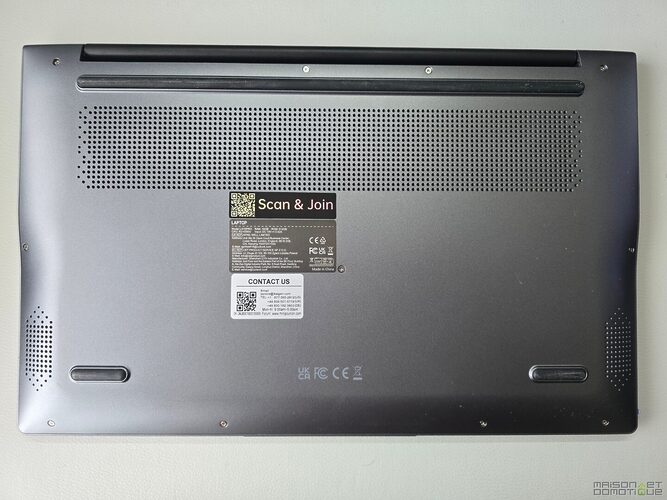
The chassis is simple, with a rather successful metallic gray finish. The whole thing is thin and light (1.7 kg on the scale and less than 18 mm thick) without giving an impression of fragility.

In terms of connectivity, it’s quite complete for this segment: USB 3.0, USB-C (not compatible with charging), HDMI, microSD reader, headphone jack… nothing is missing for regular use. No Thunderbolt, but at this price level, nothing surprising.

| Component | Details |
|---|---|
| Model | Tivique LX15Pro |
| OS | Windows 11 Pro |
| Processor | AMD Ryzen 3 4300U (4 cores / 4 threads, 2.7 to 3.7 GHz) |
| Graphics card | AMD Radeon Graphics (integrated) |
| RAM | 16 GB DDR4 2666 MHz (1×16 GB, second slot available) |
| Storage | 512 GB SSD M.2 Sata + second slot free |
| Screen | IPS 15.6″ Full HD (1920×1080), 60 Hz, 180° opening |
| Connectivity | USB 3.2 x3, USB-C x1, HDMI 1.4, 3.5 mm jack, TF reader |
| Network | Wi-Fi 6, Bluetooth 5.2 |
| Webcam | 1 MP (720p) with physical cover |
| Battery | 11.4 V / 4800 mAh (54.72 Wh) |
| Dimensions | 357.4 × 228.3 × 17.9 mm |
| Weight | 1.7 kg |
Installation and configuration of the Tivique LX15 Pro
Good news here: nothing complicated.
The PC comes with Windows 11 Pro already installed. You start it up, configure your account, and that’s it. No unpleasant surprises, nor tinkering needed. And for once we have a bare Windows, without a heap of extra software polluting the experience. We appreciate it!
The only real point to anticipate is the keyboard. The AZERTY cover works very well, but it is removable. Those who want a “native” experience might find that a bit frustrating. The idea may surprise, but in practice, it is surprisingly well executed.

The feel remains pleasant, and visually, it’s hard to tell that it’s an add-on. The whole thing stays in place so well that you quickly forget it’s an addition.

On the practical side: if the keyboard gets dirty, it is very easy to remove the membrane to wash it and have it looking like new again. Ultimately, not such a bad idea, this membrane!

A nice little detail: the webcam is equipped with a physical cover. Simple, but always reassuring regarding privacy.

Curious, I opened the back to check the layout of the components.

And there, a nice surprise: the RAM is not soldered. Better yet, the 16 GB uses one slot, leaving another slot available for easily adding a second stick.

As for the hard drive, we have here a SATA drive in M.2 format of 512 GB:

But we also have another M.2 slot for easily adding a second hard drive:

It will therefore be very easy to upgrade. And let’s just say that in this price range, it’s very rare!
Performance and everyday use of the Tivique LX15 Pro
Let’s get to the heart of the matter.
The Tivique LX15 Pro features an AMD Ryzen 3 4300U processor with integrated Radeon GPU. The Ryzen 3 4300U is not a recent processor: launched in 2020, it belongs to the Ryzen 4000 “Renoir” generation. Already positioned as entry-level at the time, it is still capable of handling office tasks and multimedia properly but quickly shows its limits when asked for more.
Compared to processors usually found on PCs at this price (Celeron, Pentium, or some Intel N100), it still has an interesting advantage: it is often more comfortable in multitasking and smoother in everyday use. In short, it is not a modern chip, but it remains overall more comfortable than many current low-cost CPUs in this segment.
We subjected it to various benchmarks.
First up, PCMark 10, which simulates real-world usage (web browsing, office work, video conferencing, content creation) to provide an overall view of performance. Here, the Tivique LX15 Pro scores 3516 points, with:
- 5523 in “Essentials” (browsing, startup, video)
- 7080 in “Productivity” (office work like Word / Excel)
- 3018 in “Digital Content Creation” (photo, video)

In practice, this is immediately felt: everything related to office work and daily usage is perfectly smooth. Browsing with multiple tabs open, working on documents, or managing emails poses no problem.
On the other hand, when it comes to content creation (video editing, rendering), the limits quickly appear.
Next is the 3DMark Time Spy benchmark, which I typically use in my PC tests to check graphics performance in conditions close to modern gaming.

Overall result: 635 points
- Graphics score: 557
- Processor score: 3117
The FPS recorded (around 3 to 10 frames per second depending on the scenes) confirm what was suspected: the integrated graphics component is not made for gaming.
In practice, this means:
- Recent games: forget it
- Light/old games: playable on low quality
- Multimedia usage: no problem
In view of the results, I skipped VRMark, which is designed to test VR performance. Much more demanding than 3DMark, thus of no interest here.
However, I did a CrystalDiskMark test, which measures the speed of the SSD in reading and writing, directly impacting the system’s responsiveness (boot-up, software opening, file transfers).

Results:
- Sequential read: 469 MB/s
- Sequential write: 388 MB/s
It’s clearly a SATA SSD (and not NVMe, despite the M.2 format), but the performance remains correct for this price range.
Practically, Windows boots up quickly, software launches without frustration, and everyday usage remains pleasant.

As we can see, the benchmarks perfectly confirm the positioning of the Tivique LX15 Pro. It is not a powerful machine, but it is coherent. Very comfortable in office work and everyday use, it remains smooth thanks to its 16 GB of RAM and its SSD, which is not always the case in this price range.
However, as soon as we step outside of this framework (gaming, creation, heavy multitasking), the limits of the Ryzen 3 4300U and the integrated GPU become evident.
In summary: a PC that does exactly what you ask it to do… as long as you don’t ask too much from it. And at under €400, that’s already very good news!

Outside of benchmarks, in “real” life, this is confirmed. For office use, web browsing, video streaming, or even Office, there are no problems. The PC is smooth, applications launch properly, and the 16 GB of RAM provides real comfort (especially with multiple tabs open). I notably used it while traveling to work on this website, with many tabs open, a bit of photo editing, and light video editing (for Tiktok). It does the job perfectly. With the added bonus of a large screen and a numeric keypad, handy when entering many numbers (like for doing accounting, for example). This is an important detail for some, and in this price range, it’s frankly welcome!
However, as soon as we push a bit: load times increase, and the limitations of the processor appear. On the gaming side, don’t get your hopes up. On a game like Forza Horizon 5, we hover around 16 FPS, making it unplayable.
On the other hand, light or less demanding games can run properly on low to medium settings. It can help out, but it’s clearly not its vocation.
Noise, autonomy, and multimedia
Good surprise on the ventilation. Under light use, the PC is quiet. And even under load, the noise remains discreet, without aggressive spikes.
The sound is decent, in line with laptops. No miracles here, but sufficient for watching videos. For a better experience, headphones are recommended.
The 15.6-inch Full HD screen does the job. It’s not a high-end screen, but the viewing angles are decent, and the colors don’t shift as soon as you move your head a bit, which is already good news at this price. However, the brightness is a bit low for working properly in full sunlight.

The battery, rated around 5000 mAh, lasts a good half-day under moderate usage (browsing, office work). In my real-world tests, I managed to last around 5 hours primarily with office tasks. Nothing exceptional, but consistent with the positioning.

A nice little bonus: the hinge allows for a flat opening, handy in some collaborative uses, like in a meeting, for example.
However, we regret that the USB-C does not support charging: you will have to remember to take the included charger with you.
Who is this Tivique LX15 Pro for?
The Tivique LX15 Pro does not aim to please everyone. But it targets very concrete uses, without overpromising.
It will be perfect for a student who needs a reliable computer for taking notes, working on documents, or following online courses. With its 16 GB of RAM, it remains comfortable even with several applications open, which really changes the game at this price.
It is also a good choice as a family computer. Browsing the internet, managing emails, doing a bit of administration, or watching movies… it handles these tasks without difficulty. In a living room or on a shared desk, it performs its job well.
We can also imagine it as a secondary PC. Typically for someone already equipped with a more powerful main machine, but who wants a simple laptop for backup, travel, or working from the couch (yes, it happens more often than you might think!). Like in my case for example: I have a tower at home, the laptop is just for travel.
However, let’s be clear: this is not a machine for demanding creatives, gamers, or intensive users. Video editing, advanced photo retouching, recent games… this is simply not its playground.
What to remember
The Tivique LX15 Pro does not seek to impress but to be useful and affordable. And in this regard, it performs quite well.
For under €400, it is difficult to find a configuration with 16 GB of RAM and 512 GB of storage. This is clearly its major strength.
In exchange, one must accept a modest processor, a non-native AZERTY keyboard, and limited performance.
But in the end, for simple everyday use… it does the job well! If you are looking for a decent laptop to work with at a very good price, go for it!
FAQ: Tivique LX15 Pro
Is the Tivique LX15 Pro a good laptop?
Yes, as long as you understand its positioning. It’s an excellent choice for office work, the web, and light multimedia. At under €400, its equipment/price ratio is very interesting.
Can you play games on the Tivique LX15 Pro?
Not really. Recent games are too demanding for its Ryzen 3 processor and integrated GPU. However, light or older games can run on low to medium settings.
Are the 16 GB of RAM useful on this type of PC?
Yes, definitely. It’s one of its major assets. It allows for good fluidity with multiple tabs open, background applications, or standard multitasking usage.
Is the keyboard AZERTY?
Not directly. The PC comes with a QWERTY keyboard and a silicone AZERTY cover. It works well in daily use, but it’s not a true French keyboard by default.
Can you work seriously with this PC?
Yes, for standard tasks: word processing, spreadsheets, browsing, emails, video conferencing. It can perfectly serve for light remote work.
Is the Tivique LX15 Pro suitable for students?
Yes, it’s actually an ideal target. It offers good comfort for studying at a very accessible price.
What is the battery life of the Tivique LX15 Pro?
It lasts several hours under normal usage (office work, web, video). It’s not an endurance champion, but it’s consistent for this range.
Can you do video editing with this PC?
It’s possible for simple projects, but it won’t be comfortable. The processor’s performance remains limited for this type of use.
Is the Tivique LX15 Pro worth it?
Yes, if your needs are simple and your budget is tight. For under €400, it’s hard to find a better-equipped machine today.
Is this PC upgradeable?
Good news, the RAM can be upgraded (available slot) and there is an additional slot for a second hard drive. Very rare in this price range!



Please remain courteous: a hello and a thank you cost nothing! We're here to exchange ideas in a constructive way. Trolls will be deleted.