


'/%3E%3Cpath%20fill='%23b2b2b2'%20d='M241%20382q0%2016%2017%2026%2017%2011%2042%2011t42-11q16-11%2017-26V269H241'/%3E%3Cpath%20fill='%239f7e00'%20d='M241%20379q0%2014%208%2023%209%209%2021%209%2014%200%2021-9%209-9%209-23V269h-59'/%3E%3Cpath%20d='M241%20339v-70h59v110q0%2014-9%2023l-6%205v-68h-15v72q-8%200-14-4v-68zm59%2040c0%2022%2015%2032%2029%2032%2021%200%2030-18%2030-32v-40h-59'/%3E%3Cpath%20fill='%239f7e00'%20d='M266%20277v5h2v12h-3v-5h2v-5h-9v5h2v5h-4v9h3v18h-5v10h34v-10h-5v-18h3v-9h-4v-5h2v-5h-9v5h2v5h-3v-12h2v-5zm42%20101q0%2010%206%2017%206%206%2015%207%2010-1%2016-7%206-7%206-17v-29h-43'/%3E%3Ccircle%20fill='%230044ad'%20cx='329.5'%20cy='372'%20r='6'/%3E%3Cellipse%20fill='%230044ad'%20cx='300'%20cy='340'%20rx='16'%20ry='21'/%3E%3C/svg%3E)

'/%3E%3C/g%3E%3Cuse%20href='%23c'%20transform='matrix(-1%200%200%201%20720%200)'/%3E%3C/svg%3E)


'%3E%3Cpath%20stroke='%23000'%20stroke-width='4'%20d='m-35-37-13%2020m5%203%2013-20m5%203-13%2020m63%2042%206-9m1-2%206-9m5%203-6%209m-1%202-6%209m5%203%206-9m1-2%206-9m-96%200%2013%2020m5-3-6-9m-1-2-6-9m5-3%2013%2020m63-42-6-9m-1-2-6-9m5-3%2013%2020m5-3-6-9m-1-2-6-9'/%3E%3Ccircle%20r='24'%20fill='%23cd2e3a'/%3E%3Cpath%20fill='%230047a0'%20d='M0%200a12%2012%200%201%201%2020%2013%2024%2024%200%201%201-40-26A12%2012%200%201%200%200%200'/%3E%3C/g%3E%3C/svg%3E)


Résumer cet article :
External storage has long been the weak link in the most powerful configurations. Even with a good NVMe SSD, one quickly found themselves limited by the interface… frustrating, especially when everything else is up to speed. Then came Thunderbolt 5, with a promise that seemed simple on paper: breaking through that glass ceiling. The ORICO X50 fits perfectly into this new generation. An external case capable of achieving speeds worthy of an internal SSD, all while remaining completely silent. No fans, no compromises, just raw speed… and a rather innovative cooling system to keep up.
On paper, it sounds enticing. But in real life? Does it really deliver on its promises? And especially, does it have any relevance today, when few machines fully utilize Thunderbolt 5? That’s what we’ll discover in this complete review of the Orico X50.
In short
The ORICO X50 is a high-end NVMe external case that harnesses all the power of Thunderbolt 5 to achieve impressive speeds. With its claimed 6000 MB/s, aluminum design, and especially its highly engineered totally passive cooling system, it clearly targets demanding creators. Silent, compact, and efficient, it ticks almost all the boxes… provided you have a compatible machine to take advantage of it.
Unboxing the ORICO X50 Thunderbolt case
The packaging directly announces the goal: up to 6000 MB/s read!

Inside the box, we find the essentials:
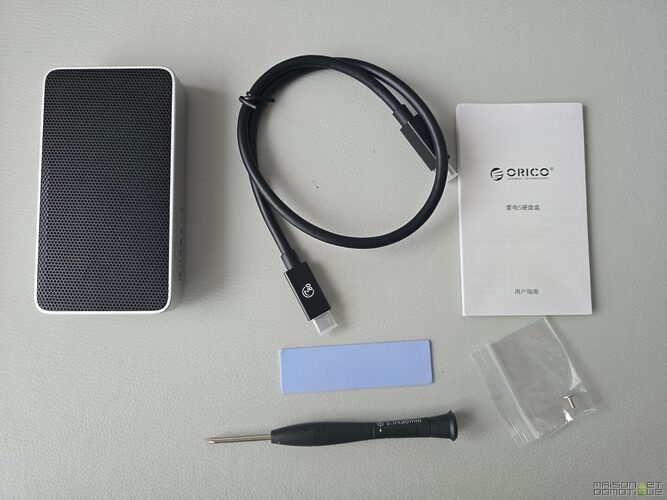
- A compatible 80 Gbps Thunderbolt USB-C cable
- A precision screwdriver
- Thermal pads (a very pleasant surprise)
And of course… no SSD. It’s a “DIY” case; you choose your NVMe.

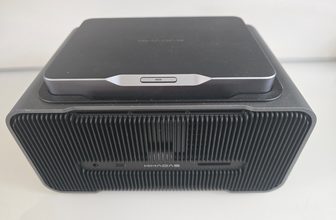
From the first grip, the ORICO X50 breathes premium quality. The case is compact (110 x 60 x 18.7 mm), featuring CNC machined aluminum that clearly resembles some Apple products (and it’s no coincidence given the target audience).

The top is covered with a rather special grille, which is not just for aesthetics. We’ll get back to it, but it plays a key role in cooling.

The overall design is clean, serious, and clearly aimed at demanding users.
Installation and configuration of the ORICO X50
Good news: it’s simple and quick.
You open the case with the provided screws, insert an M.2 NVMe SSD (PCIe Gen4 recommended to utilize the performance), put the thermal pad back, close it… and it’s ready.


No software, no driver. You plug it in, and it works immediately on Windows, macOS, or Linux.

One interesting point: the X50 is Thunderbolt 5 compatible, but also backward compatible with Thunderbolt 4, Thunderbolt 3, and USB4. So it will work everywhere, but with variable performance depending on the machine.
Thunderbolt 5: what does it really change?
This is clearly the key strength of this case.
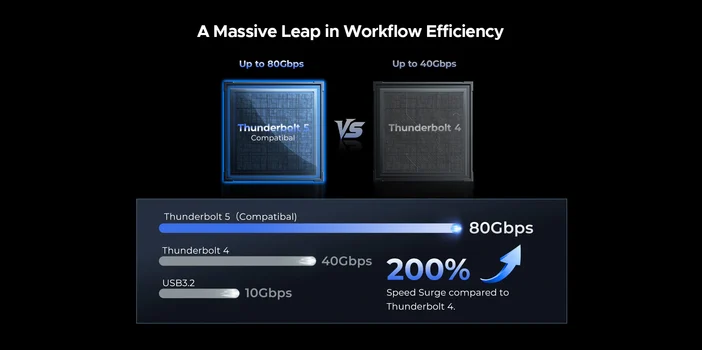
Thunderbolt 5 simply doubles the bandwidth of Thunderbolt 4:
We go from 40 Gbps to 80 Gbps
Which allows reaching up to 6000 MB/s in reading
In practice, what does that mean?
- Copying 100 Go in seconds
- Working directly on an external SSD as if it were internal
- Editing 4K / 8K videos without slowdowns
Thunderbolt 5 literally trounces the previous generations in speed.
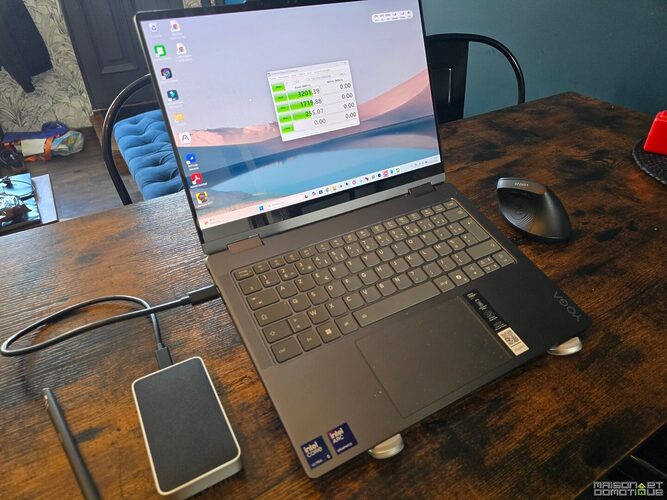
But be careful, a small important detail: you need a Thunderbolt 5 compatible machine to take full advantage of it. Otherwise, the X50 will work… but throttled. This is the case, for example, here on my Lenovo Yoga 7, which is only Thunderbolt 4:

Performance: does it really deliver?
On paper, ORICO claims:
- Up to 6000 MB/s read
- Up to 5800 MB/s write
And actual tests generally confirm these figures, provided you use a good SSD (like the Lexar 1090 Pro in this case, or the Samsung 990 Pro, for example).
With CrystalDiskMark, on a PC equipped with Thunderbolt 5, we were able to exceed 6200 MB/s in read, and 6000 in write:

Needless to say, we are at the very top tier for external storage.
In real usage, this translates to:
- Ultra-fast photo imports
- Fluid video editing directly on the disk
- Quasi-instantaneous transfers
Clearly, you quickly forget that you’re using an external SSD.
Cooling: the real innovation of the X50
This is where the X50 really stands out.
While the competition uses fans (and thus noise), ORICO has developed a 100% passive system… but highly engineered.

We find 4 layers of cooling:
- A HydroSkin film (hydrogel) that dissipates heat through evaporation
- A fin structure that increases the dissipation surface area by 200%
- A high conductivity aluminum case
- A CPU type thermal pad to transfer heat
Announced result: a temperature under 45°C even under full load
And most importantly: 0 noise.
In real life, this changes everything:
- No noise nuisance
- No throttling (loss of performance due to heat)
- Greater reliability over the long term
This is clearly one of the best passive systems seen in this type of product.
Until now, I had an external case from Ugreen, also very well designed for cooling. But aside from the fact that it is larger than the X50, it was only Thunderbolt 4.

Usage in situation
In video editing, the X50 allows working directly on the files without copying them to the PC. Handy on the go.
In photography, importing several hundred RAW files becomes nearly instantaneous.
In mobility, silence is a real plus (studio, audio editing, shared office…).
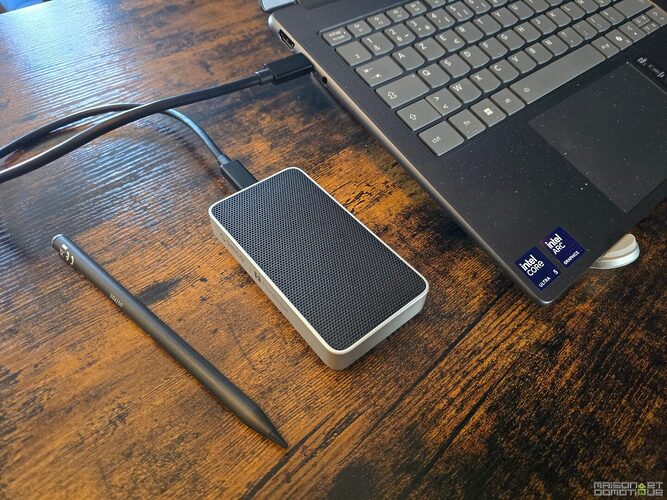
And in terms of battery life, the absence of a fan avoids unnecessarily draining the laptop battery.
In short, we are dealing with a product designed for creators and demanding users.
Who is the ORICO X50 for?
The ORICO X50 is tailored for those who handle large volumes of data daily. A video editor working on 4K or 8K footage will immediately see the difference: no need to copy files locally, everything can be done directly from the external SSD. The same goes for photographers who repeatedly import hundreds of RAW files, or creators juggling heavy projects.
It’s also an excellent companion for users of recent MacBooks or high-end laptops equipped with Thunderbolt 4 or 5. In this context, it becomes almost a natural extension of internal storage.
“Geek” profiles or homelab enthusiasts will also appreciate it. Building their own NVMe SSD, choosing their model, optimizing performance… the X50 offers real freedom.
On the other hand, for a standard use – document storage, occasional backup, or PCs without Thunderbolt – the interest is clearly limited. It would be akin to driving a Ferrari in a 30 mph zone… it works, but you’re not making the most of it!
Conclusion: a speed monster… reserved for modern machines
The ORICO X50 is clearly a next-generation NVMe case. Ultra-fast, perfectly silent, and technically impressive in terms of cooling.
But there’s a catch: without Thunderbolt 5, its potential is limited.
If you have a compatible machine, go for it. Otherwise, the interest is more questionable. You can buy it directly from the manufacturer’s website, or on Amazon (but the price is more interesting from the manufacturer).
FAQ: ORICO X50
Does the ORICO X50 work without Thunderbolt 5?
Yes, it is compatible with Thunderbolt 4, Thunderbolt 3, and USB4. However, performance will be limited to your machine’s bandwidth.
Can we really reach 6000 MB/s?
Yes, but only with a high-performance NVMe SSD (PCIe Gen4) and a Thunderbolt 5 port. Otherwise, speeds will be lower.
Which SSD should be chosen with the ORICO X50?
A high-end PCIe Gen4 NVMe SSD is recommended, such as a Samsung 990 Pro or a WD Black SN850X, to fully exploit the case’s capabilities.
Does the case overheat?
Very little compared to the competition. The passive cooling system keeps the temperature under control (around 45°C under load), without any fans.
Is there a risk of throttling?
Precisely, the X50 is designed to avoid this issue. Its thermal system allows for consistent performance even over long sessions.
Is it noisy?
No, completely silent. No fan, no noise, even under full load.
Is it compatible with Mac and Windows?
Yes, it works natively on Windows, macOS, and Linux without any special installation.
Can it be used for video editing?
Yes, it’s even one of its main uses. It allows working directly on heavy video files without slowdowns.
Is it a good choice for data backup?
Yes, but that would be somewhat “overkill” usage. It is clearly designed for performance above all.
Is the price justified?
For professional or intensive use, yes. Between the performance and passive cooling, it clearly positions itself in the high-end segment.




Please remain courteous: a hello and a thank you cost nothing! We're here to exchange ideas in a constructive way. Trolls will be deleted.