



Résumer cet article :
Home solar batteries have evolved significantly in just a few years. Not long ago, installing storage at home involved a hybrid inverter, a dedicated box, a qualified electrician, and often weeks of administrative waiting. Then, plug & play solutions changed the game: simpler, more accessible, designed for any homeowner to enhance their self-consumption without redoing their electrical installation.
This is where Jackery arrives with its SolarVault 3 range, particularly with the SolarVault 3 Pro Max, the most ambitious model in the series.
What makes this interesting is that Jackery is not an unknown name. The American brand has been around since 2012 and has built its reputation on portable power stations – those large batteries taken camping, in vans, or on job sites, like the Explorer 1000 Plus that we tested. For years, Jackery has been associated with outdoor activities, van life, foldable panels, and kits that one installs in the trunk before taking off for a few days. The positioning was clear: electricity everywhere, without a power outlet in sight.
With the SolarVault 3 Pro Max, the manufacturer keeps this philosophy but completely changes scale. We are no longer talking about powering a cooler or a laptop for the weekend. This time, the goal is to integrate directly into a home, to capture photovoltaic production, to store surplus energy, and to release it at the right time. This is a real strategic shift.
The residential storage market is booming, and for good reason. Plug & play solar panels have democratized self-consumption. Many individuals have equipped themselves with two, four, sometimes six panels on a terrace or pergola. Others have more traditional installations on their roofs. In both cases, the observation is often the same: producing electricity is great. Consuming it at the right time is even better.
The problem is well known. A house produces the most energy during the day when it consumes the least. Occupants are at work, children are at school, large appliances are not running. Part of the production goes back to the grid. In the evening, when everyone returns, the sun sets, production drops, and the house starts buying electricity again. It’s frustrating, especially when you know that just a few hours earlier the panels produced more than enough to cover these needs.
Residential batteries address exactly this mismatch. They store solar energy when it is available, then re-inject it when the house needs it. The refrigerator, the internet box, the lighting, the dishwasher, the evening computers – all these can consume energy produced a few hours earlier.
For the past two or three years, manufacturers have been rushing into this niche. Zendure, Anker Solix, EcoFlow, Marstek, Hoymiles… Some focus on aggressive pricing, others on modularity or power. Jackery thus enters a market already well occupied, and that’s exactly what makes this SolarVault 3 Pro Max interesting. To exist, it needed to come up with a real proposition, not just another battery.
On paper, Jackery has tried to tick all the boxes: modular storage, high solar power, high grid output, backup socket, full mobile app, smart meter, AI optimization, consideration of electricity rates, Shelly compatibility, TIC Linky module, Wi-Fi, Bluetooth, Ethernet, IP65 certification, neat design. The list is long. The idea behind it is quite simple: to offer a battery that suits both a small plug & play installation and a home already equipped with several kilowatts of panels.
The SolarVault 3 Pro Max thus positions itself between the public plug & play battery and true residential storage. It retains the simplicity of a DIY installation while offering capacities that were previously seen mainly on more technical systems.
It remains to be seen if the promise holds true in real life. Between an appealing technical sheet and truly efficient daily usage, there can sometimes be a world of difference. A solar battery must be simple to install, stable, quiet, reliable, well-managed, sufficiently powerful, and adaptable to the household’s habits. It must also be reassuring, as we are talking about equipment that stores several kilowatt-hours of energy in a home.
Unboxing the Jackery SolarVault 3 Pro Max
Even before opening the boxes, it is clear that this is not just a simple balcony battery. The packages are heavy, sturdy, and immediately set the tone.
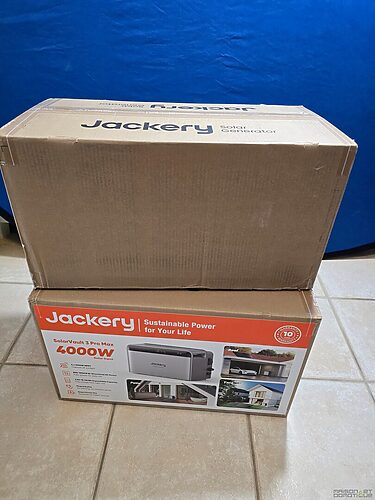
The configuration received for this test includes the main SolarVault 3 Pro Max unit, two BP2560 extension modules, and the optional base – a set that allows for just over 7.5 kWh of storage, which is sufficient to cover a large part of the nighttime needs of an average household.
The first detail worth mentioning: Jackery has integrated handles directly into the packaging. This may seem trivial, but when handling modules weighing over twenty kilograms, every detail matters. The protections are thick, the items are perfectly secured, nothing suggests a shock during transport. The manufacturer has clearly not skimped on the packaging – a good thing when dealing with equipment costing thousands of euros.
Upon removing the initial protections, the main unit is revealed. The first surprise: it is larger than what the official photos suggest. At the same time, nothing surprising given the power packed into the unit and the 2.52 kWh already integrated into the main module.

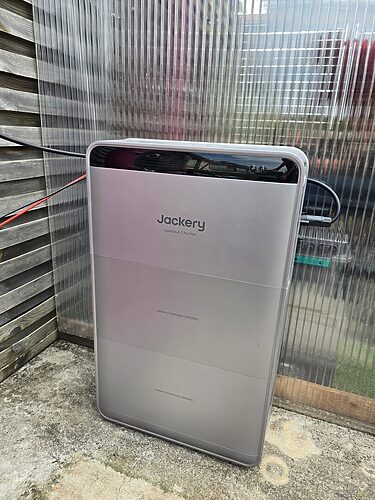
The design completely breaks with the orange and black visual codes of the Explorer portable stations (and that’s a good thing!). Jackery opted for a light gray satin finish, accented with anthracite touches, featuring particularly soft lines. While some manufacturers deliver very industrial-looking parallelepipeds, the angles here are softened, the seams discreet, and the whole gives an impression of quality rarely seen in the world of residential storage.
This is not incidental. Unlike an inverter or an electrical panel usually hidden in a cupboard, a modern storage battery is often visible – in a laundry room, under a carport, in a garage. It better be pleasant to look at.

The front is particularly well designed. In the center, a screen integrated directly into the battery. An excellent idea. Most competitors require you to pull out your smartphone to get detailed information. Here, just a glance is enough to know the charge level, incoming and outgoing energy flows, and the activity of the backup socket. The display is readable even outdoors.

Below the screen, two physical buttons allow for direct interaction with the system – useful in case of a power outage or internet failure.

Walking around the machine, one discovers the various connections. On the photovoltaic side, the four MPPT inputs with their standard MC4 connectors. Jackery provides a small tool to facilitate locking and unlocking – those who regularly handle MC4 connectors know how some can be stubborn after a few months of exposure. The four inputs are perfectly identified and protected by covers ensuring watertightness when a port is not in use.

The bidirectional AC socket occupies a central position. It is through this socket that the battery injects energy into the house and recharges. The quality of construction is evident: robust materials, precise assemblies.
A little higher up is one of the most interesting elements: the backup socket, protected by a well-designed automatic closing cover. The flap closes naturally, effectively protecting against dust and moisture – we are clearly above what is usually encountered on this type of equipment.

Nearby, a Wi-Fi antenna and an Ethernet port hidden behind a waterproof cap. The presence of this wired connection deserves to be highlighted. Many manufacturers settle for Wi-Fi. In a garage far from the router, a technical room, or a metal shed, wireless may not always be optimal. The Ethernet port changes the game.
One also notes thermal sensors integrated directly on certain sensitive connections: MC4 connectors, the AC socket, and several strategic points are continuously monitored to detect any abnormal rise in temperature. A relevant approach considering that poor terminations are often the cause of incidents in photovoltaic installations.

The extension module adopts exactly the same aesthetic language as the main unit. Assembly is remarkably simple: simply position the module on the base, place the main unit on top, and the connectors fit together naturally. No extra cables. The result is uniform, unlike some modular solutions that can give a DIY impression when stacking several batteries with large cables in between.

The optional base slightly raises the installation, which is always appreciated in a garage or under a shelter. A few extra centimeters can sometimes make all the difference in case of water runoff.

Once the whole is assembled, the result is frankly impressive. Modern lines, integrated screen, neat finish, coherent modular architecture. One can feel that Jackery has designed this product for Mr. and Mrs. Everyday, not just for solar energy enthusiasts – while still maintaining a level of finish that will satisfy even the most demanding.
Connectivity: everything has a reason to be
When discovering the SolarVault 3 Pro Max for the first time, the number of ports may be surprising. The SolarVault 3 Pro Max is particularly rich in connections. But in reality, each connector serves a specific purpose.
The four MC4 photovoltaic inputs
These are the most important inputs. Each has its own MPPT (Maximum Power Point Tracking) controller, responsible for continually optimizing the production of its group of panels. Specifically, this means that each field works independently of the others.
Imagine a house with panels facing different orientations: full south on the roof, southeast on the garage, southwest on the pergola. With a single MPPT, the overall production is often limited by the least performing group at any given moment. With four independent MPPTs, each orientation is optimized separately: the gain becomes particularly interesting on complex or partially shaded installations.

Each MPPT accepts up to 1000 W, with a maximum voltage of 60 V and a current of up to 28 A. Total: 4000 W of panels can be connected directly, which means for example ten 400 W panels. We are far from small balcony batteries!
Another important point to check before installation: the limit of 60 V per input often imposes parallel rather than series connections. A 500 W panel often has an open-circuit voltage between 45 and 50 V – two panels in series would exceed 90 V, which is out of limits. This detail deserves to be checked during sizing.
The bidirectional AC socket
It manages all energy exchanges with the house. When the panels produce more than what the home consumes, the excess goes to the battery. When the house needs energy, the SolarVault automatically re-injects. All this happens totally transparently – the user simply plugs in the provided cable and the system takes care of the rest. On the Pro Max version, this connection allows a charge and discharge power of up to 2500 W. Under certain conditions, a bypass mode allows going up to 3680 W. A thermal sensor constantly monitors the temperature of this connector.

The Backup socket
Protected by its robust waterproof flap, it turns the SolarVault into a backup power supply. In the event of a power outage, this output continues to power connected devices. The Backup socket can deliver up to 2500 W continuous. To be concrete: refrigerator, internet box, NAS, computers, LED lighting. All these together usually don’t exceed 800 W to 1 kW. There remains a comfortable margin. During the simulated outage test, the computer continued to run, the screens stayed on, the NAS noticed nothing. Less than 20 milliseconds of switching, as advertised – and in practice, it’s imperceptible.
The Ethernet port
Behind a waterproof cap is a real RJ45 port. Wired connection, better stability, lower latency than Wi-Fi. In a distant garage or buried technical room, Wi-Fi is not always optimal. This port changes everything!
Wi-Fi and Bluetooth
Wi-Fi connects the battery to the mobile app and provides access to all smart features. Bluetooth, often underestimated, becomes extremely useful during the initial setup or in case of network problems – even without Wi-Fi available, one can communicate locally with the battery.
The extension connectors
Under the main head and on each extension battery, dedicated connectors for stacking modules. No external cables, no reconfiguration. You stack in the right order, and the electrical and communication connections are established automatically. Adding a module later takes only a few minutes.

The whole forms a coherent architecture, designed for both the beginner user and the one who wants to build a genuine energy strategy around their connected home.
Coupled AC operation: store without touching the existing setup
Before going further, you need to understand how the SolarVault 3 Pro Max works. Because this battery is not just a simple energy reserve. It belongs to the category of “AC coupled” batteries. Behind this technical term lies one of the main reasons for its attractiveness: ease of installation.
For a long time, installing a domestic battery required direct intervention on the electrical installation. The panels were connected to a hybrid inverter that managed both solar production, battery charging, and the home’s supply. These systems work very well, but they are expensive, require a professional, and sometimes entail replacing equipment that is still relatively new when adding storage to an existing installation.
An AC coupled battery does not connect between the panels and the house. It connects simply to the existing electrical grid. For the SolarVault, simply plug it into a dedicated socket. From there, it becomes an integral part of the home network.
It observes what happens in the house through the associated smart meter, which continuously monitors energy flows. When the panels produce more than what the home consumes, the battery immediately detects this surplus and stores it instead of letting it go back to the grid. Conversely, when consumption exceeds production, it automatically re-injects the stored energy.
All this happens automatically, several times a second. A concrete example: it’s noon, your installation produces 3000 W, the house consumes 500 W. Without a battery, the 2500 W excess goes back to the grid. With the SolarVault, it charges the battery. In the evening, when production drops to 300 W but the house consumes 1500 W, the battery automatically injects the missing 1200 W. The house continues to operate normally, powered by energy stored a few hours earlier.
This mechanism significantly increases the self-consumption rate.
Why “AC”? AC stands for alternating current, the type of electricity in our homes. Photovoltaic panels produce direct current (DC), which an inverter converts before it can be used. In an AC coupled architecture, the battery intervenes after this conversion – it works directly on the home’s alternating network. This is why it can easily integrate into an existing installation without replacing the inverter already in place.
For a homeowner who has already had a 6 kW system for five years, for example, with a relatively new inverter and an amortized installation, this is excellent news: they can add storage without touching anything. They plug in the battery and the smart meter, and the rest continues to work exactly as before.
What the SolarVault 3 Pro Max does more than many competing AC coupled batteries is that it can operate in hybrid mode. It captures the surplus from an existing installation via AC coupling, but it can also receive up to 4000 W of panels directly on its four MPPT inputs. A user can thus start with a few panels connected directly to the battery and then progressively complete with an existing photovoltaic plant. The two can coexist.
DC coupling via MPPT: energy at the shortest path
The AC coupled mode is ideal for adding storage to an existing installation. But the SolarVault can also work in DC coupling, meaning it can directly capture the energy produced by panels before it is converted into alternating current.
The difference may seem subtle. In practice, it changes a lot of things.
In a traditional installation, energy follows a fairly long route: Panels → Inverter → Domestic network → Battery. At each step, a small part is lost. Yields are good nowadays, but no conversion is perfect.
In DC coupling, the panels connect directly to the battery: Panels → Battery → Domestic network. Energy is stored in its native form before being converted only when it needs to be used in the house. This reduces conversion losses and slightly improves the overall yield.
The interest of the Jackery SolarVault 3 Pro Max is that it does not force a choice between AC coupling and DC coupling. Both coexist. An existing photovoltaic installation continues to function normally via the AC coupled mode. New panels can be connected directly to the MPPT. The battery simultaneously manages both sources. It is not merely a storage point. It can become the nerve center of a modern photovoltaic installation, capable of managing both DC and AC systems.
The MPPTs, why they are essential
MPPT stands for Maximum Power Point Tracking. A solar panel never produces exactly the same power: it varies continuously according to sunlight, temperature, orientation, shading, and time of day. At every moment, there is an optimal operating point that allows extracting the maximum available energy. The role of the MPPT is to search for this point continuously, several hundred times per second.
Without MPPT, a significant portion of solar energy would be lost. It’s a bit like driving while stuck in the same gear all day: the engine would run, but never at its optimal yield.
The SolarVault integrates four MPPTs, and they are totally independent. Many competitors offer one or two MPPTs. With four separate inputs, one can connect several groups of panels at different orientations and optimize them independently. In the morning, east panels produce more. At noon, south takes over. In the late afternoon, west compensates. With a single MPPT, the entire field would operate according to a unique compromise, with the less well-exposed limiting the others. With four independent MPPTs, each group works at its maximum.
Each MPPT accepts up to 1000 W, that is to say, a total photovoltaic power of 4000 W. Under good summer conditions, the battery can charge quickly while simultaneously powering the house.
Installing the SolarVault 3 Pro Max: under an hour, really
One of the main arguments of the SolarVault 3 Pro Max is its simplicity of installation. When the equipment arrives with all its ports, one is always a bit skeptical before getting started. The promise “install a battery capable of managing several kilowatts by yourself” sometimes sounds more like marketing than reality.
But the reality is roughly in line with the promise. Simple does not mean improvised – we are talking about a system capable of managing several kilowatts, and a few precautions are still necessary – but the whole is accessible to a motivated user without specific training.
Choosing the location
The SolarVault 3 Pro Max is IP65 certified, which means it is resistant to rain, dust, and relatively harsh outdoor conditions. Operating range: -20°C to +55°C. A garage remains ideal – battery protected from direct UV and extreme thermal variations – but a carport, technical room, or covered terrace also works well.
Common sense rules: stable and flat ground, not prone to flooding, good airflow around the system (a few dozen centimeters of free space is sufficient). The battery gives off little heat but does give off some. And anticipate connections before securing anything – a few minutes of thought can save a lot of work.
The physical assembly
If you opted for the optional base, it is positioned directly on the ground. It serves two roles: aesthetic (it finishes the whole neatly) and practical (it slightly raises the battery, limiting risks related to ground moisture).
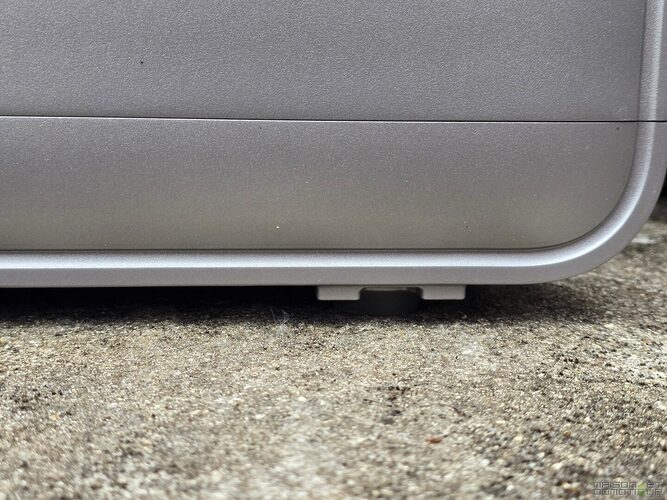
The extension module sits on this base – no screws, the positioning guides ensure alignment. You remove the protective caps from the interconnection connectors, the main unit can be placed on the lower module, and the connectors automatically fit together.

No cables to connect, no configuration. The whole is operational in a few seconds.

Jackery provides wall mounting brackets to secure the installation against any risk of tipping. This is not always mandatory, but in a garage or a busy area, it is recommended, especially when several modules are stacked.

Connecting the panels
The MC4 connectors click together with a locking click. The provided tool makes it easy to unlock them if needed. Before connecting, be sure to check the electrical characteristics of the panels (maximum voltage 60 V per input – if necessary, parallel connection). Once the panels are connected, the battery automatically detects their presence. A few seconds later, the solar production appears on the integrated screen.

Connection to the domestic network
A single bidirectional AC cable. The connector locks onto the battery via a well-designed ring system: everything is securely held, nothing seems simply plugged in. The other end plugs into a dedicated socket. For installations utilizing the full power of the Pro Max, Jackery recommends a circuit protected by a 20 A circuit breaker. With 2500 W of injection capacity, this makes sense.
Smartphone configuration
A QR Code in the documentation gives direct access to the Jackery app. After creating an account, the battery is detected in a matter of moments via Bluetooth.

The assistant guides step by step: Wi-Fi connection, pairing, possible firmware updates, basic settings. The interface is clear, without technical jargon.

The smart meter: the step that changes everything
Without a smart meter, the battery is already operational: it can store solar energy and power the house. But it does not know precisely what the home consumes at every moment. The meter provides this information.
Jackery offers several compatible solutions. The Shelly Pro 3EM, which we have already discussed several times, remains probably the reference. For many home automation users, this name is indeed familiar. The Shelly Pro 3EM is now one of the most popular energy meters on the market, compatible with Home Assistant, Jeedom, MQTT, and many other platforms. It has become a benchmark for tracking electrical flows in a home. Good news: Jackery has natively integrated it into the SolarVault ecosystem, which avoids imposing additional proprietary equipment while benefiting from a proven solution.

The real novelty of this Jackery version is the TIC Linky module: it connects to the TIC terminals of the Linky meter, plugs in via USB-C, connects to Wi-Fi, and immediately starts transmitting the household’s consumption information. The Jackery TIC Linky meter is simpler to install – no intervention in the electrical panel required. For users primarily seeking simplicity, this is an excellent option. The Shelly still retains several advantages: it works with virtually all types of installations, provides more technical data, remains completely independent of the Jackery ecosystem, and integrates perfectly into advanced home automation environments. For Home Assistant or Jeedom users, it remains one of the best options available.
Equipped with the Shelly for my other systems, I did not install the Tic version. But it exists, and it proves simpler to install if opening the electrical panel scares you.

From this moment on, the SolarVault really reveals its potential. The complete installation generally takes less than an hour, without specific tools, accessible to a beginner. Going from a battery in its box to an intelligent solar installation in less than an hour is a real promise, and it is kept.
The app: the brain of the installation
Once the battery is physically installed, the panels connected, and the meter operational, the app configuration remains to be done. And let’s just say right away: it’s a pleasant surprise.
On many domestic batteries, the app is limited to supervising. One quickly checks the charge level and a few statistics. Here, the approach is different. The Jackery app becomes the brain of the installation: it defines the energy strategy, optimizes savings, controls operating modes, and utilizes the embedded intelligence.
The energy dashboard
This is the screen that will be consulted most often. Upon opening, a dynamic diagram presents all the energy flows in the house in real time: photovoltaic production, battery level, household consumption, exchanges with the public grid. Everything is animated, energy seems to flow before your eyes. Even a person unfamiliar with photovoltaics immediately understands what is happening.

Over the course of the days, one finds oneself consulting this screen like one consults the weather. A glance is enough to know whether the house runs mostly on solar or still draws from the grid.
Energy strategies
The self-consumption mode suits most users: the battery automatically stores photovoltaic surpluses then returns them when the house needs them. But the advanced settings become very interesting.

You can define time slots for charging and discharging. A user with advantageous off-peak hours can ask the battery to recharge automatically at night, then use that energy during peak hours. With Tempo contracts or dynamic pricing offers, the battery no longer just uses solar energy; it intelligently arbitrates between the different rates of the provider.
Managing the backup reserve
The app allows you to precisely define the capacity reserved for the Backup socket. You can set a threshold of 20 or 30%: the battery will stop discharging for regular uses at this level, keeping this energy exclusively for a potential outage. Particularly reassuring for areas prone to power cuts.

The history
The app keeps a detailed history: daily photovoltaic production, household consumption, stored energy, energy injected, energy purchased from the grid. Data can be consulted daily, weekly, monthly, or yearly. For those who like to optimize their installation, it’s a goldmine of information – you quickly identify the most productive periods, consumption habits, and savings made.

Alerts
Every important event is immediately reported: abnormal temperature rise, connection issues, anomalies with the panels, communication faults. Notifications are sent directly to the smartphone. This permanent monitoring greatly contributes to the sense of trust that the system provides.
After several weeks of use, what stands out is that the app does not just control a battery. It helps understand what is happening in the house. One visualizes periods of high consumption, identifies energy-hungry devices, and understands how solar energy is used.
Embedded intelligence: real AI or marketing argument?
For the past two or three years, the term “artificial intelligence” has become ubiquitous in the energy sector. Manufacturers use it everywhere. The problem is that behind this label, there are sometimes relatively basic features: a simple time programming rebranded as “predictive AI”, a classic charging algorithm dressed up as “smart optimization”.
Jackery prominently promotes the embedded intelligence in its SolarVault. Thus, the question deserves to be asked honestly: marketing or a real advancement?
After analyzing how the system works, the answer is nuanced.
Why is energy management complex?
If a battery merely charged when the sun shines and discharged when it disappears, the problem would be simple. But reality is much more complex.
A typical day: at 8 a.m., the house starts producing. At noon, the panels reach their maximum yield. At 2 p.m., the occupants are often absent. At 6 p.m., consumption explodes when everyone comes home. At 10 p.m., the water heater may kick in. Meanwhile, the weather forecasts change, rates fluctuate, habits vary.
A truly effective battery must constantly answer questions like: Should it store now or inject into the house? Should it keep energy for the evening? Will tomorrow’s weather allow for a complete recharge? Is it beneficial to charge during off-peak hours? Should it maintain a backup reserve?

What embedded intelligence actually does
The SolarVault simultaneously monitors multiple data sources: available capacity, photovoltaic production, household consumption (via the smart meter), exchanges with the grid, pricing zones, and weather forecasts when advanced functions are activated. This accumulation of information enables it to have a very comprehensive view of the energy situation.
Weather anticipation
Two distinct situations. Tomorrow is forecast to be a perfectly sunny day: it might be wise to use more stored energy tonight, as a complete recharge will be possible starting in the morning. Conversely, if the weather predicts several cloudy days, the battery will adopt a more conservative strategy. This type of arbitration significantly improves the self-consumption rate.
Behavioral analysis
No, the battery will not guess that you will start a washing machine tomorrow at 2:23 p.m. However, after several weeks of use, it identifies recurring trends: consumption systematically increases around 7 a.m., high activity appears every evening between 6 p.m. and 10 p.m., weekends present a different profile from weekdays. This information gradually allows for refining the energy strategy. The battery no longer just follows fixed schedules – it learns how the house operates.
Rate optimization
For French users with multi-tier rate contracts (peak/off-peak hours, EDF Tempo, dynamic offers), the price of kilowatt-hour can vary greatly. The algorithm takes this into account. A concrete example with Tempo: on a red day forecasted for the next day, the battery may decide to charge more during the previous night at a favorable rate, then limit electricity purchases when prices skyrocket. The goal is no longer just to maximize solar self-consumption; it also becomes to minimize the overall energy cost.

Dynamic power management
The house produces 2500 W, consumes 600 W, the battery is at 70%. Several strategies are possible. The algorithm continuously evaluates these options: store the entire surplus, keep a margin, anticipate an upcoming increase in consumption. This process repeats several hundred times an hour, completely invisible to the user. It’s this foundational work that enables truly optimized operation.
What ultimately convinced me
It’s not that the intelligence is spectacular. It’s that it is invisible. Unlike some manufacturers who multiply complex adjustments and incomprehensible graphs, the SolarVault prioritizes simplicity. You can fine-tune certain parameters, but in most cases, the system operates efficiently without constant intervention. The battery charges at the right time, discharges when it is relevant, optimizes costs, and progressively improves overall yield.
The best definition of successful intelligence is when you eventually forget it exists.
Charge and discharge tests: do the numbers match reality?
On paper, the SolarVault 3 Pro Max claims 2500 W in charge and discharge via the AC connection, and up to 4000 W of panels on the MPPT input. After several weeks of use and various test scenarios, here is what I observed.

Complete computer workstation
First test: powering a workstation composed of a high-performance desktop computer, several screens, networking equipment, and various peripherals. A typical telecommuting setup, with consumption generally oscillating between 120 and 250 W.
The battery takes over without any difficulty. No visible fluctuation, no cut, no abnormal reaction. With more than 7 kWh available in my test configuration, this load could be maintained for many hours, even several days depending on solar recharging conditions. This first attempt primarily serves to confirm the system’s stability.
Progressive load increase
I then gradually increased: electric heater, kettle, vacuum cleaner, various home appliances. At each step, the SolarVault immediately adjusts its power. The integrated screen allows observing these variations almost in real-time: when an energy-hungry device starts, the battery immediately adjusts its discharge to compensate for the additional consumption. The benefit of the smart meter is here very concrete.
Test at 1500 W
To simulate real winter usages, I connected an electric heater consuming about 1500 W. The app displayed a discharge between 1500 and 1550 W depending on fluctuations. The battery maintained this power without difficulty, no excessive temperature rise, perfectly stable operation.
This is an important point. Some batteries display high powers on their specs but struggle to maintain them over time. The SolarVault seems perfectly comfortable in this zone. For reference, 1500 W already covers the combined consumption of the refrigerator, freezer, lighting, TV, computers, and light appliances. A vast part of daily needs.

Bypass mode at 3680 W
Jackery has provided a bypass mode that deserves some explanation. When a high-energy device is used, it is not always pertinent to let all energy transit through the battery: each charge/discharge cycle contributes, even slightly, to the natural wear of the cells. The bypass allows for directly powering certain equipment when it’s more advantageous: the available power increases and the lifespan of the cells is preserved. In daily uses, this function remains totally transparent.
Solar recharging
For photovoltaic recharging tests, I used several panels of 300 to 350 W. Even with relatively modest power, operation is immediately visible in the app. The behavior of the MPPT is particularly interesting to observe: passing clouds, changing sun orientation, temperature variation – the system continuously adapts its operating point. With an installation capable of exploiting the 4000 W allowed and good summer conditions, it becomes entirely feasible to recharge several kilowatt-hours in just a few hours.
The precision of management
What impressed me most is the precision of the adjustment. Thanks to the smart meter, the SolarVault constantly adjusts its power. When a device starts in the house, the battery reacts almost instantly. When consumption drops, it immediately adjusts. This responsiveness significantly limits unnecessary exchanges with the grid. On the graphs, one often observes a particularly stable network consumption curve, the battery permanently compensating for fluctuations.
A word on noise
Throughout the testing period, the SolarVault proved remarkably discreet, even when installed in my office under the electrical panel. Even during significant charge or discharge phases, no annoying noise. This is a major advantage compared to some systems equipped with audible fans. Thermal management seems effective; temperatures remain controlled even under significant loads.

Ultimately, the performance matches the promises. The SolarVault handles significant domestic loads without difficulty, recharges quickly when conditions allow, and precisely adjusts its power to real needs. A successful residential battery is one that you eventually forget. In this regard, it fully achieves its mission.
Backup socket tests: a function not to be underestimated
When discovering the technical specifications of the SolarVault, one could almost overlook the Backup socket as the other features grab attention. After several weeks of use, this emergency output has proven to be one of the most interesting features of the product. And probably one of the most underestimated.
Because beyond solar self-consumption, the SolarVault can act as a giant domestic inverter, capable of taking over during a power cut. A use that becomes increasingly relevant as our homes fill with electricity-dependent devices.
A few years ago, a power outage meant a few lights off and a dead TV. Today, an outage immediately impacts the internet box, Wi-Fi network, security cameras, NAS servers, home automation devices, alarms, computers, heating systems, and freezers. In a connected home, the impact can quickly become serious.
The tests
The Backup socket can deliver up to 2500 W continuous. To visualize what this represents: a refrigerator consumes between 50 and 200 W, an internet box rarely exceeds 20 W, a high-performance desktop computer with several screens often stays under 500 W. With 2500 W, one can simultaneously power a large part of the essential equipment in a home.
First test: a complete workstation connected to the Backup socket (desktop computer, screens, router, network switch, NAS, internet box). Total load oscillating between 300 and 500 W. No difficulty, obviously. The interest appears when simulating a power outage.
Jackery announces a switching time of under 20 milliseconds. In practice, that’s what we observe. The computer continued to function normally, the screens stayed on, the NAS experienced no interruption, and the internet connection remained active. The outage was practically invisible to the user. This is the highest compliment one can give to a backup function.
Second scenario: a power outage occurring on a winter evening. Refrigerator, internet box, main lighting, home automation equipment. The SolarVault took over instantly. Total consumption remained well below maximum capabilities, and with several kilowatt-hours available, essential equipment could continue to operate for several hours.
In Sologne, where I live, windy episodes can cause outages lasting several hours. In this context, the Backup function takes on an entirely different dimension. It no longer just serves to protect a computer; it becomes a domestic energy reserve. Keeping a freezer operational, maintaining internet communications, or continuing to use certain essential devices brings peace of mind one may not have anticipated when purchasing the battery.
Managing the reserved capacity
How to ensure there is always enough energy left for the backup function? The app allows you to define a reserve threshold (for example 20 or 30%). When this threshold is reached, the battery stops using this energy for regular uses. It remains available at all times for a potential outage. The user does not need to constantly monitor the level.
What impresses most about this Backup socket is its discretion. No complex manipulation, no manual switching; everything is automated. The day a power outage occurs, connected devices simply continue functioning. This Backup socket goes far beyond being just a marketing argument. It truly transforms the SolarVault into a comprehensive energy solution – not just a tool for self-consumption, but also a layer of security that can make all the difference when the grid fails.

Managing EDF Tempo rates: where the SolarVault truly makes a difference
If you are on an EDF Tempo contract, you already know how profitable it can be… and sometimes frustrating.
On paper, Tempo remains one of the most advantageous subscriptions on the market for households capable of adapting their consumption. Most of the year, the price of the kilowatt-hour is particularly attractive. In return, EDF applies much higher rates during red days, concentrated in winter when the grid is most stressed. The year is divided into three colors: very advantageous blue days, intermediate white days, costly red days – plus the usual distinction between peak and off-peak hours.
The result: the price of kilowatt-hour can vary significantly. And it’s precisely in this context that a battery like the SolarVault 3 Pro Max makes all the sense. Unlike a conventional photovoltaic installation that only produces when the sun is present, a battery allows for shifting consumption over time. And that’s exactly what needs to happen with Tempo.
The well-known problem of Tempo users
The morning before, EDF announces a red day for the following day. Immediately, one tries to change habits – avoid the dishwasher, postpone laundry, limit energy-hungry devices. But this is not always possible: the sun sets early, lighting works more, the house is occupied, heating is running, the hot water tank is recharging. This is precisely when the Tempo rate is most penalizing that needs are the highest.
Without storage, two solutions: consume despite the high rate or significantly reduce comfort. The SolarVault provides a third way.
Anticipated night recharge
One of the great advantages of the SolarVault 3 Pro Max is its ability to recharge from the grid at 2500 W. When a red day is announced, the battery can be programmed to auto-recharge during the off-peak hours of the previous night, at a favorable rate. By morning, several kilowatt-hours are available, which will cover the day’s needs and avoid grid withdrawals during the most costly periods.
The logic is similar to that of a hot water tank storing thermal energy during off-peak hours. Except here, it’s the entire house that benefits from this reserve.
The solar + Tempo combination
A wintry red day but sunny: the photovoltaic panels produce a few kilowatt-hours. The battery stores this energy. In the evening, when the EDF rate is at its highest, it returns this reserve. Each solar kilowatt-hour not only serves to reduce instantaneous consumption: it also helps avoid the costliest periods. The economic effect can be particularly interesting.
Home Assistant home automation compatibility
Good news, the Jackery app offers a direct MQTT connection! In other words, it will be very easy to retrieve all the information from the SolarVault 3 Pro Max in Home Assistant.

You can then set up automations. Because a battery is not meant to be looked at – it should be utilized. Home Assistant enables transforming energy data into concrete actions.
When the battery is charged to over 90%, rather than continue injecting the photovoltaic excess into the grid, an automation can activate the hot water heater, start the pool filtration, launch the dishwasher, or allow the charging station. Conversely, when the battery drops below a certain threshold, some non-priority devices can be temporarily suspended.
For Tempo users, Home Assistant allows for automatically retrieving Tempo colors and controlling the whole house accordingly. Associated with the SolarVault, this information becomes even more relevant: at 11 a.m., Home Assistant learns that tomorrow will be red, and can immediately force a complete recharge of the battery that night, anticipate the hot water heater, and postpone certain non-priority uses. All without human intervention – it’s exactly the type of scenario that gives real meaning to a truly smart home.
Profitability: depending on your profile, it changes everything
This is the question that comes up most often. Is it profitable?
The answer is honestly less simple than a yes or no. The profitability of a battery depends heavily on the household’s consumption habits. Two houses equipped with exactly the same solar system can achieve totally different results. It all depends on when electricity is consumed, the electricity contract, the installed photovoltaic power, the presence of an electric vehicle, a heat pump, a pool, the level of automation.
Retirees present all day
This may seem paradoxical, but users who already directly consume their photovoltaic production may not be the ones to make the best use of a battery. A couple of retirees at home, running the dishwasher in the afternoon, doing laundry when the sun shines, cooking at noon – a significant portion of solar energy is already consumed instantly. The surplus available for the battery remains limited. The SolarVault will provide a gain by storing the excess from late morning for the evening, but the improvement will generally be less spectacular. The return on investment will often be longer.
The active family: the ideal scenario
Parents at work, children at school – the house consumes very little while the panels produce at full speed. Without a battery, a significant portion of the energy goes back to the grid. In the evening, when everyone comes home, consumption explodes while the panels produce nothing. This is precisely the problem that the SolarVault solves. In this type of configuration, the gains become very interesting – it’s not uncommon to see the self-consumption rate double compared to a standalone photovoltaic installation.
Tempo users
As we’ve seen: the battery is not just for storing solar energy; it becomes a pricing arbitrage tool. The price difference between various periods can be significant, and profitability generally progresses faster than with a standard subscription.
Electric vehicle owners
A car often represents the largest electric consumer in the household, with 10 to 20 kWh per daily charge. Even if the SolarVault does not cover all of these needs by itself, it allows for realizing a significant amount of solar production that would otherwise go back to the grid. Every self-consumed kilowatt-hour takes on even greater value when it is used to “refuel”.
Heat pump users
Depending on the operating mode of the system and the insulation of the house, it is often possible to anticipate part of the heating during peak solar production hours. The battery completes this work by taking over when the sun disappears. The interest is particularly visible in the transitional seasons – in spring and autumn, production remains high while heating needs remain moderate.
Advanced home automation users
They generally know how to exploit every available watt. When the battery approaches its full charge, automations can trigger the hot water heater, pool filtration, dishwasher, recharging secondary batteries. In this context, the battery no longer works alone – it becomes part of an overall energy system optimized by home automation, and this is often where the best results are obtained.
Benefits beyond direct savings
A point often forgotten in calculations: the battery also provides energy security in case of outages (as I recently experienced due to the explosion of my neighborhood transformer), cost stability, and better independence from the grid. For some users, especially in rural areas, these advantages weigh as heavily as direct savings. It’s hard to put a price on maintaining internet access, security cameras, and the freezer during a power outage.
The SolarVault 3 Pro Max will be particularly relevant for households already having significant photovoltaic production, consuming more in the evening than during the day, using an optimizable rate contract like Tempo, or regularly charging an electric vehicle. Households already consuming most of their production in real-time will see a more moderate gain, but even in this case, the battery retains its strengths in energy security and valorization of the existing installation.
The real question may not be “Is it profitable?” but rather: how many kilowatt-hours are leaving your house for free every day? It is exactly these lost kilowatt-hours that the SolarVault transforms into available energy when you really need it.
Feedback after several weeks: the honest assessment
After several weeks of use, one thing becomes clear: the SolarVault 3 Pro Max is not a battery that one constantly monitors. In fact, I almost forgot that I had to publish its review, so it had blended into our daily life. And that’s probably the highest compliment one can give it.
Many energy solutions impress during installation. In the first days, one compulsively checks the graphs, monitors any power variation, checks the battery level several times a day. Then comes the most important phase: daily life.



Please remain courteous: a hello and a thank you cost nothing! We're here to exchange ideas in a constructive way. Trolls will be deleted.