


'/%3E%3Cpath%20fill='%23b2b2b2'%20d='M241%20382q0%2016%2017%2026%2017%2011%2042%2011t42-11q16-11%2017-26V269H241'/%3E%3Cpath%20fill='%239f7e00'%20d='M241%20379q0%2014%208%2023%209%209%2021%209%2014%200%2021-9%209-9%209-23V269h-59'/%3E%3Cpath%20d='M241%20339v-70h59v110q0%2014-9%2023l-6%205v-68h-15v72q-8%200-14-4v-68zm59%2040c0%2022%2015%2032%2029%2032%2021%200%2030-18%2030-32v-40h-59'/%3E%3Cpath%20fill='%239f7e00'%20d='M266%20277v5h2v12h-3v-5h2v-5h-9v5h2v5h-4v9h3v18h-5v10h34v-10h-5v-18h3v-9h-4v-5h2v-5h-9v5h2v5h-3v-12h2v-5zm42%20101q0%2010%206%2017%206%206%2015%207%2010-1%2016-7%206-7%206-17v-29h-43'/%3E%3Ccircle%20fill='%230044ad'%20cx='329.5'%20cy='372'%20r='6'/%3E%3Cellipse%20fill='%230044ad'%20cx='300'%20cy='340'%20rx='16'%20ry='21'/%3E%3C/svg%3E)

'/%3E%3C/g%3E%3Cuse%20href='%23c'%20transform='matrix(-1%200%200%201%20720%200)'/%3E%3C/svg%3E)


'%3E%3Cpath%20stroke='%23000'%20stroke-width='4'%20d='m-35-37-13%2020m5%203%2013-20m5%203-13%2020m63%2042%206-9m1-2%206-9m5%203-6%209m-1%202-6%209m5%203%206-9m1-2%206-9m-96%200%2013%2020m5-3-6-9m-1-2-6-9m5-3%2013%2020m63-42-6-9m-1-2-6-9m5-3%2013%2020m5-3-6-9m-1-2-6-9'/%3E%3Ccircle%20r='24'%20fill='%23cd2e3a'/%3E%3Cpath%20fill='%230047a0'%20d='M0%200a12%2012%200%201%201%2020%2013%2024%2024%200%201%201-40-26A12%2012%200%201%200%200%200'/%3E%3C/g%3E%3C/svg%3E)


Résumer cet article :
Portainer has become part of the furniture in many home labs. You install it on a NAS, a Raspberry Pi, a mini PC, or in a Proxmox VM, and five minutes later you have a web interface for starting, stopping, updating, and monitoring your Docker containers.
It’s really handy for home automation. Home Assistant runs very well in a container, and you’ll often find Mosquitto, Zigbee2MQTT, Node-RED, ESPHome, Frigate, InfluxDB, Grafana, AdGuard Home, Nginx Proxy Manager… The list grows quickly.
On September 11, 2026, Portainer announced a change of direction: version 3.0 will be designed with Kubernetes as its priority, while the Community Edition will remain on the 2.x branch.
Should you uninstall Portainer tomorrow morning? No. But now’s a good time to see what’s growing in the neighbor’s garden.
Portainer 3.0: focused on Kubernetes
It was Portainer CEO Neil Cresswell who detailed the new strategy in a blog post. And we’re not talking about a simple version number change.
Portainer 2.45 LTS, released in August, is the last version of the 2.x branch. The 3.x branch will be developed with one priority: Kubernetes.
The company explains it quite frankly. The gap between Docker and Kubernetes has grown so wide that it’s no longer sustainable to develop everything in parallel for Docker, Podman, Swarm, and Kubernetes in the same codebase. Its enterprise customers are asking for security policies, observability, GitOps, and ways to run AI workloads… All of this relies on mechanisms specific to Kubernetes (network policies, admission controllers) that Docker doesn’t have.
Several products are in development around this ecosystem: Portainer-Run, Portainer-IDP, Portainer-Command, Portainer-Operations, and Portainer-AiGrid. The names alone set the tone.
If all you want is to run Zigbee2MQTT and a handful of services on a mini PC, that’s quite far from what you need.
Portainer CE isn’t dead, though
Some headlines published after the announcement were downright alarmist, so let’s set the record straight: Portainer isn’t abandoning Docker or pulling the plug on the Community Edition overnight.
CE will remain on the 2.x branch and continue to receive security patches and bug fixes. Portainer also promises to backport 3.x features that have an equivalent in the Docker API. Portainer 2.45 LTS will be maintained until May 2027.
If your server is running well today with Portainer CE, there’s no rush.
That said, there won’t be a Portainer CE 3.0. To use 3.x for free, you’ll need to join the “3 Nodes Free” program, which means the Business Edition is free for up to three nodes. Docker, Swarm, and Podman environments will still be supported, but they’ll take a back seat in the interface, and new features will arrive first, or possibly only, on the Kubernetes side.
Today, the difference seems minor. In two or three years, I think it’ll be much more noticeable.
Why this matters for home automation
For a home lab, Kubernetes is usually overkill.
Take a typical server running Home Assistant, Mosquitto, Zigbee2MQTT, Node-RED, Frigate, and two or three monitoring tools. Docker Compose does the job: one file per application, data in volumes, and a few commands to back everything up or rebuild it all.
Setting up a Kubernetes cluster just to keep the latest features in an admin interface is a bit like using a bulldozer to plant three tulips.
Portainer acknowledges this, too: Docker will remain supported in 3.x, but development efforts will focus on Kubernetes. If you have no intention of switching to it, the question is: are there interfaces designed primarily for Docker and Docker Compose?
Yes. And several have made great strides in recent months.
Arcane: probably the most compelling replacement today
If I had to test just one in 2026, this would be it.
Arcane looks like what you’d expect from a modern Portainer: containers, images, volumes, networks, and Docker Compose projects in a web interface, plus remote machine management through an agent.
For authentication, it offers OIDC, passkeys, and two-factor authentication. There’s also an API, image update management, and a vulnerability scanner that displays the risks associated with each image.

And it’s moving fast. Versions 2.10 to 2.14 came out in less than a month. Version 2.14.0 was released on September 26, 2026, just a few days before I wrote these lines. It adds bulk actions for vulnerabilities, a redesigned security risk view, and a tab showing the processes running in each container.
Installation is simple: Arcane runs in a container itself and accesses the host’s Docker socket. As with Portainer, keep in mind that access to the socket is equivalent to root access on the machine. So avoid exposing the interface to the internet without taking precautions.
If I had to replace Portainer in my home lab tomorrow, this is the first one I’d install.
Dockge: simplicity above all
Dockge is the other name that keeps coming up in discussions.
It’s developed by Louis Lam, the creator of Uptime Kuma, and has a different philosophy. It doesn’t try to recreate all of Portainer: it focuses on Docker Compose. You can create, edit, start, stop, and update your stacks from a very uncluttered interface.
What I like most is that compose.yaml files remain actual files on disk (in /opt/stacks by default), rather than entries in an internal database. You can open them with any editor or run a good old docker compose up -d from the terminal.
Since version 1.4, it can also connect to other Dockge instances to display stacks from multiple machines in the same interface.
On a Raspberry Pi or mini PC running a dozen home automation services, it’s genuinely pleasant to use.
The downside is the pace of development. The latest stable version, 1.5.0, dates back to March 2025. That doesn’t stop it from working, but for a new installation I plan to keep running for several years, I’d hesitate to make it my first choice.
Komodo: when your home lab has several servers
If your home lab has grown a bit, Komodo is worth a look.
It’s designed to deploy and manage multiple servers. It’s an open-source project under the GPLv3 license, with no limit on the number of connected machines.
It supports Docker Compose, can import existing stacks, and can pull configurations from a Git repository. So you can define a stack in Git, deploy it automatically to a server, and redeploy it whenever the repository changes. And if you’d rather keep your Compose files directly on the machine, the old-fashioned way, that’s possible too.

Komodo 2 added Docker Swarm management, two-factor authentication (TOTP or passkey) for local accounts, the ability to link multiple sign-in methods (local, OIDC, GitHub…) to the same account, and revamped remote terminals. It already had plenty of automation features.
A practical example: a mini PC for home automation, a second server for Frigate and the cameras, a NAS with a few services, and an external VPS. Komodo brings it all together.
It’s obviously more involved to get started with than Dockge. But it’s also much more powerful.
Dockhand: the newcomer to watch
Last on the list: Dockhand. Its first version came out in December 2025, and it’s moving at an impressive pace.
It manages containers, Compose stacks, multiple Docker environments, Git repositories, and webhooks. You can also browse volumes and files inside containers, view network connections, or schedule maintenance tasks.
Its main differentiator is security, with features rarely seen in self-hosting tools. It analyzes images with Grype and Trivy to detect known vulnerabilities, and can scan a new image before replacing a running container. That’s useful for preventing an automatic update from installing an image riddled with known vulnerabilities in the middle of the night.
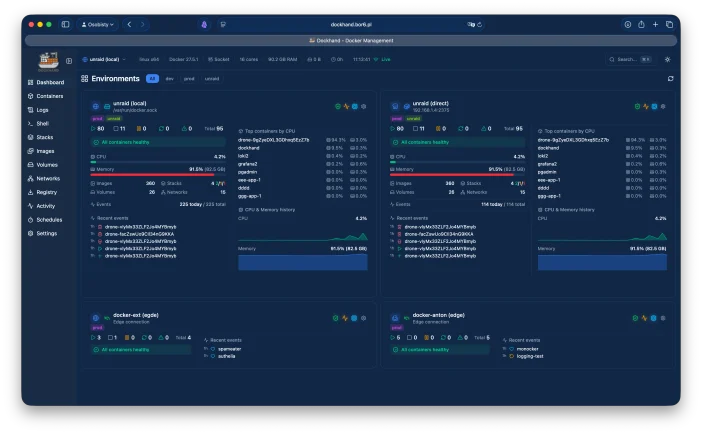
Version 1.0.50 was released on September 30, 2026.
There is one thing to watch out for, though: the license. Dockhand is released under the Business Source License 1.1: it’s free for personal or internal business use, but it isn’t free software in the sense of a GPL- or MIT-licensed project. For example, you can’t resell it as a hosted service. The code will switch to the Apache 2.0 license in 2029.
So, should you leave Portainer?
Not necessarily.
If you have Portainer CE 2.45 on a home Docker server and everything is running smoothly, I see no reason to break everything. The branch is maintained, and patches will continue to arrive.
But the announcement has changed how I view the tool in the long term. Portainer has chosen its path: Kubernetes and enterprise. I completely understand that from the company’s point of view. It’s just not the path for someone with a mini PC and twenty containers in their utility closet.
For that kind of user, here’s my take:
- Arcane is currently the closest thing to a modern, actively developed Portainer;
- Dockge is still excellent if you want a minimalist interface for Docker Compose and don’t mind the slowdown in development;
- Komodo really comes into its own when you’re managing several servers or want to move to GitOps;
- Dockhand is very feature-rich, especially when it comes to security, and worth keeping a close eye on if its license works for you.
The safest option is to hold off on migrating for now. Install one of these tools alongside Portainer and test it for a few weeks. They all talk to the same Docker daemon and coexist without any problems; Dockge’s FAQ explicitly confirms this. One thing to keep in mind: stacks created using Portainer’s web editor are stored in its data volume, not in a directory you control. Retrieve their Compose files before switching.
That’s what I’d do in your position.
For years, the question “which interface should I use to manage Docker?” had an almost automatic answer: Portainer. In 2026, we finally have a real choice, and that’s good news for those of us who tinker with our home labs.
What do you think?


Please remain courteous: a hello and a thank you cost nothing! We're here to exchange ideas in a constructive way. Trolls will be deleted.