


Résumer cet article :
The IFA 2026 has barely started, and I have already had the chance to have a good time with the teams from FRITZ!, who are playing here at home. The company is Berlin-based and is celebrating its 40th anniversary this year. It goes without saying that this IFA was the right time to showcase a bit of what it has in store for the future. And there was a lot to see.
I attended the conference organized by FRITZ! before being able to take a closer look at the new products. Fiber 10 Gbit/s, Wi-Fi 7, 5G, new Mesh repeater, Matter, new smart home functions… The catalog is seriously expanding. But the product that immediately caught my eye is the new FRITZ!Box DSL/Fiber 7-90. Simply because it no longer really resembles the FRITZ!Boxes we know.
The timing is amusing since I published my full review of the FRITZ!Box 7690 just a few weeks ago. I am using it behind my Freebox Pop, and I really appreciated its performances in Wi-Fi 7, its 2.5 Gbit/s network and especially FRITZ!OS, which goes much further than what is usually found in a provider’s box.
In Berlin, FRITZ! showed me what’s next.
The FRITZ!Box DSL/Fiber 7-90 completely changes its look
Let’s start with what is visible.
The FRITZ!Box DSL/Fiber 7-90 introduces the new design that FRITZ! plans to use for its next generations of Boxes.

Of course, the iconic white and red colors of the brand are maintained, but the casing becomes vertical, much more understated. The front is almost empty: a button, a LED. Gone are the rows of lights.

Even the cables have been redesigned. The connectors are now located under the casing, with a system that allows for grouping and hiding the cables. It’s a detail, of course, but when a router is placed in the living room or on a piece of furniture, four or five cables going in all directions are never very elegant.
The Box can be placed vertically or mounted on the wall. FRITZ! has even retained compatibility with the mounting holes of the very common 7590. No need to bring out the drill if you’re replacing the old one.
The new casing also has a technical justification. With the connectors pushed down, the 11 antennas have been placed in the upper part, allowing more freedom for their orientation.
The cooling remains passive, without a fan. FRITZ! announces an average consumption of 12 W, making it its least energy-consuming DSL/fiber Box to date. Considering the number of hours a router operates each year (almost all…), this is not entirely trivial.
Wi-Fi 7 at 12.2 Gbit/s and fiber directly in the Box
Inside, we find something quite close to the philosophy of the 7690 I tested, but in a much more versatile form.

The DSL/Fiber 7-90 can directly manage a DSL connection up to 300 Mbit/s but also a GPON fiber connection up to 2.5 Gbit/s or AON up to 1 Gbit/s. It can also be used behind an ONT via its 2.5 Gbit/s WAN port.
And of course, Wi-Fi 7 is part of the mix. This time, we move to three bands: 2.4, 5, and 6 GHz. FRITZ! announces 5,760 Mbit/s in 6 GHz, the same in 5 GHz, and 688 Mbit/s in 2.4 GHz, for a total of 12.2 Gbit/s combined.
The MLO (Multi-Link Operation) also allows compatible devices to use multiple bands simultaneously. This was one of the features of Wi-Fi 7 that I appreciated during my testing of the 7690.
On the Ethernet side, there is a 2.5 Gbit/s WAN/LAN, a 2.5 Gbit/s LAN, and two Gigabit ports. Personally, I would have liked to see more 2.5 Gbit/s here, or even 10 Gbit/s given the increasing strength of fiber. FRITZ! is clearly reserving this area for other models.
And as often with the manufacturer, the Box does much more than just networking. DECT and Zigbee are directly integrated, along with telephony, VPN, Mesh, and all the Smart Home features of FRITZ!OS.
By the way, FRITZ! finally simplifies the names
DSL/Fiber 7-90. This name was not chosen at random. FRITZ! is taking advantage of this new generation to completely revamp its nomenclature, and it’s genuinely not a bad idea. Until now, you had to know a minimum about the catalog to understand what differentiated a 7690 from a 5690 Pro or a 5590 Fiber.
The new logic is much easier to read. The beginning of the name indicates the type of connection: Fiber, DSL, Cable, Mobile, or WAN. The numbers then inform about the Wi-Fi generation and the product range.
This isn’t certainly the most spectacular announcement of the IFA, but on a daily basis it should prevent some Google searches before buying a Box :p
FRITZ!Box 5630 XGS: 10 Gbit/s directly on fiber
If you’re lucky enough to have access to an XGS-PON connection, another new product is worth a look: the FRITZ!Box 5630 XGS. It accepts a fiber XGS-PON up to 10 Gbit/s directly.
And this time, FRITZ! gives it the right Ethernet port: a WAN/LAN 10 Gbit/s, accompanied by three Gigabit ports.
The Wi-Fi 7, on the other hand, is more modest than on the DSL/Fiber 7-90 since it only operates on the 5 and 2.4 GHz bands, with 2,880 and 688 Mbit/s, respectively.
FRITZ! is thus beginning to have quite a substantial fiber range, including the 5630, 5690, 5690 Pro, 5690 XGS, and now this 5630 XGS.
For the French market, these models are interesting. The question of completely replacing the operator’s box unfortunately remains highly dependent on the operator and the line configuration. But as I demonstrated with my 7690, using a FRITZ!Box behind a Freebox works very well and allows for serious control over your home network.
FRITZ!Box 6835 5G: this one, I can see it in a camper van
The FRITZ!Box 6835 5G also pleased me, but for a completely different reason. It is a small 5G Box with Wi-Fi 7 capable of reaching up to 2 Gbit/s in reception and 900 Mbit/s in transmission on the mobile network. It accepts a Nano-SIM, but also an eSIM. So far, nothing very unusual for a good 5G router.

But it is powered by USB-C and can function with an external battery. And here, the uses become much more numerous. I obviously think of camper vans or caravans, but also of a chalet, a construction site, a second home, or simply temporary Internet access. All you need is 5G coverage and a USB-C power supply.
FRITZ! also planned for a more stationary use with FRITZ! Failsafe. The 6835 5G can serve as a backup connection to another FRITZ!Box. If the fiber or DSL goes down, the connection switches to 5G.
For someone who works remotely and cannot afford to lose Internet for two hours, this can be very handy.
The FRITZ!Repeater 6700 Pro boasts a whopping 18 Gbit/s
Here, FRITZ! has definitely gone all out. The new FRITZ!Repeater 6700 Pro uses four Wi-Fi radios: one in 6 GHz, two in 5 GHz, and one in 2.4 GHz. On paper, we reach 18 Gbit/s of combined throughput.
Of course, no device will download at 18 Gbit/s. This figure should be understood as the total available capacity between the different radios and the various clients. In a house where multiple devices are using the network simultaneously, this bandwidth reserve becomes much more interesting.
Especially since the wired network keeps up. The 6700 Pro indeed has a 10 Gbit/s port and another 2.5 Gbit/s port. To create a Mesh access point connected via Ethernet to a 10 GbE switch, for example, begins to get very serious.
I was already pleasantly surprised by the FRITZ! Mesh during my testing of the 7690. The interest is mainly its simplicity: you add the repeaters, and then FRITZ!OS manages the network with the same SSID and the same settings. No need to spend your evening in the menus.
With the 6700 Pro, this simplicity remains, but the performance levels up several notches.
FRITZ!OS 8.50 will also monitor the quality of your network
During the conference, FRITZ! talked a lot about software. This makes sense: a good part of the interest of these Boxes comes from FRITZ!OS. Version 8.50 will notably bring DNS filtering, automatic management of network priorities for latency-sensitive applications, and an evolution of FRITZ! Failsafe.
But the feature I’m most interested in is called Smart Check. The FRITZ!Box will analyze the network in the background and report any problems it detects. The MyFRITZ! app could, for example, advise moving a device or a repeater because its Wi-Fi signal is poor. It seems trivial, but it is typically the kind of feature that is missing in consumer routers.
Many of us here know how to read an RSSI level or analyze Wi-Fi channels. For the average Joe, “Internet is slow in the bedroom” often remains the only available diagnosis. If the Box can explain why and suggest a comprehensible solution, it’s much more useful.
Matter Bridge brings FRITZ! closer to true home automation
This is probably the part I am most personally interested in.
FRITZ! pushes its integration of Matter even further with the Matter Bridge function of the FRITZ!Box 5690 Pro. It allows FRITZ! smart home devices, as well as compatible equipment registered in the Box, to be accessible from a Matter network. You can thus find them in Apple Home, Google Home, or Amazon Alexa.

During my testing of the 7690, I had already played with its Zigbee part. I was able to directly pair it with different Philips Hue, Lidl, and Ikea devices. Not everything was perfect. With some more advanced Zigbee peripherals, we are still far from the flexibility of a Home Assistant associated with Zigbee2MQTT. But that’s not really the same audience either.
For someone who wants to connect a bulb, a socket, or a thermostat without installing Home Assistant, MQTT, and three Docker containers, FRITZ!’s proposal is quite appealing.
Matter is just beginning to break down some barriers between these different ecosystems.
A new connected socket FRITZ!Smart Energy 201
The home automation range also welcomes the FRITZ!Smart Energy 201, scheduled for October.
This small DECT socket supports up to 3,680 W / 16 A and measures the consumption of the device plugged into it. Its own consumption remains under 0.2 W.
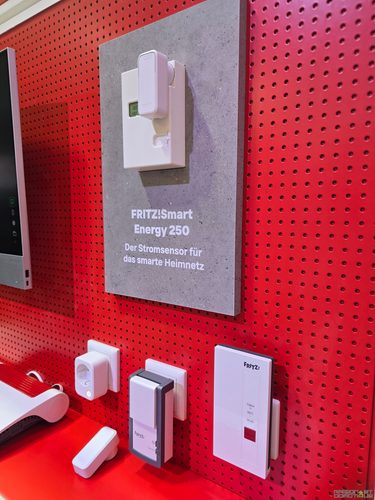
It can be controlled from FRITZ!OS or the FRITZ!App Smart Home and, via Matter with compatible FRITZ! equipment, join the main smart home ecosystems.
Nothing exotic in its operation, but the format is much more compact than some older FRITZ! sockets. And monitoring energy consumption quickly becomes addictive when you start equipping the house. You plug in the socket “just to see” what the TV corner consumes… then you end up measuring the freezer, NAS, and coffee machine :p
The FRITZ!Smart Thermo 303 prepares for winter
Another new smart home product: the FRITZ!Smart Thermo 303. This radiator thermostat is more compact than the Thermo 302, particularly to facilitate its use on poorly positioned thermostatic valves.

It manages heating schedules, window opening detection, Boost mode, anti-freeze, anti-limescale protection, and button locking. It can also anticipate the heating startup in order to reach the requested temperature at the programmed time. FRITZ! also plans to display the evolution of the temperature over the last 24 hours.
With thermostats, connected sockets, Zigbee, DECT, and now Matter, the Smart Home part of FRITZ! is starting to take a place that would have been hard to imagine on a router just a few years ago.
And what about Wi-Fi 8? Not just yet…
I found one of the discussions at the conference quite interesting. One question was about the adoption of Wi-Fi 7, which is perhaps considered slower than expected, and how FRITZ! envisions Wi-Fi 8.

The answer was quite down to earth. For FRITZ!, we are still clearly in the Wi-Fi 7 era. Many manufacturers are still selling a lot of Wi-Fi 6 equipment and the transition to Wi-Fi 7 is still ongoing.
As for Wi-Fi 8, FRITZ! wants to wait to see what it will concretely bring during laboratory tests. Among the improvements discussed during the conference: better speeds at medium range and improved performance when the device is on the edge of the Wi-Fi coverage area.
In other words, there’s no intention to put Wi-Fi 8 on a box just because 8 is greater than 7. And I find the approach quite reasonable.
40 years after its creation, FRITZ! remains very Berlin
The IFA also had a somewhat special dimension this year for FRITZ!, which is celebrating its 40 years.
The company was born right here in Berlin in 1986. The FRITZ!Card arrived in 1995, followed by the first FRITZ!Box in 2004. At that time, bringing together a modem, Wi-Fi router, and telephony in the same device was already quite an ambitious idea.

FRITZ! now announces more than 25 million FRITZ!Boxes in use worldwide and a presence in over 40 countries. The products are still developed in Berlin and manufactured in Europe.
The company also emphasized during its presentation the importance of European digital sovereignty, security, and open standards. This message takes on a particularly resonant tone at the moment, especially when discussing the router that controls all the communications in a home.
A new FRITZ!Box that I am now very eager to test
I arrived at my testing of the FRITZ!Box 7690 with quite little recent experience of the FRITZ! ecosystem. I came away much more convinced than I expected.
What I saw here in Berlin clearly goes in the same direction.
The DSL/Fiber 7-90 is probably the product I will remember from this presentation. Not just for its 12.2 Gbit/s in Wi-Fi or its 11 antennas, but because FRITZ! took advantage of the generational change to rethink very down-to-earth things: the casing, the cables, the mounting, the cooling, and even the product name.
The 6835 5G also appeals to me a lot for its portable nature and backup connection. As for the Repeater 6700 Pro and its 10 Gbit/s Ethernet, it is likely to attract those who are starting to seriously enhance their home network.
But I am still especially keeping an eye on the home automation part.
With Zigbee and DECT directly in certain FRITZ!Boxes, Matter Bridge, thermostats, connected sockets, and FRITZ!OS regularly gaining new features, the boundary between router and home automation box is becoming quite thin.
After the 7690, I will therefore need to get my hands on this DSL/Fiber 7-90. Just to see if the plumage matches the chirping ;-)


Please remain courteous: a hello and a thank you cost nothing! We're here to exchange ideas in a constructive way. Trolls will be deleted.