
Résumer cet article :
A pistol-shaped mouse, with a real trigger and a mechanism that mimics a weapon’s recoil with every shot. On paper, it sounds like a gimmick. Yet that’s exactly what the Ragnok ErgoStrike7 offers, and it looks nothing like anything we’re used to seeing on a desk.
Gaming mouse manufacturers have a hard time standing out: everyone makes ultralight models, with ever more precise sensors and RGB. Ragnok took a different approach. Instead of shaving off a few grams or adding a few DPI, the brand is trying to make shooter games more immersive.
And I have to admit, I was sold on the idea. So I got the white version to match my all-white setup. It certainly catches the eye. But what I was really interested in was finding out whether you could actually feel the shots in your hand without sacrificing the precision of a gaming mouse.
I’ll tell you right away: I really like the concept. Playing an FPS with this in your hand really changes the feel of the game. The question is how it holds up technically, how it performs day to day, and what compromises you have to accept.
Unboxing and introducing the Ragnok ErgoStrike7
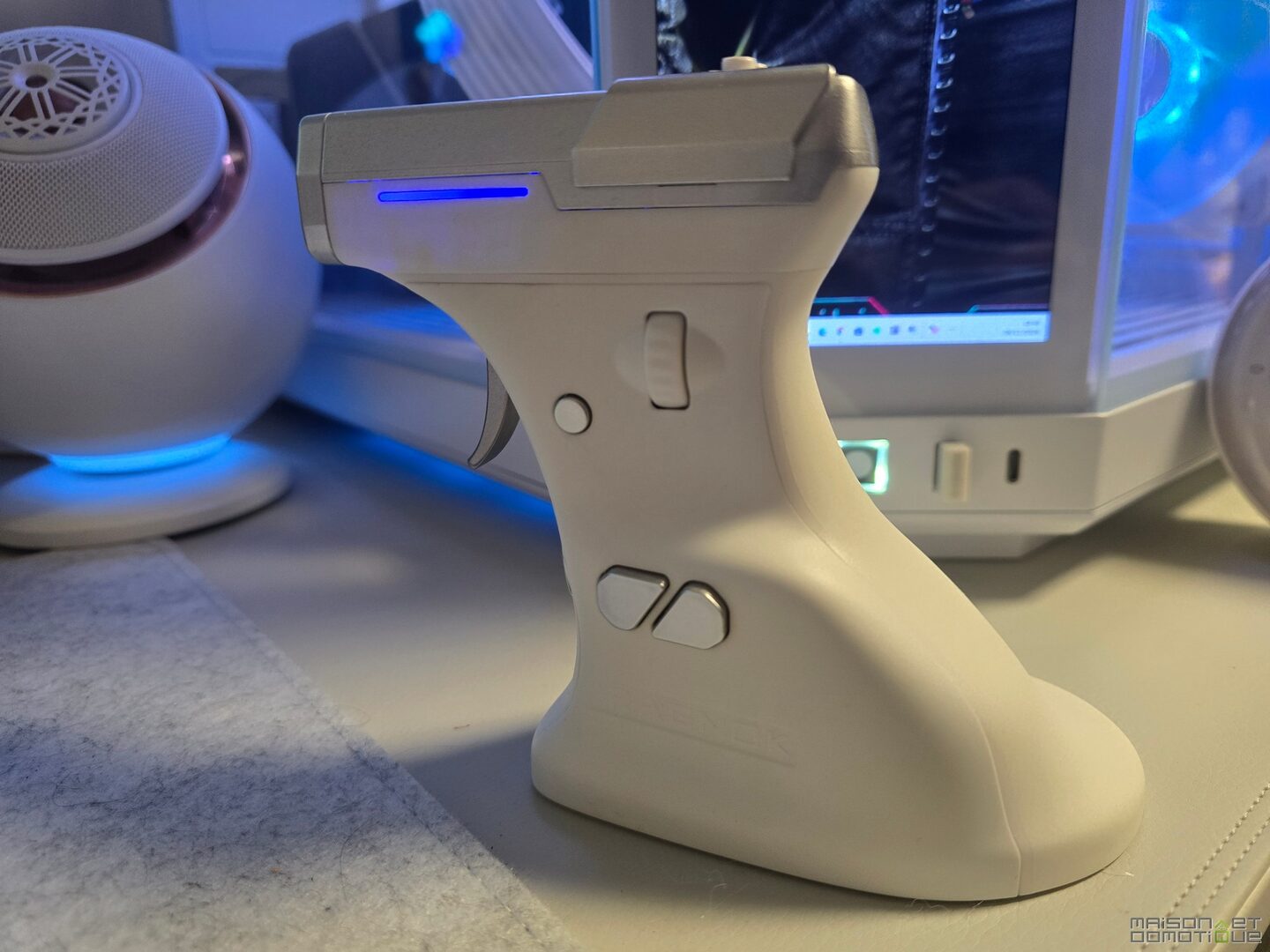
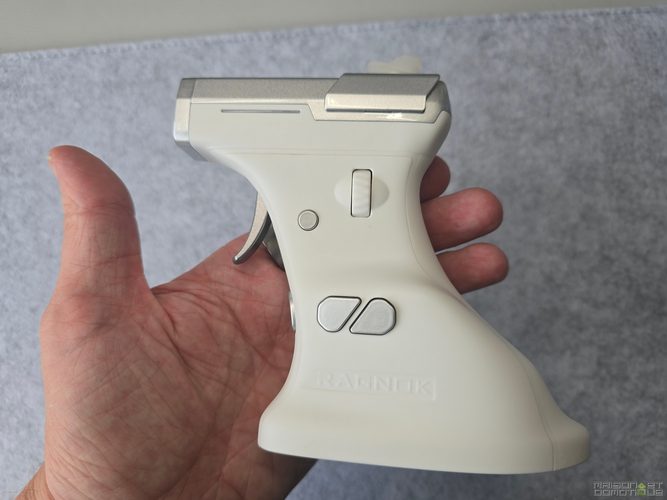
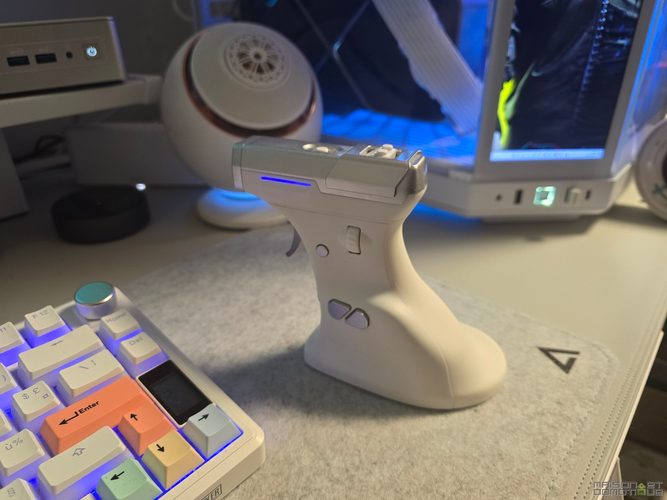
It’s hard to mistake it for a regular mouse. A vertical grip, a metal trigger, a large upper section reminiscent of a slide, and a few RGB strips: it looks more like a little sci-fi pistol. The packaging follows the same gaming theme, with a polished presentation.
In the box: the mouse, a USB-A to USB-C cable for charging and wired play, a 2.4 GHz USB receiver with an extender to position it closer to the mouse, replacement feet, and documentation.
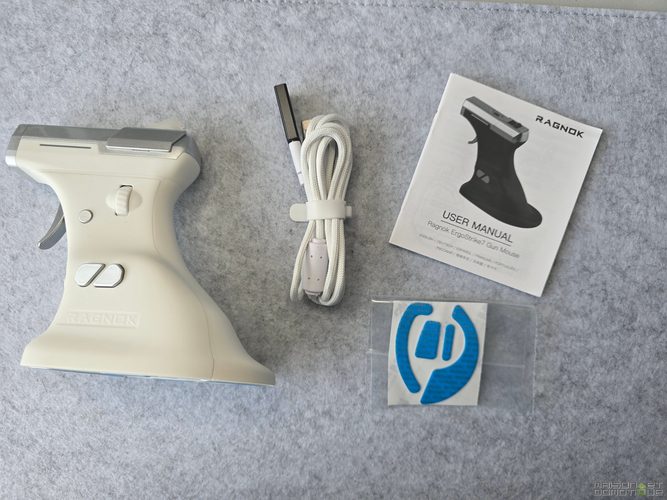
Ragnok also includes a small cover for the recoil mechanism. It helps muffle the firing pin’s snap, and as we’ll see later, it’s there for a reason. The receiver, meanwhile, fits into a compartment underneath the mouse, which is handy for keeping it from getting lost on the go.
As for materials, the grip has a soft TPE coating that feels nice and provides a good grip. The trigger is metal, while the upper section is plastic with a metallic finish.

On the white version, the combination works really well: the white grip contrasts with the metallic gray, and the two RGB strips on the sides add just the right amount of color. It fits perfectly into my white setup.
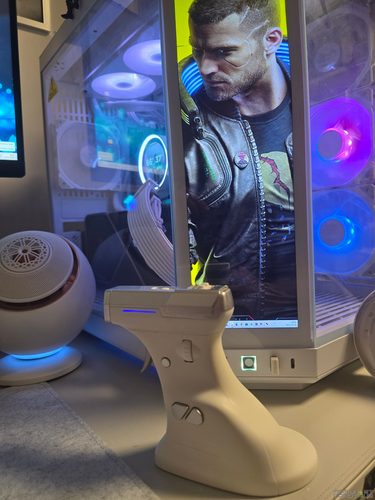
It’s also hefty: 113 × 122 × 78 mm and around 180 g. Today’s competitive mice weigh less than 60 g, so the Ragnok is about three times heavier.
That said, judging it by this figure alone would be a mistake. Its shape completely changes how you hold and move it, as I’ll explain below.
A vertical mouse designed for comfort
The pistol shape also has an ergonomic rationale.
A regular mouse requires you to keep your palm flat. The ErgoStrike7 is held vertically, at an angle of around 65°. Your hand is in a position similar to a handshake: your wrist turns inward less, and your fingers wrap around the grip. If you already use a vertical mouse, you know the idea. Ragnok has simply adapted it for gaming.
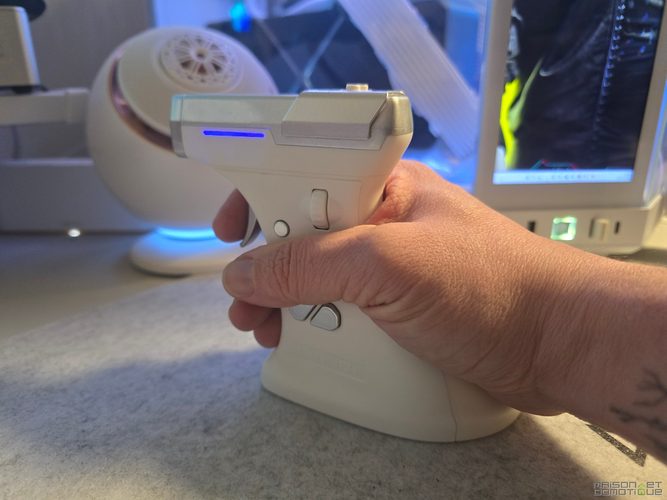
The grip is wide enough to hold comfortably, and its flared base supports the edge of your palm, also preventing your hand from constantly rubbing against the mouse pad. Your thumb has its own spot, and your index finger naturally rests on the trigger.
It’s an interesting option for long sessions. A vertical position can relieve your forearm, which has to rotate less, although it obviously can’t prevent all fatigue or pain.
One small downside: the ErgoStrike7 is for right-handed users only; there’s no left-handed version at the moment. Hand size matters, too. With medium or large hands, the grip is comfortable. With small hands, you’ll need to stretch your fingers to reach some of the controls.
And you can’t really switch between palm, claw, or fingertip grip as you can with a regular mouse. Its shape dictates how you hold it.
Unusual buttons, but all the features of a real mouse
This is what feels most unusual at first. On a regular mouse, the left and right clicks are under your index and middle fingers. Here, everything has been moved around.
The left click becomes a metal trigger, which you press with your index finger as you would a pistol trigger. In an FPS, the idea immediately makes sense: you finally make the same gesture as your character. The right click, used for aiming in most shooters, is just below the trigger and is operated with your middle finger.
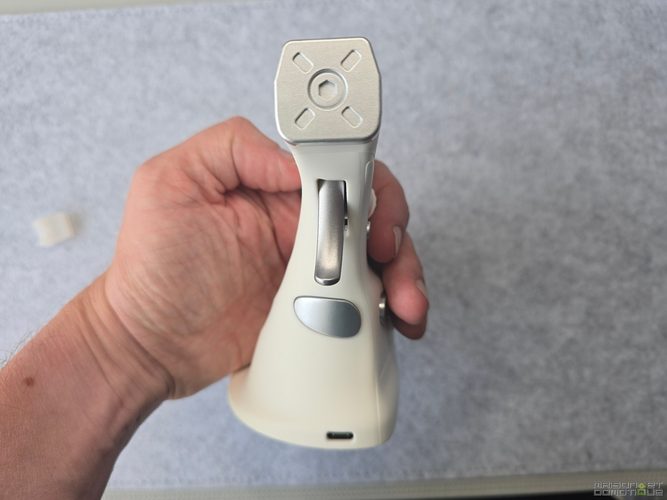
On the left side, under your thumb, you’ll find a clickable scroll wheel and several buttons: back, forward, and a configurable control. A Fire button can also be used as a double-click, depending on the configuration. It has nothing to do with the recoil mechanism; they are two separate functions.
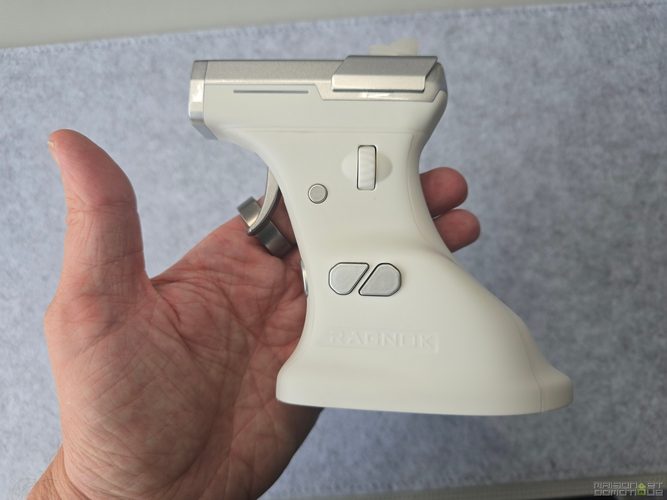
Underneath the mouse are the DPI selection button, the connection selector, and the optical sensor.
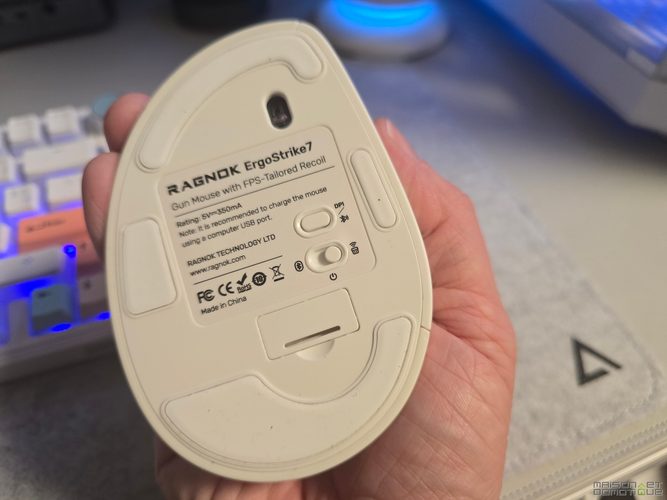
The hardest part is forgetting your regular mouse habits. You turn the scroll wheel with your thumb. It works well for switching weapons, but when you need to aim, move, and press several controls at once, your brain has to relearn a few gestures. The right click also takes some getting used to, depending on your finger length and how you hold the grip.
There’s nothing inherently wrong with this layout. It’s just very different from what we’ve been using for years.
A physical recoil mechanism: the ErgoStrike7’s real innovation
Now we get to the heart of the matter. The main reason the ErgoStrike7 has this shape is its force-feedback system, which simulates a weapon’s recoil with every shot.
Ragnok uses an electromechanical mechanism with a linear motor, more like a small firing pin than a controller’s vibration motor. When you press the trigger, you feel a brief jolt in the grip. The mechanism is located in the upper section, where the dummy barrel is, and each pulse produces a distinctive snap that heightens the sensation of firing.
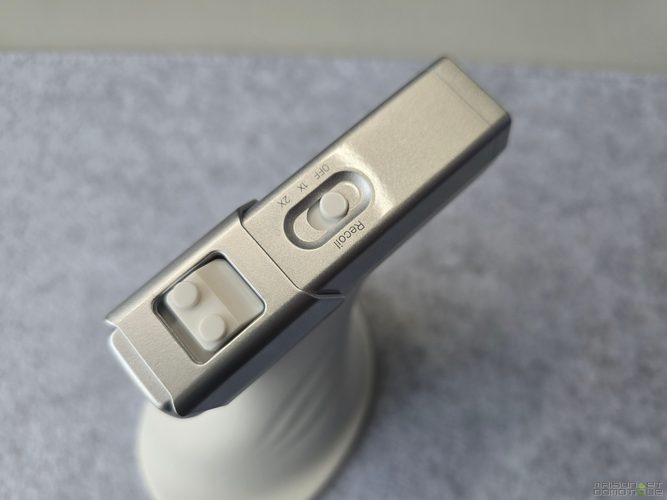
A switch on top has three positions:
- OFF: recoil is disabled, and the mouse behaves like a regular vertical gaming mouse.
- 1X: one pulse each time you press the trigger. Perfect for single shots, pistols, or sniper rifles.
- 2X: pulses repeat as long as the trigger is held down, creating a series of small jolts like an automatic weapon.
And it works! In an FPS, you’re no longer clicking to fire: your index finger presses a trigger, the mechanism snaps, your hand absorbs the impulse, and your brain connects it all to what’s happening on screen.
That’s exactly why I like this mouse. The game is still the same, and so are the mechanics, but firefights feel completely different!
Immersive recoil, but not synced with the game
There is one important caveat: the mechanism doesn’t communicate with the game. It doesn’t know which weapon you’re holding or how fast it fires. It only responds to the trigger. In 1X mode, each press activates one pulse. In 2X mode, pulses repeat at a fixed frequency for as long as the trigger is held down.
So if your weapon fires at 600 rounds per minute, the mouse won’t match that rate, and there may be a mismatch between what you hear and what you feel. Switching weapons doesn’t change how the mechanism behaves, either.
So this is a trigger-activated recoil simulation, not game-driven haptic feedback. With real synchronization, the immersion could have gone much further.
One more thing: the mechanism also works outside games. If you forget to turn it off and click a Windows icon, it activates. For office work, you’d be better off disabling it :p
A fun little detail: LEGO-compatible studs
Ragnok added a little novelty on top: two studs for attaching a LEGO-compatible figurine. When recoil is enabled, it jiggles with every pulse.
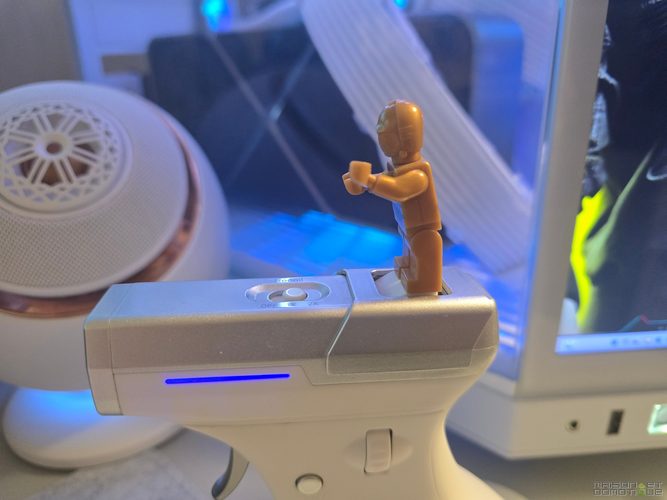
It serves absolutely no purpose, but it’s funny. And it sums up the spirit of the product nicely: at Ragnok, fun comes first.
Setup and connectivity: three ways to play
Despite its looks, the ErgoStrike7 is easy to set up, just like any other mouse. It offers three modes: wired USB-C, 2.4 GHz wireless with the receiver, and Bluetooth 5.1.
On PC, 2.4 GHz is the best option. It’s suited to fast-paced games, with a polling rate of up to 1,000 Hz: the mouse sends its position to the computer up to 1,000 times per second, or theoretically once every millisecond. That doesn’t mean a click takes 1 ms to register: button processing and the rest of the chain add their own latency.
Bluetooth is better suited to occasional use with a laptop or tablet. It’s convenient, but I wouldn’t use it for competitive play.
The included USB-C cable lets you play wired, so you can keep going while it charges, which is handy when recoil has drained the battery. The port is easy to access and accepts any USB-C cable, so there’s no need for a proprietary one.
On Windows, the mouse works as soon as you plug it in for everyday use, with no software to install. Support for other platforms is more limited. The basic functions work on macOS, but the customization software isn’t available for that system. For PlayStation, Xbox, and Switch, Ragnok lists compatibility via a third-party adapter. So it all depends on the game and adapter you use: it won’t automatically work with every game on every console.
Ragnok software: plenty of customization options
To get the most out of the ErgoStrike7, Ragnok provides a Windows utility. You can remap the buttons, adjust the sensor sensitivity, and customize the RGB. The brand lists five customizable buttons, with the trigger remaining the left click.
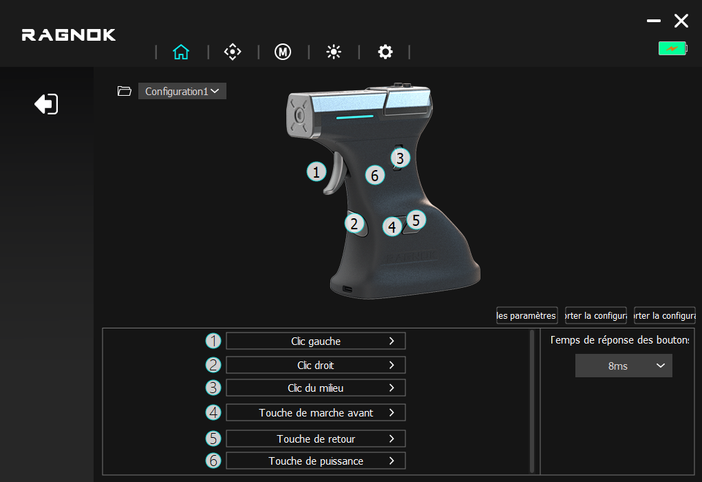
Sensitivity can be adjusted in DPI steps up to 26,000, making it easy to get a pointer speed close to what you had with your old mouse. You’ll also find a polling rate setting (up to 1,000 Hz) and, depending on the software version, options for performance and click behavior.
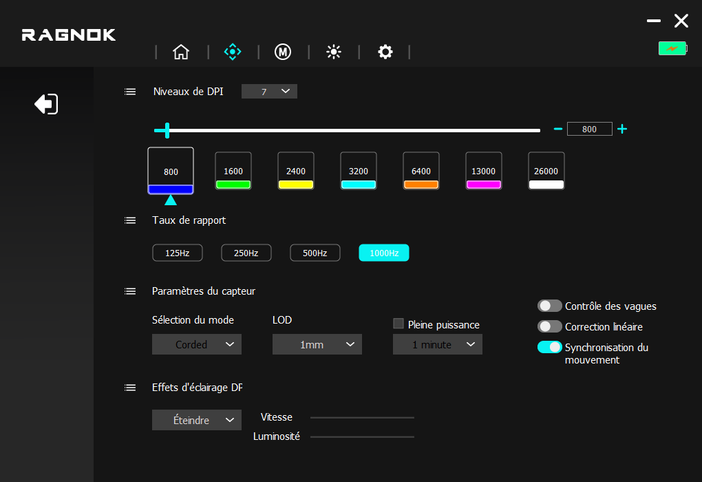
One setting is worth taking a closer look at: debounce time. This is a delay that prevents a single mechanical contact from registering as multiple clicks. Too high, and it adds latency. For example, lowering it from 8 ms to 0 ms reduced measured click latency from around 15 to 6 ms.
On the other hand, a debounce time that’s too low can cause phantom clicks if the contacts aren’t perfectly stable. It’s up to you to find the right balance.
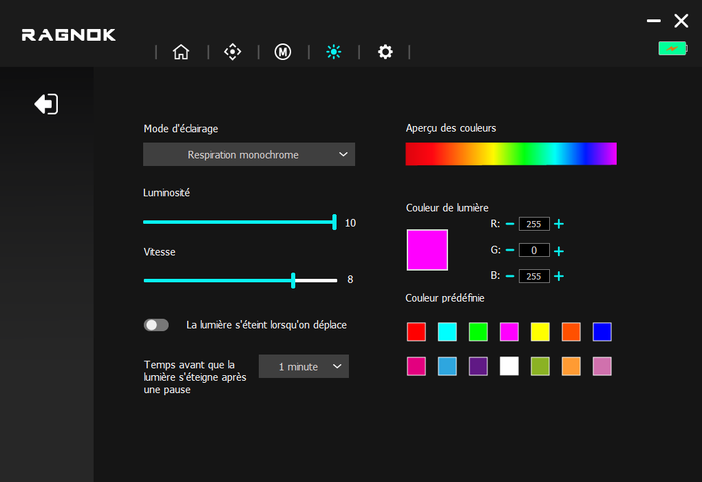
The two RGB strips support several effects or static colors, and can be turned off to save battery. You can also create profiles and macros for each game. Be careful with macros and multiple clicks in multiplayer: some anti-cheat systems and competitive rules prohibit them, so check the rules first.
While it doesn’t offer the same level of sophistication as the software suites from major gaming brands, it does cover the essentials.
A PixArt PAW3395 sensor: genuine gaming specs
You might think a mouse this unusual is all about the spectacle. But Ragnok hasn’t skimped on the technical side.
The ErgoStrike7 uses a PixArt PAW3395 optical sensor, well known in high-performance gaming mice. Its advertised specs are 26,000 DPI maximum, a tracking speed of 650 IPS, and 50 G acceleration.
DPI measures sensitivity: the higher the value, the farther the pointer moves for the same hand movement. Don’t worry, nobody plays at 26,000 DPI. Many players stick between 400 and 1,600 DPI, depending on their in-game sensitivity.
The 650 IPS figure corresponds to the maximum movement speed the sensor can track, around 16.5 meters per second. That’s plenty of headroom! The 50 G rating indicates its ability to track sudden changes in movement. The PTFE feet, meanwhile, glide smoothly on a suitable mouse pad.
On paper, then, it’s a good gaming mouse. Its weak points lie elsewhere: its weight, its unusual ergonomics, and the recoil, which can make your hand move slightly.
Its 1,000 Hz polling rate is still below that of high-end models at 4,000 or 8,000 Hz. But for a mouse designed for immersion, honestly, that’s not what matters most.
In-game: a genuinely interesting FPS experience
It’s obviously in FPS games that the ErgoStrike7 really comes into its own, and that’s where it impressed me the most.
With a regular mouse, firing means pressing a button. Your brain connects it to what’s on screen, but the action itself remains abstract. With the ErgoStrike7, your index finger presses a trigger and your hand feels an impulse. The difference is simple, yet it makes certain scenes feel different.
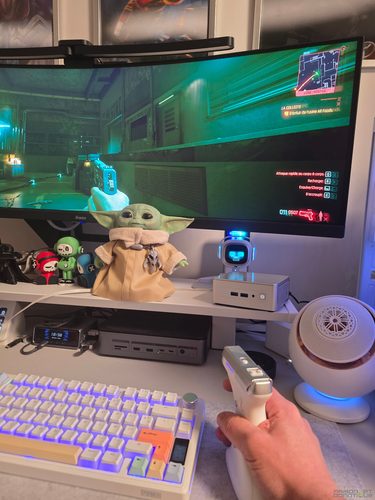
A round of Far Cry, a tense face-off in Resident Evil, a firefight in Call of Duty: recoil adds a physical dimension that works really well when the sound and visuals are already doing their job. It’s at its best in single-player or co-op, when atmosphere matters more than anything else.
There are two things to distinguish: being able to play with it, and getting back to your usual level of precision. Ten minutes or so is enough to learn the controls and start playing. Getting back to the same muscle memory you have with a regular mouse, however, can take several days or even longer, depending on your experience and the games you play.
Your first movements feel a little clumsy, especially when you need to quickly bring your aim back onto an opponent. The vertical position changes your habits and engages your hand and forearm a little differently, while the side-mounted scroll wheel also requires you to relearn a few gestures.
In games that require a lot of simultaneous inputs, such as Fortnite’s building mode, the layout can become awkward. It’s much better suited to more traditional FPS games, where you move, aim, and shoot.
A mouse for fun, not for shaving off a few milliseconds
The ErgoStrike7 won’t replace a competitive gaming mouse.
At around 180 g, it feels heavy during very fast movements, especially flick shots, those sharp movements used to snap your aim onto a target. With a 55- or 60-g mouse, they take less effort and are easier to chain together. Recoil can also slightly affect your aim, especially during bursts.
In a single-player game, where immersion matters more than performance, it’s no big deal. In Counter-Strike 2 or Valorant, every detail counts.
If your priority is climbing the ranks, a regular ultralight mouse is the obvious choice. If, like me, you mainly want to have more fun with your shooters, the ErgoStrike7 offers something very different. And honestly, it’s great to see a manufacturer trying to make games more fun instead of just inflating a spec sheet!
A pistol-shaped mouse, but not a real Light Gun
Its shape inevitably brings to mind the light guns found in arcades. Anyone who’s played Time Crisis, The House of the Dead, or Virtua Cop can immediately see the appeal of a trigger with recoil.
But the two technologies have nothing in common. The ErgoStrike7 is still an optical mouse that glides across a mouse pad: it doesn’t know where on the screen you’re pointing the barrel. To move your aim, you have to move the mouse, just like any other.
On an on-rails shooter, with recoil enabled, the experience can be fun. But you’re not aiming directly at the screen like you would with a real Light Gun. It’s entertaining with some arcade games, but it doesn’t replace a dedicated optical aiming system.
Battery life: the price you pay for recoil
The ErgoStrike7 has a 1,000 mAh battery. Ragnok claims up to 70 hours of battery life with recoil disabled, which is decent for a wireless mouse.
With recoil and RGB switched on, that drops to around 10 hours. That’s a huge difference!
It’s not surprising: the electromechanical mechanism uses much more power than an optical sensor. Every time you press the trigger, a motor has to produce an impulse, and power consumption depends on how often you fire. Those 10 hours are the manufacturer’s estimate, not a guaranteed runtime.
So don’t expect to get several days of intensive gaming without charging if you leave recoil enabled all the time. Fortunately, you can play over USB-C while it charges, which saves you during long sessions, and turning off the RGB helps extend battery life a little.
Battery life remains one of this mouse’s biggest compromises: to enjoy the feature that makes it unique, you’ll have to charge it more often than a regular gaming mouse.
The mechanism’s noise: a detail not to overlook
You don’t just feel the recoil; you hear it, too. Every impulse produces a little snap that adds to the illusion, and in rapid-fire mode, in 2X, it becomes much more noticeable.
It’s fun during a firefight, not so much for anyone else in the room :p If you’re wearing a headset, you’ll hear it less than the people around you!
The included cover muffles the snaps, but it doesn’t make the mechanism silent. What’s more, the cover can sometimes be difficult to put back in place. It’s nothing deal-breaking, but it’s worth knowing.
The switch on top turns off the recoil with a flick, without needing to open the software. So you can save it for sessions when you really want to immerse yourself, and enjoy a quiet mouse the rest of the time.
Can you use the ErgoStrike7 as your primary mouse?
It’s a fair question, because the ErgoStrike7 isn’t cheap, and it would be a shame to use it for only a few hours a week.
Technically, it has everything you need: left and right clicks, a scroll wheel for browsing pages, and side buttons for navigation. It works perfectly well for office tasks, web browsing, and everyday applications, and some people may even appreciate its vertical ergonomics. I’ve been using a Logitech vertical mouse myself for several years, so it doesn’t bother me.
But its size and weight won’t suit everyone. If you’re constantly switching between software and windows, or your work requires a lot of precision, a regular mouse will probably feel more comfortable.
Personally, it’s the fact that it’s specialized that I like. It doesn’t have to be the best at everything to earn a place on your desk. It can easily sit alongside a regular mouse, which you keep for work and competitive gaming, and become the one you happily reach for during a single-player campaign. That’s where it really shines.
Price and value for money: originality comes at a cost
The ErgoStrike7 is a specialized peripheral, and its price reflects that. In early November 2026, it was listed for €109 instead of €149 on the Ragnok website, or on Amazon. Prices may change depending on promotions, currency, and retailer. It’s also available on Amazon France, where you’ll need to check the current price and whether your preferred color is in stock.
At that price, you could obviously buy an excellent regular gaming mouse, often much lighter and better suited to competitive play. But the comparison only goes so far: no regular mouse combines a pistol-style vertical grip, a metal trigger, a high-performance sensor, and electromechanical recoil.
So you’re paying both for a working peripheral and for a one-of-a-kind experience. Its build quality, PAW3395 sensor, three connection modes, and customization options mean it doesn’t feel like you’ve bought a gimmick.
Is it worth it for you? If you play almost exclusively competitive FPS games, probably not. If you like unusual peripherals, customized setups, and immersive games, the ErgoStrike7 becomes much more tempting.
Conclusion: the Ragnok ErgoStrike7 delivers on its promise of immersion
The ErgoStrike7 is a reminder that video games aren’t just about chasing performance.
The concept is original, the ergonomics are well thought out, and the technical side is serious enough for it to count as a real gaming mouse. The metal trigger, and especially the recoil, add something to FPS games. It’s not on the same level as a light gun, and the recoil doesn’t follow what’s happening in the game. But pulling the trigger and feeling the impulse in your hand is genuinely fun, and that’s what I like about this mouse!
I also like its design, and the white version fits perfectly into my setup. It has character, unlike all those mice that end up looking alike.
It has its flaws: its weight, the scroll wheel that forces you to change your habits, the battery life that plummets when recoil is on, and the mechanism’s noise. You also have to allow for an adjustment period and not expect it to help you improve competitively.
Judged for what it’s trying to be, though, it delivers. For me, it’s an excellent fun mouse for FPS fans who want to play differently. It may not replace your primary mouse, but it can make your gaming sessions a lot more fun. For once, here’s a gaming peripheral whose originality goes beyond adding three more LEDs!