


'/%3E%3Cpath%20fill='%23b2b2b2'%20d='M241%20382q0%2016%2017%2026%2017%2011%2042%2011t42-11q16-11%2017-26V269H241'/%3E%3Cpath%20fill='%239f7e00'%20d='M241%20379q0%2014%208%2023%209%209%2021%209%2014%200%2021-9%209-9%209-23V269h-59'/%3E%3Cpath%20d='M241%20339v-70h59v110q0%2014-9%2023l-6%205v-68h-15v72q-8%200-14-4v-68zm59%2040c0%2022%2015%2032%2029%2032%2021%200%2030-18%2030-32v-40h-59'/%3E%3Cpath%20fill='%239f7e00'%20d='M266%20277v5h2v12h-3v-5h2v-5h-9v5h2v5h-4v9h3v18h-5v10h34v-10h-5v-18h3v-9h-4v-5h2v-5h-9v5h2v5h-3v-12h2v-5zm42%20101q0%2010%206%2017%206%206%2015%207%2010-1%2016-7%206-7%206-17v-29h-43'/%3E%3Ccircle%20fill='%230044ad'%20cx='329.5'%20cy='372'%20r='6'/%3E%3Cellipse%20fill='%230044ad'%20cx='300'%20cy='340'%20rx='16'%20ry='21'/%3E%3C/svg%3E)

'/%3E%3C/g%3E%3Cuse%20href='%23c'%20transform='matrix(-1%200%200%201%20720%200)'/%3E%3C/svg%3E)


'%3E%3Cpath%20stroke='%23000'%20stroke-width='4'%20d='m-35-37-13%2020m5%203%2013-20m5%203-13%2020m63%2042%206-9m1-2%206-9m5%203-6%209m-1%202-6%209m5%203%206-9m1-2%206-9m-96%200%2013%2020m5-3-6-9m-1-2-6-9m5-3%2013%2020m63-42-6-9m-1-2-6-9m5-3%2013%2020m5-3-6-9m-1-2-6-9'/%3E%3Ccircle%20r='24'%20fill='%23cd2e3a'/%3E%3Cpath%20fill='%230047a0'%20d='M0%200a12%2012%200%201%201%2020%2013%2024%2024%200%201%201-40-26A12%2012%200%201%200%200%200'/%3E%3C/g%3E%3C/svg%3E)


Résumer cet article :
Home Assistant 2026.8 has been available since August 5th. This version does not aim to impress with a standout feature. Instead, it addresses a series of details that ended up complicating everyday use: remembering port 8123, sometimes intimidating vocabulary, imposed entity IDs, and devices merged somewhat haphazardly.
The guiding principle chosen by the team is simple: to make Home Assistant more welcoming, without removing the tools beloved by experienced users. The software does not become less powerful. It primarily aims to be less intimidating at first glance.
The difference is subtle, but it is felt in almost every corner of this update.
Port 8123 disappears from new installations
Port 8123 has almost become part of Home Assistant folklore. Anyone who has installed the system at least once probably knows this address:
http://homeassistant.local:8123
With Home Assistant 2026.8, the number at the end is no longer necessary on a new installation of Home Assistant OS. It is now sufficient to enter:
http://homeassistant.local
Home Assistant then uses the standard HTTP port, port 80. For a device that presents itself as a ready-to-use solution, this makes much more sense. No one should have to memorize a port number to access their smart home interface.
The change only affects new installations of Home Assistant OS. An existing installation retains its current port, whether that is 8123 or a custom port. Home Assistant Container installations also remain on port 8123 by default, as they often use an inverse proxy or host multiple services on the same machine.
The port can now be modified directly from Settings, System, Network. Therefore, it is no longer necessary to go through the configuration.yaml file.

Home Assistant even provides a safety net. After the change, the user has five minutes to confirm that they can indeed access the new address. Without confirmation, the system automatically reverts to the old setting. A typo should no longer cut off access to the entire installation.
Home Assistant abandons expert-only vocabulary
The advanced mode had already begun to fade away in previous versions. The work is now complete.
The features once hidden behind this option remain available. They are simply presented differently, with clearer descriptions or in collapsible sections.
The team explains that it has corrected 43 locations in Home Assistant, the mobile apps, and the documentation. The goal is not to hide technical settings but to avoid labeling them as if they were reserved for a small elite of experts.
The most visible change concerns the “Developer Tools,” now simply called “Tools.” The new name is quite well chosen. Checking the status of an entity, testing an action, verifying an event, or trying a template does not require being a developer. These are useful manipulations as soon as one starts to seriously customize their installation.
Some mentions of “advanced” may still appear when they come directly from a device or its manufacturer. Home Assistant will not rename a section present on a product if the documentation specifically requests to open a menu bearing that name.
Entity IDs become customizable
Entity IDs are at the heart of Home Assistant. Behind a readable name like “Living Room Temperature” lies, for example, an identifier such as:
sensor.thermostat_temperature
Recent versions had begun to automatically add the room in new IDs. One could then obtain:
sensor.living_room_thermostat_temperature
This choice improves readability on a new installation, but it does not suit everyone. Many users already have their own sorting method, sometimes used for several years. Home Assistant 2026.8 thus allows everyone to choose the format used when creating a new entity.
It is possible to use the device name, the entity name, the area, and even the floor. The order of this information can also be modified.
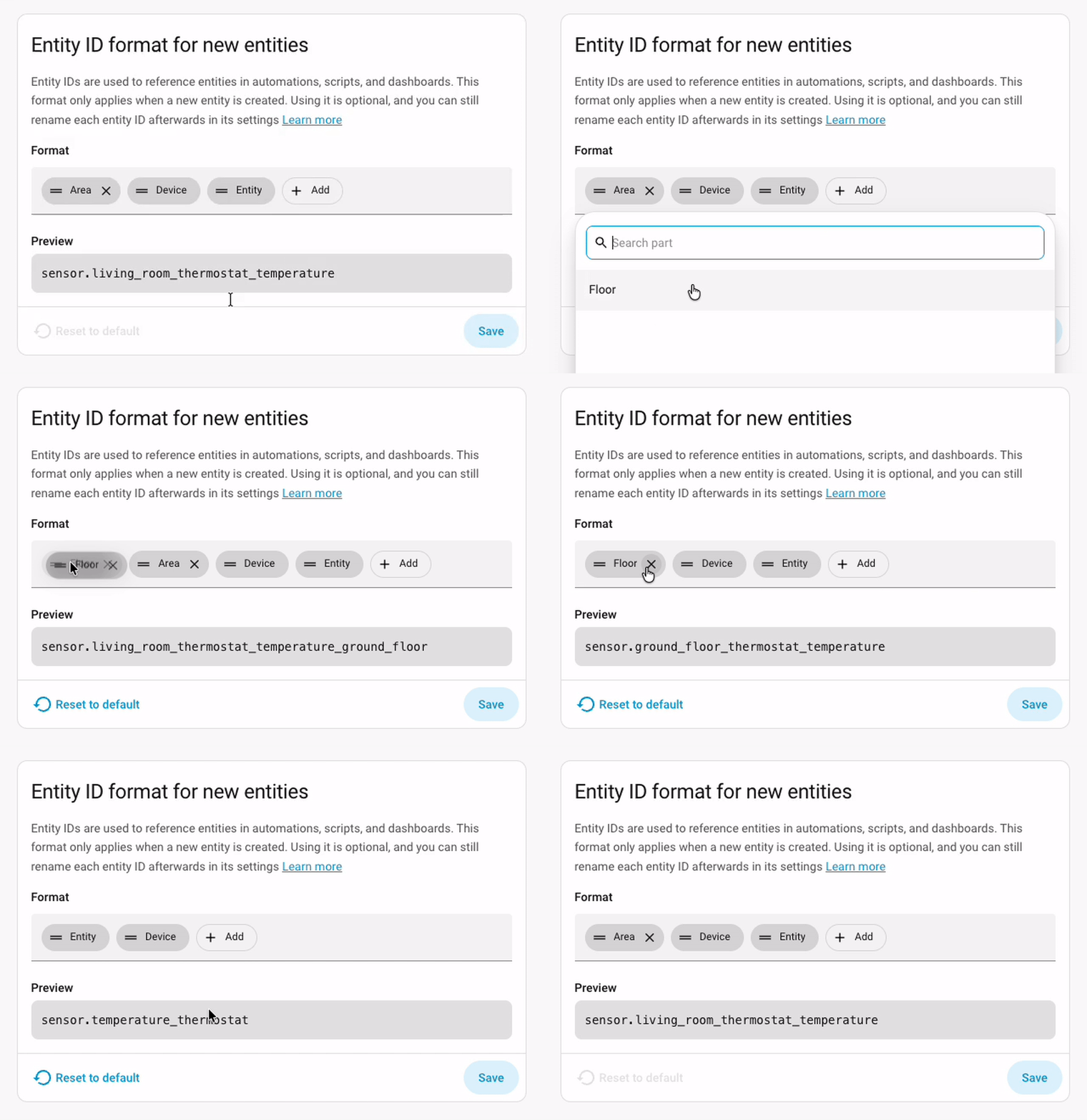
A house with multiple levels could, for example, generate an identifier like:
sensor.first_floor_living_room_thermostat_temperature
Conversely, a simpler installation could maintain a short format:
sensor.thermostat_temperature
The setting can be found in Settings, System, Entity ID Format. It applies to new entities. Home Assistant also allows regenerating the IDs of an existing device based on the chosen format.
However, one must still be cautious before modifying a well-filled installation. An ID used directly in a dashboard, template, or YAML automation will need to be corrected manually after its change.
Modern automations based on devices, areas, or unique IDs are less exposed to this problem. This is one of the reasons why Home Assistant now encourages targeting a room or device rather than a simple entity_id.
Vibrations enter the automation editor
Vibration sensors can now be used directly as triggers and conditions. Home Assistant knows how to detect the start or stop of a vibration. It is also possible to impose a minimum duration before launching the automation.
The example shown during the official presentation uses a sensor placed on a washing machine. When the machine no longer vibrates for two minutes, Home Assistant sends a notification to inform that the laundry is done. The delay prevents a simple drum pause from being interpreted as the end of the program.
The same principle can be used with a dryer, a pump, a gate motor, or a tool installed in a workshop. An Aqara vibration sensor or an equivalent Zigbee model is enough to make an old device much more talkative.
On a washing machine, a plug measuring energy consumption often remains more accurate. However, the vibration sensor has an advantage: it installs in seconds and doesn’t need to handle the device’s power.
Moon phase becomes a condition
Another more unexpected addition: the moon phase can now be used as a condition in an automation. New moon, first quarter, full moon, or last quarter are accessible from the graphical editor. The team jokingly mentioned the possibility of receiving an alert during a full moon, just to be cautious of werewolves. However, the uses are not limited to humor.
A photographer can prepare outdoor lighting based on nighttime brightness. An astronomy enthusiast can turn off certain lights during a new moon. It also becomes possible to adapt scenarios related to gardening, observing animals, or certain routines based on the lunar calendar.
This will probably not be the most used condition in Home Assistant, but it clearly demonstrates the interest of its automation editor: to provide building blocks and then let everyone imagine the scenario.
A device will no longer be merged between multiple integrations
Home Assistant is changing the way it classifies devices detected by multiple integrations.
Until now, two integrations could create a single device when they found a common identifier, like a MAC address. The idea seemed good: to avoid duplicates when the same product was detected via Bluetooth, the local network, or the cloud.
However, merging led to quite confusing situations. A Yale lock compatible with both the cloud integration and the Bluetooth integration could display two locking entities in the same card. Nothing allowed to immediately distinguish the fast local command from the often slower cloud command.
The two integrations could also provide different information about battery, model, or firmware. Depending on the boot order, one sometimes took precedence over the other.
With Home Assistant 2026.8, each integration keeps its own device. Therefore, the local Yale lock and the cloud Yale lock appear separately.
The result may give the impression of having more duplicates, but the cards will be easier to understand. It is then up to the user to hide the cloud device and keep only the local command in the dashboards.
Most installations will see no difference. Automations and scripts should continue to work. Home Assistant may only ask to select a device again in some cases, particularly for template sensors attached to an old merged card.
This change also prepares for future management of devices composed of multiple sub-devices. A power strip, for example, could group each socket into a different zone without mixing all switches and energy measurements on the same page.
Favorite cards speed up dashboard creation
The window for adding a Lovelace card displays an increasingly long list. Between the cards provided with Home Assistant and those installed from HACS, finding the same models can quickly become tedious.
A little star now allows placing a card in favorites.

Favorite cards rise to the top of the window during subsequent creations. The choice is saved for each user and also works with custom cards, such as those from Mushroom.
This may not be the headline feature, but anyone who has built several dashboards should save a few clicks.
The manual card can also be added to favorites, which will please YAML enthusiasts.
Floorplan interfaces become easier to use on mobile
The Picture Elements card is often used to create an interactive floor plan of the house. Icons, values, and buttons are placed directly over an image representing the different rooms.
On a smartphone, touching a small element could be a game of skill. Two close zones sometimes overlapped, risking triggering the wrong command.
Home Assistant 2026.8 revamps the calculation of touch zones. The elements remain positioned in the same place, but the sensitive area around each one is better adjusted.
The change should be especially noticeable on very crowded plans and small screens.
Multimedia search becomes really useful
The multimedia browser gets a real search system.
Radio Browser benefits from this by allowing you to find a station without browsing categories by country, language, or style. You just need to enter part of its name.
Music Assistant can search the music library. Immich also leverages this function to find photos from Home Assistant. The integration can rely on Immich’s smart search, capable of identifying the content of an image and not just its file name.
Home Assistant also supports media sources that do not have their own player. Previously, searches often depended on a media_player, which excluded certain services that only provided content.
The Overseerr integration goes even further: it can search for a movie or series and allow you to request its addition without leaving Home Assistant.
The Energy dashboard better understands batteries
Home Assistant now allows you to indicate the capacity of each home battery.
This information serves to correctly calculate the average level when an installation contains multiple batteries of different sizes.
Imagine a 2 kWh battery charged to 100% and a 10 kWh battery charged to 20%. A simple average would give 60%, while the installation actually stores only 4 kWh out of a total capacity of 12 kWh, or about 33%.
Home Assistant now weights the calculation according to the capacity of each battery. The overall percentage thus better represents the energy actually available.
With the multiplication of residential batteries, photovoltaic systems, and modular energy stations, this correction has become necessary.
Home Assistant Cloud changes its presentation
The Home Assistant Cloud page was seriously outdated. It still retained an organization inherited from older configuration pages. Home Assistant 2026.8 offers it a more modern interface closer to the rest of the system.
An assistant placed at the top of the page guides the user to activate remote access, cloud backups, and voice functions. The lower part summarizes the status of each service.

The functions do not really change. They are simply better organized and easier to discover.
Home Assistant Cloud remains optional. It particularly serves to access your installation from outside without configuring port forwarding, while funding part of the work of the Open Home Foundation.
Numeric templates are up to 40% faster
Templates returning numeric results have received several optimizations. The team announces improvements of up to 40%.
The improvement will not transform a small installation overnight. However, it can benefit systems with many computed sensors, statistics, energy conversions, or automations heavily relying on Jinja.
The template editor is also evolving. The separation between code and result can be resized or displayed vertically, a layout more suitable for mobile screens.
The result continues to update live as soon as an entity used in the template changes state.
Z-Wave locks gain a real access manager
Z-Wave lock access codes now have their own tab. It becomes easier to see registered users, create a code, modify it, or delete it.

These identifiers can also be activated or deactivated by an automation. A code given to a cleaning lady may work only on Tuesday mornings. A rental home can create a code upon the tenant’s arrival and then delete it at the time of departure.
Home Assistant offers here a flexibility difficult to obtain with the proprietary application of many locks. One will need to plan a backup solution and thoroughly test automations before using them in a professional setting.
A Home Assistant OS update no longer restarts without warning
Some Home Assistant OS updates require a restart. Until now, the installation button could trigger this restart without clearly announcing it.
Home Assistant now displays a message when a restart is necessary. The user can then choose the right moment, especially if other updates or important tasks are in progress.
The system currently goes through the Repairs panel. The team is already considering a more integrated presentation in a future version.
Assist becomes accessible from the quick search
The quick search can now directly send a request to Assist. A phrase like “turn on the living room lights” can be entered in the search field without first opening the voice assistant interface.
This possibility gives Assist a broader role. It is no longer just for talking to Home Assistant. It also becomes a text command accessible from almost any page.
The operation of course depends on the configuration of Assist, recognized phrases, and exposed entities.
Some very practical improvements
The Clock card can now display the date in addition to the time.
The Activity panel offers CSV export, as well as commands to delete or reset data.
The entity list can be filtered by manufacturer, model, and model identifier. The time savings will be appreciable on installations with several hundred entities.
A dedicated device class for radon appears. The sensors concerned thus have a consistent unit and representation in Home Assistant.
The sharing of infrared commands also progresses. Infrared proxies can now be utilized by more integrations, notably through ESPHome and MQTT.
New integrations for local AI, health, and appliances
Home Assistant 2026.8 adds another series of integrations.
Dyson uses the new infrared proxy system to control certain fans that do not have an appropriate network connection.
LED Infrared supports strips and lights delivered with small generic remote controls found on many unbranded products.
Google Health Connect allows the retrieval of health information from Android in Home Assistant, such as activity, sleep, or some nutrition data. Their presence in a home automation platform obviously raises questions about their utility and privacy. It’s up to each person to decide what they wish to expose.
LiteLLM and llama.cpp pave the way for the use of locally hosted language models. The two integrations accept access points compatible with the OpenAI API while taking into account the real differences between implementations. It thus becomes possible to use a local model launched with llama.cpp, LM Studio, or a LiteLLM server to power Assist, without sending every request to an external service.
Midea joins Home Assistant with a local integration. It concerns particularly air conditioners and dehumidifiers. Several of these devices are sold under other brands, with Midea also manufacturing white-label products. However, exact compatibility will depend on the model and its network protocol.
Neol Pool adds local management of pool equipment via Modbus. This integration comes just in time to monitor and control filtration, water treatment, or other parameters from Home Assistant.
Fuel Prices DK retrieves fuel prices from Danish stations. Gatus monitors the availability of IT services. GeoSphere Austria Warnings provides local weather alerts in Austria.
Harman Luxury Audio allows control of certain network audio players from the Harman group. Harbor Sleep, finally, integrates equipment designed for monitoring baby sleep.
The global device database takes shape
The official presentation also provided updates on the device database developed by the Open Home Foundation.
The project aims to catalog the connected objects available on the market, their firmware versions, and how they operate. The user will thus be able to know if a product works locally, if it relies on a cloud, or if it continues to function without an Internet connection.
The database already contains over 20,000 references but is still in preview mode.
Home Assistant collects information through voluntary sharing that can be enabled in the settings. The data sent concerns the manufacturer, model, firmware, and types of entities. Room names and personal information are not transmitted.
This database could eventually help buyers compare two visually similar products that work very differently. A cheap Wi-Fi sensor may depend entirely on a remote server, while a slightly more expensive Zigbee model will continue to operate locally for years.
It will also allow for quicker identification of a faulty firmware by observing the versions actually installed and reported issues.
Home Assistant 2026.8 mainly improves what we use every day
This version does not contain a feature that will alone change the way we use Home Assistant. However, it makes many actions simpler.
Opening a new installation no longer requires knowing port 8123. The tools no longer present themselves as a space reserved for developers. Entity IDs follow the format chosen by the user. Local and cloud devices no longer mix in the same card.
Automations gain some useful building blocks, dashboards require fewer manipulations, and energy management aligns better with current installations.
This is less spectacular than a new voice interface or a major evolution of Matter. In daily life, however, the gain can be more noticeable. A good home automation update does not always need to add a screen or a protocol. Sometimes it just needs to remove the small obstacles that have accumulated over the years.


Please remain courteous: a hello and a thank you cost nothing! We're here to exchange ideas in a constructive way. Trolls will be deleted.