


Résumer cet article :
Regularly traveling for various trade shows or meetings, I needed to replace my aging laptop by the end of the year, in order to set off well-equipped to cover CES in Las Vegas. After numerous comparisons, I chose a model from Lenovo. This manufacturer continues to assert itself thanks to products where innovation and refinement come together. The Yoga 7 2-in-1 (14ILL10) that I selected is the perfect illustration: a premium hybrid PC, available with AMD or Intel processors, that combines elegance, versatility, and cutting-edge technologies. The 14-inch OLED display and the 360° hinge are two assets that particularly interested me. After several months of use and numerous travels with it, I propose to delve into its details.
In brief: why this Lenovo Yoga 7 2-in-1 is worth a look
Need a versatile laptop to work on the go without compromising visual comfort or fluidity? The Lenovo Yoga 7 2-in-1 clearly checks many boxes.
- In this Intel Core Ultra 5 configuration, you get a fast, quiet machine that is perfectly suited for nomadic professional use. The OLED display is simply stunning (it’s hard to go back after that…), the 360° hinge provides true freedom of use, and the modern connectivity with Thunderbolt 4 and Wi-Fi 7 already prepares the ground for the coming years.
- This is not a pure gamer machine, nor is it an upgradeable model, but for working, creating light content, and enjoying an excellent display everywhere, it’s a remarkably efficient travel companion. Clearly, a choice I do not regret after several months on the field.

Configurations for all needs: AMD or Intel?
The difficulty with Lenovo is navigating the wide range. Not only does the manufacturer offer many series, but they are also available in several configurations. The Lenovo Yoga 7 2-in-1 presented today is thus available in AMD and Intel versions, reflecting the intensity of current competition in the convertible laptop market. On the AMD side, the choice fell on Ryzen 7 8840HS or Ryzen 5 8640HS processors, known for their energy efficiency and solid integrated Radeon graphics. In the version tested here, Lenovo opted for the latest Intel Core Ultra 5 226V, a Meteor Lake generation chip that combines efficient and powerful cores, native AI capability, and a much-improved integrated Intel Arc 130V graphics card compared to the previous generation. This Intel processor, designed to meet modern needs (multitasking, AI optimization, videos, image editing), is also distinguished by Thunderbolt 4 support and better cooling management through new architectures. While the AMD solution focuses on optimal performance/watt ratios, the Intel version appeals with its versatility, openness to recent AI and multimedia applications under Windows 11. The question of noise, temperatures, or load handling will depend directly on these structural choices, just as the finesse of software integration (Microsoft, Lenovo, and partners now focus heavily on dynamic optimization of AI and graphics platforms).
Comparison of screen types: OLED vs IPS on the Yoga 7 14 inches
Between the OLED version and the IPS variant of the Lenovo Yoga 7 2-in-1, the difference in experience becomes immediately noticeable upon startup. The choice of the 14-inch OLED panel (resolution 1920 x 1200, 16:10 format) offers unmatched color fidelity: 99.8% DCI-P3 coverage, deep blacks, virtually infinite contrast, and a brightness of nearly 600 cd/m². The IPS panels, reserved for AMD configurations, remain very good (good sRGB coverage, wide viewing angles), but struggle to compete on black depth and cinematic HDR content reproduction. The OLED panel, through its responsiveness and rendering, is clearly positioned by Lenovo as the ideal choice for graphic designers, photographers, or any high-end multimedia content enthusiasts.
Element | OLED 14 inches | IPS 14 inches |
|---|---|---|
Contrast | Nearly infinite (absolute blacks) | Up to 1200:1 |
Colors | DCI-P3 99.8% | sRGB 100% |
Brightness | 600 cd/m² | 400 cd/m² |
Responsiveness | 1 ms | 10-25 ms |
Stylus compatibility | Yes (multi-touch, stylus supported) | Yes |
Other differences between versions
When analyzing the AMD and Intel alternatives, beyond the obvious questions of processor and display quality, other differences emerge. In terms of connectivity, the Intel version of the Lenovo Yoga 7 2-in-1 has two Thunderbolt 4 ports, ensuring universal compatibility and ultra-fast transfer speeds up to 40 Gbps – an advantage that the equivalent USB4 on the AMD side cannot satisfy, despite high speeds. Additionally, the native handling of Wi-Fi 7 on the Intel platform places this laptop ahead of its time, while the AMD version, sometimes equipped with a MediaTek Wi-Fi 6E or 7 chip depending on markets, remains slightly behind.
A notable distinction also lies in storage management: the Intel configuration offers a 512 Go PCIe 4.0 NVMe SSD directly, while the AMD version opts for sometimes more accessible options but limited to PCIe 3.0 models on some entry-level configurations. Finally, the Intel version benefits from the latest generation of LPDDR5x RAM (16 Go), guaranteeing smooth multimodal fluidity for graphic standby, extended sessions, and multitasking. Users keen on instant power, cutting-edge ports, and an extraordinary multimedia experience will undoubtedly retain the Intel edition, while those who prefer sobriety or maximum autonomy will favor the AMD variant. This product positioning, at the intersection of innovation and pragmatism, makes the Yoga 7 2-in-1 a unique convertible in today’s market.
For my part, I chose the Intel version (model 14ILL10), whose full specifications are as follows:
- 2-in-1 convertible: 360° hinge, smooth transition from laptop mode to tablet mode.
- 14-inch OLED display: Color fidelity, 1920 x 1200 resolution, 16:10 format.
- Configured with Intel Ultra 5 226V: AI-Ready chip, 16 Go LPDDR5x soldered RAM.
- 512 Go PCIe 4.0 NVMe SSD storage: Speed, compactness, non-upgradable.
- Premium connectivity: 2x Thunderbolt 4, HDMI, Wi-Fi 7, infrared webcam with privacy shutter.
- Luna Grey aluminum finish: Lightness (1.49 kg), robustness, elegance.
- Dolby Atmos audio system: 4 speakers, above-average sound experience.
- 70 Whr battery: Up to 10h of advertised autonomy, compact 65W power adapter.

Discovering the Lenovo Yoga 7 2-in-1
With its Luna Grey aluminum finish, the Lenovo Yoga 7 2-in-1 fits into a lineage of products where the care given to the finish is noticeable at first glance. The subtle touch, discreet brushing, and lunar hue contribute as much to the elegance as to the perceived robustness.

This design underscores the promise of a convertible laptop that is solid enough to withstand twisting when moving to tablet or tent mode. Under pressure, the chassis flexing remains minimal, proving meticulous work on the structure and the distribution of internal components.
For professionals on the move, this choice of premium materials is not trivial: the case’s resistance, the stability of the hinges, and the durability of the surfaces prevent (to a certain extent) everyday mishaps.

This Yoga 7 remains clearly an ambassador of the clean and balanced design that Lenovo has favored since the first generation of the Yoga convertible range.
Ultra-portability: weight, dimensions, and maneuverability
The Lenovo Yoga 7 2-in-1 immediately convinces with its ultra-portability advantages. With its compact dimensions (approx. 31.6 x 22.1 x 1.75 cm) and a weight of only 1.49 kg, it fits as easily in a professional backpack as in a creative nomad’s bag. I had the opportunity to carry it in my backpack for several days during a trade show; it’s not the heaviest item in the bag!

This lightness, combined with its overall compactness, makes it an ideal tool for working on a train, in a coworking space, or on your couch. Unlike some competitors in the convertible segment (Dell Inspiron 2-in-1, HP Envy x360 that I studied during my choice), this Yoga 7 offers a perfect balance between solidity and thinness without compromising the number of built-in ports or the cooling surface.

Handling a device like the Yoga 7 2-in-1 at a trade show is akin to handling a digital notebook: pleasant, devoid of sharp edges, with a central hinge that does not clash aesthetically. The mobility, enabled by this featherweight, adds to the serenity of transportability without fears for the battery (70 Whr), optimized to last a day without recharging.

Versatility of the 360° hinge
The true strength of a convertible laptop lies in its hinge. With its 360° rotation, the Yoga 7 2-in-1 opens a field of scenarios for daily alternating uses: classic laptop mode for work, tent position during a streaming session, or a large tablet for drawing or annotating a PDF.


This articulation proves fluid, flexible but maintains the screen plate rigid once deployed. Where other brands may falter due to excessive play or stiffness, Lenovo delivers a homogeneous experience that will be greatly appreciated, whether one is a student or a demanding professional.
Benefits of the tablet transformation
The transition to tablet format constitutes the main argument of the convertible concept: a 2-in-1. Practical on a train or on a couch, it allows unlimited use of the OLED screen through touch commands, especially with stylus support (even if this is not provided by Lenovo).

For digital reading enthusiasts, illustrators, or those who like to present slideshows on the fly, the transformation of the Yoga 7 proves natural – and without any notable mechanical effort. The mechanical robustness of the hinge guarantees a lasting and secure experience over time, a determining criterion when purchasing a convertible laptop.
This transformation into a tablet was crucial in my choice. At home (office), I enjoy a powerful setup as I presented in my gaming setup. I benefit from a ultra-wide monitor and performance for photo and video processing, etc., to work under excellent conditions. I do not use the laptop when I am at home. However, it is unfortunate to let the laptop sit in its bag between two trips (sometimes spaced out). I use this Lenovo in tablet mode on the couch or even in bed when I want to watch series or simply browse the web on a larger screen than my smartphone.
One problem in this mode, of course: fingerprints on a glossy OLED screen. It quickly shows marks, whether from fingerprints or dust. A microfiber cloth in the bag remains essential, while my trusty EcoMoist cleaning product works wonders on the OLED panel safely. To limit accumulation, some accessory makers offer anti-reflective protective films compatible with the touch panel, minimizing the visual impact of stains without significant loss of precision or comfort. So far, I have not felt the need for one.
Lenovo Yoga 7 2-in-1 in use
I have dragged this ultra-portable from Paris to Las Vegas, passing through Rome, since the beginning of the year. Train, plane, hotel, I could use it in various situations. How does it perform in use?
The 14-inch OLED display
The OLED technology embedded by Lenovo in this Yoga 7 2-in-1 showcases first-rate technical advantages: 1920 x 1200 pixel resolution on 14 inches, a 16:10 ratio conducive to multitasking, and an optimal display area to juggle between spreadsheets, browsing, and graphic creation on Windows 11. With a peak brightness of 600 cd/m², the screen remains readable even close to a window or under strong LED lighting while preserving the intensity of saturated colors. The contrast, nearly infinite like on most modern OLEDs, enhances images, whether they are photographs, video readings, or advanced design work. When on the go, where lighting conditions can vary greatly throughout the day, it’s a detail that changes everything. This is, after all, my first laptop equipped with an OLED display, and the difference is impressive.

The absence of bleed, perfect pixel alignment, and fast response time (1 ms) place the Yoga 7 2-in-1 at the top of its category, at least for professional or advanced multimedia use. This OLED panel, a signature of Lenovo’s premium convertible range, positions the Yoga 7, in my opinion, within the top three for digital natives seeking color precision.
The OLED screen of the Yoga 7 indeed proves to be a formidable tool for anyone engaged in photo or video editing in a mobile/advanced context. Its almost total DCI-P3 coverage (99.8%) ensures color fidelity, while the nature of the panel mitigates the issues of banding or color shifting at the edges of the panel.
Regarding multimedia, movies and games benefit from a reproduction of blacks and gradients that only OLED can provide at this level. The DisplayHDR True Black 500 certification allows for an immersive cinematic experience, all the more evident on a convertible of this diagonal. To leverage all the potential of Windows 11, Lenovo integrates advanced color management profiles, dynamically adjusting temperature and vibrancy according to the open application.
In short, it’s beautiful, and we appreciate it!
Touch features multi-touch and stylus support
Again, this is my first touchscreen laptop. And I must say that the Yoga 7 2-in-1 ensures a smooth touch experience thanks to 10-point multi-touch support and compatibility with Lenovo styluses (Active Pen 3, not included). Finger movements across the surface trigger immediate reactions without latency, whether browsing Windows 11, annotating a document, or participating in a collaborative diagram via Microsoft Whiteboard. For professional creatives, the precision of the stylus supported by palm rejection and pressure management elevates sketchbooks, quick edits, or collective brainstorming. I now use it for proofreading and correcting my magazine SmartHome Electricien+, and it’s a real pleasure.
Performance of the Lenovo Yoga 7 Intel Core Ultra 5
The heart of the configuration tested here is the Intel Core Ultra 5 226V, the latest iteration of the Meteor Lake series. This processor stands out with a winning combination of efficiency-oriented (E-cores) and high performance (P-cores), intelligent load management, and the capacity to assist the system in AI tasks, assisted writing, or immersive multimedia experiences. Its presence ensures rapid application launches, flexibility in advanced productivity (complex office tasks, light video editing), and the ability to manage displays on external 4K screens without lag.
The RAM, here in LPDDR5x 16 Go (soldered), complements the Yoga 7 2-in-1’s proposal for speed and flexibility. Its speed – well above that of LPDDR4x from previous AMD generations – ensures the simultaneous opening of dozens of tabs under Windows 11, heavy Lightroom imports/exports, or code compilation on Visual Studio, without a hint of lag. The only downside, and a significant one: upgradability. This design, common to many convertible ultrabooks from Lenovo, prevents adding RAM later – an aspect that may discourage tech enthusiasts or buyers seeking long-term investment. Therefore, one must choose the right configuration right from the start.
As with my other PC tests, I ran this Yoga 7 through PCMark 10, a comprehensive benchmark that simulates real-world usage (office work, web browsing, content creation) to evaluate the overall performance of a PC under conditions close to daily life.

With an overall score of 3,824 points, this Yoga 7 performs quite well for an ultraportable, demonstrating excellent ease in office and productivity tasks (over 6,000 points) as well as good performance in general usage, while content creation remains suitable without being its strong suit, confirming its ideal positioning for mobile, versatile, and fluid daily professional use.
SSD NVMe PCIe 4.0 storage and optimized multitasking management
The SSD NVMe PCIe 4.0 storage, with a capacity of 512 Go (compact M.2 2242 format), powers the performance of the Lenovo Yoga 7 2-in-1. The read speeds easily exceed 5000 Mo/s in sequential reading, effectively eliminating wait times when launching a video project or installing large Windows 11 updates. Handling large files, whether raw photos, Audacity projects, or VM disk images, becomes trivial, as long as the storage doesn’t fill up to the half-terabyte limit. This SSD technology, common in mobile workstations and ultra-fast systems, renews the user experience for all nomadic professional use.
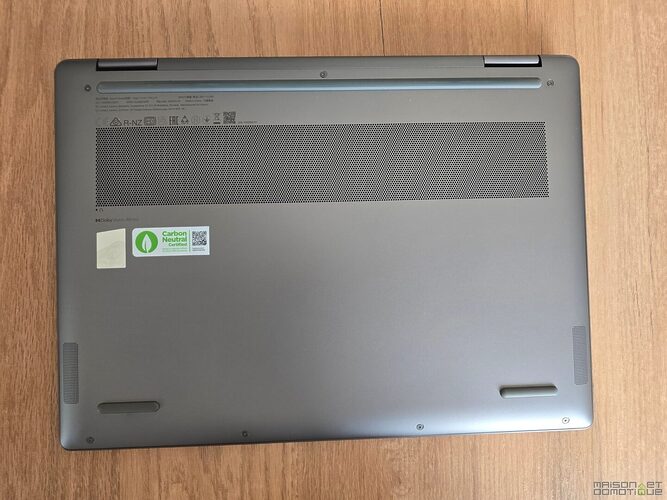
In multitasking, the synergy between the PCIe 4.0 NVMe SSD, LPDDR5x memory, and the Intel Ultra 5 processor guarantees total responsiveness of the convertible. The feel in Windows 11: continuous fluidity, instantaneous transitions between Photoshop, Chrome, Zoom, or OneDrive without compromise, where older models stagnated due to memory bottlenecks. It is essential, however, to monitor free space: for large projects or videographers, recourse to external drives via Thunderbolt 4 will be necessary, as Lenovo does not permit changing the SSD without a complete chassis disassembly.
Intel Arc 130V graphics card: performance for graphics and light gaming
In terms of graphics processing, the Yoga 7 2-in-1 Intel version relies on the new Intel Arc 130V integrated solution. This setup, much more powerful than the previous generation Iris Xe, allows for comfortable basic visual creation, 3D rendering of a SketchUp model, or Full HD video editing. Gaming sessions remain feasible on less demanding or older titles in 1080p – Rocket League, The Sims 4, or popular MOBAs – but this convertible does not target intense AAA gaming where dedicated machines have the advantage. For architecture students needing to visualize renderings, designers creating light animations, or videographers on the move, the Intel Arc 130V solution represents an excellent compromise.

I have also run this model through benchmarks. First, 3DMark, which is a gaming-oriented benchmark that measures CPU and GPU performance on demanding 3D scenes to assess a PC’s ability to run modern games.

With a Time Spy score of 1,749 points (1,560 on the graphics side), this Yoga 7 clearly confirms its positioning: sufficient for light gaming and occasional graphical uses, but far from machines dedicated to gaming, which is consistent with its ultraportable format.
Despite this, I managed to run Cyberpunk 2077 on it. You have to lower the settings, but it works ;-)

VRMark, on the other hand, tests a PC’s ability to run virtual reality applications by simulating very heavy graphical loads.

Here, with a score of 1,463 in the Orange Room and an average of about 32 FPS (far from the targeted 109 FPS), the verdict is clear: this model is not suited for VR and will offer a limited or even uncomfortable experience in this type of use. At the same time, it’s not its role, but I wanted to check to compare with other tested computers :)
Lenovo’s benchmarks on 3DMark – notably Time Spy – position this iGPU among the best integrated chips, without surpassing some AMD Radeon integrated equivalents but compensating for this slight deficit with better managed consumption and superior compatibility with AI tools integrated into Windows 11 (for instance, Copilot and Paint Remix).
Thunderbolt 4, USB, HDMI ports, and integrated external readers
A central point in choosing a current convertible laptop: connectivity. This Lenovo Yoga 7 2-in-1 in the Intel configuration adopts standards and offers:
- 2x USB-C Thunderbolt 4 (power, transfer up to 40 Gbps, video streams, daisy chaining of displays)
- 1x USB-A 3.2 Gen 1 (wide compatibility, classic accessories, fast charging)
- 1x HDMI 1.4b (external display up to 4K 30Hz)
- 1x microSD reader (quick storage expansion, photo imports, portable backup)
- 1x 3.5 mm audio jack (headphones, microphone, dual uses for work/leisure)


This comprehensiveness places this Lenovo above the fray in the convertible category: while some competitors omit HDMI or the microSD port by sacrificing compactness, the Yoga 7 2-in-1 fills up on options to connect presentation screens, bulky storage, or audio accessories. When traveling at a trade show, it becomes extremely easy to transfer videos and photos from your camera thanks to the built-in microSD reader.

The two Thunderbolt 4 ports offer boundless scalability, whether for multifunction hubs, eGPUs, or even for rapid charging solutions (up to 65W, included in the Lenovo bundle). The connectivity contributes to the daily versatility expected from a convertible laptop: productivity, mobility, and creativity combined.
Wireless technologies: Wi-Fi 7, Bluetooth 5.4, and infrared webcam with privacy shutter
This Yoga 7 2-in-1 model also stands out by integrating the latest evolution of wireless connectivity: Wi-Fi 7 (be, 2×2), capable of making the most of new multipoint routers and establishing itself in both domestic and professional environments. The gain in stability and speed – theoretical but real in a modern office – will benefit VDI sessions, streaming, and intensive cloud management. Alongside it, Bluetooth 5.4 allows for instant connectivity to the latest headphones, mice, and accessories from MediaTek or Lenovo Smart Pen, while reducing latency and energy consumption.
Another strong point of the Intel version: the 5 MP infrared webcam, compatible with Windows Hello (facial recognition), backed by an integrated privacy shutter to ensure visual confidentiality. In an era of repetitive video conferencing and increasing demands for privacy protection, this configuration places Lenovo at the forefront of the convertible market.

With Windows Hello compatibility, you just have to open the laptop, which automatically recognizes our face to identify us in the Windows session. No more password to enter, resulting in a significant time gain, similar to what we are used to experiencing today on smartphones.
Comfortable AZERTY backlit keyboard and touchpad
Extended typing on a convertible laptop quickly reveals the difference between a premium machine and an entry-level model. On the Yoga 7 2-in-1, the AZERTY chiclet backlit keyboard benefits from an adjusted travel (about 1.4 mm), a soft yet precise strike, ideal for long note-taking or writing sessions under Windows 11. Its progressive backlighting allows maintaining a high productivity level, even in poorly lit environments. The touchpad, wide and perfectly centered, proves fluid for tactile navigation, taking into account Windows Precision Driver (multi-touch gestures, smooth scrolling). It is possible to drag-and-drop, zoom, or control video with one finger, with an efficiency rarely matched in this segment.

The mobile ergonomics of the keyboard and touchpad are appreciated in meetings, on the plane, or in a hotel room: the stability of the chassis prevents the keyboard from sinking even in tablet mode, while the trackpad, insensitive to accidental clicks or false contacts, enhances the quality of experience already provided by the touch OLED screen. The absence of a numeric keypad ultimately only bothers strictly accounting profiles – the target of this convertible being clearly creative and mobile.
Sound performance: Dolby Atmos audio quality
Lenovo has bet on Dolby Atmos: the Yoga 7 2-in-1 brings together two upward-facing tweeters and two woofers positioned at the bottom of the chassis, totaling four speakers. The sound rendering thus benefits from a clear reproduction of voices, crisp highs, and a general balance rarely found in a high-end convertible PC.

Naturally, the bass marks its limits, but the power and sound space exceed what most competitors HP, Dell, or ASUS of equivalent generation offer. Watching Netflix or a Teams meeting takes on a new dimension, without saturation or distortion, even at high volume.
70whr battery: a comfortable autonomy
Regarding the battery, the Yoga 7 2-in-1 relies on a 70 Whr accumulator, a rather comfortable choice for this 14-inch format, and this quickly becomes apparent in real use. On paper, Lenovo announces up to 10 hours of autonomy, but as is often the case, reality depends heavily on use… and especially on the OLED screen. In practice, with a typical mixed use (web browsing with many tabs, article writing, some photo editing, and streaming), we find ourselves more between 8 and 9 hours with brightness around 60-70%. This is more than enough to last a day of stress-free mobile work, especially on a train or at a trade show where outlets are not always accessible. However, as soon as you push the machine a bit further – video export, intensive AI use, or high brightness to counter a very bright environment – autonomy drops faster, which is logical with this type of panel and processor. A pleasant surprise, however, regarding charging: the compact 65W USB-C charger is compatible with Power Delivery, allowing you to recover about 50% of battery in just half an hour. Typically, a coffee break at the airport is enough to set off for several more hours. In the end, Lenovo strikes a good balance here between thinness, power, and endurance, even if the AMD versions hold a slight advantage for those looking to squeeze out a bit more autonomy.

Characteristic | Lenovo Yoga 7 2-in-1 | Average Competition (HP/Dell Equivalents) |
|---|---|---|
Thunderbolt Connectivity | 2x Thunderbolt 4 | 1x Thunderbolt 4 or only USB-C |
Wi-Fi | Wi-Fi 7, Bluetooth 5.4 | Wi-Fi 6E, Bluetooth 5.2 |
Screen | OLED 1920×1200, 14 inches, touch | IPS or OLED 1080p/1440p |
Announced autonomy | Up to 10 h (70 Whr battery) | 8–12 h, 50–70 Whr battery |
Infrared Webcam | Yes (5 MP, privacy shutter) | HD 720p or 1080p, rarely IR |
Audio | 4 Dolby Atmos speakers | 2 to 4 classic speakers |
Conclusion
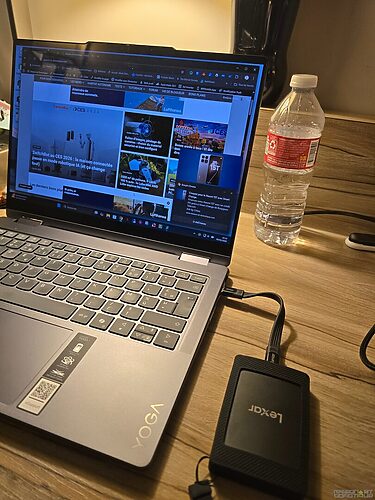
Against its rivals, the Yoga 7 2-in-1 showcases its versatility, connectivity, and display quality, all while fitting into a price point that does not cater to all budgets. The issue of upgradability (soldered RAM, not easily removable storage) must be anticipated right from the order, but this unfortunately remains the norm in this category of high-end convertible laptops. In my configuration of 16Go of RAM and 512Go of storage, the laptop does its job perfectly for my nomadic use. I just have an external SSD that accompanies me to store the rushes of my videos, which quickly take up a lot of space. Bought for just under €800 during the last Black Friday, it’s a perfect laptop for my hybrid needs! The choice was difficult, but I do not regret it at all!
Is the Intel version of the Yoga 7 2-in-1 suitable for gaming?
The Intel Core Ultra 5 configuration and the Intel Arc 130V graphics card tested here allow for playing less demanding or older titles in 1080p, but this convertible is not designed for intensive AAA gaming. It remains ideal for multimedia, light graphic creation, and advanced office work.
Can RAM or storage be increased on the Lenovo Yoga 7 2-in-1 after purchase?
No, the LPDDR5x 16 Go RAM is soldered and non-upgradable. The SSD NVMe PCIe 4.0 is modular but requires opening the chassis, which may affect the warranty. Lenovo prioritizes ultra-portability and compactness at the expense of upgradability.
Is the Yoga 7 2-in-1 compatible with all Lenovo styluses?
Yes, the 14-inch OLED display offers multi-touch compatibility and accepts most Lenovo styluses (Active Pen 3, etc.). However, the stylus is not included in the box and must be purchased separately for note-taking or drawing use.
How does Lenovo manage webcam privacy on the Yoga 7?
The 5 MP infrared webcam is equipped with a physical privacy shutter, allowing for quick coverage of the lens to protect privacy. It supports Windows Hello for quick and secure identification via facial recognition.
What is the actual autonomy observed with the 70 Whr battery in the Yoga 7 2-in-1?
In everyday use (web, office, multimedia), autonomy ranges from 8 to 10 hours depending on brightness intensity and OLED utilization. Demanding tasks (video editing, gaming, AI) will lower this number, but the battery remains effective for a day of mobility.


Please remain courteous: a hello and a thank you cost nothing! We're here to exchange ideas in a constructive way. Trolls will be deleted.