



Résumer cet article :
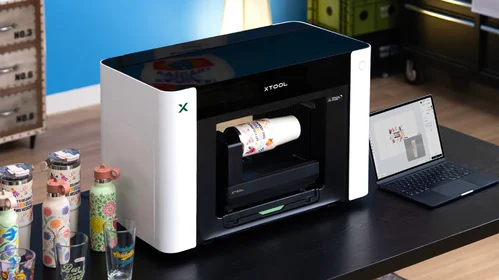
For a few years now, xTool has been releasing products at a pace unique to them. Laser engravers, cutting modules, the M2 that I am testing right now: each product is interconnected with the previous one. Now, the Chinese manufacturer moves on to UV printing with the O1 Omni Printer: a machine that can print on wood, metal, glass, ceramics, plastic, faux leather, and, depending on the version, directly on textiles. All of this comes in a desktop unit, starting at €1,549.
A new step in the evolution of the xTool ecosystem
I have already shared several tests of DIY machines: 3D printers, laser engravers, etc. It is a field that interests me greatly, especially since my wife, sewing creator, also uses this type of machine a lot for her creations. I have been following xTool’s releases for several years. CES, IFA – their booth is one that I consistently visit.
What has always pleased me about them, apart from the quality of the equipment itself, is their way of thinking about the catalog. Where most manufacturers release machines that are independent of one another, xTool designs each device to interact with the others. The M2 is a good example, as are the P2, P3, or the F2 Ultra.
With the O1 Omni Printer, it goes even further. What is created on the machine can be automatically cut on another, with no need to re-import or reposition in third-party software. XTool Studio manages the alignment between printing and cutting. For those who regularly produce signs, plaques, or customized objects, it really changes the working method.
A printer capable of printing on (almost) everything
UV printing has existed for a long time. The problem until now has been that these machines were expensive and designed for equipped workshops, not for a garage or a small studio.
The O1 Omni Printer can print directly on:
- wood
- acrylic
- glass
- metal
- ceramics
- leather and faux leather
- plastics
- canvas
- composite materials
- pre-made objects
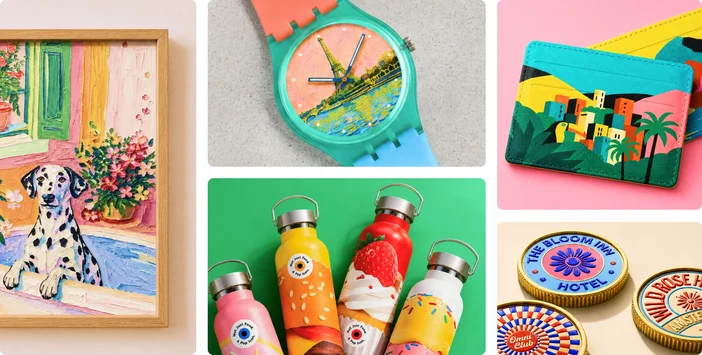
And it can also produce UV DTF transfers to decorate cylindrical or complex-shaped objects.
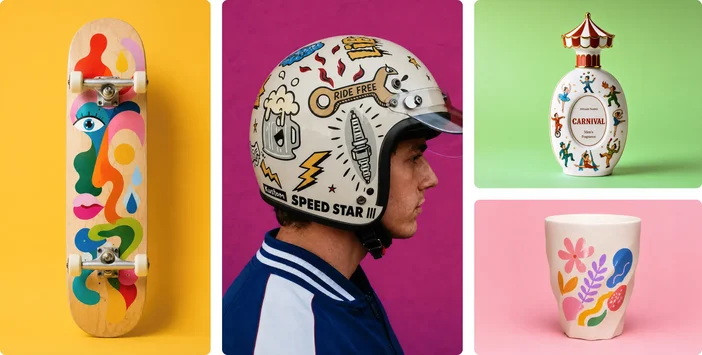
Some concrete use cases:
- customizing a stainless steel water bottle
- making high-end coasters
- creating trophies
- printing directly on a smartphone case
- producing embossed keychains
- decorating 3D printed parts
Three versions to meet different uses
xTool offers three versions.
The first has a UV head. It targets makers and creators who want to personalize rigid substrates.
The second has two UV heads. The second is not only for speed; it expands the machine’s capabilities to specialized inks, such as flexible white for soft materials or fluorescent inks.
The third replaces this second head with a textile head. This results in four modes in a single machine: direct UV printing, UV DTF, DTG (Direct To Garment), and DTF textile. Choose between an aluminum plate or a custom t-shirt.
Really impressive embossed prints
This is what surprised me the most when discovering the machine. The O1 can stack multiple layers of ink to create visible relief: up to 7 mm in thickness according to xTool. This is no longer flat printing: embossed logos, textures, material effects. In the examples shared by the first creators who received their machine, the result is stunning. For someone who sells handmade creations, it completely alters the object: moving from “printed” to “crafted”.
A precise positioning system
The placement of objects is often the weak point of UV printers. A simple camera overhead can cause distortions at the edges.
xTool has taken another direction with the Pixel Scan. The system relies on a CIS sensor, similar to those found in professional scanners. The object is scanned before printing, providing very precise positioning without optical distortion. A laser sweep also measures height differences to adapt the printing to the surface contours.
Good news for both mass production and unique pieces.
Maintenance designed to reassure users
UV printers have a bad reputation regarding maintenance. Inks that dry, nozzles that clog, endless cleaning.
xTool has worked on this aspect. The O1 includes a system called Smart Cycle 2.0 that automatically mixes white ink, circulates the inks regularly, monitors humidity and temperature, and even includes a vacation mode to protect the head during two weeks of non-use.

The cartridges are sealed, preventing contamination and simplifying handling. Less flexibility than with refillable tanks, but for someone new to UV printing, this is likely more reassuring.
An already promising print quality
Initial feedback on the colors is positive. The support white allows for vibrant printing even on dark materials.
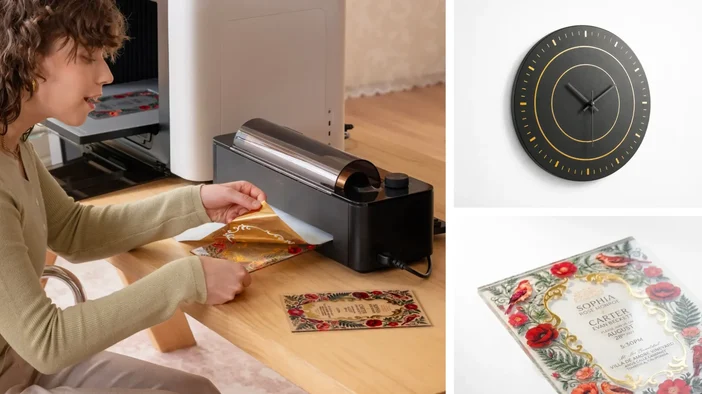
With the laminator, you can also produce varnish effects, metallic finishes, or lenticular prints. During the launch in Berlin a few days ago, creators printed on glass, faux leather, textiles, and cylindrical objects with convincing results.
Software that continues to make a difference
This is where xTool really gains an edge over the competition: the software. XTool Studio is enhanced with each update.
For the O1, this includes AI tools capable of transforming a photo into stained glass, embroidery, or painting, relief management, a common workflow with laser engravers, and automatic object positioning. The software is becoming the heart of the system.
Accessories that further extend possibilities
As with other xTool machines, the O1 can evolve with modules. A rotary axis for printing directly on water bottles, mugs, or bottles. A laminator to produce UV DTF transfers with golden, silver, or holographic effects. A unroller to print long strips of stickers or vinyl.
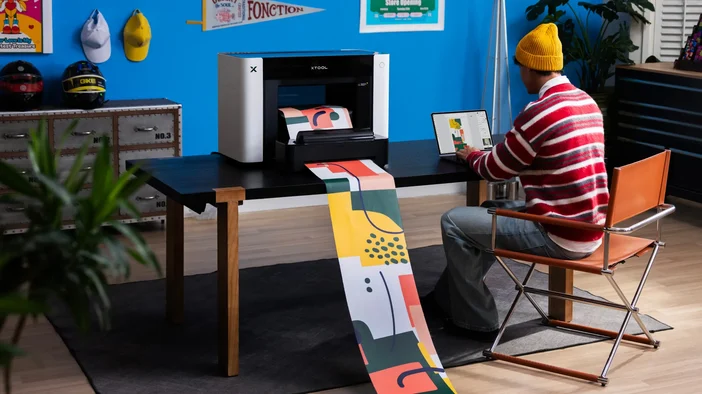
You buy the machine, add what you need.
A machine also designed for creators wanting to sell their works
The O1 Omni Printer is not just for DIY enthusiasts. Etsy creators, artisans, customization shops, signage manufacturers, corporate goodies: all can produce quality objects with a single machine.
Moving from a rigid object to a personalized garment without changing workshops can save quite a bit of time and materials.
Pricing: a more accessible positioning than expected
As mentioned above, there are three configurations, available on the official page:
- O1 Omni Printer UV (single head): €1,549
- O1 Omni Printer Dual UV (dual head): €2,499
- O1 Omni Printer UV + DT Fabric Edition: €2,549
For a machine capable of printing on so many materials, creating reliefs, selective varnishing, and DTF transfers (with the added textile option), the prices are lower than what is generally found in the professional sector.

The consumables are also well-priced. Standard UV cartridges of 125 ml at €14.99 during launch (subsequently €20.99), high-capacity white cartridges of 290 ml starting at €25.99. In a machine of this type, inks represent a significant portion of the budget – this is something to keep in mind over time.
A pre-order offer at €50
xTool offers a pre-order with a €50 deposit, deducted from the final price and refundable if you change your mind.
First registrants access a launch offer announced at €455 in gifts: a Batch Flow Jig (templates for quickly positioning multiple identical objects in series), discounts on inks, Atomm AI credits for the AI functions of the software, and other bonuses reserved for the first buyers.

If you were already considering purchasing a UV printer, it’s worth securing the launch price now.
As usual, to facilitate the investment, xTool offers interest-free payments spread over 12 months (starting at €129/month) and, if you are subject to VAT, exemption from VAT upon payment, which saves 20% on the purchase.
Our first opinion
I haven’t yet had the machine in hand, so this first opinion remains necessarily partial. But it is the announcement that has intrigued me the most in the maker world for some time – not because it is a desktop UV printer, but because xTool clearly seeks to integrate it into a complete workflow: UV printing, textiles, relief, laser cutting, all controlled by the same software.
If it works as announced, this is a machine that can truly simplify the lives of creators who juggle several pieces of equipment today.
Having followed xTool closely, I finally gave in, and I recently acquired the M2 that was released a few weeks ago, for which I will provide a complete review soon. I hope to test the O1 shortly after: seeing how the two integrate will be a good way to judge whether the ecosystem promise truly holds!




Please remain courteous: a hello and a thank you cost nothing! We're here to exchange ideas in a constructive way. Trolls will be deleted.