



Résumer cet article :
Digital photo frames have long had a small identity problem. Too bright, too “screen-like”, too much of a gadget sitting on a shelf. Nice for scrolling through memories, yes. But rarely elegant enough to replace a real frame hanging in a living room.
With the SwitchBot AI Art Frame, the approach is different. Here, no backlit LCD screen, no shining display, no cable hanging down to a socket. SwitchBot uses a E Ink Spectra 6 color panel, in other words, color digital ink, to display photos, artworks or images generated by artificial intelligence. The goal is to give the impression of having a real painting on the wall, but capable of changing images whenever you want.
I was able to test the 13.3-inch version, probably the most interesting format in the range. The small 7.3-inch model is rather designed for a desk or shelf, while the large 31.5-inch model clearly targets large walls… and big budgets. The 13.3-inch version finds a good balance between visual presence, discretion, and price, even though we will see that not everything is perfect.
In short
The SwitchBot AI Art Frame is not a classic digital photo frame. It operates in a different category. Its color E Ink screen completely transforms the visual rendering, creating an effect close to a paper print, without light or glare. This makes all the difference in daily use: you forget that it is a connected object.
On the 13.3-inch version, the balance is really interesting. Large enough to decorate a room, but still reasonable in terms of price. The battery life is impressive, lasting several months or even years depending on usage, and the absence of a cable enhances the illusion of a real painting.
The product performs best with artworks, illustrations, or edited images. Classic photos work, but often require some adjustments to really stand out. The integrated AI can help, but it relies on a subscription, which may be a drawback.
Ultimately, this frame is primarily targeted at those who want a connected, evolving, and discreet decorative object, rather than a simple screen to display photos. In that role, it is truly successful, even though there are still some limits regarding the app and storage.
A digital frame that definitely does not want to resemble a screen
The SwitchBot AI Art Frame comes in three sizes: 7.3 inches, 13.3 inches, and 31.5 inches. The model tested here, at 13.3 inches, has a resolution of 1600 x 1200 pixels, with a density of 150 ppi. It has a 2000 mAh battery, charges via USB-C, communicates over Wi-Fi 2.4 GHz and Bluetooth LE, and can store up to 10 images locally. The officially announced price for this version is €349.99, compared to €149.99 for the small model and €1499.99 for the very large format.
The first impression is frankly good. The frame does not give that feeling of a high-tech product disguised as a decorative object. It really looks like a classic frame, with a white mat and a sober finish. No visible cables, no stray light, no visible interface on the front. Once placed or hung, it becomes forgettable. And that’s exactly what you expect from this type of product.
The 13.3-inch version also benefits from being large enough to be seen from a distance, without becoming intrusive. On an office wall, in an entryway, near a bookshelf or on a low cabinet, it easily finds its place. The format remains compact, but it moves beyond the simple desk gadget.
Unboxing: SwitchBot provides everything to set it up quickly
The packaging clearly announces the color: a connected frame to a mobile app.

Inside the box, you’ll find the frame, several spare white mats, fixation hooks, adhesives, a USB-C cable, a power adapter, a small bubble level, and documentation.

It’s complete, neat, and especially designed to avoid having to pull out the entire toolbox right from the first few minutes.

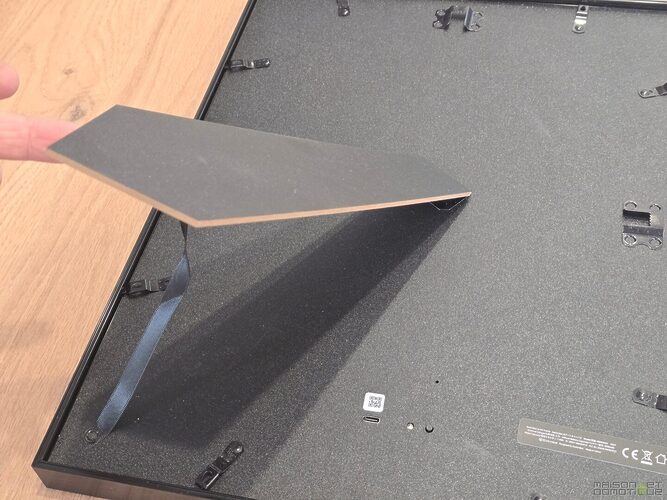
At the back of the frame, SwitchBot has integrated a stand allowing it to be displayed in both portrait and landscape modes.
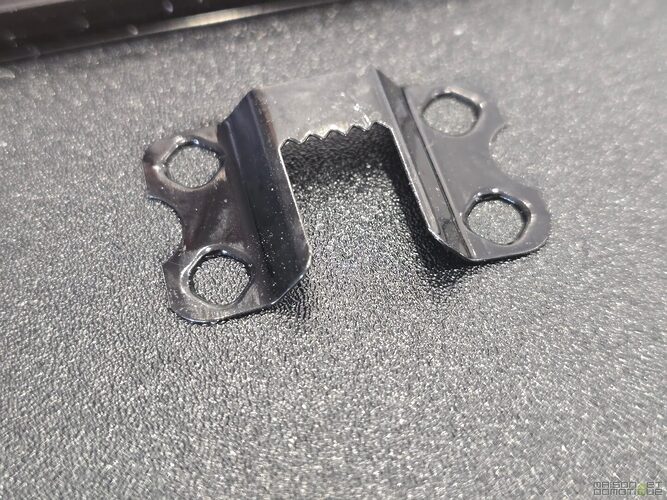
Hooks also allow it to be hung on the wall.
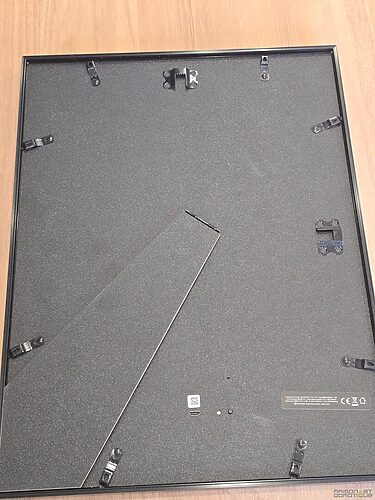
The USB-C port is solely for charging. Once charged, the frame operates wirelessly, which visually changes everything. A frame with a cable running down the wall is no longer an illusion!
The frame is also advertised as compatible with certain IKEA frames from the RÖDALM range, to change the exterior look. The idea is excellent, as it would allow the SwitchBot AI Art Frame to adapt to a more wooden, lighter, or classic decor. One small caveat: depending on the countries and formats, IKEA dimensions can vary. It is, therefore, better to check precisely before purchasing a replacement frame. In France, the frame unfortunately does not seem to match the same dimensions, so one will have to find an equivalent.

Installation and setup: a few minutes in the SwitchBot app
Starting up goes through the SwitchBot app. You press and hold the button located at the back of the frame for a few seconds, add a new device, then connect the frame to the Wi-Fi network. The procedure is simple and quite quick. You then need to name the frame, associate it with a room, and choose what you want to display.
The app offers several main access points. The Album mode allows you to send your own images to the frame. The Gallery mode gives access to already available works. The AI Studio allows you to generate or transform images using artificial intelligence.
Finally, the settings allow you to define the orientation, the slideshow behavior, the battery level, or even firmware updates.

The frame arrived with a very low battery, under 10%, which even prevented launching a firmware update before recharging. This is not dramatic, but it’s good to know. Before planning a permanent wall installation, it’s better to charge it completely, make the updates, and only then hang it.


E Ink Spectra 6: the real secret of this frame
The most interesting point of the SwitchBot AI Art Frame is undoubtedly its E Ink Spectra 6 panel. Unlike a classic LCD screen, it does not produce light. It uses colored pigments that move to form the image. The rendering is therefore closer to a paper print than to a screen.

The result: no blue light, very few reflections, a matte surface, and an image that remains visible even in bright light. This is very different from a traditional digital photo frame. This attracts less attention like a screen but integrates much better into a room.

Another huge advantage: the digital ink only consumes energy when the image changes. Once the image is displayed, it remains visible without continuous consumption. Even if the battery runs out, the image remains displayed. The frame therefore continues to serve as a painting, even when turned off. SwitchBot claims up to two years of battery life with one image change per week, thanks to this 2000 mAh battery.

However, there is a downside. The refresh is not instant. When a new image is sent, the frame goes through several visual stages, with flashes and successive color changes. The update generally takes about 15 to 20 seconds. This is not an issue if the image changes once a day or once a week. However, it is not suited for a very dynamic slideshow like on a tablet.
Image quality: superb for art, more capricious with photos
This is probably the most important point of the test. Is the rendering beautiful? Yes. But not with any image.
On graphic works, illustrations, Japanese prints, paintings, drawings, or AI-generated images with bold colors, the result is truly convincing. The matte rendering gives an impression of a physical object.

You’re not looking at a screen; you’re looking at almost a print. This is where the SwitchBot AI Art Frame makes complete sense.

On classic photos, the assessment is more nuanced. Bright photos, with good contrast and bold colors display correctly.

Dark photos, poorly lit indoor scenes, or images with a lot of fine detail lose impact. The blacks may lack depth, colors sometimes become less faithful, and some areas blend a bit.

This is not a flaw specific to SwitchBot, but rather a current limitation of color E Ink. The Spectra 6 technology is beautiful for simulating paper, but it does not have the brightness or vividness of an OLED or LCD screen. Therefore, one should not buy this frame expecting to recreate the rendering of a tablet. That would miss the point of the concept.

You also need to take a little distance. Up close, you can see the ink dots, and the resolution appears less fine than on a modern screen. At normal distance, the illusion works much better. SwitchBot also states this on its product sheet: the pixels of the E Ink Spectra 6 are larger, with a perceived lower resolution, and the rendering is better when observing the frame from a bit of distance.
AI Studio: fun gadget or real good idea?
The product name emphasizes AI a lot with this “AI Art Frame.” In the SwitchBot app, the AI Studio offers two main functions.
The first allows generating an image from a prompt. You describe a scene, a style, an atmosphere, and then the app generates a suitable image for the frame. For example, a beautiful Sologne forest in spring:

Once synchronized to the frame:

The second function, probably the most useful, allows transforming an existing photo into an artistic image. You can apply different styles: oil painting, minimalist drawing, black and white sketch, comic style, engraving, etc.

And there, the result becomes really interesting. An average photo, not necessarily ideal for E Ink, can become much more convincing once transformed into an illustration. This is probably the best way to use this frame with personal memories.

The problem is that this AI function comes with a subscription, at €4.99 per month, allowing the creation of 400 images. This is not huge, but it can be annoying on a product already priced at €349.99 for the 13.3-inch model. Especially since AI is in the product name. We would have liked a more generous free quota or a few transformations included each month without a subscription.

Fortunately, the subscription is not mandatory. You can very well use your own images, prepare them with another tool (another AI?), and then send them to the frame. With a bit of practice, it’s even possible to achieve very good results by optimizing images before import: stronger contrast, bolder colors, simple cropping, and a clearly readable subject.

Gallery, album, and slideshow: practical, but still limited
The SwitchBot app allows storing up to 10 images in the frame. This is sufficient for alternating a few artworks, creating a small seasonal atmosphere, or rotating a selection of memories. But let’s be honest: 10 images is few.
A classic digital photo frame can often connect to Google Photos, Apple Photos, a memory card, or a cloud service. Here, the approach is much more closed and minimalist. No automatic synchronization with a Google Photos album. No bulk import from a complete library. No advanced family management. You choose your images, send them, and the frame keeps them locally.
The slideshow allows defining automatic changes, with intervals of up to 24 hours. It’s practical, but we would like more flexibility. For example: change once a week, only on weekends, according to a home automation scene, or based on a specific time of year. The product makes you want to go further than what the app currently offers.

The integrated gallery of works is a good idea. It allows direct access to artistic content without having to prepare everything yourself. But it would benefit from being richer, more modern, and better organized. For now, it’s a temporary solution, but it does not replace a real digital art platform.
Battery life: does the promise of two years hold up?
SwitchBot claims up to two years of battery life with one image change per week. This may seem huge, but with E Ink, it’s coherent. The frame really only consumes power when the image changes.
In a rigorous test with an image change every 15 minutes, the frame went from 65% battery to 10% in 20 days. Extrapolating this provides about 38 days of battery life with a very intense rhythm, much more demanding than the expected usage by SwitchBot.
This is fairly reassuring. In actual use, nobody will change the image every 15 minutes consistently. If you set a daily change, the battery life should already be quite comfortable. If you opt for a weekly rotation, the idea of lasting for several months, or even much longer, seems credible.
And then there’s this very appreciated detail: even when the battery is empty, the image remains displayed. The frame does not become a black rectangle on the wall. It remains a painting. It’s quite simple but essential for a decorative object.
Home Assistant: a discreet but promising integration
The SwitchBot AI Art Frame remains primarily a connected decorative object. But as often with SwitchBot, home automation integration adds an interesting layer.
Through Home Assistant, it’s possible to track certain information like the battery, but also to trigger actions like next image or previous image. It’s not yet a complete home automation dashboard, and that’s not its objective. But it opens up some nice scenarios.

You can imagine a frame that displays a different ambiance depending on the mode of the house. In away mode, a calm artwork that remains for several days. In presence mode, a more regular change. For Christmas, a selection of winter illustrations. For Halloween, a darker ambiance. In an office, a motivating image in the morning, then a more soothing visual in the evening.
You can also imagine a more practical use, even if it’s not the primary vocation of the product. For example, displaying a dedicated image when the house goes into vacation mode, or changing visuals during a family event. It won’t be as dynamic as a connected screen, but precisely, that’s what makes it elegant. It doesn’t scream “look at me,” it complements the ambiance.
In use: an object you forget about, and that’s a good sign
After a few days, the SwitchBot AI Art Frame does not behave like a gadget that one manipulates constantly. It becomes a living decorative element. You choose a few images, adjust the rhythm, and then let it do its thing.
This is also where you better understand its interest. A classic frame requires you to choose one photo or work, then live with it for months. A classic digital screen often gives an impression that is too bright, too artificial. The SwitchBot AI Art Frame sits between the two. It maintains the flexibility of digital while providing the visual calm of paper.
The 13.3-inch version is clearly more relevant than the small model for a living space. The 7.3 inches can be cute on a desk, but it quickly lacks presence. The 13.3 inches begins to have a real decorative role. The 31.5 inches must be spectacular, but its price of €1500 makes it suitable for very specific uses.

You simply have to accept its limits. This is not a connected family frame like an Aura or a Nixplay. This is not a wall tablet. This is not a screen to display real-time information. It is a connected artistic frame. And when judged as such, it becomes much more convincing.
Strengths of the SwitchBot AI Art Frame
The biggest strength is obviously the E Ink rendering. On good images, the paper effect works very well. Artworks, illustrations, AI creations, and graphic visuals stand out with a lot of charm.
The absence of a cable also completely changes integration. You can place it or hang it without worrying about the nearest outlet. For a decorative object, this is a real luxury.
Battery life is also excellent. Even under intensive use, the frame lasts a long time. Under normal usage, recharging should become a non-issue.
Compatibility with the SwitchBot and Home Assistant ecosystem adds a welcome home automation touch. It’s not indispensable, but for us smart home enthusiasts, it’s clearly a small plus.
Finally, the AI Studio can really improve the rendering of personal photos. Transforming an average photo into an illustration adapted to E Ink sometimes gives very beautiful results.
Weaknesses to know before purchase
The price remains the main barrier. At €349.99 for the 13.3 inches (currently €297 due to a promotion), the SwitchBot AI Art Frame requires a real budget. You can find classic digital photo frames much cheaper, even if they do not offer the same visual experience at all.
The storage limited to 10 images quickly frustrates. For a product so focused on art and decoration, one would like to be able to create real collections, seasonal albums, or a broader rotation.
The subscription to fully benefit from the AI can also be off-putting. On a product that has AI in its name, having to pay extra to fully exploit it leaves a little taste of “there’s a piece missing in the box.”
The photo rendering remains uneven. Dark photos, low-contrast, or overly detailed images do not showcase the frame. You need to choose your images carefully, or even rework them.
Finally, the app would benefit from offering more planning and automation options. The hardware makes you want to do many things, but the software still remains a bit conservative.
Who is the SwitchBot AI Art Frame for?
The SwitchBot AI Art Frame is made for those who love decor, discrete tech, and connected objects that do not look like gadgets. If you are looking for a frame that can display artworks, AI creations, or memories transformed into illustrations, it has a lot of charm.
It also fits very well in an office, a workspace, an entryway, or a modern living room. In a connected home, it can become a small ambiance element, controlled according to life moments.
However, if your priority is to display hundreds of family photos with cloud synchronization, comments, shared albums, and automatic updates, this may not be the best choice. A classic digital photo frame will be more practical.
And if you are looking for a wall screen to display weather, calendar, surveillance, energy or Home Assistant dashboards, it’s better to go for a dedicated tablet or screen. The SwitchBot AI Art Frame plays a different score.
Verdict: a superb connected decorative object, still improvable
The SwitchBot AI Art Frame 13.3 inches is one of the most interesting digital frames available right now, precisely because it refuses to resemble a classic digital frame. Its E Ink Spectra 6 panel provides a matte rendering, calm, very close to paper. On artworks and graphic images, it is truly successful.
Not everything is perfect. The price is high, local storage is limited, AI requires a subscription, and classic photos are not always flattering. But the product has a real personality. It brings something different to the connected home: technology that knows how to be discreet.
For me, the 13.3 inches version is the best compromise in the range. It is large enough to become a real decorative element, without tipping into the very high price of the 31.5 inches model. If you enjoy personalizing your interior, changing ambiance with the seasons, showcasing your creations, or giving a second life to your photos, this frame clearly has something to say.

SwitchBot AI Art Frame
FAQ: SwitchBot AI Art Frame
Does the SwitchBot AI Art Frame replace a classic digital photo frame?
Not really. It should not be seen as just a connected photo frame, but rather as a digital painting. It is perfect for displaying a few carefully chosen images, but less suitable for scrolling through hundreds of photos automatically.
What is the difference between E Ink and a classic screen?
E Ink does not emit light. It uses pigments to display the image, like ink on paper. Result: no glare, no eye strain, and a much more natural rendering than an LCD or OLED screen.
Can I display my own photos?
Yes, no problem. You can send your photos via the SwitchBot app. It is even advised to slightly optimize them (contrast, brightness) for a better rendering.
Why is the rendering of photos sometimes less good?
E Ink technology is more suited for illustrations and graphic images. Dark photos or very detailed images can lose contrast and readability. A reworked image or one transformed into an artistic style often gives a better result.
Is artificial intelligence mandatory?
No. AI Studio is optional. You can use your own images without a subscription. However, to generate or transform images directly in the app, a monthly subscription is necessary.
How many images can be stored?
The frame can hold up to 10 images locally. This is sufficient for simple rotation, but it remains limited compared to other digital frames.
Can the image change be automated?
Yes, but still in quite a simple way. It is possible to program a slideshow or changes at regular intervals. To go further, integration with Home Assistant allows triggering changes according to home automation scenarios.
What is the actual battery life?
It all depends on the frequency of image changes. With classic usage (one image per day or week), battery life can reach several months, or even up to two years according to the manufacturer. The more often you change images, the quicker the battery drains.
What happens when the battery is empty?
The image remains displayed. This is one of the major advantages of E Ink. The frame therefore continues to serve as a painting, even without battery.
Can the frame be easily hung on the wall?
Yes, everything is provided in the box. It is possible to fix it to the wall or place it on a piece of furniture. And since it operates wirelessly, there is no constraint related to an electrical outlet.
Is it compatible with Home Assistant?
Yes, through the SwitchBot ecosystem. This allows for tracking battery life or triggering image changes in home automation scenarios.
Is it a good choice for a connected home?
Yes, if you are looking for a discreet, aesthetic, and original object. This is not a control screen, but rather a connected ambiance element that fits perfectly into a smart home.





Please remain courteous: a hello and a thank you cost nothing! We're here to exchange ideas in a constructive way. Trolls will be deleted.