


Résumer cet article :
When discussing home networks in France, one first thinks of the operators’ boxes. Freebox, Livebox, Bbox, SFR Box… they do the job, sometimes very well. But as soon as you want to take control over your network, improve Wi-Fi, create a true Mesh, properly manage guest access, VPN, telephony, or even a few home automation functions, the limits quickly become apparent. That’s when I installed the FRITZ!Box 7690. A high-end Wi-Fi 7 router, originally designed for DSL connections, but perfectly capable of functioning behind a fiber modem or an operator box thanks to its 2.5 Gbit/s WAN port. I tested it in this configuration: behind a Freebox Pop connected to fiber at 5 Gbit/s, with the Ethernet output of the Freebox capped at 2.5 Gbit/s.
A very realistic configuration for many French users: keep the operator box for Internet access, and entrust the real home network to a more complete and configurable router. This allows for true network management, and you don’t have to reconfigure everything when you change operators to take advantage of the best rates :)
But the FRITZ!Box 7690 does not just provide fast Wi-Fi. It also includes a home automation layer with DECT ULE and Zigbee, a complete integrated telephony system, WireGuard/IPSec VPN, advanced parental controls, Mesh capability, mobile apps, regular updates, and a 5-year warranty. The official specifications claim Wi-Fi 7 up to 7.1 Gbit/s, DSL modem up to 300 Mbit/s, two 2.5 Gbit/s ports, Zigbee, DECT, VPN, telephony, and home automation. Let’s discover it without delay.
FRITZ!, a well-known manufacturer in Germany, much less so in France
The FRITZ! brand, formerly AVM, is very well known in Germany, where a FRITZ!Box is almost an institution. The company designs its products in Berlin and manufactures them in Europe since 1986. In 2025, it employed 925 people for a turnover of 630 million euros, which is quite impressive. Yet, in France, the brand remains confidential, as we are very accustomed to operator boxes. But as soon as you scratch the surface a bit, you understand why Germans appreciate it so much: it is stable, complete, maintained over time, and designed to last.
In Germany, FRITZ!Boxes are not just routers. They are real network centers. They replace or complement the operator box, manage DECT phones, answer machines, guest access, VPNs, USB NAS, Mesh repeaters, smart plugs, thermostats, and now Zigbee devices.
This approach contrasts with the French market, where we have long let the operator box manage everything. But with the multiplication of connected objects (cameras, solar batteries, robotic lawn mowers, NAS, home automation servers), the network becomes a real issue. The FRITZ!Box 7690 addresses this evolution.
Unboxing and presentation of the FRITZ!Box 7690
The FRITZ!Box 7690 retains the typical design of the brand: white and red casing, quite flat, rounded shapes, serious finish. You either love or hate this immediately recognizable style. It’s not a black router bristling with antennas like a gamer’s spider, and frankly, it changes things a bit!

In the box: the router, its power supply, a 4 m DSL cable, a 1.5 m Ethernet cable, and the startup guide.

At the back, connectivity is one of the strong points of the product. DSL ADSL2+/VDSL port up to 300 Mbit/s, WAN/LAN port 2.5 Gbit/s, LAN port 2.5 Gbit/s, two Gigabit LAN ports, two analog phone ports, not to mention a DECT base, a Zigbee base, and a USB 2.0 port on the side.
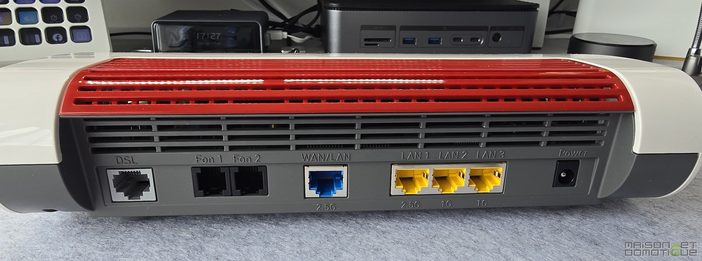
The two 2.5 Gbit/s ports are a real selling point. The first connects the FRITZ!Box 7690 to the Freebox Pop. The second can power a 2.5 Gbit/s switch, a NAS, a mini PC, a Home Assistant server, or any other bandwidth-hungry equipment. In practice, it avoids capping everything at 1 Gbit/s and wasting the benefits of fast fiber.

The downside is that there are only four Ethernet ports in total. For a modern setup with NAS, desktop PC, home automation gateway, Hue bridge, console, TV, switch, you quickly reach the limit. In my case, a switch is essential. But let’s be honest: in a moderately advanced setup, a switch is already often present.

The USB port is only 2.0. For a printer, a backup 4G/5G dongle, or occasional storage, that’s enough. But to turn it into a performing mini NAS, no. It’s a bit disappointing compared to the rest of the connectivity, which is quite well sorted.
Installation behind a Freebox Pop fiber
My test installation: the fiber arrives on the Freebox Pop, with a theoretical speed of up to 5 Gbit/s shared. To connect an external router, we go through the Freebox’s 2.5 Gbit/s Ethernet port. The FRITZ!Box 7690 is placed behind it, via its 2.5 Gbit/s WAN port.
The configuration is done from the web interface (fritz.box) or the mobile app. FRITZ!OS offers a guided assistant. You indicate that you are using an external modem or router for Internet access, choose the operating mode. That’s it.
In my case, the Freebox keeps the Internet connection, and the FRITZ!Box 7690 takes over for the local network. You can leave the Freebox active for certain uses, or switch all devices to the FRITZ! network. My recommendation: create a clean Wi-Fi network, connect the important devices, and then gradually migrate the connected objects.

FRITZ!OS deserves a real compliment. Dense but readable. You can feel years of development behind it. The settings are numerous, rarely lost in incomprehensible menus. IP ranges, DHCP, port forwarding, guest Wi-Fi, VPN, user profiles, access schedules, connected devices, Mesh repeaters, phones, home automation devices: it’s all there, without the feeling of managing a clunky professional router. I recently had a Netgear router that had a rather austere interface. Here, this freshness feels good!

The interface is also fast. When you often manage your network, that matters.
A very high-performance Wi-Fi 7, even without the 6 GHz band
The FRITZ!Box 7690 is a dual-band Wi-Fi 7 router. It utilizes the 2.4 GHz and 5 GHz bands, not the 6 GHz band. This is probably the point that will spark the most debate among technical specifications enthusiasts. Is Wi-Fi 7 without 6 GHz really Wi-Fi 7? Yes, because Wi-Fi 7 also brings improvements to the existing bands: MLO, better efficiency, reduced latency, higher data rates. FRITZ! explains that the 7690 utilizes Wi-Fi 7 on a dual-band architecture with intelligent Mesh, while remaining compatible with Wi-Fi 6, Wi-Fi 5/AC, and Wi-Fi N.

In practice, the 5 GHz Wi-Fi is excellent. Nearby, one enjoys very high speeds with recent devices without difficulty. With a local network of 2.5 Gbit/s behind it, there is no longer that artificial ceiling of 900 Mbit/s that is often encountered with routers limited to Gigabit Ethernet.
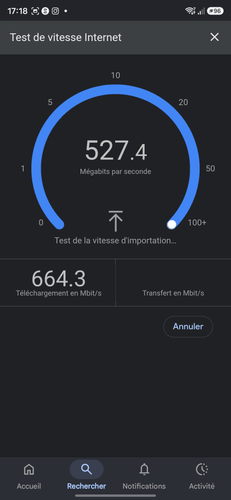
The range is also very good, and that was one of the points I appreciated the most. Wi-Fi is not about displaying a big number on a Speedtest capture one meter from the router. What matters is what remains in the living room, bedroom, office, garage, or at the end of the garden. On this point, the FRITZ!Box 7690 performs well.
In 2.4 GHz, the performance is more modest, but this band remains essential for connected objects. Wi-Fi bulbs, smart plugs, small sensors, old peripherals, garden equipment: not everything lives in 5 GHz yet, far from it. The FRITZ!Box manages this coexistence well.
The absence of 6 GHz remains a limitation in a very crowded urban apartment, where this band can make a difference. For a house, especially in less dense areas, like mine in the countryside, betting on a very good 5 GHz is often more relevant on a daily basis. That’s also what I measured in my case.
FRITZ! Mesh, simple and effective
The Mesh is one of the major advantages of the FRITZ! ecosystem. Rather than piling up repeaters configured individually, a unified network is created managed by the FRITZ!Box. The repeaters automatically take on the network name, Wi-Fi key, and important settings. Devices switch to the best access point based on their location.
The FRITZ!Box 7690 performs this role well. You can visualize the equipment in a clear network map, check their connection mode, speed, the band used, and their membership in the Mesh. Diagnosing a device that is having trouble holding onto the network is handy.
The FRITZ!Repeater 1610 Outdoor was part of the test, addressing a well-known problem on Maison et Domotique: outdoor Wi-Fi.
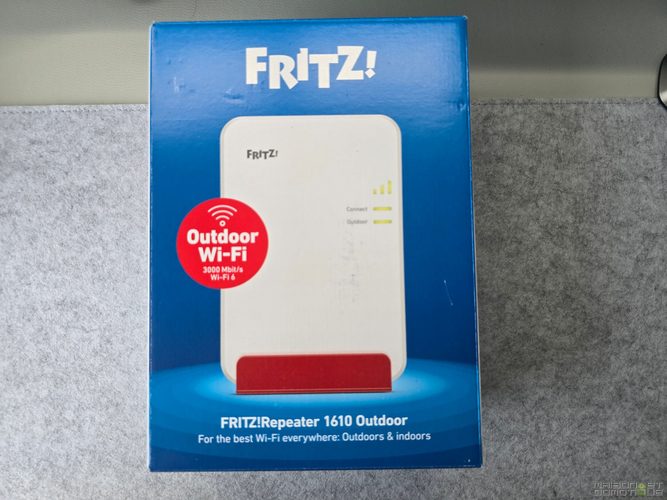
We often talk about Wi-Fi inside the house, but many connected devices live outside. Robotic lawn mowers, outdoor cameras, gate automation, terrace lighting, irrigation modules, connected pools, solar inverters, storage batteries like Zendure in the garage or near the panels. When Wi-Fi does not extend outside the house, all these products become finicky.
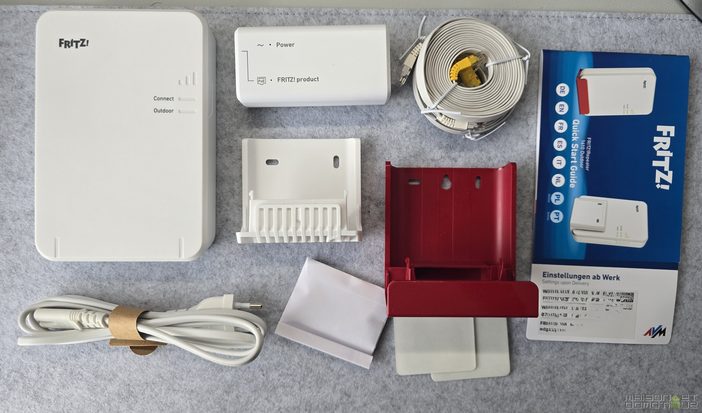
The FRITZ!Repeater 1610 Outdoor offers dual-band Wi-Fi 6 up to 3000 Mbit/s, an IP54 enclosure, Mesh integration, and a Gigabit LAN port with PoE+. PoE allows everything to be passed through a single Ethernet cable: data and power. Under an eave, in a garage, or near a terrace, this single cable changes everything.

In my use case, the benefit is immediate: covering the garden, the mowing area, the energy equipment that aren’t close to the house. No more connection losses for the robotic lawn mower at the far end of the yard, no more solar battery application struggling to retrieve the data.

Wired network: the two 2.5 Gbit/s ports make a difference
The 2.5 Gbit/s WAN/LAN port retrieves high-speed from a fiber box, an ONT, a cable modem, or another router. The second 2.5 Gbit/s LAN port redistributes this speed to the local network.
In my Freebox Pop configuration, this is what was needed. The Freebox outputs at 2.5 Gbit/s via Ethernet. The FRITZ!Box 7690 accepts this speed without capping it at 1 Gbit/s, then sends it to a fast device.
For a typical household, 2.5 Gbit/s seems enormous. But with a NAS, a Proxmox server, a mini home automation PC, local backups, 4K streaming, several PCs, and dozens of connected objects, the benefit becomes obvious. We’re talking about the internal circulation of data within the house, not just internet speed.
The only frustration: two additional Gigabit ports is just a bit tight. For a serious installation, a switch will often be necessary. It’s not a big deal, but it should be anticipated.
VPN, security, and parental controls
The FRITZ!Box 7690 also manages network security, not just distribution.
The integrated VPN is compatible with WireGuard and IPSec. Handy for accessing the home network remotely, consulting a NAS, managing Home Assistant, retrieving a file, or securing a connection from outside.

WireGuard is a good choice: fast, modern, relatively simple to configure. For an advanced user, this is a serious argument. For an installer, it allows remote access to certain devices without exposing sensitive interfaces on the internet.
The parental control feature is very comprehensive: profiles, schedules, restrictions by device, guest access, usage tracking. For a family, this is useful. For a home filled with connected objects, it also allows better segmentation of certain devices.

It is even possible to give “tickets” that grant an additional 45 minutes of Wi-Fi connection :p

The guest Wi-Fi also deserves mention. Secure access for guests without giving them the main network password, with QR Code: scan, and it’s connected, everyone is happy.

Home automation: Zigbee, DECT ULE, and simple scenarios
The FRITZ!Box 7690 integrates a DECT base for FRITZ!DECT phones and devices, and a Zigbee base. It can manage certain home automation devices without needing an additional gateway. DECT and Zigbee devices can be integrated into automations, schedules, and if-then routines, controllable from FRITZ!App Smart Home, the web interface, connected switches, or a FRITZ!Fon.

You can control connected plugs, Zigbee bulbs, thermostats, certain sensors, or FRITZ!DECT devices. The idea is not to replace a complete Home Assistant, but to offer accessible, stable home automation integrated directly into the router. Compatibility is indeed more limited than with a “real” home automation hub, but I was able to pair Philips Hue, Lidl, or even Ikea Zigbee bulbs and plugs without any issues. More complex devices like certain multi-sensors from Aqara may, however, not be supported.

Many users do not want to install Home Assistant, Zigbee2MQTT, MQTT, USB dongles, backups, add-ons, and dashboards. They want to turn on a light, program heating, trigger a plug, simulate presence during holidays, or turn off devices at night. For these uses, FRITZ!OS works well.

Some concrete examples:
- A FRITZ!DECT plug automatically cuts off a TV power strip at night to avoid unnecessary standby.
- A Zigbee bulb lights up in the evening in the entrance according to a time range.
- A FRITZ!DECT thermostat lowers the temperature when no one is present, then restarts heating before return.
- A connected plug measures the consumption of a network or multimedia device.
- A routine simulates presence during holidays by turning on lamps at variable times.
An interesting detail, some features of the FRITZ!Box even enter the scenarios: for example, in the “I’m leaving” scenario, you can turn off all lights, cut the plugs, set the thermostat to eco mode, but also turn off guest Wi-Fi and activate the answering machine for telephony!
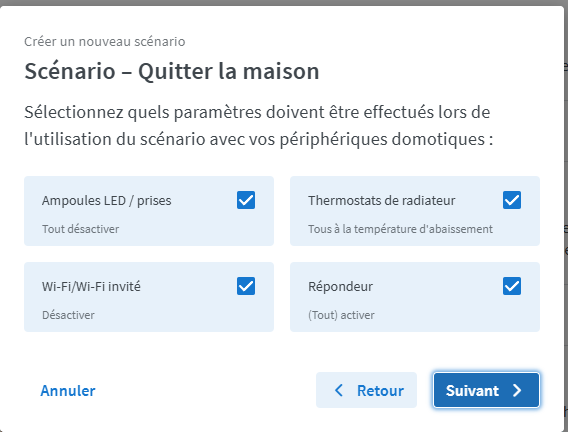
Another interesting possibility: turn on a bulb in a certain color when a call is received. Very handy for hearing-impaired people, for example.

Somewhat more complex routines can be developed with conditions:

For a light connected home, this is sufficient. For an advanced setup, Home Assistant will remain more powerful, but the FRITZ!Box can become an interesting complementary brick (we’ll discuss that further).

FRITZ!Smart Gateway: for furthering the connected home
I also received a FRITZ!Smart Gateway. Its role: to extend the home automation capabilities of the FRITZ! ecosystem, particularly around Zigbee and DECT ULE. It connects to the FRITZ!Box via Wi-Fi or Ethernet and facilitates the addition of Zigbee or DECT ULE devices. It extends FRITZ! Smart Home for Zigbee devices and increases the number of usable DECT ULE devices.
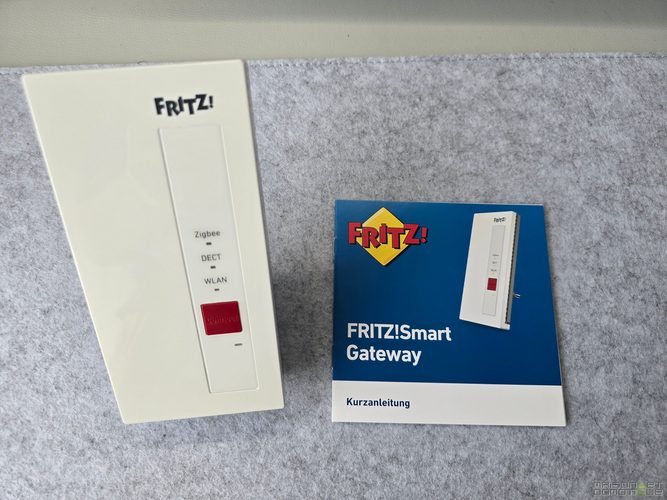
With the FRITZ!Box 7690 already integrating Zigbee, the gateway may seem less essential than with older FRITZ! boxes. But it still holds interest in a large house, or to better position the home automation radio point. It can be positioned in a more central area to improve Zigbee/DECT range, while the FRITZ!Box stays near the fiber entry.
In home automation, the location of the gateway matters. A network box often ends up in a cabinet, office, garage, or near the fiber entry. Not necessarily the best place to communicate with bulbs, sensors, or thermostats scattered throughout the house. A dedicated gateway provides more flexibility.
Telephony: a full integrated central
Telephony is less trendy than Wi-Fi 7, but it is a real strength of the FRITZ! ecosystem. The FRITZ!Box 7690 includes a complete telephone system. It manages analog, IP, SIP, and DECT phones, answering machines, directories, and synchronization of contacts with certain services. You can connect two analog phones, use IP or DECT phones, and rely on the integrated answering machine.

For many French households, the landline has become secondary (I haven’t used a landline for years myself). But for a home office, a tradesperson, a small business, a consulting firm, or a house that maintains a landline, it is very practical.

DECT handsets directly on the box, several numbers, call filtering, message consultation, call tracking from the FRITZ! apps on smartphones. This level of depth is very rarely found in operator boxes.
FRITZ!OS: dense, clear, and very comprehensive
FRITZ!OS is one of the major strengths of the product. The interface is rich without being intimidating. The menus are logical, the assistants guide through routine operations, and advanced users can go very deep into settings.
List of connected devices, speed, IP address, type of connection, history, Mesh membership, bandwidth consumption, etc. everything is there. Access profiles, guest Wi-Fi, VPN, telephony, home automation devices, Wi-Fi schedules, notifications. It’s hard to be more comprehensive.

It’s a real change compared to operator boxes that deliberately limit settings. Here, you have control. For an advanced user, this is a strong argument.

FRITZ! emphasizes regular, automatic updates, support, and a 5-year warranty. For a product that runs 24/7, at the heart of the home’s network, this is reassuring.

In daily use
After installation, the FRITZ!Box 7690 is forgotten. For a router, this is the best sign.
Stable Wi-Fi, connected devices always on, high speeds, responsive interface, Mesh that covers the house. With the FRITZ!Repeater 1610 Outdoor, the benefit is even clearer outside. The garden and energy-connected devices have a more reliable connection.
In a connected house, network stability is everything. It is clearly the backbone of the house. A sensor that no longer sends data, an inaccessible solar battery, a camera that loses its stream, a robotic lawn mower that can no longer communicate, a Zigbee gateway that drops: generally, we blame the connected object. The network is rarely blamed in our minds, yet it often disconnects first.
With the FRITZ!Box, the foundation is solid. Home Assistant, NAS, cameras, repeaters, Zigbee devices, VPN, guest access, remote work, multimedia, light home automation: everything can coexist. It does not replace everything, but it restores order.
One point to watch in my case: potential double NAT if you keep the Freebox in router mode in front of the FRITZ!Box. For classic use, this is not an issue. For advanced uses (incoming VPN, port forwarding, remote access, self-hosted server) it will require proper configuration of the whole setup. Depending on needs: DMZ, adjusted forwarding, or revisiting the network architecture.
Home Assistant Compatibility: two very useful integrations
The FRITZ!Box 7690 also integrates with Home Assistant through two official integrations.
The first, FRITZ!Box Tools, connects Home Assistant to the router. It is used to detect the presence of devices connected to the network, monitor the box’s status, retrieve the external IP, uptime, CPU temperature, some network monitors, manage Wi-Fi switches, parental controls, or trigger actions like a reboot, reconnection, or guest Wi-Fi management. Home Assistant specifies that this integration works with FRITZ!Box routers from the 4xx0, 5xx0, 6xx0, and 7xx0 series, as well as with several FRITZ!Repeaters.
What interests me most in this integration is presence detection. If a family member’s smartphone connects to the Wi-Fi, Home Assistant assumes the person is home. If all phones leave the network, the absence mode is activated: lower heating, cut certain plugs, activate the alarm, close shutters. Simple, local, without GPS.
To activate it: allow TR-064 and UPnP protocols in the FRITZ!Box network settings, then create a dedicated user with “FRITZ!Box Settings” rights. The integration is then added from Settings > Devices and Services in Home Assistant.
The second integration, FRITZ!SmartHome, covers the home automation part. It integrates FRITZ!SmartHome / FRITZ!DECT devices (plugs, thermostats, bulbs, shutter modules) as well as some compatible devices. Home Assistant also indicates support for the FRITZ!Smart Gateway. The plugs appear as switches with measurements according to the models: consumption, power, voltage, current, temperature, or total energy. The thermostats show up as climate entities, bulbs as lights, shutters as covers, and FRITZ! routines as switches or buttons based on their type.
A limitation to note: the FRITZ!Box API does not work in push mode. Home Assistant queries the box every 30 seconds. To monitor a plug, a temperature, or network presence, this works very well. For buttons or sensors that require instant reaction, it is insufficient.
In an advanced setup, the two integrations complement each other well. The FRITZ!Box simply manages some DECT/Zigbee devices, while Home Assistant centralizes the more in-depth scenarios with other home protocols. Turning off guest Wi-Fi at night, sending the guest password by notification when activated, blocking internet on children’s devices at a specified time, triggering an absence mode based on connected smartphones, etc.
For those already under Home Assistant, the 7690 becomes a usable network block in automations, not just a simple Wi-Fi access point.
The limits to be aware of
The 7690 is excellent, but not perfect.
The absence of the 6 GHz band is the limit that will spark the most debate. In a very dense urban apartment with dozens of neighboring networks, a tri-band 2.4/5/6 GHz would have valuable. For a house in less congested areas, this is debatable – but in a Parisian building, it could have made a difference.
USB 2.0 is harder to justify for a product in this range. If you plan to use it for shared storage regularly, the speeds will quickly become disappointing. A printer or a backup 4G dongle, yes. A replacement NAS, no. It is a bit frustrating on this point.

Regarding Ethernet ports, four in total, including two at 2.5 Gbit/s and two Gigabit, is a bit tight for a well-equipped house. A switch remains often essential.
And the price. The Amazon page listed it at a price of €337 at the time of consultation, with a recommended price of €379. It’s not cheap, but the built-in functions justify the price.
Who is the FRITZ!Box 7690 for?
The 7690 is aimed at those who want to take back control of their home network without switching to complex professional hardware. It suits a connected home, a fiber-equipped household, a small business, or a teleworker looking for a stable, comprehensive, and well-maintained router.
It is also very interesting behind an operator box, as in my case with a Freebox Pop. You benefit from fiber speed, with better Wi-Fi, a true Mesh, a clean VPN, a richer interface, and home automation functions.
For someone who just wants “to have Internet,” the operator box will suffice. For those managing cameras, a NAS, a Home Assistant, solar panels, a storage battery, a robotic lawn mower, repeaters, children with access profiles and needing reliable Wi-Fi throughout the house – the FRITZ!Box 7690 is really worth it.
Conclusion
The FRITZ!Box 7690 is a pleasant surprise. On paper, the absence of Wi-Fi 7 in 6 GHz could have raised concerns about a somewhat hybrid product. In use, no: excellent Wi-Fi 5 GHz, two truly useful 2.5 Gbit/s ports, effective Mesh, comprehensive FRITZ!OS, home automation gaining ground thanks to Zigbee and DECT ULE.
Behind a Freebox Pop fiber, it fits perfectly. It does not seek to replace the operator box in all cases, but to regain control of the home network. In a connected house, that’s often what is needed.
With the FRITZ!Repeater 1610 Outdoor, the network finally extends beyond the walls of the house: robotic lawn mowers, cameras, solar equipment, home batteries, outbuildings.
No 6 GHz band, USB 2.0, only four Ethernet ports. These limitations do not spoil the experience. The 7690 remains a powerful, stable, versatile, and pleasant router to use. It’s a manufacturer still little known in France, but the equipment is solid and deserves to be known!



Please remain courteous: a hello and a thank you cost nothing! We're here to exchange ideas in a constructive way. Trolls will be deleted.