


Résumer cet article :
A pool robot, on paper, is always magical. You put it in the water, it works in your place, and you get a clean pool without having to pull out the net every five minutes. In real life, it’s sometimes a bit less idyllic. Some robots forget areas, others struggle on steps, and many have a small annoying flaw: when you take them out of the water, part of the dirt falls back into the pool. Let’s just say it dampens the mood a bit.
The Dolphin EON 120d comes with a rather ambitious promise: to clean the entire pool, including difficult areas like steps, the waterline, or submerged beaches, while providing much more efficient filtration thanks to its DebrisLock basket. This is the highlight of this model. This special basket does not just retain leaves and large debris. It also captures fine particles, compacts debris, and significantly limits the return of impurities into the water when removing the robot. And that, when you’ve already used several pool robots, you quickly understand the benefit!
On paper, the Dolphin EON 120d ticks a lot of boxes. Now let’s see how it performs in real usage.
Unboxing and presentation of the Dolphin EON 120d
Upon unboxing, you immediately feel that the Dolphin EON 120d plays in the premium category.

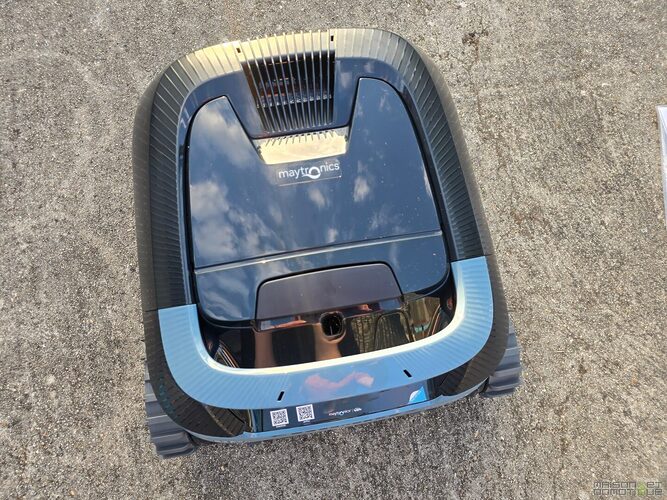
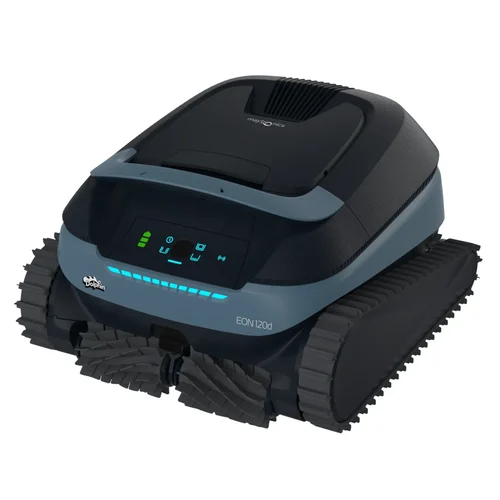
The robot is massive, well-finished, with a modern body and a fairly understated design. It doesn’t try to look like a futuristic gadget, but rather a real maintenance tool designed to last. That’s reassuring.
In the box, we find the robot, its charger, the DebrisLock filtration basket, the famous ClickUp device, and a retrieval hook.
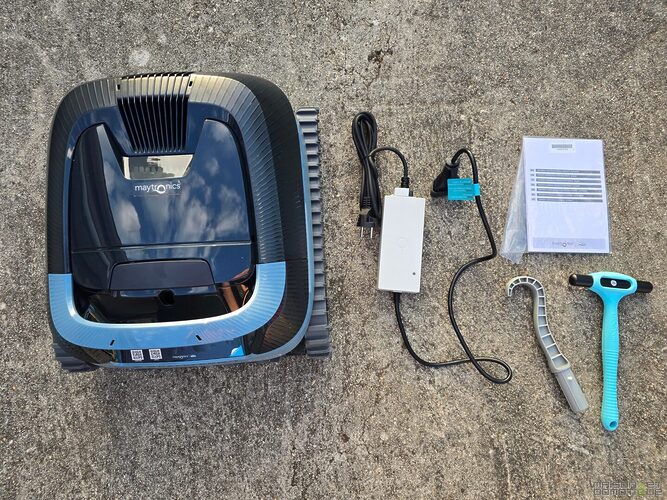
The latter remains useful if the robot is at the bottom of the water, battery empty, or if you need to bring it back manually to the edge. But to be honest, the robot’s operation is so well thought out that I’ve rarely needed to resort to it during my tests.

The control panel is located on top. It includes the on/off button, the battery indicator, and cleaning modes: the UltraRun mode, the bottom only mode, the waterline only mode, and the full coverage mode. The indicators are clear and allow you to quickly understand what the robot is doing.
- Solid blue: it is on and waiting to be placed in the water.
- Flashing blue: it is working.
- Flashing green: it is working in UltraRun or climbing to be retrieved.
- Solid yellow: the filter is full.
- Flashing red: the application must be used to check the error.
The robot weighs 11 kg. It’s not a lightweight, but this weight also contributes to its stability in the water, especially when it climbs walls or works on the waterline. Once submerged, it becomes much more discreet. However, to take it out, you need to let it drain for a few seconds before lifting it completely. Your back will thank you, especially if like me you have an above-ground pool.

A cordless robot, but not a gadget
Going cordless has become very trendy with pool robots, and we understand why. No more floating cable, no more tangled cable, no more outlet next to the pool, no more power block sitting at the water’s edge. You charge the robot, put it in the water, and it works. Personally, I could never go back.
But cordless also has its pitfalls. On some competing models, the autonomy is limited, the suction power drops quickly, or navigation becomes approximate. The EON 120d is among the most advanced models of the moment in this regard.
Its 9600 mAh lithium-ion battery offers a claimed autonomy of up to 4 hours and 30 minutes. This is comfortable, especially for large pools or complex swimming areas. The standard cycles can last 1 hour and 30 minutes, 2 hours, or 2 hours and 30 minutes, depending on the need. The UltraRun mode goes further: it allows the robot to stay in the pool and perform several short cycles on a single charge, up to two and a half weeks according to Maytronics.
Of course, one should not imagine that the robot cleans for two weeks non-stop. It rather performs scheduled passes to keep the pool clean with minimal intervention. For a secondary residence, a vacation period, or simply for those who want to reduce handling, it’s very convenient.
Installation and first startup
Starting it up is simple. First, charge the robot completely until the battery indicators are solid green. A complete charge can take up to 4 and a half hours.
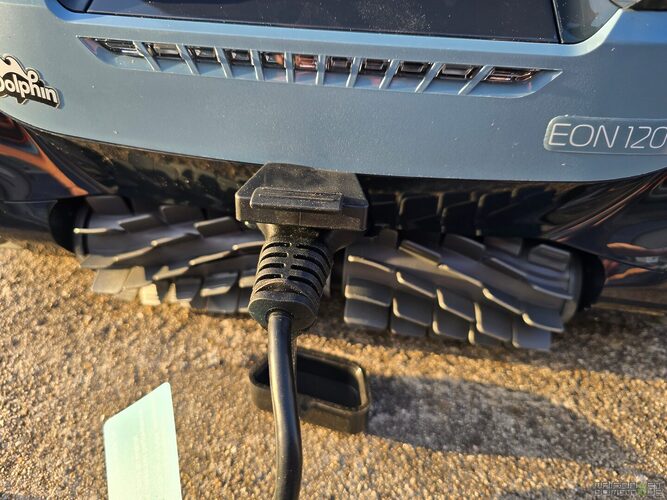
Then, you need to securely close the rubber cover of the charging port, because even if the robot is IPX8, the connector must remain clean and dry.

Maytronics recommends usage in water temperatures between 5 and 35°C, with a pH between 7.0 and 7.8, chlorine below 4 ppm, and a maximum salinity of 5000 ppm. These are conventional values, but they are important. A pool robot, no matter how good, is not there to compensate for totally unbalanced water or walls covered with algae. It cleans, brushes, and vacuums. It does not replace water treatment.
Once charged, press the button briefly, optionally choose the cleaning mode, then quickly place it in the water (within 20 to 30 seconds after turning it on). The robot is designed to operate only when submerged.
Maytronics One App: useful, but not essential
Pairing with the Maytronics One app is done when the robot is out of the water. It’s logical: Bluetooth and Wi-Fi do not transmit correctly through water.

The Maytronics One app is not a gimmick added to make the product sheet look nice. It provides real practical functions.

From the app, you can schedule cleanings, activate UltraRun mode, check the battery level, check the last cycle, access assistance, order accessories, or define the automatic return wall.

This last function is interesting: the robot uses a compass to approximately reach the chosen wall at the end of the cycle. You can therefore indicate where you prefer to retrieve it.

You can also choose additional cleaning modes. In addition to the modes available from the robot, the app offers a Smart mode that analyzes the pool and adapts the route, a Corner mode for the curved areas between the bottom and walls, or a Super Clean mode with enhanced suction until the battery is drained.


Not everything is controllable in real-time when the robot is in the water. This is a normal constraint related to wireless communications. To regain control via the app, the robot must be out of the water or connected to the charger. But in practice, this is not an issue. You configure it, start it, and let it work.
The DebrisLock basket: what other filters can’t do
This is the feature that deserves the most attention on this model.
The DebrisLock basket is not just a simple leaf bin. It is an ultra-fine filtration system with patented backwash technology. Its dual objective: to retain very fine particles and compact debris to prevent the filter from clogging too quickly.
In a pool, dirt is not just limited to fallen leaves. There is also pollen, fine sand, dust, small insects, plant residues, debris carried by the wind… And this is often where pool robots show their limits. They do a good job of sucking up large waste but leave fine particles suspended or release them when we handle them.

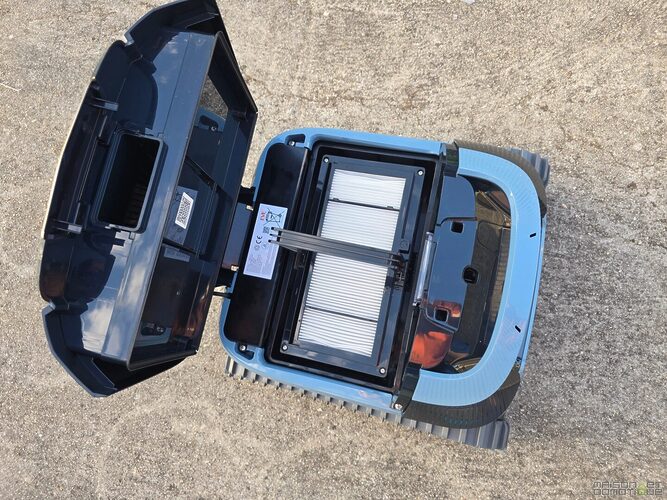
With DebrisLock, the behavior is different. The basket has two compartments and an additional filter panel. Debris is better retained, better distributed, and above all much less likely to come out when the robot leaves the water. This is a point that truly changes the experience.
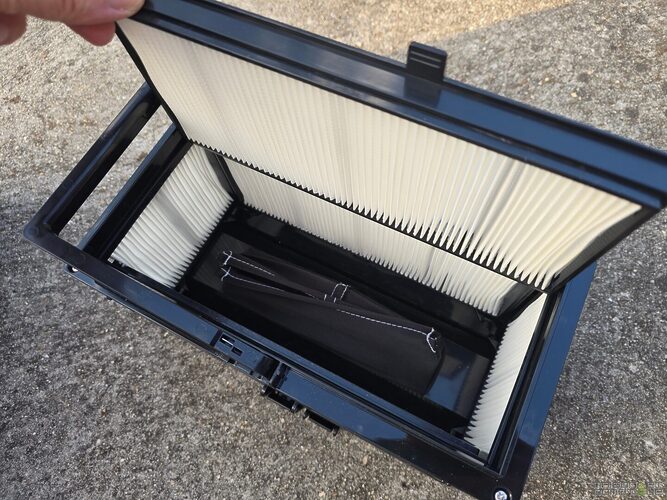
On many competing robots, we observe this frustrating phenomenon: the robot has done its job well, the bottom is clean, and then at the moment of taking it out, a small cloud of dirt escapes and falls back down. It feels like going backwards. With the Dolphin EON 120d, the DebrisLock basket very effectively limits this issue. The dirt stays locked in. The pool remains clean. And psychologically, it’s much more satisfying.

During the tests, I submerged the robot in a purposely very dirty pool, with a lot of debris at the bottom, due to a storm that occurred after the heatwave. After the first pass, the basket was filled, including in the lower DebrisLock compartment.
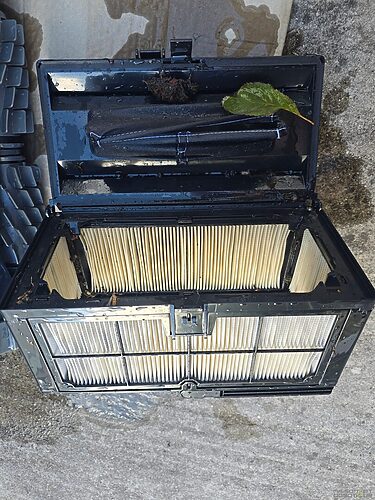
The pool became perfectly clean after two cycles. This is exactly the type of situation where a good robot stands out from an average model.

Cleaning the basket remains simple. You open the top cover, remove the basket, and rinse it with a jet of water. The manual recommends doing this immediately after each cycle to prevent debris from drying and hardening. With the DebrisLock, be sure to rinse both compartments thoroughly. About once a month, Maytronics also advises disassembling the filter panels for a more thorough cleaning.
Bottom cleaning: efficient, methodical, reassuring
On the bottom of the pool, the Dolphin EON 120d works seriously. It does not just wander around randomly. The SmartMap navigation allows it to analyze the shape of the pool and adapt its path. This is particularly useful in pools that are not perfectly rectangular, with steps, benches, curves, or free forms.

The dual active brush helps dislodge dirt before suction. This is important because a pool robot should not only swallow what is already freely lying on the liner. It should also brush enough to remove deposits that start to stick.

The announced suction rate of 15 m³/h is consistent with what is expected from a high-end robot. The robot swallows leaves, dust, insects, and fine deposits without seeming to struggle. Of course, if the pool has just come out of a disastrous wintering with several centimeters of leaves at the bottom, it is better to be realistic: a first pass with a net is preferable. But for a “normally dirty” pool, it does the job very well.
Walls, waterline, and steps: where many robots fall short
The Dolphin EON 120d is not limited to the bottom. It also cleans the walls, the waterline, the steps, the corners, and the submerged beaches.

The waterline is often a troublesome area. Sunscreen greasy residues, dust, deposits, and pollen: everything tends to mark this strip over time. The dedicated waterline mode allows the cleaning to focus on this part when it needs it. In full coverage mode, the robot automatically integrates it into its course.

The steps and submerged beaches are even more interesting. Many robots ignore them, slip, get stuck, or simply cannot access them. The Dolphin EON 120d is designed to navigate in only 20 cm of water. This is one of its big selling points. If your pool has an submerged beach, a bench, or wide stairs, you know how quickly these areas accumulate impurities. Having a robot capable of treating them automatically changes the game.
The EON maximizes coverage by identifying and effectively cleaning the steps and submerged beaches, especially in total coverage mode and UltraRun total coverage. This is not a secondary function: it is an integral part of the robot’s philosophy.
ClickUp: the little handle that changes everything
The other excellent idea of the Dolphin EON 120d is the ClickUp.
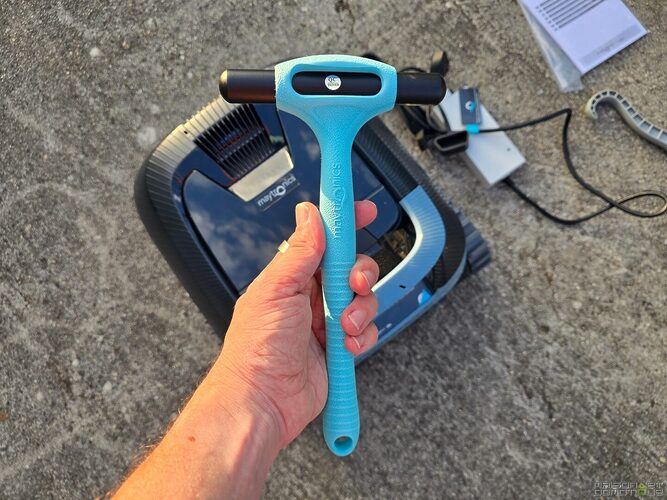
The principle is simple: after a cycle, you shake the small ClickUp in the water for 3 to 5 seconds, and the robot climbs towards you to be retrieved.

During a cycle, a first shake stops the robot, a second asks it to climb. You don’t have to take out your smartphone, wait for it to come back on its own, or search for where it has stopped at the bottom of the pool.

This is the kind of detail that seems trivial before use, but quickly becomes essential. Especially with an 11 kg robot. The ability to call it back toward you, then grab it at the waterline, avoids pulling it around awkwardly or having to use the hook all the time. That’s actually the reason why, as I mentioned earlier, I rarely had to use that famous hook.
There are some limits to note, however. The ClickUp works when the robot is navigating or stopped at the bottom of the pool. In UltraRun mode, using it cancels the programmed cycles, so you will need to restart UltraRun before putting the robot back in the water. The function remains available for up to 14 days after a normal 3-hour cycle if the battery was full at the start, and at least 2 days after UltraRun or if the initial charge was not complete.
In real life, it’s mostly a huge comfort gain. And you quickly wonder why all pool robots don’t have this system.
Autonomy and UltraRun mode: designed for those who don’t want to deal with it every two days
With autonomy of up to 4 hours and 30 minutes, the Dolphin EON 120d can cover large pools or complex swimming areas without stress. For a standard pool, a 2-hour cycle will often be sufficient. For a very dirty pool or one with many areas to treat, the long cycle or Ultra Clean mode will be more suitable.
The UltraRun mode is particularly interesting for owners who want to keep a clean pool without having to manipulate the robot after each swim. You schedule several short cycles, the robot stays in the water, and it regularly maintains the pool over an extended period.

This is also very useful for a secondary residence. You leave for a few days, let the robot maintain a regular cleaning, and avoid coming back to find a pool full of dust and leaves. However, be careful: even if UltraRun is handy, it does not eliminate the need to check water balance, chlorine levels, pool filtration, and the overall condition of the basin. The robot is an excellent assistant, not an all-knowing aquatic butler.
Robot maintenance: simple, but not to be neglected
The Dolphin EON 120d requires little maintenance, but you need to follow a few good habits.
The basket must be rinsed after each cycle. This is even more true with fine particles, pollen, or organic deposits. If left to dry, the filter becomes more difficult to clean and efficiency decreases.
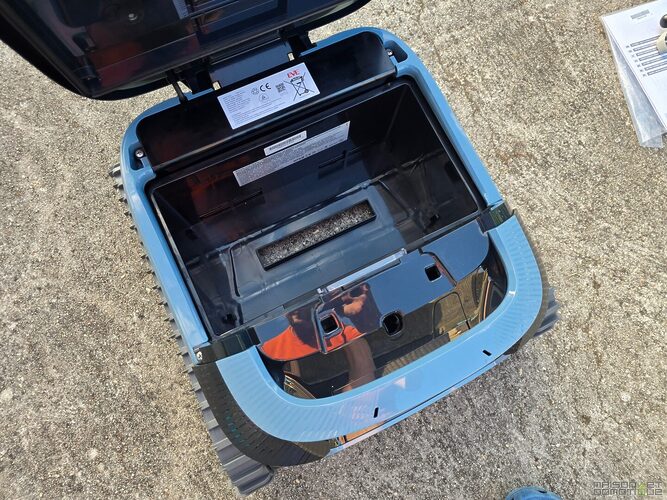
About once a month, a more thorough cleaning of the filter panels is recommended. Simply disassemble them, rinse them with a jet of water, and then reassemble them. The manual also emphasizes cleaning the propeller if hair, threads, or debris get stuck in it. This applies to all pool robots: a clogged propeller can reduce suction power or cause abnormal movements.
The charge should be done in the shade, in a dry place, between 6 and 35°C. The charger is IP54, so it is splash-proof, but it is not meant to be submerged or exposed to heavy water jets. For off-season storage, Maytronics recommends keeping the battery around 50% and avoiding excessively hot places.
In use: a reassuring, comprehensive, and very pleasant robot
The Dolphin EON 120d is powerful, but what surprised me the most is how practical it is on a daily basis. These two qualities together are less common than one might think.
The DebrisLock filtration provides a real benefit on a daily basis. The pool remains clean, fine particles are better captured, and above all, dirt does not fall back into the water when removing the robot. For me, this is the point that truly makes a difference compared to many competing robots. You can feel that Maytronics has addressed a very concrete frustration of users.

The navigation is effective, the walls are well taken care of, the waterline is properly worked on, and the ability to manage steps or shallow depths gives a real advantage to owners of modern pools with submerged beaches.
The ClickUp is also a great surprise. This is not a spectacular feature on a technical sheet, but it provides huge comfort in use. You shake the little handle in the water, the robot returns, you retrieve it. It seems trivial, but after a few outings, you can’t do without it.
A little preview of the robot in Smart mode during a full cycle:
The limits to be aware of
The Dolphin EON 120d is not perfect, and that’s normal.
Its weight of 11 kg requires a bit of attention when taking it out of the water. You need to let it drain before lifting it completely. The price is also premium: the recommended retail price is €1199 including tax on the official Maytronics page. So it’s not a small impulse purchase.
The app cannot communicate with the robot when it is submerged. This is a classic technical constraint, but it’s good to know. Finally, like any pool robot, it will not perform miracles if the water is unbalanced, if the walls are covered with algae, or if the basin has just come out of a very heavy wintering without any prior cleaning.
These limits do not undermine its effectiveness. They simply remind us that a pool robot always works better in a well-maintained pool. And this applies to any brand of pool robot.
Who is the Dolphin EON 120d for?
The Dolphin EON 120d is aimed at pool owners who want a truly comprehensive robot, cordless, capable of managing more than just a simple flat rectangular bottom.
It will be particularly suitable for pools up to 15 m, for basins with steps, submerged beaches, or complex shapes, for users demanding on filtration quality, and for those who are tired of seeing dirt fall back into the water when they take their robot out.
It will also interest owners of secondary residences thanks to the UltraRun mode, as well as anyone who wants to limit daily handling. If your pool is exposed to trees, pollen, fine sand, or plant debris, the DebrisLock becomes a very strong argument.
Conclusion: a premium pool robot that finally resolves those annoying little flaws
The Dolphin EON 120d is one of the most convincing cordless pool robots on the market right now. It efficiently cleans the bottom, walls, waterline, steps, and submerged beaches. It has real autonomy, intelligent navigation, a comprehensive app, and above all a DebrisLock basket that truly changes the experience.
Its biggest asset is this filtration. The ability to capture fine particles, compact debris, and prevent dirt from falling back into the water when removing the robot provides enormous comfort. The ClickUp adds another layer of practicality by allowing you to call the robot back with a simple gesture in the water.
Yes, the price is high. Yes, the robot is a bit heavy. But it offers a service that is consistent with its high-end positioning. For a well-equipped family pool, especially with steps or a submerged beach, it’s an excellent choice.

Please remain courteous: a hello and a thank you cost nothing! We're here to exchange ideas in a constructive way. Trolls will be deleted.