


'/%3E%3Cpath%20fill='%23b2b2b2'%20d='M241%20382q0%2016%2017%2026%2017%2011%2042%2011t42-11q16-11%2017-26V269H241'/%3E%3Cpath%20fill='%239f7e00'%20d='M241%20379q0%2014%208%2023%209%209%2021%209%2014%200%2021-9%209-9%209-23V269h-59'/%3E%3Cpath%20d='M241%20339v-70h59v110q0%2014-9%2023l-6%205v-68h-15v72q-8%200-14-4v-68zm59%2040c0%2022%2015%2032%2029%2032%2021%200%2030-18%2030-32v-40h-59'/%3E%3Cpath%20fill='%239f7e00'%20d='M266%20277v5h2v12h-3v-5h2v-5h-9v5h2v5h-4v9h3v18h-5v10h34v-10h-5v-18h3v-9h-4v-5h2v-5h-9v5h2v5h-3v-12h2v-5zm42%20101q0%2010%206%2017%206%206%2015%207%2010-1%2016-7%206-7%206-17v-29h-43'/%3E%3Ccircle%20fill='%230044ad'%20cx='329.5'%20cy='372'%20r='6'/%3E%3Cellipse%20fill='%230044ad'%20cx='300'%20cy='340'%20rx='16'%20ry='21'/%3E%3C/svg%3E)

'/%3E%3C/g%3E%3Cuse%20href='%23c'%20transform='matrix(-1%200%200%201%20720%200)'/%3E%3C/svg%3E)


'%3E%3Cpath%20stroke='%23000'%20stroke-width='4'%20d='m-35-37-13%2020m5%203%2013-20m5%203-13%2020m63%2042%206-9m1-2%206-9m5%203-6%209m-1%202-6%209m5%203%206-9m1-2%206-9m-96%200%2013%2020m5-3-6-9m-1-2-6-9m5-3%2013%2020m63-42-6-9m-1-2-6-9m5-3%2013%2020m5-3-6-9m-1-2-6-9'/%3E%3Ccircle%20r='24'%20fill='%23cd2e3a'/%3E%3Cpath%20fill='%230047a0'%20d='M0%200a12%2012%200%201%201%2020%2013%2024%2024%200%201%201-40-26A12%2012%200%201%200%200%200'/%3E%3C/g%3E%3C/svg%3E)


Résumer cet article :
The arrival of the new version Home Assistant 2025.11 sounds like a continuous celebration for the world of smart homes. This ecosystem, often compared to a real digital conductor, stands out today thanks to the evolution of its customization and automation tools – and it continues to surprise even seasoned users. This November offers a subtle but effective update, facilitating the handling and multiplying the opportunities for even more responsive control of household devices.
A redesigned target selector for greater simplicity
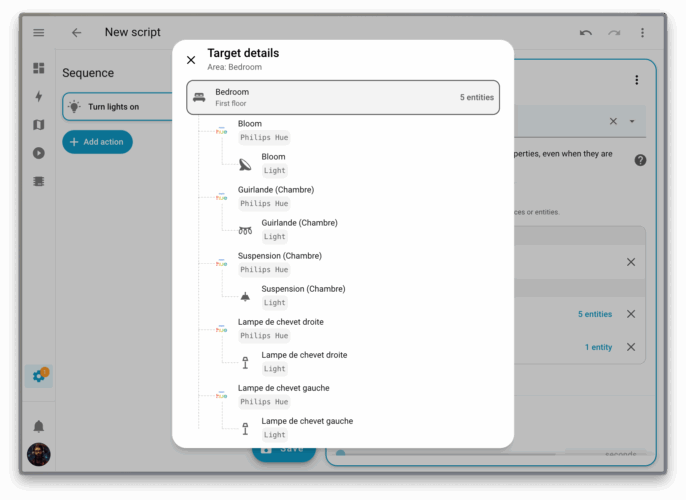
Creating automations in Home Assistant now benefits from a completely rethought target selector. The interface offers better visibility on the relevant devices, zonal location, and the concrete impact on triggered objects.
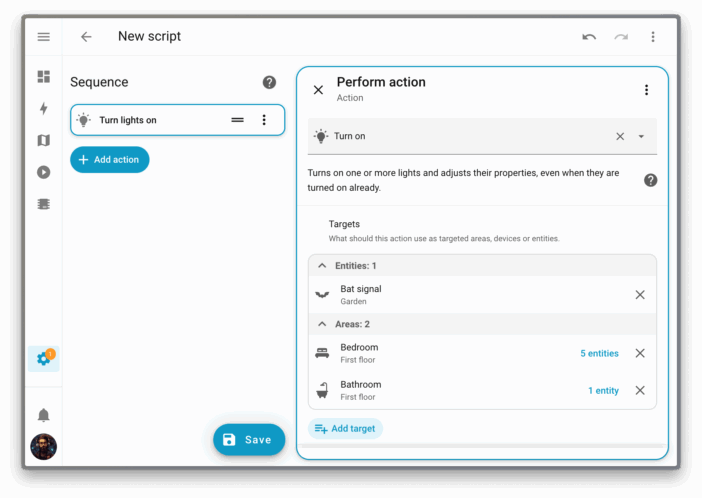
The choice is no longer a headache when several devices share the same function but are installed in different spaces. It has now become very natural to turn off all the lights on a floor, including those that will be added later – each automation adapts in real-time to the composition of the connected household. For example, integrating a new “living room” switch into the general automation no longer requires revisiting the complete configuration. A time saver, but also a source of peace of mind.
Automations, scenarios, and creativity
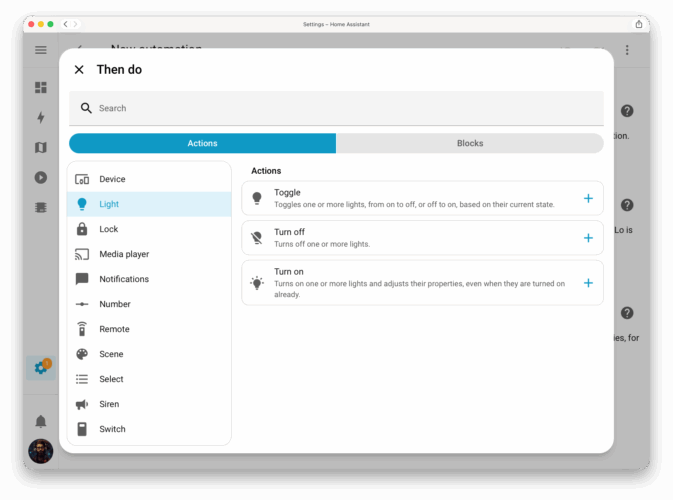
The scenario editor, sometimes deemed austere, is now adorned with new features. The redesign of the interface makes the succession of triggers, conditions, and actions much clearer. The whole structure is organized around a double column where each parameter displays its description in a clear and incisive manner. This improvement, intense on a visual level, does not yet disrupt the deep logic of automation but invites users to conceive more elaborate routines. Thus, the user can imagine a lighting scenario adapted to late arrivals, a voice alert as a heatwave approaches, or reminders for daily energy management. A touch of flexibility has been added, giving a creative impulse that many have been waiting for.
Dashboard customization and optimal display management
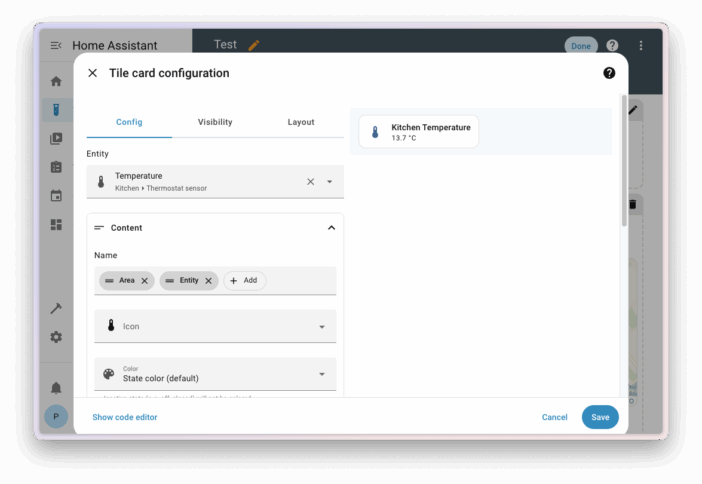
The latest version of Home Assistant gives essential importance to dashboard customization. Cards can now display the device name, installation area, or a precise combination of these parameters, making it immediately clear to distinguish between several equivalent devices. For installations spanning multiple levels, the dashboards intelligently gather favorite and suggested entities into a single window, sorted by floor. Views dedicated to lights, climate, and security are integrated into distinct panels, accessible with one gesture from the “settings” bar. More than a visual enhancement, this organization constitutes a pragmatic response to the proliferation of connected objects and the diversity of uses.
Energy at a glance: a pie chart that speaks
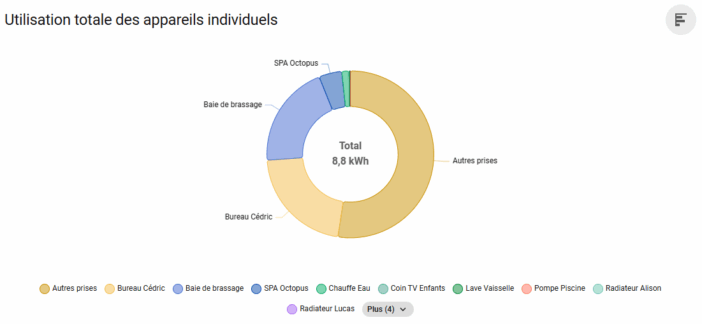
Counting kilowatt-hours has never been so fun: Home Assistant now offers a pie chart to visualize the distribution of energy consumption by device. It becomes easy to identify the American fridge that shows an upward curve or the internet box that is not moving at all, in a blink of an eye and without digging through menus. The total energy produced or consumed displays directly at the top right, allowing users to track, for example, daily photovoltaic production. The classic bar function remains available, switchable with a click according to preferences. This tool directly contributes to a more serene energy budget management.
Transparent updates, increasingly reassuring
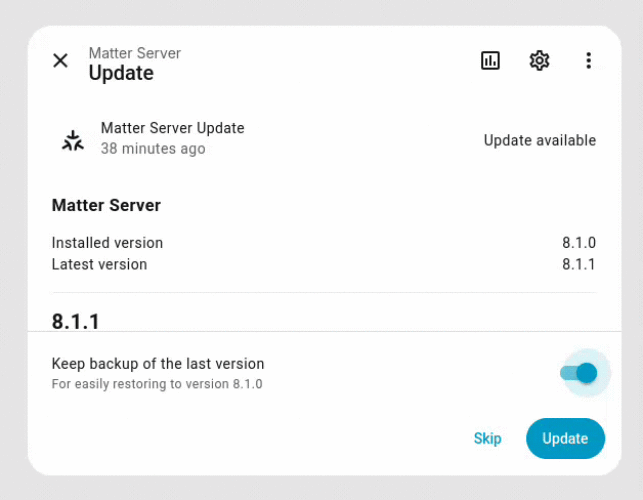
No more suspense when installing an update! Home Assistant introduces a progress bar that precisely indicates each step of the process: downloading, installing, decompressing. The previously opaque procedure finally becomes readable—even on the most temperamental machines. A detail that brings real comfort of use for both professionals and individuals.
Integrations and cascading extensions
The richness of the Home Assistant ecosystem is further illustrated by new integrations. Actron Air now allows expert management of air conditioning, Sunricher DALI opens its doors to professional lighting, and Fing, focused on network monitoring, emerges as the new ally for hyper-connected households. Family finance finds its place on the dashboard with Firefly III, as well as Nintendo Parental Controls, for perfect control over family gaming sessions. Additions and updates also concern notifications, roller shutter control, LED management, or the recognition of new avatars on the Xbox consoles. All is designed for ever-wider compatibility, speed of implementation, and sometimes a welcome touch of humor (who would have bet on the automation of tooth brushing?).
Log management and durability
Subtle yet impactful improvement, the reallocation of logs avoids a time-consuming double write. The result: the server’s memory is preserved and the longevity of storage media is better assured. In large installations, this evolution makes a real difference. Nothing is more frustrating than seeing an SD card fail at the worst moment—a wake-up call that is not trivial.
Compatibility, migrations, and anticipated corrections
Like any ambitious update, Home Assistant 2025.11 imposes certain revisions. Groups, trackers, mobile integrations, LG televisions, connected blinds, dental robots (!) – the list of adjustments is considerable, and the fix must be anticipated, lest unexpected malfunctions occur. Traccar users, for example, will need to generate a new token to avoid losing vehicle tracking. The CLI documentation provides valuable advice to ensure a smooth transition. A vigilance that reflects the team’s willingness to combine innovation and robustness.
Concrete uses, and increasingly smart homes
Throughout its updates, Home Assistant offers not only clearer interfaces or better-organized menus. It enables concrete, practical, and scalable uses: automatic adaptation of lighting scenarios, real-time consumption tracking, remote control of security and comfort, and even centralized management of financial or recreational devices (who would have imagined, ten years ago, controlling weather forecasts and video game sessions from the same panel?). It is this modularity, combined with the active community, that continues to attract professional installers, enthusiasts, and novices in the wake of the project. Minimalists find simplicity; the more demanding find the potential to invent tomorrow’s smart home. (We’re still waiting for the thermostat that proposes Spotify playlists according to the temperature—stay tuned.). If you want to take a look at the Home Assistant interface without the hassle of installing it yourself, remember that you can visit testhomeassistant.fr for that. It’s a “sandbox” that I’m offering you for free!
Collective strength and community support
The community dynamic remains central to the Home Assistant adventure. Specialized forums, lively Discord servers, exchanges of configurations or tips, and even assistance with incidents: everything contributes to a permanent improvement of the solution. Each new addition, every correction, and every technical digression are the fruit of this collective intelligence, where the diversity of uses enhances the robustness of the project. It is not uncommon for the most unexpected ideas to give birth to features that are both amusing and inspiring—the control of the parrot’s aviary has become a reality for some users!



Please remain courteous: a hello and a thank you cost nothing! We're here to exchange ideas in a constructive way. Trolls will be deleted.