


Résumer cet article :
After the testing of the ultra-wide screen from Philips this summer, I must say that I had a crush on this screen format, which I find well-suited for both gaming and work. A format quite different from the 16:9 aspect ratio that I had with my 4K TV that I used as a PC monitor, but a format to which I quickly adapted. Today, I invite you to discover the Iiyama GCB4580, which I received from TopAchat, a specialist in gaming PCs (Ready to Play, DIY, or custom-made). This model stands out in the high-end gaming monitor universe with its incredible 45-inch diagonal, offering exceptional visual immersion thanks to its 32:9 aspect ratio and pronounced curvature at 1500R. Designed to meet the needs of demanding gamers, streamers, and creatives in search of a versatile tool, this model from the Iiyama G-Master Red Eagle range shakes up the usual standards. With its impressive resolution of 5120 x 1440 pixels, 165 Hz refresh rate, HDR rendering, and sprawling workspace, it promises unprecedented efficiency for multitasking and a gaming experience that literally absorbs the user. Let’s explore it in more detail.
In brief
- Ultra-wide 32:9 curved format of 45 inches : unique immersion and vast display surface.
- Resolution 5120 x 1440 pixels & 165 Hz : ultra-detailed image and extreme fluidity.
- 1500R VA panel : intense colors, deep contrast, and optimal visual comfort.
- Full connectivity : 2 HDMI, 1 DisplayPort, USB-C (90W), USB 3.2 hub, and built-in KVM.
- Gaming compatibility : FreeSync Premium Pro, HDR VESA DisplayHDR 400, MPRT 0.8 ms.
- High-end ergonomics : adjustable stand, thin bezels, sleek and robust design.
- Ideal for multitasking, streaming, and simulation, requires dedicated space.
- Power consumption between 30 and 58W, built-in speakers.
- Excellent reliability from Iiyama, but optimal KVM compatibility under Windows 11 recommended.
Overview of the Iiyama GCB4580 curved monitor in the ultra-wide gaming range
The Iiyama GCB4580 is part of the excellent tradition of the Iiyama G-Master Red Eagle family, renowned among gamers for its monitors that are both high-performing and robust. This model stands out due to its titanic 45-inch size (44.5″ to be precise) with a 32:9 aspect ratio, designed for those who wish to push the boundaries of immersion, both in competitive gaming and professional use. While many screens settle for a traditional 16:9 format, this GCB4580 doubles the horizontal space, thus abolishing the barrier between gaming and intensive productivity.

Its curved screen at 1500R literally envelops the field of vision, immersing the user at the heart of the action. An ideal choice for car simulation enthusiasts, FPS players, or management games, but also for creatives demanding a large workspace. Since the launch of this type of ultra-wide monitors, players have praised this type of reference to benefit from multiple application windows simultaneously, streaming or editing video seamlessly. Unlike other brands, the presence in the Iiyama range ensures serious software support, proven reliability, and a clearly high-end orientation.


Exceptional image quality of the Red Eagle GCB4580 with 5120 x 1440 resolution and 165 Hz
One of the major assets of this curved monitor lies in its out-of-the-ordinary resolution: 5120 x 1440 pixels. This level of detail far exceeds the QHD standard and allows for simultaneous display of multiple software applications or splitting the screen for native dual display. The display density is remarkable to avoid any pixelation, even at close viewing distances.
In addition, it features a refresh rate of 165 Hz, perfect for performance in gaming and fast scenes. The sensations of fluidity are enhanced by the FreeSync Premium Pro compatibility, which virtually eliminates tearing in games. The HDR VESA DisplayHDR 400 standard also guarantees dynamic rendering on compatible content, with peak brightness levels around 450 cd/m² during testing, enhancing the depth of images.

| Characteristic | Value | Impact for the user |
|---|---|---|
| Resolution | 5120 x 1440 px | Ultra-detail, expanded workspace |
| Refresh Rate | 165 Hz | Extreme fluidity, responsiveness in gaming |
| HDR | VESA DisplayHDR 400 | Better contrast and color management |
| Contrast | 3,000:1 (VA) | Deep blacks, better immersion |
This model stands out, lying at the intersection between a gaming-oriented display and a creative tool, by the unique quality of its image, ensuring both precise display and maximum visual comfort over time. This panel enables enjoying the latest graphical trends in gaming, but also largely improves daily productivity.
Sleek gaming design and ergonomics of the Iiyama GCB4580 curved monitor
The design of the Iiyama Red Eagle GCB4580 perfectly illustrates the serious and elegant gaming orientation advocated by the brand. Its chassis adopts sleek lines and a matte black finish, breaking away from the excesses sometimes observed in other models focused on gaming aesthetics. The thin bezels on three sides enhance immersion, amplified by the very enveloping curvature of 1500R. This choice proves relevant for both gaming and use in collaborative or creative spaces, as it avoids any visual discomfort due to overly contrasting edges.

The robustness of the adjustable stand ensures perfect stability for the screen despite its size. This base allows for generous height adjustment and a modifiable tilt to tailor the working or gaming posture to one’s morphology. However, the monitor’s imposing dimensions (about 109 cm wide) necessitate a deep and sturdy desk to securely accommodate this curved screen.

Of course, the screen can also be wall-mounted or attached to an articulated arm, thanks to its VESA 100 compatibility.
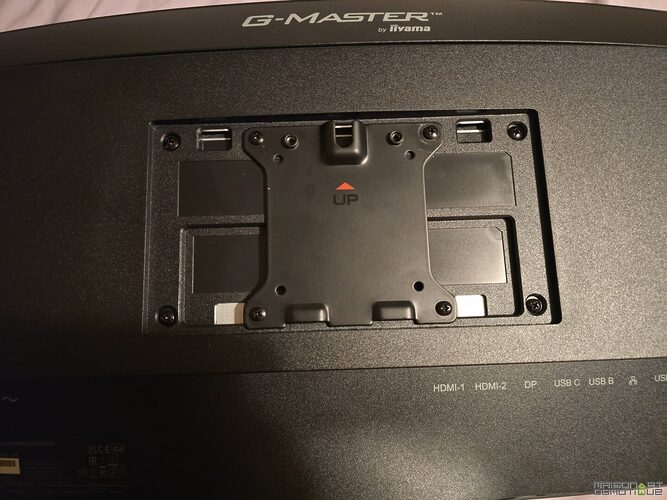
- Anti-reflective finish to limit light distractions.
- Integrated cable management system for a clean setup.
- Mounting location adapted for wall installation (mounting VESA 100×100 mm).
By combining aesthetic sobriety, efficiency, and comfort, the GCB4580 positions itself as a reference for those who refuse to choose between professional appearance and assertive gaming spirit.
Advanced technical specifications of the 1500R VA panel on the Red Eagle GCB4580
This model features a 1500R curved VA panel, a strategic choice to enhance immersion while providing a wide color gamut and an excellent native contrast ratio of 3,000:1. This VA technology guarantees deep blacks essential for dark gaming or graphic creation, while avoiding the side color shifts sometimes observed in IPS panels.
The brightness, reaching 400 to 450 cd/m², provides excellent rendering of bright scenes, whether in games, photo editing, or HDR content consumption. Another asset is the MPRT response time of 0.8 ms, coupled with optimization modes like “Black Tuner,” which enhance visibility in dark scenes, a clear advantage for fans of tactical shooting games or night-time simulations. Anti-flicker technologies and blue light reduction also ensure long-term comfort, even during marathon sessions.
| Technical Specificity | Description | Benefits |
|---|---|---|
| 1500R curved VA | Enhanced curvature, very deep blacks | Increased immersion and visibility |
| Response time | 0.8 ms MPRT | Extreme responsiveness in gaming |
| Comfort technologies | Anti-flicker, blue light reduction | Reduced eye strain |
| Contrast / brightness | 3,000:1, up to 450 cd/m² | Rich image, suitable for HDR and dark games |
With such advanced attributes, the screen thus meets the most demanding standards of competitive gaming and high-precision graphic work, without compromising on ergonomics or prolonged usability comfort.
Complete connectivity and USB-C docking function with KVM on the Iiyama GCB4580
The connectivity of the Iiyama Red Eagle GCB4580 offers extended versatility. It has two HDMI 2.0 ports, a DisplayPort 1.4 of the latest generation. A nice detail: all cables are provided, including the DisplayPort.
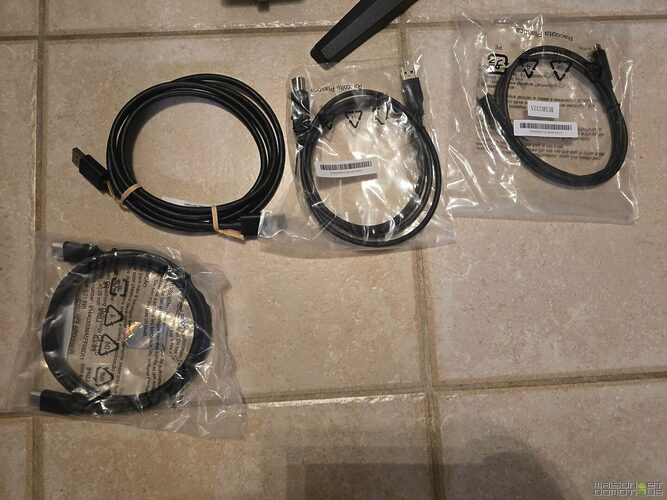
We also have a USB-C port capable of delivering up to 90W to charge a laptop while ensuring video, data, or LAN network transfer. This USB-C docking function transforms the monitor into a true desktop hub, facilitating installations and transitions between devices.
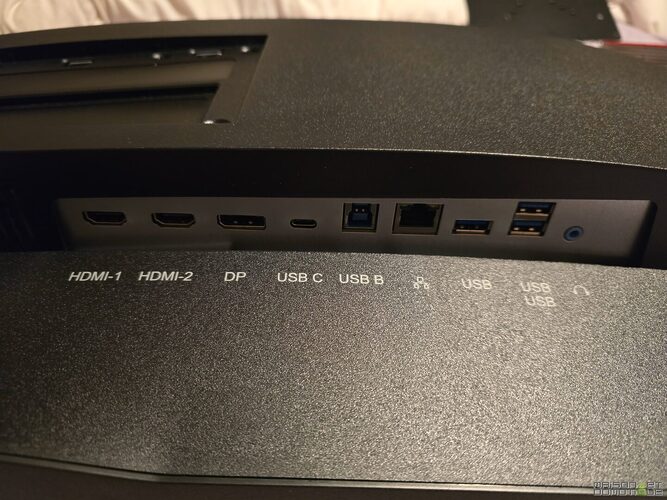
The built-in USB 3.2 hub has several ports to connect peripherals, controllers, or streaming accessories. The KVM device allows control of two machines simultaneously with a single keyboard/mouse/display setup, an advantage for users juggling between platforms or wanting, for example, to manage a work PC and a gaming tower on the same screen. Very handy in my case when I test mini PCs, for example.

- Practical KVM for switching from a desktop PC to a laptop with one touch.
- Built-in speakers of 2 x 3W : useful for troubleshooting but with basic quality.
- Standard headphone output to connect a dedicated audio system.
The KVM function proves very practical in use. However, caution is advised: it’s better to be on Windows 11 to take full advantage of all advanced features of this functionality.
My experience with the 32:9 format
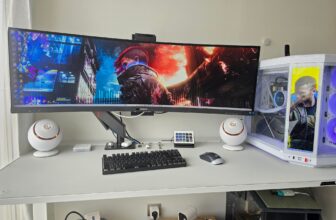
Adopting a 32:9 curved screen like the Iiyama Red Eagle GCB4580 radically transforms the experience in both gaming and work. The first moments reveal the extent of the diagonal : the windows align without overlapping, and the field of vision completely fills the gaze. Under Windows, it’s enough to slide a window up for the system to propose an automatic layout in 3 adjacent windows. It takes 2 seconds, without the need to resize each window manually.

Here I have, for example, the manufacturer’s website to have the official information in front of me, my WordPress to write my article, and my photo folder for the illustrations to use. In practice, this is extremely handy, and we gain productivity. In the same spirit, I can have a back-office development window, a documentation window, and one more for the rendering of the ongoing development.

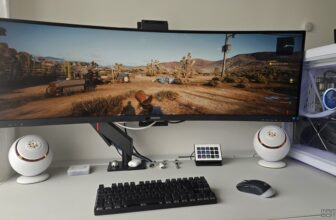
On the leisure side, racing and flight simulators are transformed : you can distinguish mirrors, cockpits, and environments seamlessly, without visible seams. In FPS games, the increased peripheral vision improves the perception of opponents and the sense of immersion, without increased fatigue thanks to the curvature perfectly dosed at 1500R. In Cyberpunk 2077, my current game, you enjoy a very wide field of view :)

Let’s not forget the adaptability of the format for audiovisual creation, where multi-track editing becomes intuitive, even if a small acclimatization period will be necessary when transitioning from a “classic” 16:9 format. However, this format allows for exploiting the width of the digital workspace to place timelines, previews, and tool palettes on a single surface, which proves quite practical in use.

Energy consumption and space management for the Iiyama 45-inch curved screen
The energy consumption of the Iiyama Red Eagle GCB4580 ranges between 30 and 58 W depending on brightness and usage. This performance is acceptable given its size, beating some competitors in the category. The automatic adjustment of the LED for standby reduces the energy footprint when not in use.
However, with its 109 cm wide by 36 cm high dimensions, this curved screen requires organizing the workspace to avoid clutter : it is recommended to have a desk depth greater than average (ideally 80 cm or more), optimized cable management, and often a revision of audio positioning. For my part, the space optimization has happened naturally thanks to my motorized desk SecretLab Magnus Pro, which is specially designed to allow for excellent cable management. The Iiyama GCB4580 is fixed onto the articulated arm of the desk, allowing it to be oriented to my liking while saving space on the desk, as the stand provided with the screen is still bulky.

For audio, while the built-in speakers can be useful as a back-up for calls or light multimedia, I personally prefer my Creative Pebble Nova speakers, or at least my headphones, for a truly immersive audio experience.
Comparison with competing ultra-wide gaming monitors on the market
Compared to the leaders in the segment like Samsung Odyssey, LG UltraGear, or Asus ROG, the Iiyama Red Eagle GCB4580 stands out for its solid value for money and the brand’s reputation for reliability. While some competitors bet everything on aesthetics or spectacular LED effects, this model opts for discretion and modularity. Its USB-C (90W + LAN), the presence of KVM, and the provided ergonomics raise the bar ; few references currently offer such a comprehensive combination at a “reasonable” price for this format, even though the investment remains significant.
Another notable difference concerns the hardware requirement : to exploit a resolution of 5120 x 1440 at 165 Hz in gaming demands a very high-end graphics card (I have a Geforce RTX 3090). Moreover, you’ll need to opt for DisplayPort connectivity to fully take advantage of the performance of this screen, as my HDMI output limits the refresh rate, for instance.

Analysis of the strengths and limitations of the Iiyama Red Eagle GCB4580 for demanding gamers
The Iiyama GCB4580 ticks most of the boxes sought after by gamers and professionals : large immersive size, immense resolution, cutting-edge refresh rate, impressive responsiveness, FreeSync compatibility and HDR, ultra-complete connectivity including USB-C with effective KVM, not to mention the robustness inherent to the brand. Gamers seeking competitive advantage benefit from the responsiveness, while creatives appreciate the VA panel comfort for color accuracy.
When listing the weaknesses, three points stand out : the price remains high, as is the case for most monitors in this caliber (though available at under €650 in recent days); the bulkiness may deter those with limited space; finally, the KVM requires optimal software compatibility (preferably Windows 11) to avoid some bugs during quick switching. It’s also worth noting that the built-in speakers, while convenient for troubleshooting, do not provide sufficient quality for demanding audio experiences. But that’s the lot of most screens.
Why choose the Iiyama Red Eagle GCB4580 curved screen for gaming and intensive multitasking
For anyone looking for an ultra-wide curved screen that is both immersive and productive, the Iiyama Red Eagle GCB4580 appears as the essential tool. No other monitor combines gaming pleasure, frantic pace, and support for extreme multitasking so effectively (the Philips we tested, for example, was optimized for professional use and not at all for gaming). Whether you are a streamer, video editor, or simulation enthusiast, the combination of USB-C, KVM, high resolution, and rich functionality offers an unparalleled margin for juggling multiple windows, connecting multiple machines instantly, and switching from desktop to leisure in a second.
It primarily addresses sharp profiles : that of the demanding gamer seeking ultimate sensations ; but also that of the creative professional who wants to save precious time by visualizing their entire software ecosystem on a single screen (my case!). The GCB4580 justifies its price with a superior experience, provided that one plans for the necessary space and configurations. Investing in this monitor means pushing the usual limits of display and opening up new perspectives in both gaming and professional efficiency.
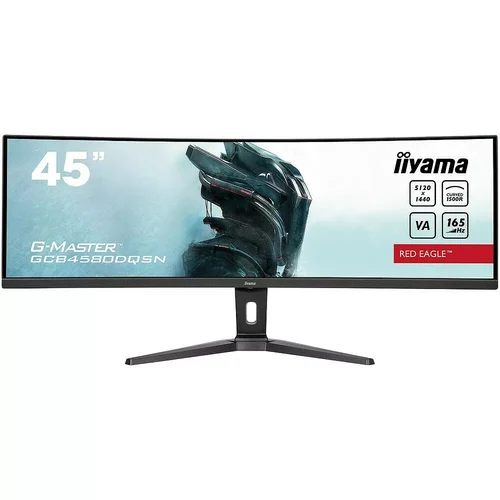
Iiyama Red Eagle GCB4580
If you’re looking to buy it with confidence, TopAchat remains a reference for equipping yourself with gaming PCs and peripherals, whether you’re going for a Ready to Play, DIY, or custom setup. The benefit with TopAchat is also the support: machines assembled and tested by experts in France, with a real focus on airflow and cable management. And if you’re hesitating between multiple setups (monitor + graphics card + CPU), TopAchat highlights a 3DMark indicator to better anticipate FPS per game before buying. To go further, you can also use the ConfigoMatic to design a configuration adapted to your needs, validated on the performance side.
Is the Iiyama Red Eagle GCB4580 compatible with all PCs?
Yes, the monitor works with all PCs equipped with HDMI, DisplayPort or USB-C ports compatible with DisplayPort Alt. The KVM feature and some advanced options are optimized for Windows 11, but general compatibility is excellent, including with Mac and Linux (KVM limitation depending on OS).
Can the USB-C be used to charge a laptop and display a screen?
Yes, thanks to the 90W Power Delivery via USB-C, it is possible to charge a laptop while displaying the image and taking advantage of the USB hub, including for the LAN network.
Is the Iiyama Red Eagle GCB4580 suitable for competitive gaming?
Absolutely. With its 165 Hz refresh rate, 0.8 ms response time, and FreeSync Premium Pro compatibility, it meets the demands of competitive gaming, especially for fast FPS and racing simulations.
Is it possible to adjust the height and tilt of the screen?
Yes, the stand of the GCB4580 allows for precise adjustment of height and tilt, ensuring ideal ergonomics according to morphology and desk layout.
What are the main advantages of the integrated KVM?
The integrated KVM allows you to control two different machines (PC, laptop) with one keyboard and one mouse via the screen, making multitasking seamless, especially for streamers and professionals switching between environments.


Please remain courteous: a hello and a thank you cost nothing! We're here to exchange ideas in a constructive way. Trolls will be deleted.