Résumer cet article :
E se os robôs aspiradores finalmente parassem de apenas umedecer o chão para realmente lavá-lo? Essa é exatamente a promessa do MOVA Z60 Ultra.
O mercado de robôs aspiradores lavadores começa a estar bem preenchido. Muito bem preenchido, na verdade. Entre os modelos que aspiram forte, mas lavam timidamente, aqueles que prometem fazer tudo sozinhos, mas ainda requerem muita atenção, e aqueles que brilham principalmente na ficha técnica, fica difícil identificar as verdadeiras boas surpresas. O MOVA Z60 Ultra Roller Standalone entra exatamente nesse terreno com um posicionamento interessante: uma grande potência anunciada, um verdadeiro sistema de lavagem com rolo, uma estação completa e um preço que se mantém mais sábio do que alguns líderes do setor. No papel, ele check muitas caixas. E, sinceramente, é para despertar a curiosidade. As características oficiais destacam uma aspiração de 26.000 Pa, uma lavagem HydroForce com 12 bocais, uma estação com esvaziamento automático, lavagem a quente e secagem a ar quente, além de um sensor retrátil para passar por baixo de móveis baixos. Vamos explorar mais em detalhes…
Desembalagem do MOVA Z60 Ultra Roller Standalone
Desde a abertura da caixa, o MOVA Z60 Ultra Roller Standalone causa uma impressão bastante séria.

O robô é acompanhado por sua estação, uma placa de extensão de rampa, um módulo de distribuição automática de solução, dois sacos de pó, um já instalado, o rolo esfregão, a escova lateral, a placa de lavagem e uma garrafa de solução de limpeza.

Visualmente, o Z60 não tenta ser original a todo custo. Ele retoma os códigos do robô premium moderno, com uma base bastante simples e, sobretudo, esse famoso bloco superior retrátil que imediatamente chama a atenção.

É ele quem abriga a navegação FlexScope, anunciada como capaz de reduzir o perfil do robô a 96 mm quando o sensor DToF se retrai. Em campo, é uma ideia excelente, porque muitos robôs ficam presos por alguns milímetros a mais.
Além dessa varredura de 360° permitida pelo sensor DToF quando elevado, o robô também possui uma visão RGB, um scanner 3D com luz estruturada e um laser lateral para aprimorar a detecção de obstáculos e bordas. A MOVA até menciona o reconhecimento de mais de 200 tipos de obstáculos.

Abaixo do robô, não encontramos os tradicionais dois rodízios rotativos que vemos em todos os lugares. A MOVA aposta aqui em um rolo lavador de 25,6 cm, associado à tecnologia HydroForce.

Esse é um ponto chave. O princípio consiste em injetar continuamente água limpa através de 12 bocais, esfregar com uma pressão descendente anunciada de 4100 Pa, e evacuar a água suja em tempo real.
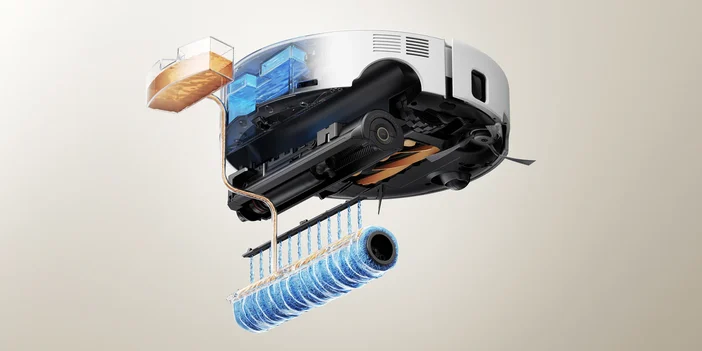
No papel, estamos mais perto de uma pequena lavadora de chão do que de um simples pano umedecido arrastado atrás de um aspirador. E isso, sem dúvida, muda muitas coisas na promessa do produto.
A outra forte promessa é, claro, a aspiração. A MOVA anuncia 26.000 Pa, o que coloca este modelo muito alto na hierarquia atual dos robôs aspiradores. A MOVA associa isso a um sistema TroboWave DuoBrush e um mecanismo triplo anti-emaranhamento certificado pela TÜV SÜD para limitar cabelos e pelos emaranhados.


A estação, por sua vez, é uma parte significativa do produto.

Ela esvazia automaticamente o recipiente do robô em um saco de 3,2 L, recarrega a água para a lavagem, gerencia um reservatório de água limpa de 4 L e um reservatório de água suja de 3,5 L, oferece um sistema de lavagem em 4 temperaturas, desde ambiente até 80 °C, e seca o rolo com ar quente.


A marca anuncia até 100 dias sem intervenção no lado da poeira. É ambicioso, mas esse tipo de número sempre precisa ser colocado em um uso real, dependendo do tamanho da casa, da presença de animais e da frequência dos ciclos, é claro.
Instalação e configuração do MOVA Z60 Ultra Roller Standalone
O início do MOVA Z60 Ultra Roller Standalone é o que esperamos hoje de um robô de alta gama. É preciso instalar a estação em uma área desobstruída, encaixar a placa de rampa, preencher o reservatório de água limpa e adicionar a solução de limpeza, se necessário. Um ponto a ser destacado aqui: o fabricante decidiu oferecer um pequeno reservatório que pode ser preenchido com detergente quando desejado. Nada de cartucho proprietário para comprar, como é o caso de alguns concorrentes. E isso, gostamos!


Em seguida, iniciamos a associação com o aplicativo. A mapeação é feita rapidamente graças à varredura de 360°.

No aplicativo, a experiência é bastante completa. Temos um mapeamento claro, zonas de tapete bem identificadas, limpezas por cômodo, por área ou em modo global, além de vários perfis de limpeza personalizáveis.

Encontramos também um modo voltado para animais, um comando de voz integrado “Hey, MOVA”, e um retorno vocal em francês, o que é bastante apreciável no dia a dia.

O fabricante destaca o AI-PetMate, animações 3D em tempo real e o comando de voz. Temos até uma visualização da câmera à distância, a busca de animais de estimação, um microfone e a possibilidade de tirar fotos.


Uma função “cruzeiro” permite até programar uma ronda do robô no horário e no dia que desejar.

Ele então tira automaticamente fotos, o que permite monitorar o que está acontecendo em casa. Um complemento interessante ao seu sistema de segurança, para poder ir a qualquer lugar da casa e verificar o que está acontecendo.
Essas funções claramente enriquecem o produto, mesmo que não sejam úteis para todos.
O que eu aprecio nesse tipo de configuração é a flexibilidade que isso permite no dia a dia. Em uma casa com cozinha, sala, corredor, quartos e eventualmente um animal que espalha pelos e migalhas durante toda a semana, o fato de poder enviar o robô apenas para o cômodo que precisa faz toda a diferença. Não é necessário iniciar um ciclo completo para apenas uma pequena mancha perto da mesa ou alguns detritos na entrada. Nesse aspecto, o MOVA parece estar bem em sua época: não obriga a suportar um modo único, permite adaptar a limpeza à vida real. Assim, é possível programar uma passagem todas as manhãs ao redor da mesa após o café da manhã, sem ter que limpar toda a sala, por exemplo.

Feedback de uso em testes
Onde o MOVA Z60 Ultra Roller Standalone se torna realmente interessante é na lavagem. E para ser franco, é até seu melhor ponto. Muitos robôs sabem aspirar corretamente hoje. No entanto, muito poucos lavam com uma verdadeira sensação de trabalho mecânico no chão. Aqui, a combinação do rolo, da água injetada continuamente, da raspagem a 360° e da aspiração instantânea das águas sujas parece produzir algo mais convincente. Teste com uma poça de leite em pisos cerâmicos: absorvida e limpa corretamente, sem que o rolo continue espalhando a sujeira na sala seguinte. Obtemos um chão limpo, sem marcas e sem excesso de água. É exatamente o tipo de comportamento que se espera de um robô lavador moderno.

A gestão de tapetes é outro bom ponto. A MOVA utiliza aqui o AutoShield: o rolo se eleva em 14 mm e uma proteção limita a exposição à umidade ao passar por carpetes ou tapetes. No papel, a ideia é realmente bem vista. Um teste simples com um lenço colocado sobre o tapete permite verificar que o tapete permanece seco após a passagem do robô. É inteligente, porque esse é precisamente um dos reclamos recorrentes feitos aos modelos híbridos: eles sabem lavar… mas acabam umedecendo ao passar superfícies têxteis que não pedem nada. Aqui, a MOVA parece ter levado a questão a sério, adicionando essa proteção física.
Na aspiração pura, o balanço é bom, mas um pouco menos espetacular do que a ficha técnica poderia deixar a esperar. Em pisos duros, cabelos, pelos e detritos do dia a dia, os resultados são muito positivos. As ração do cachorro são engolidas sem dificuldade, e os vários testes confirmam um nível de limpeza muito satisfatório em cerâmica e parquet. No entanto, em tapetes de pelos longos, o resultado, sem ser ruim, não ameaça a concorrência tanto quanto se poderia imaginar com um valor anunciado de 26.000 Pa. Algumas migalhas ainda podem resistir. Isso não é um impeditivo, longe disso, mas é uma nuance importante: este robô impressiona principalmente pela sua soma de aspiração + lavagem, mais do que por uma dominação absoluta sobre tapetes espessos.

O sistema anti-emaranhamento parece, igualmente, bastante convincente. A MOVA anuncia uma arquitetura pensada para limitar os cabelos em torno das escovas e da roda. O fabricante fala de pelos e cabelos de até 30 cm bem geridos, com pouco emaranhamento observado após a passagem. Na prática, o sistema anti-emaranhamento realmente funciona muito bem, e o interesse é evidente em uma casa com cabelos longos, animais ou passagens frequentes (com 3 meninas em casa, os cabelos longos são, de fato, bem conhecidos dos aspiradores). É o tipo de detalhe que muda tudo a longo prazo, porque um robô muito eficiente, mas difícil de manter, acaba por ser usado com menos frequência.
A navegação, por fim, é uma das boas surpresas. O Z60 combina vários sensores, visão em cores e iluminação LED automática para trabalhar mesmo na escuridão. Oficialmente, ele evita mais de 200 obstáculos. O robô facilmente desvia de animais, contorna um cabo que apareceu bem no meio da trajetória e memoriza áreas delicadas. Em uma casa viva, isso não é um luxo, é quase uma obrigação. Ninguém quer precisar organizar cada carregador, cada brinquedo ou cada tigela antes de iniciar um ciclo. Novamente, a MOVA parece ter entendido o que se espera de um robô premium em 2026: um aparelho que se adapta ao habitat, não o contrário.
Não podemos esquecer do radar retrátil, que permite que o robô passe sob os móveis até 96 mm de altura. A escova MaxiReach, que se move lateralmente para frente, assim como o rolo MaxiReach que se move para lavar próximo das paredes, garantem uma limpeza bem próxima dos muros.


É necessário, no entanto, falar sobre os limites. O primeiro diz respeito aos obstáculos e degraus. O fabricante menciona uma superação de 22 mm. O Z60 sabe, então, gerenciar pequenos degraus e irregularidades bem graças ao seu sistema Quad Synergy Drive, mas não se deve esperar milagres em relação a verdadeiros grandes obstáculos.
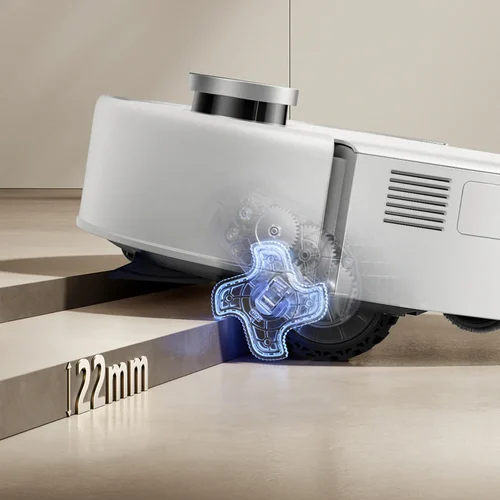
A segunda limitação é que passar sob os móveis baixos dependerá tanto do design do mobiliário quanto da altura útil.
Por fim, mesmo que o preço promocional oficial de 699 € seja agressivo para esse nível de equipamento, o preço habitual que é exibido a 899 € o coloca, ainda assim, frente a uma concorrência séria.
Conclusão
O MOVA Z60 Ultra Roller Standalone deixa uma impressão bastante clara: não é apenas um robô aspirador com uma função de lavagem adicionada para parecer bonito. Seu verdadeiro ponto forte é, precisamente, a lavagem, com uma abordagem muito mais inteligente e eficaz do que a média. O rolo HydroForce, a evacuação contínua da água suja, a gestão séria de tapetes e a estação muito completa dão a ele uma verdadeira personalidade. A aspiração está no nível esperado em pisos duros e detritos do dia a dia, mesmo que a diferença não seja tão surpreendente em tapetes espessos como o número de 26.000 Pa poderia fazer crer. No final, é um modelo coerente, moderno, bem pensado para casas ativas, e particularmente pertinente se você procura um robô que realmente lava em vez de simplesmente umedecer o chão. Lançado oficialmente a 899 €, o que já é um preço atrativo frente à concorrência, geralmente o encontramos em promoção a 699 €, o que o torna um modelo extremamente interessante dada suas características! Em resumo, só posso recomendar!