


Résumer cet article :
We already knew about the Nuki smart locks, which we have mentioned many times before. These smart locks can transform any door into a smart entry point. Paired with the Keypad with fingerprint recognition, it’s a combination that one can’t live without and that I have been using for many years now. But the manufacturer has just launched the new Keypad 2 NFC, which we have had the chance to test for several days. This time, the brand takes an interesting step: that of “Tap to Unlock”, directly inspired by contactless payment.
Bringing your smartphone close as if to pay for a coffee… and seeing your door open. On paper, it’s appealing. In practice, it’s even better, especially when integrated into a modern home automation ecosystem.
Opening the door has never been so simple, fast, and secure. With the Keypad 2 NFC, we transfer the advantages of Tap to Pay directly to the front door. Users benefit from the same level of comfort and security they are already used to during contactless payments in their daily lives.
Martin Pansy, co-founder and CEO of Nuki
Let’s see how it performs in the field.
Unboxing and presentation of the Nuki Keypad 2 NFC
Visually, Nuki remains true to its DNA.
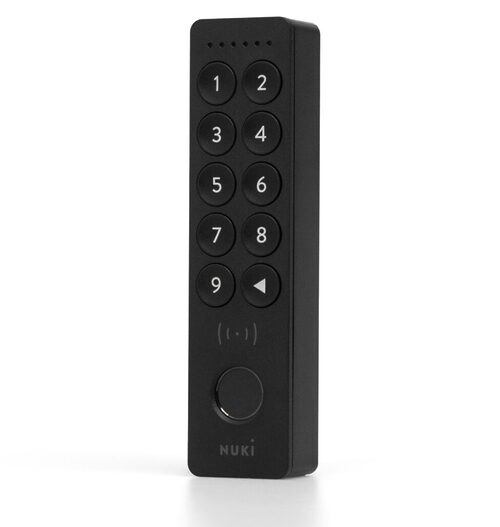
The Keypad 2 NFC retains the design of the previous model, with a sleek and modern look that easily integrates into an entryway. It features a compact, IP54 certified casing, capable of withstanding splashes of water and dust without any issues.


A small comparison with the previous model:

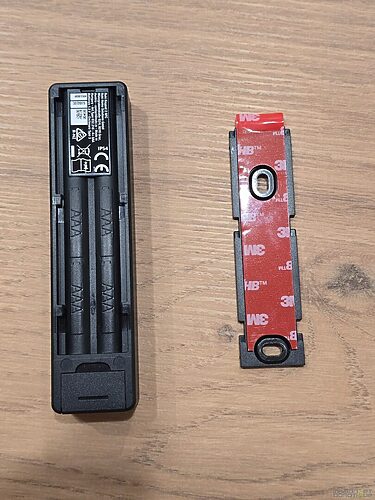
The installation can be done either with adhesive or screws, without wiring, which is always appreciated.
But the real novelty lies elsewhere.

This Keypad features an NFC chip, allowing the use of contactless technology to unlock the door. Specifically, it can operate in five different ways: code, fingerprint, smartphone via NFC, Apple Home Key, or Samsung Digital Home Key.

Up to 20 fingerprints, 200 codes, and 35 NFC keys can be stored. So, there’s enough to manage an entire family… or even more.
One interesting detail: data is stored locally and protected with encryption equivalent to that of contactless payments.
NFC technology designed to simplify access
The heart of the product is based on NFC, exactly like a bank card. You bring your smartphone or watch close, and the door opens.
This operation can be done in two distinct ways:
- The Smart Home mode, which relies on Matter and allows the use of Apple Wallet or Samsung Wallet.
- And the Nuki App mode, which is simpler and works directly with the Nuki application without requiring a home automation ecosystem.
Important to note: it is not possible to mix the two modes. You must choose from the beginning.

In my case, not being equipped with Apple, I opted for Smart Home mode with SmartThings, to enjoy complete integration into my setup.
Prerequisites for everything to work
Before getting started, a few points should be checked.
The Keypad 2 NFC requires a Nuki Smart Lock compatible with Matter generation 4 or 5 (such as the Go, Pro, or Ultra for example).
For Smart Home mode, a Matter/Thread hub is also required. In my case, the Aeotec SmartThings v2 hub does the job perfectly.
On the smartphone side, you need an NFC-compatible device. My Galaxy S24 Ultra is of course compatible, and it is officially supported for Samsung digital keys.
On the Apple side, all you need is an iPhone XS or newer with Apple Wallet (it also works with the Apple Watch Series 4 and later models running at least watchOS 11.6), as well as a hub like HomePod or Apple TV.
Note: if you don’t want to deal with Matter, the Nuki App mode already allows you to enjoy Tap to Unlock with a simple NFC smartphone, without requiring an additional Matter Hub.
Installation and configuration
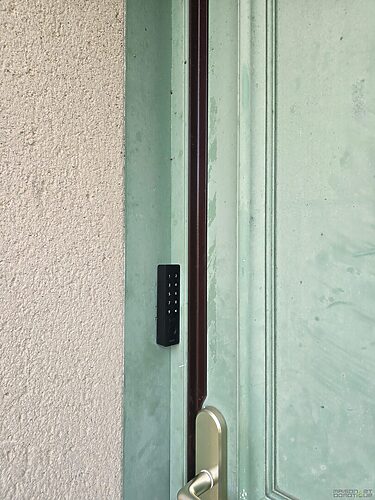
The physical installation literally takes 5 minutes. You attach the Keypad next to the door, and you’re done.
Then, everything happens in the Nuki app.


You add the Keypad from the lock settings, then configure the access: code, fingerprint, etc.

Next comes the interesting part: the choice of mode.


By selecting Smart Home mode, the application automatically guides toward Matter integration.

You just need to scan the QR code of the lock and follow the steps in SmartThings or Apple Home.

In my case, the integration with SmartThings via the Aeotec hub went smoothly.

You really just need to follow the steps one by one.


In just a few minutes, the digital key was available in Samsung Wallet.

And then… magic.
Daily use: real comfort
This is clearly where the Keypad 2 NFC makes the most sense.
Taking out your smartphone, bringing it close to the keypad, and seeing the door open instantly… you get used to it very quickly. No need to open an app; everything is seamless.
With Android, the operation is straightforward: you unlock the phone, place it on the Keypad, and the door opens automatically.
A small demonstration in video (lock not mounted, just to see it functioning simultaneously; otherwise, it is behind the door ;-)
In everyday use, it’s extremely practical.
No more need for keys, nor even a code to remember. And for the children or guests, we can still use codes or fingerprints.
In my SmartThings setup, I was even able to imagine a few nice scenarios. For example, the door opening automatically triggers the lighting in the living room and turns on the Samsung TV. Typically, the kind of little comfort that is appreciated in the evening when coming home.

Another concrete case: for a tradesperson or short-term rental, we can easily create very temporary accesses.
Apple and Samsung Compatibility: Two Approaches, Same Goal
Even though my test was conducted with Samsung, it should be noted that the Apple ecosystem is just as well integrated.
Apple Home Key allows exactly the same use via Wallet, with iPhone or Apple Watch (and I admit, unlocking with your watch must be very nice!).
The logic is identical: you bring the device close, and the door opens.
The only current limitation is that you cannot mix the two environments on the same installation.
But in practice, each ecosystem works very well on its own.
Verdict: An Accessory That Truly Changes the Experience
The Nuki Keypad 2 NFC is not just another accessory. It brings a real evolution in the use of smart locks.
Tap to Unlock works perfectly, Matter integration opens interesting possibilities, and the ease of use is astounding.
It’s not essential if you already have a Smart Lock… but once you’ve tried it, it’s hard to go back.
For its launch, you can benefit from 5% off at the Domadoo store using the code “maisondomotique” (the code is valid across the ENTIRE store, not just Nuki ;-)
Nuki Keypad NFC
Note that on the occasion of the launch, all users of previous generations of Nuki Smart Lock will be able to benefit from an exclusive upgrade program, valid for 2 months from today. This program includes a 20% discount on the pack comprising the Smart Lock Pro (5th generation) and the Keypad 2 NFC.



Please remain courteous: a hello and a thank you cost nothing! We're here to exchange ideas in a constructive way. Trolls will be deleted.