


Résumer cet article :
Homey has just announced Homey Self-Hosted Server, a new “software-only” offering that allows you to run the Homey Pro experience… on your own hardware. The idea is simple: to keep the Homey approach (interface, Flows, dashboards, energy monitoring), but without relying on a dedicated Homey box.
Athom (Homey) clearly positions this product for advanced users and enthusiasts who want to choose where and how their home automation runs, while still being on a ready-to-use integration ecosystem.
Homey on your hardware: Raspberry Pi, NAS, Docker, Proxmox…
Homey Self-Hosted Server can be installed in a wide range of environments: Raspberry Pi, Windows, macOS, Linux, Docker, but also Synology, QNAP, Proxmox, TrueNAS (and more broadly, “anything that can run Linux”).

Regarding prerequisites, Homey specifies a base of Linux + Docker, compatible with ARM64 and AMD64, with a recommended processor of at least 1.5 GHz (ideally multicore). The announced consumption remains reasonable: about 200 to 300 MB of RAM for the server, plus a variable “addition” depending on the installed apps, and about 1 GB on the disk (depends on data and number of apps).
Compatibilities: Matter, LAN, Cloud… and more via Homey Bridge
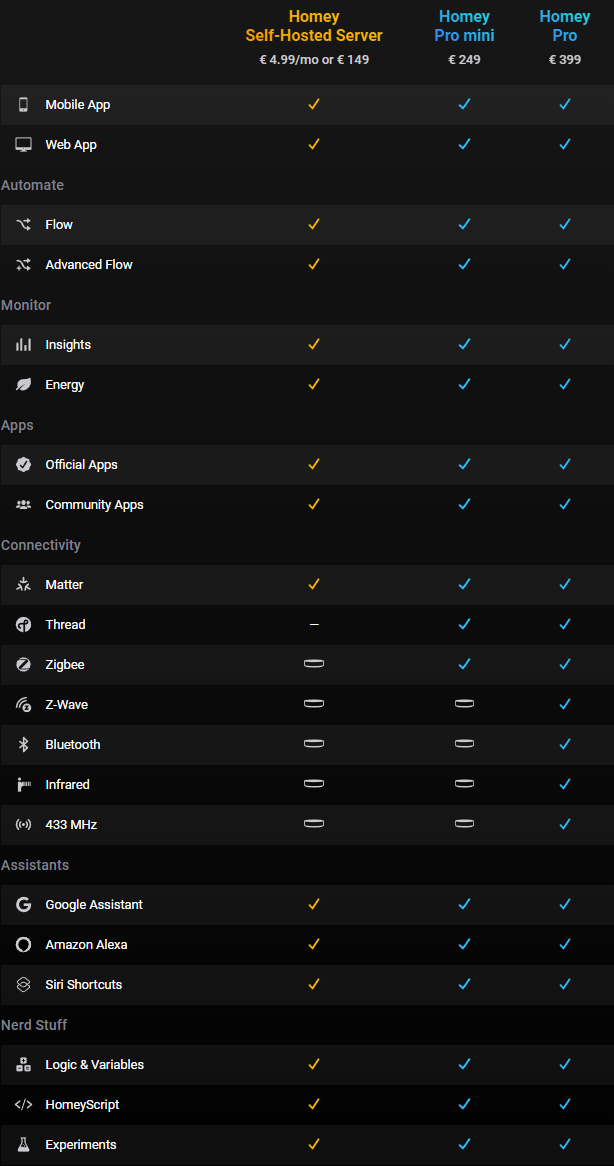
By default, Homey Self-Hosted Server can handle LAN, Cloud, and Matter devices without additional hardware.
For Thread, it is possible if you already have a Thread Border Router on your network (typically a compatible router/speaker or a hub that acts as a Thread bridge).
And for everything that often spices up an “historic” home automation setup – Zigbee, Z-Wave, Bluetooth LE, 433 MHz, infrared – Homey offers to go through a Homey Bridge (sold for €69). An interesting bonus: you can add multiple ones, with a “satellite” mode to extend the radio range in the house.
You find the Homey DNA: Flows, dashboards, energy, apps…
On paper, Homey Self-Hosted Server takes the main strengths of Homey Pro: Homey Flow and Advanced Flow for automations, Homey Dashboards, Homey Energy, and Insights, and access to the Homey App Store (official and community apps). Homey announces compatibility with 50,000+ devices and 1,000+ brands through its app ecosystem.
A very concrete example: install Homey Self-Hosted Server on a Synology NAS (Docker), add a Homey Bridge to retrieve your Zigbee sensors, then build an Advanced Flow such as “if everyone has left, lower heating + turn off non-essential plugs + activate simulated presence lighting” (yes, that kind of scenario that makes you say “okay, now it’s working for me!”).
Another nice use case: in a Proxmox environment, you can isolate your home automation in a dedicated VM/CT, take snapshots, test a new community app without stress, and then roll back if needed (we’ve all “broken” an integration on a Sunday night…).
Cloud included, but local-first approach
Important point: even if the server runs at your place, Homey includes a whole range of cloud services: remote access, App Store, push notifications, webhooks, some weather-type functions, and voice assistant compatibility.
Homey also specifies that the whole system is designed to continue functioning even if the Internet goes down, within the limits of your devices (everything that depends on a manufacturer’s cloud will remain… dependent). It is possible to access locally via the server’s IP, provided that you enable “Local Users.”

Pricing, free trial, lifetime license… and a small constraint to know
Each new installation includes a 30-day free trial, no credit card required. After that, two options: €4.99 per month, or a lifetime license for €149.
Important detail: if the monthly subscription expires, the instance goes offline until a resubscription or purchase of a lifetime license.
In terms of backups, it remains quite classic “self-hosted”: just back up the data folder (by default ~/.homey-shs/).
What this changes for Home Assistant / Jeedom users… and the current limitations
The promise is clear: Homey is moving into the territory of self-hosted solutions, with a strong argument “I let you choose the hardware, but I keep a more guided experience.” One could even say that Homey Self-Hosted Server is a direct response to Home Assistant on the “software-only” side.
In return, Homey is transparent on several points:
- Homey Self-Hosted Server is not exactly a clone of Homey Pro, and you are the one who installs/maintains the platform.
- There is no “tailored” technical support for your server (too many possible combinations), except for billing issues.
- Currently, it is not possible to migrate user data directly from Homey Cloud / Homey Pro / Homey Pro mini to Self-Hosted Server.
Availability and context
Homey Self-Hosted Server is announced as available worldwide starting now.
As a reminder, Athom (the company behind Homey) was acquired by LG Electronics in 2024, which definitely provides an interesting perspective on long-term strategy: to push Homey as a home automation platform while maintaining a “privacy-first” image and focusing on local execution.



Please remain courteous: a hello and a thank you cost nothing! We're here to exchange ideas in a constructive way. Trolls will be deleted.