
Test Asus ROG Xbox Ally: mini PC or portable Xbox? Spoiler... it’s both!

Asus and Microsoft have merged their brains to give birth to the ROG Xbox Ally: a portable console running Windows 11 that delivers AAA gaming like a PC. Ryzen Z2 A, 120 Hz screen, Game Pass, crazy performance… But does it justify its price? We tell you everything in our complete review.
Since the resounding announcement of the collaboration between Asus and Microsoft, the ROG Xbox Ally has made a mark on the enthusiast radar. Its promise? To merge the power of a laptop with the essence of a console, to dethrone Valve’s Steam Deck and Nintendo’s Switch 2. Equipped with a next-generation AMD Ryzen AI Z2 A APU, an optimized “Full Screen Experience” Windows 11 interface, and ergonomic refinements, it crystallizes the expectations of “on-the-go” gaming, without compromising on hardware finish or software ambition. But between technical feats and some questionable choices regarding battery life or accessories, does the machine really manage to keep all its promises?
In short :
- Unprecedented alliance between Asus and Microsoft Xbox for a hybrid portable console running Windows 11 with a console interface (Full Screen Experience)
- Powerful AMD Ryzen AI Z2 A APU, 16 GB LPDDR5X RAM, storage PCIe 4.0, bright 7” 120 Hz IPS screen
- Redesigned ergonomics: prominent side grips, Xbox-style integrated controller, increased weight and volume
- Solid performance at 1080p with Turbo and FSR 3.0 (Frame Generation) modes, advanced thermal management
- Improvement needed in battery life (2 to 3 hours in intensive gaming, max 7 hours in cloud), no charger or accessories provided
- Two versions available: White Ally Standard (€599), more powerful Black Ally X (€899)
- ROG range competes directly with Steam Deck, pushing further the Windows integration and console experience
- Weak points: high price, limited portability, average D-pad, interface to refine
ROG Xbox Ally: complete review of the hybrid portable console from Asus and Microsoft
The ROG Xbox Ally establishes itself in the landscape of portable gaming machines by betting on the close collaboration between Asus and Microsoft. Whereas Valve’s Steam Deck opened the way to a portable PC experience based on Linux, Asus takes the opposite approach by directly installing Windows 11, optimized through a “Full Screen Experience” interface. This orientation crystallizes the desire to shake up the segment so far dominated by Valve and to threaten Nintendo‘s strategy with its Switch 2, all while satisfying players’ aspirations who wish to find their PC environment in a portable console format.
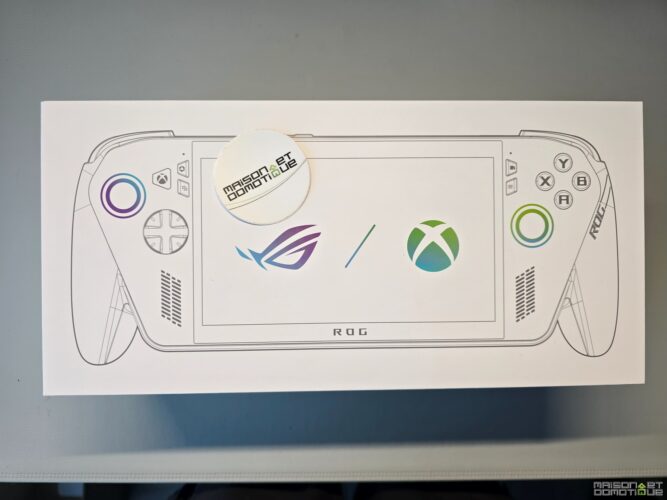
In concrete terms, the ROG Xbox Ally embraces its hybrid DNA. It combines the software flexibility of a PC, the Xbox ecosystem for cloud and Game Pass, and the typical hardware DNA of ROG gaming machines. The device theoretically offers total freedom to play Windows titles (Steam, Epic, GOG, Ubisoft…) with integrated high-end controller ergonomics. The main ambition: to marry the accessibility of a console with the brute power of a mini-PC. To achieve this, Asus relies on the AMD Ryzen AI Z2 A APU (Zen 5 architecture, which combines a CPU and a GPU), a marked focus on display quality, and a chassis designed for endurance and prolonged handling.
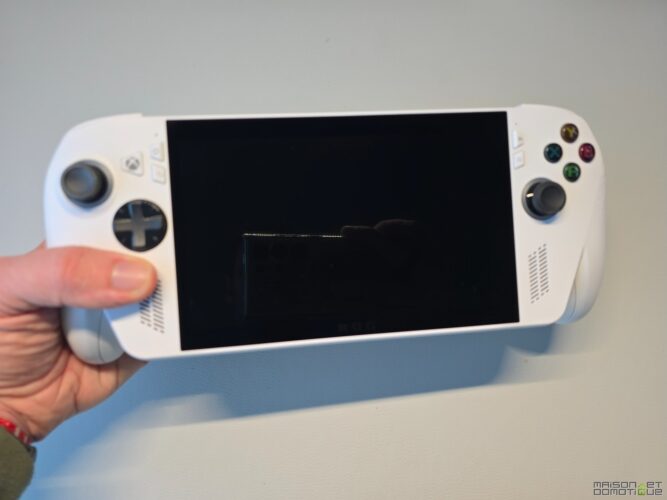
But the proposition does not settle for adding an alternative to the Steam Deck: it wants to go further in versatility, comfort, and transition between PC and console universes.
Technical specifications of the ROG Xbox Ally: AMD Ryzen Z2 A processor, 120 Hz IPS screen, and optimized Windows 11
The analysis of the specifications reveals Asus‘s ambition with this ROG Xbox Ally. At the heart of the machine is the AMD Ryzen AI Z2 A. It is a next-generation APU based on a Zen 5 architecture.
- CPU Zen 5: 4 cores/8 threads, Boost frequency up to 3.8 GHz
- GPU RDNA 2 with AI functions, max frequency 1.8 GHz, 8 CU
- RAM: 16 GB LPDDR5X integrated, high bandwidth for multitasking
- Storage: 512 GB SSD in M.2 2280 format (PCIe 4.0 NVMe)
- System: Windows 11 custom version, console interface “Full Screen Experience”
- Screen: IPS 7 inches 1920×1080 px (Full HD), 120 Hz
- Wi-Fi 6E + Bluetooth 5.2, Thunderbolt 4 connectivity, 2x USB-C, microSD, headphone jack
- Battery: 60 Wh Standard, fast charging (charger not included)
- Audio: stereo, front speakers with Smart Amp technology
This hardware choice positions the machine at the top of the range, particularly in the Ally X version. The integration of fast PCIe 4.0 storage and AMD‘s optimization for portable gaming ensures smooth loading and enough space to install several AAA titles from Game Pass.
| Feature | Ally Standard | Ally X |
|---|---|---|
| Processor | AMD Ryzen Z2 A (Zen 5) | AMD Ryzen Z2 Extreme |
| Screen | IPS 7″, FHD, 120 Hz | IPS 7″, FHD, 120 Hz |
| RAM | 16 GB LPDDR5X | 24 GB LPDDR5X |
| Storage | 512 GB PCIe 4.0 | 1 TB PCIe 4.0 |
| Battery | 60 Wh | 80 Wh |
| Estimated price | €599 | €899 |
This technical sheet, especially in the Ally X version, indicates an upgrade compared to competitors (Steam Deck, Lenovo Legion Go, MSI Claw), and offers a solid basis for performance tests.
Ergonomic design of the ROG Xbox Ally: side grips, bulkiness, and aesthetic choices
The inspiration is obvious: the ROG Xbox Ally shares the (visual and material) DNA of the first Ally, but optimizes handling thanks to prominent side grips. This ergonomic choice clearly targets players on long sessions: on the sides, there are textured surfaces of excellent quality, which hug the hand, comparable to a premium Xbox controller.
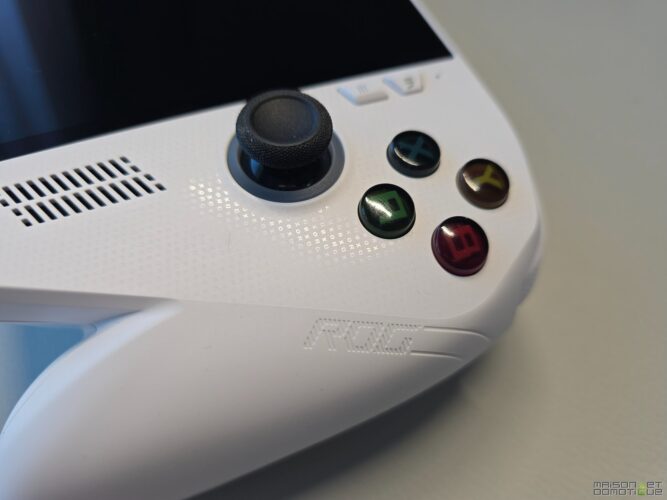
On the bulkiness side, the size is nonetheless considerable. The console weighs 670 grams. This heft, while improving stability, somewhat detracts from portability: it’s hard to slip it into a small bag. However, the execution is neat, made of robust materials, and the buttons and triggers have a firm response.
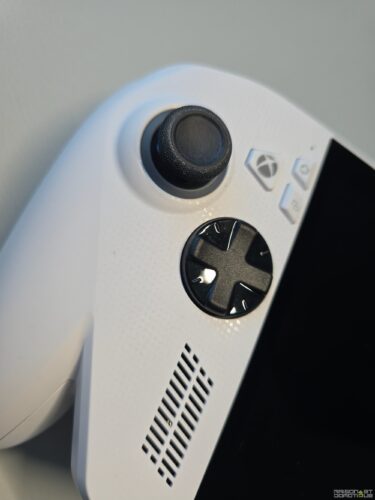
However, the D-pad is disappointing; too soft, it does not evoke the precision of Xbox Elite controllers. The sticks are pleasant, but the overall size of the machine – while designed for endurance – limits the “portable console” experience in some mobile usages.
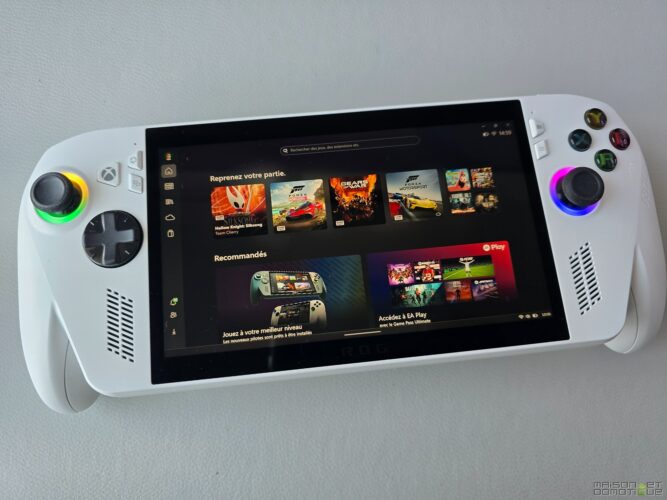
The overall design is appealing with discreet RGB LEDs around the joysticks, a very “premium” look, but suffers from the compromise between stationary comfort and absolute mobility. Between brute power and portability, the machine does not seek to find a middle ground.
Gaming performance of the ROG Xbox Ally: benchmarks, power modes, and comparison with Steam Deck
The heart of the ROG proposition remains the promise of a gaming experience without compromises. This is where this review of the ROG Xbox Ally makes perfect sense: will it surpass the Steam Deck or at least compete against the Switch 2? The challenge lies on three axes: APU power, thermal management (noise, temperature), and software optimization.
APU Ryzen Z2 A and thermal management: tests on Cyberpunk 2077 and Forza Horizon 5 at 1080p
The new AMD Ryzen Z2 A chip, built on Zen 5, promises a generational leap in energy efficiency and raw performance. To measure the gain, for example, I ran Cyberpunk 2077 and Forza Horizon 5 in Full HD.
- Cyberpunk 2077 (1080p, medium, FSR 3.0): up to 45-50 FPS in Turbo mode plugged in, 36 FPS in Performance mode, stable frame rates with FSR Frame Generation
- Forza Horizon 5 (1080p, high): 60 FPS in Turbo mode plugged in, 48-50 FPS in Performance, smooth experience, relatively quiet noise level
- Thermal management: the ROG cooling system impresses; 32-35 dB under load, heat well channeled to the back, no thermal throttling observed
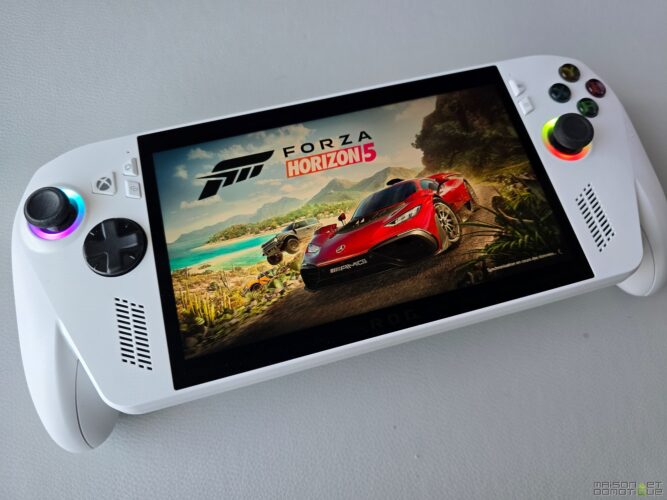
The FSR 3.0 contribution (with Frame Generation on native support) proves crucial for maintaining fluidity in AAA titles. However, consumption skyrockets in Turbo mode, immediately impacting battery life.
Against other players (MSI Claw, Lenovo Legion Go, Steam Deck), the Ally reigns over the performance segment but heavily relies on energy settings and the power supply.
Turbo, Performance, Silent modes: impact on fluidity and battery life of the portable console
The ROG Xbox Ally operates on a triple energy management system that can be modulated on the fly via Armory Crate or Xbox shortcuts. The Turbo mode pushes the chip to its limit, delivering the best performance… at the expense of battery life and silence. But on Cyberpunk 2077 for example (Steam version), there’s no choice: the game runs much smoother in Turbo mode.
- Turbo Mode: Maximum power, moderate noise (38 dB), battery life sacrificed
- Performance Mode: compromise between FPS and endurance, heat well managed
- Silent Mode: for cloud/streaming use, fan audible but discreet, extended battery life
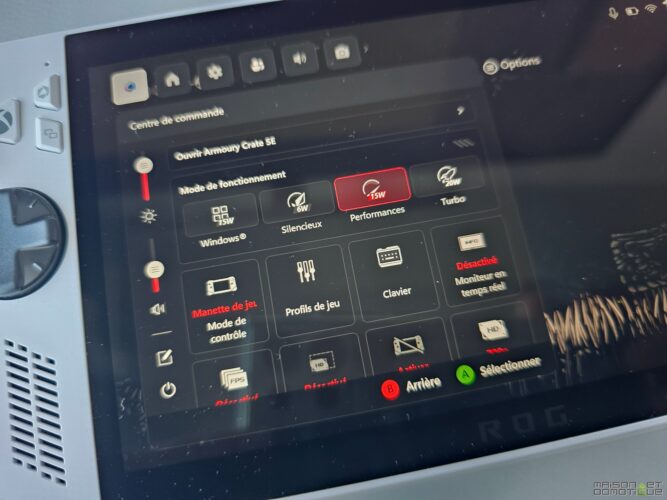
In real conditions, the battery life fluctuates: 1h45-2h15 in Turbo mode on demanding titles, up to 2h45 in Performance mode, and up to 7h in cloud gaming (xCloud, GeForce Now). This positioning, comparable to the Steam Deck and lower than some MSI models, remains a hindrance to mobility. Nomadic gamers would therefore prefer the Ally X version to benefit from the boosted battery and optimized Turbo mode.
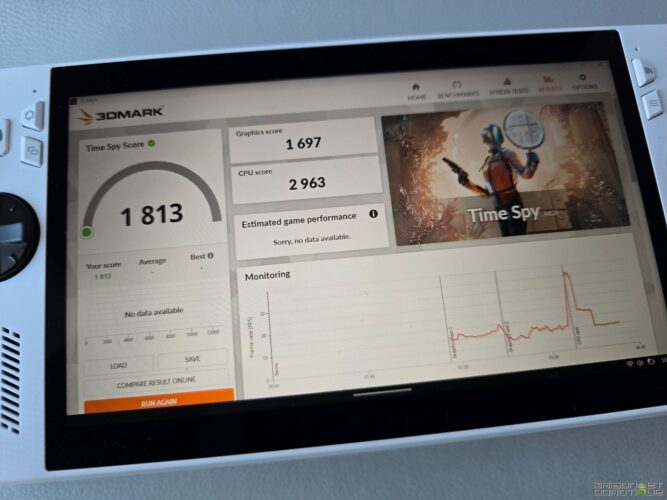
The verdict of this test: performance worthy of a gaming mini-PC, but low battery life when unplugged. Therefore, a choice must be made between pure power and offline usage.
Screen, audio, and connectivity: the hardware strengths of the ROG Xbox Ally portable console
Beyond raw power, the ROG Xbox Ally boasts a premium offering in two other physical aspects: display quality and rich connectivity. These elements make a difference during marathon sessions and contribute to the attractiveness of the ROG range against the Steam Deck or competing MSI solutions.
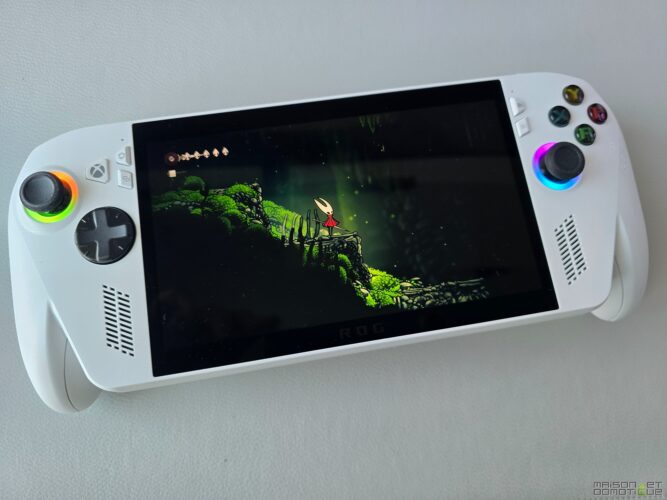
Quality of the 7-inch IPS screen (Full HD, 120 Hz): colorimetry, brightness, and calibration recommendations
A true gem, the 7-inch IPS screen delivers high definition: Full HD (1920×1080), 120 Hz, reduced latency. The panel impresses with its brightness (up to 484 nits measured in the center), contrast (1276:1), and dynamic colors. Nevertheless, the factory calibration skews slightly towards blue, necessitating a visit to Armory Crate for a more neutral render.
- Fine definition: perfect for AAA gaming
- 120 Hz refresh: appreciated responsiveness on FPS/arcade
- Above-average contrast and brightness
- Colorimetry to refine via software
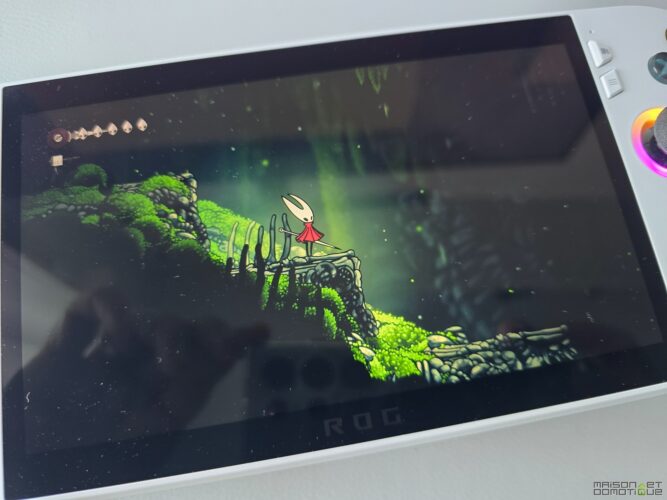
The low motion blur persistence, typical of modern IPS, allows it to partially compete with OLED in terms of clarity – without matching it in black depth. However, the diagonal remains narrow for immersion in certain games, especially compared to the wider screen of a Switch 2. Thus, games displaying a lot of text (puzzles, etc.) may not be very suitable, as the text is far too small to read comfortably.
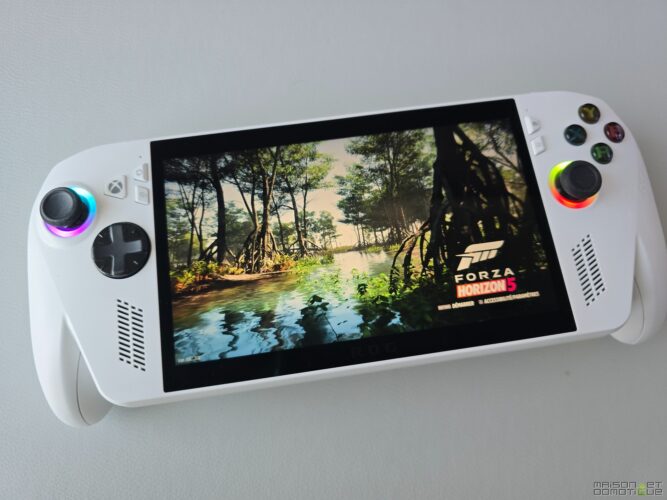
For the most demanding gamers, this panel stands out as a valid compromise, combining responsiveness, fineness, and brightness. A real asset compared to the simple LCD screens of the first Steam Deck for example.
Rich connectivity, audio and cooling: Thunderbolt 4, Wi-Fi 6E, noise management in gaming
The connectivity of this portable console is impressive. A series of premium ports are concentrated on the top edge: two USB-C ports, one of which is compatible with Thunderbolt 4 (for dock, fast storage, or eGPU), a microSD card slot, a headphone/microphone jack, and volume/power buttons integrated with a fingerprint sensor.
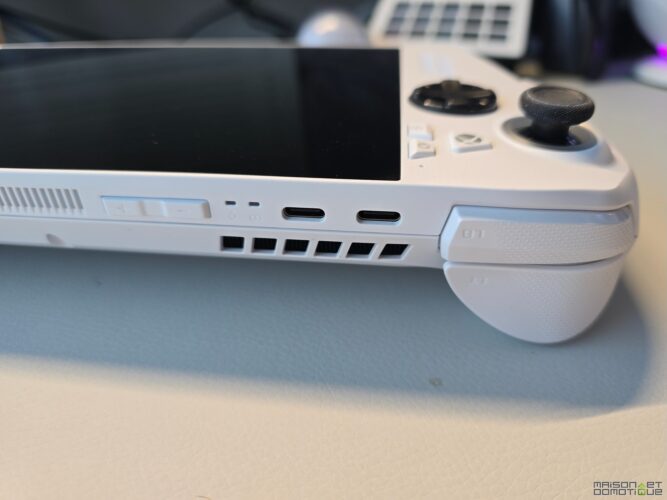
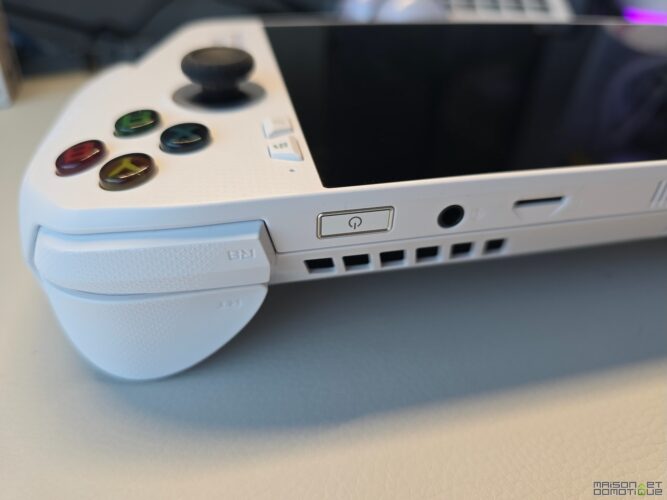
This integration choice signals Asus‘s intention to move beyond the proprietary ecosystem of the Steam Deck towards the versatility of a “gaming PC.”
The audio system outperforms many competitors: spacious rendering, contained distortion even at high volume, and decent headphone output, without hiss.
With Wi-Fi 6E/Bluetooth 5.2, network stability is ensured, but the absence of wifi 7 will disappoint future-proofing enthusiasts.
Finally, thermal management hits the mark: even in Turbo mode, fan noise does not exceed 40 dB, heat distributes over the back shell, preventing overheating of the hands.
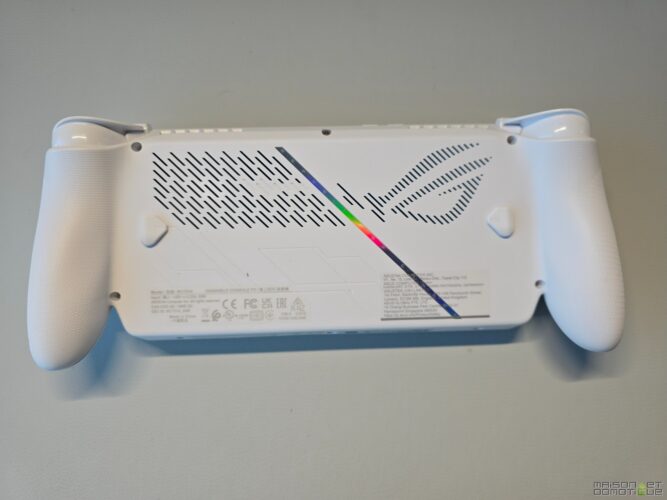
Ultimately, the machine stands as a hardware reference in its segment, especially for those looking for the most open and efficient ecosystem.
Xbox interface and user experience: console navigation, game compatibility, and ROG Ally battery life
Hardware alone is not enough: the true richness of the ROG Xbox Ally is expressed through software integration, designed to transform the “gas factory” Windows into a console experience.
Full Screen Experience on Windows 11: interface, compatible platforms, and areas for improvement
The Full Screen Experience, based on the Xbox app reimagined by Microsoft for ROG, aims to provide a “console” navigation with simplified menus, automated updates, and cross-access to Game Pass, Steam, and Ubisoft Connect. The full-screen mode starts automatically at boot, allowing users to browse the library, install or launch games, while (almost) forgetting about the Windows backdrop.
- Compatibility with the entire Xbox Game Pass catalog
- Fast launches via a unique interface, multitasking possible
- Support for Steam, GOG, Ubisoft Connect, and Epic Games Store
I was able to play Cyberpunk 2077 from Steam, then Forza Horizon 5 on Xbox Pass without friction. In terms of fluidity, it’s almost an Xbox, but sometimes you can feel it’s a disguised PC…
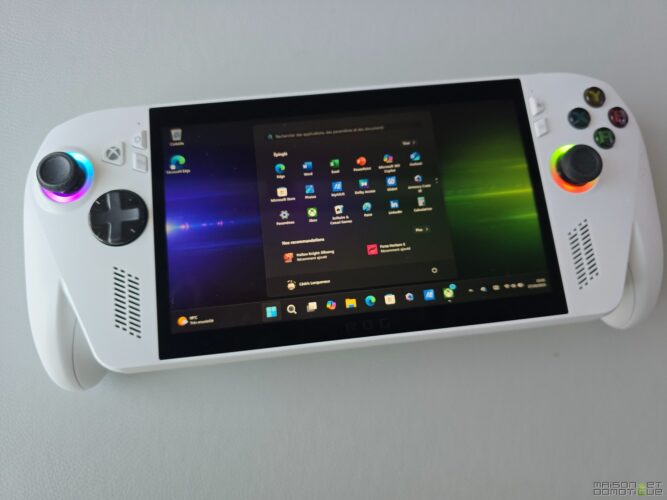
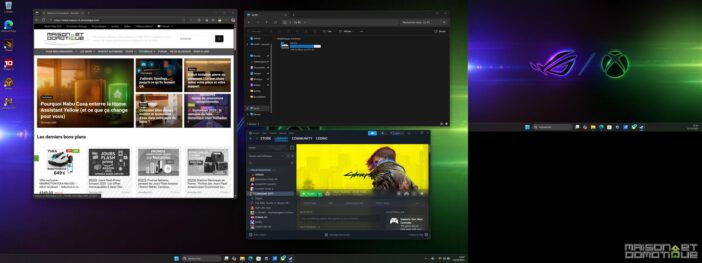
Moreover, by connecting a USB-C Hub, it is entirely possible to connect a monitor, keyboard/mouse to turn it into a fully functioning computer under Windows:
Battery life, accessory policy, and value for money
The battery life of the ROG Xbox Ally is the true Achilles’ heel of the concept. With a 60 Wh battery for the Ally, you get between 2 to 3 hours of AAA gaming, up to 7 hours for mixed/video/cloud usage. Values close to the Steam Deck, but lower than traditional gaming portables or the Switch 2 for example.
- AAA gaming (Turbo mode): 1h45–2h15
- Silent mode/cloud gaming: 6–7h
- Charging time (65W USB-C not included): about 1h30
On the accessory side, the ROG policy disappoints: only a simple cardboard stand in the box, no charger or carrying case or hard shell. For a “premium” console experience, this detail detracts from the unboxing magic and imposes a mandatory additional purchase.
Regarding pricing, two versions coexist: the Standard white version tested here (less powerful, around €599) and the Ally X black version (Ryzen Z2 Extreme, 80 Wh, up to 24 GB RAM, €899). Both benefit from 3 months of Xbox Game Pass Ultimate, an argument to amortize the investment. However, considering the power and battery life delta, it seems wise to recommend the Ally X to truly enjoy the ROG promises.
| Model | Price | Storage | Battery | Accessories |
|---|---|---|---|---|
| Ally Standard | €599 | 512 GB | 40 Wh | Cardboard stand only |
| Ally X | €899 | 1 TB | 80 Wh | Cardboard stand only |
The value for money raises the question of the target audience: for short trips (or cloud streaming), the Standard suffices. For demanding gamers, only the Ally X guarantees consistency between power and portable console experience.
Conclusion
Ultimately, the ROG Xbox Ally stands as a milestone between the world of gaming laptops and that of consoles, highlighting the transition towards a powerful and modular nomadic experience – but subject to battery endurance, accessory openness, and the software maturity of the Xbox interface.
Ces articles pourraient aussi vous intéresser:


0 reaction