


Résumer cet article :
C.A.F.E. (Complex Automation Flow Editor) is an integration that adds to Home Assistant a visual “flow” editor, somewhat in the spirit of Node-RED, but with a major difference: C.A.F.E. is not an execution engine. Home Assistant remains the sole executor of your automations. C.A.F.E. simply transforms your visual diagram into 100% compliant YAML and stores it directly in the Home Assistant system.
In short, you draw the logic with blocks connected by arrows, then you save… and Home Assistant executes as usual. No Docker container to add, no database to maintain, no addon that becomes the weak link, as is the case with Node-Red. This is exactly the “zero overhead” promise highlighted by the project.

Why it’s interesting for Home Assistant
If you like YAML, you already know why: it’s robust, native, predictable… but as soon as an automation grows, you quickly find yourself facing a wall of text. C.A.F.E. precisely targets that moment when “it becomes a bowl of spaghetti.” It can read an existing automation and rebuild a visual map, which is very handy for auditing, understanding, and restructuring.
If you came from Node-RED, the reassuring aspect is elsewhere: you find a node logic again, but without offloading the execution from Home Assistant. C.A.F.E. changes the interface, not the engine, and you can return to the native editor at any time.
There are also two “bonuses” that appeal to many:
- C.A.F.E. handles the notion of variables better on the visual interface side, whereas the native visual editor of Home Assistant often forces you to dig into YAML for such things.
- C.A.F.E. integrates with Home Assistant’s trace: the goal is to keep debugging within the official tools, without inventing a parallel universe.

The clever “trick”: no locking, no exotic format
This is probably the most reassuring argument: if you uninstall C.A.F.E., your automations continue to work. You mainly lose the visual layout (positions of the blocks), not the logic, as it remains standard YAML.
And to maintain this layout, C.A.F.E. stores metadata (positions of nodes, etc.) in a “harmless” object within the variables block of the automation. You can modify an automation in Home Assistant, then reopen it in C.A.F.E.: both edit the same source.
Installing C.A.F.E. in Home Assistant (via HACS)
The recommended method is through HACS, by adding the custom repository. The official README provides the steps to follow: in HACS, navigate to Integrations, the three-dot menu, “Custom repositories,” then add https://github.com/FezVrasta/cafe-hass as an integration.

Then, you find C.A.F.E. in HACS, and you install it (download it).
Restart Home Assistant, then add the C.A.F.E. integration via Settings → Devices & Services → Add an integration.

Once in place, C.A.F.E. appears in the Home Assistant sidebar as a panel. It is not a Lovelace “dashboard,” it is indeed an entry in the sidebar.

Want to test without installing?
It is possible to try C.A.F.E. without installing anything, via a web interface, provided you have remote access to Home Assistant.

In practice, keep in mind that exposing Home Assistant on the Internet should be done properly (Nabu Casa, reverse proxy, authentication, etc.). It is feasible, but we avoid the “yolo” mode when it comes to home automation.
If you do not wish to grant access to your Home Assistant (which is completely understandable), I have set up C.A.F.E. on the Home Assistant test server that I have made available to you for a few weeks, which will allow you to test under real conditions without breaking anything at home or needing to provide remote access ;-)
Getting Started: How We Use It Daily
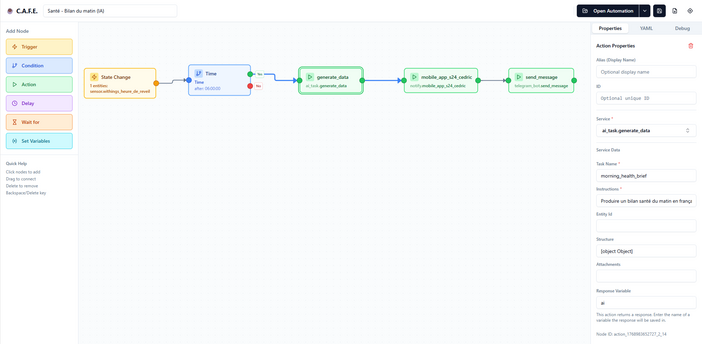
Once in C.A.F.E., the interface is very “flow editor”: a palette of nodes on the left (triggers, conditions, actions, delays, waits…), a large central canvas where the blocks are placed, and a properties panel on the right to configure each node. You can zoom, move around, and even use a mini-map to navigate through complex automations.

The typical scenario looks like this: you drop a trigger (for example, “motion detected”), you add a condition (for example, “it’s dark”), then an action (for example, “turn on the hallway light”), and you connect everything. Then, you open each node to select entities and services. C.A.F.E. relies on the intelligence of the entities on the Home Assistant side (auto-completion, knowledge of states via API) to avoid typing identifiers by hand.
A very handy point: you can open an existing automation, see it “laying” on the canvas, move the blocks to clarify, modify, and then save in Home Assistant. You edit, you save, and you find the automation in the native editor, with YAML enriched by layout metadata!
Import, Export, Debug
C.A.F.E. can import an existing automation, and it can also import YAML or JSON, then export a flow in JSON. This is useful for sharing a “diagram” or archiving a version before reworking a somewhat tricky logic.
On the debugging side, the idea is simple: keep a clear reading of the execution. There is a debugging mode with a “step-by-step” indicator and options to simulate condition results, to visualize the path taken in the automation.
And on the project side, integration with the Home Assistant Trace View is one of the announced strong points: you stay within the official tools to analyze what happened.
Concrete Examples Where C.A.F.E. Really Makes a Difference
Take a somewhat realistic “evening lights” automation. Trigger: just before sunset. Condition: only if we are before a certain hour (otherwise, too late, unnecessary). Action: turn on certain lights, but with different brightness depending on a time window. In YAML, this often ends up with nested “choose” statements and intersecting conditions. In C.A.F.E., this kind of logic becomes a roadmap: you see the branches, you see the paths, you breathe. And this is exactly the type of example shown in the transcript.
Another very telling case: scenarios with variables. A very simple example: you call a script that returns information (temperature, rate, synthesized state), you store the response in a variable, then reuse that variable in subsequent actions via Jinja templates. The README explains the mechanism of “script responses” (response_variable) and the use in Jinja {{ variable.field }} in the following nodes.
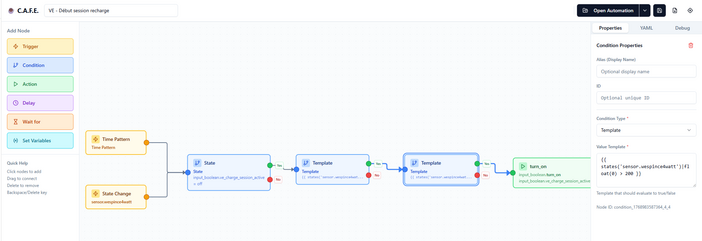
And for installers or advanced users: as soon as we talk about loops, backtracking, non-linear logics, C.A.F.E. announces an “optimized” compilation that can generate a structure of type “state machine” when necessary, while remaining 100% compatible with Home Assistant.
Limits and Precautions (because yes, it’s a beta)
The project is presented as “non-destructive,” but it remains in beta, with frequent corrections. First rule: make a backup of your automations before modifying important things.
Second rule: on a critical automation (alarm, heating, security), proceed gradually. Test first on a simple automation, compare the YAML before/after, check the trace, then increase complexity. It’s a bit like the method “you don’t renovate a house by breaking down all the walls at once” (and your future peace of mind will thank you!).
Third rule: accept the idea that auto-layout and visual reconstruction will not be perfect 100% on very artisanal YAML. The project acknowledges it: importing complex manual YAML can have rough edges.
Should You Adopt It Now?
If you are comfortable with the native editor and your automations remain simple, C.A.F.E. is not “mandatory.” However, if you have scenarios that go in all directions, if you hate rereading long YAML like a day without Wi-Fi, or if you enjoy the visual comfort of Node-RED but without wanting a second engine, C.A.F.E. checks many boxes: visual, native, without overhead, and without long-term pitfalls since we remain on standard Home Assistant automations. Here at least, it is adopted!




Please remain courteous: a hello and a thank you cost nothing! We're here to exchange ideas in a constructive way. Trolls will be deleted.