



Résumer cet article :
Home Assistant has just published the official announcement: Music Assistant is now at version 2.7, featuring a visual overhaul, new “network” bricks, and a significant wave of audio integrations. It is even referred to as the “biggest update to date,” and for once, it’s not just a saying: there is concrete improvement in terms of interface, user accounts, remote streaming, and compatibility.
As a reminder, Music Assistant is the “audio” component designed to gather your music (local sources and services) and your players (speakers, amplifiers, network players…) all in one place, with the added bonus of control via Home Assistant and its automations. And this 2.7 version clearly pushes the idea further.
A project gaining strength, with a full-time developer
The first strong signal: Music Assistant welcomes its first full-time employee within the Open Home Foundation. Marvin officially joins the team to lead the project on a daily basis, after three years of contributions, particularly on Apple Music and YouTube. This is the kind of detail that doesn’t generate a “click” in the interface… but often changes everything regarding the pace of bug fixes, the quality of integrations, and the speed of evolution.
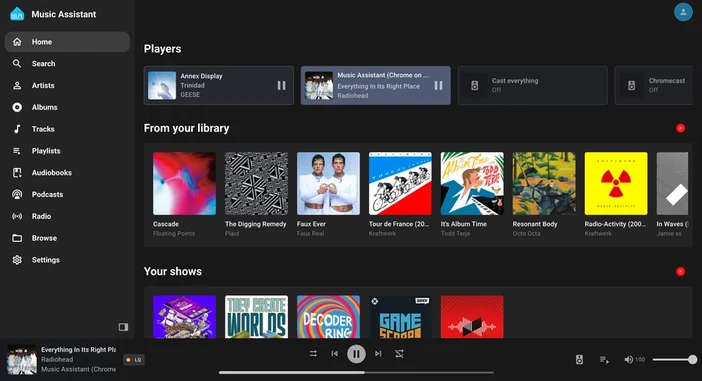
A visual overhaul, finally an interface at the level
Music Assistant 2.7 starts a UI/UX modernization announced as a long-term project. Immediately, there’s a collapsible sidebar navigation, a more intuitive discovery process (especially for newcomers), and a better-structured settings page with a “breadcrumbs” system for orientation.
The small novelty that can make you smile but is genuinely useful: an integrated “Built-in Player” in the browser. Handy for previewing a track before sending it to all the speakers in the house (to avoid the “explicit lyrics” surprise at breakfast…).
Accounts, profiles, and security: each their music, each their speakers
Big structural change: Music Assistant introduces real user management and log-in capabilities. The goal is twofold: to secure access (even at home, a shared device remains a shared device) and unlock advanced functions.
In practical terms, each household member can have their profile, with their own music providers. Gone are the four mixed Tidal accounts in the same interface, and it is even possible to limit access to certain speakers according to users. Home Assistant can also serve as a Single Sign-On, to avoid multiplying identifiers and maintain a consistent experience.
Remote streaming: Music Assistant outside the home, without a mandatory subscription
This is the other announcement that catches the eye: Music Assistant can now stream remotely via a new dedicated web app, usable as soon as you have Internet.
Technically, Music Assistant relies on the multimedia streaming capabilities of Home Assistant Cloud (WebRTC) to route audio between your Music Assistant server and your remote device. Important point: although the Nabu Casa infrastructure is provided, the Home Assistant Cloud subscription is not required to use this feature. However, subscribers benefit from a more “powerful” routing (thus potentially more robust depending on the networks).
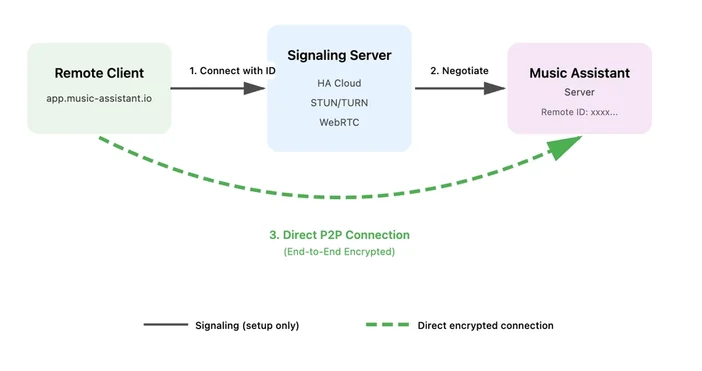
The connection is announced as peer-to-peer with end-to-end encryption. And Home Assistant makes it clear: the idea is not necessarily to replace Spotify/Apple Music on the go, but rather to be able to take your library (including FLAC) to friends’ houses, or even to synchronize multiple remote devices by opening several instances of the web app.
Sendspin: a new open source protocol for streaming audio, covers, and visualizations
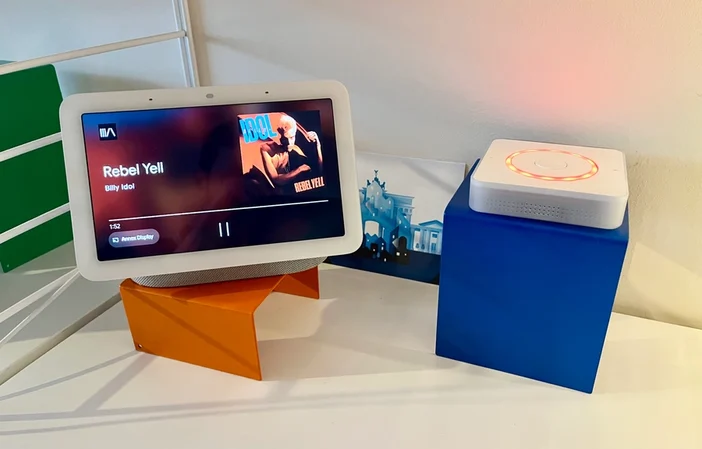
This is probably the most “geeky” part of the announcement, but also the most exciting for the future: the team introduces Sendspin, an open source protocol to stream and synchronize not only audio but also cover art and visualization data, with automatic adaptation to device capabilities.
The given example is telling: an e-paper screen displaying the cover while several speakers play in sync, and the connected lighting pulses to the beat. Today, the “simplest” usage is through the browser or by using a Home Assistant Voice Preview Edition in beta firmware. There is also experimental support on Google Cast compatible speakers, and the team mentions wanting to do the same for AirPlay. Be careful, this is presented as a “tech preview,” with an explicit call to developers and DIYers to test and build around the protocol.
AirPlay: audio reception and AirPlay 2 multiroom
On the Apple side, Music Assistant continues to expand its arsenal. The team highlights the arrival of support for external audio sources, including Spotify Connect, and now announces the possibility of sending an AirPlay stream to Music Assistant, and then relaying it to the players of your choice.
Even more interesting for multiroom: AirPlay 2 speakers become a full “player provider,” with synchronization announced for AirPlay 2 speakers (example: HomePods). However, be cautious to check the limitations in the documentation, as not all AirPlay 2 devices behave identically.
Lyrics, karaoke, and intelligent crossfade
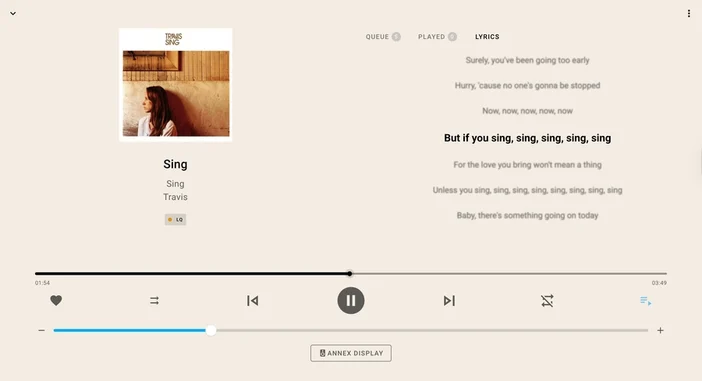
In terms of user comfort, two new features are highlighted. First, the display of lyrics, introduced in 2.6, is recalled and enriched: depending on the lyrics provider, it is possible to have timed synchronization like karaoke. The mentioned providers include LRCLIB, Tidal’s lyrics sync, Genius, and local LRC files.
Next, 2.7 adds “Smart fading”: a more natural crossfade that takes into account the BPM of the tracks to improve the transition when chaining a playlist. Activation happens at the player level, in the Audio section, via “Enable Smart Fades”.

And “a lot of other things”: DSP, scrobbling, Yamaha MusicCast, Roku, radios, and podcasts
The announcement concludes with a flurry of new features that deserve attention, even if they are less “headline.” There are DSP presets to quickly record and reapply audio settings, the addition of a shareable listening history with scrobbling (LastFM, ListenBrainz, Subsonic), new supported players like Yamaha MusicCast and Roku devices via Media Assistant, as well as a new input provider VBAN.
And for fans of “radio and podcasts in the kitchen,” the list grows: Radio Paradise, Podcast Index, BBC Sounds, gPodder, iTunes Podcasts, Dl.fm, and ARD Audiothek are mentioned. Added to these are more “niche” but really cool providers like Phish.in, Nugs.net, Internet Archive, and even Niconico.
What it means, very concretely, in a connected home
With this 2.7, Music Assistant comes closer to a true home audio “hub.” User profiles finally allow for a home where everyone keeps their own services and recommendations, without polluting others’ experiences. Remote streaming opens the door to very “Home Assistant” scenarios: launching a playlist from home on your phone when you are out, checking the queue, or streaming an AirPlay received on a room that is not AirPlay compatible in the first place.
And Sendspin, even in preview mode, hints at a logical continuation: displays of covers on secondary screens, visualizations, and more universal multiroom sync, without relying solely on proprietary protocols.
Availability and update
The update is available now; simply update to enjoy the new features. In practice, regarding Home Assistant, the update generally goes through the Music Assistant Server add-on (and the associated integration) depending on your installation mode.



Please remain courteous: a hello and a thank you cost nothing! We're here to exchange ideas in a constructive way. Trolls will be deleted.