



Résumer cet article :
When I wrote the first guide for connecting the Ajax alarm to Home Assistant, I had to juggle between SIA, Jeedom, MQTT, topics galore… The result worked perfectly, but you had to love complicated setups. Today, a complete change of scenery: developers have created a native Ajax Home Assistant integration, installable via HACS, that communicates directly with the official Ajax Cloud API. Arming, disarming, notifications, sensors, relays… everything feeds into Home Assistant in (almost) real time!
Installed at my home for a few days now, I invite you to discover a bit more detail about this eagerly awaited plugin…
Quick reminder about the old methods
Until now, to talk about Ajax Home Assistant, there were two approaches.
The first involved the SIA Alarm Systems integration of Home Assistant. The Ajax alarm was configured as if Home Assistant were a monitoring center. We retrieved the state of the system, some fire/flood information, and that was it. It was impossible to control the alarm, and no details were available for each sensor. It was mainly useful for triggering a few scenarios based on the global state of the alarm, such as switching the heater to eco mode when arming the alarm upon leaving home.
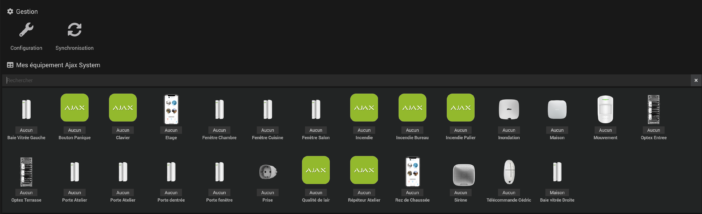
The second method, detailed in my previous guide, involved using the Ajax plugin on Jeedom, then republishing all information into Home Assistant via MQTT. Much more comprehensive, with data from nearly all Ajax sensors, but at the cost of a second home automation server, an MQTT broker, and mapping dozens of topics… In short, very powerful, but clearly not for everyone.
The new plugin completely changes the game: Ajax Home Assistant becomes a much simpler pair to set up.
What the new Ajax Home Assistant plugin allows
The ajax-hass integration is a custom Home Assistant component that connects directly to the Ajax Cloud via the official API and a gRPC stream, exactly like the Ajax mobile app. In practical terms, your Ajax Hub becomes a “first-class citizen” in Home Assistant, with a real alarm panel and entities for sensors, sirens, relays, plugs, etc.
You gain complete control of security. The Home Assistant alarm panel allows full arming, disarming, night mode, partial arming by group, and even forced arming when certain sensors remain open. A dedicated service manages the panic button, which can be placed on a dashboard or a virtual remote.
On the information retrieval side, the plugin exposes arming/disarming events with the Ajax user’s name, alarm notifications, motion detections, door and window openings, fire or flood alarms, as well as “technical” sensors such as battery level, signal quality, temperature, or connection status. It’s very comprehensive.
The integration manages multiple Ajax hubs in the same Home Assistant if needed, and the interface is already translated into French. Regarding the range of equipment, the developer primarily tests the Hub 2 Plus and the MotionCams, but the design is based on the official Ajax API, and the community has already validated a good number of keypads, sirens, opening contacts, fire detectors, etc.
So we end up with a true tandem Ajax Home Assistant, capable of finely controlling and observing the alarm system without any detours.
Preparing your Ajax and Home Assistant installation
Before getting started, it’s best to check a few prerequisites.
Your Ajax system must be operational, with a Hub configured in the official app, all detectors properly added and named, and preferably the groups already defined (ground floor, floor, garage, etc.). The cleaner the Ajax configuration, the more enjoyable the Home Assistant part will be.
On the home automation side, you need an up-to-date Home Assistant, with HACS already installed and functional, as the Ajax Home Assistant plugin is distributed as a custom integration. Also, check that your Home Assistant instance has outbound internet access to the Ajax servers, as communication goes through the Cloud via HTTPS and gRPC.
Finally, ensure your Home Assistant installation is properly secured: strong password, protected remote access (reverse proxy, authentication, TLS certificate), and regular backups. Integrating your alarm system into your home automation is very convenient, but it involves being a bit more rigorous about the overall security of the infrastructure.
Installing the Ajax integration via HACS
Let’s get to the concrete. Is HACS already in place on your Home Assistant? Perfect, we can start the installation of the Ajax Home Assistant plugin.
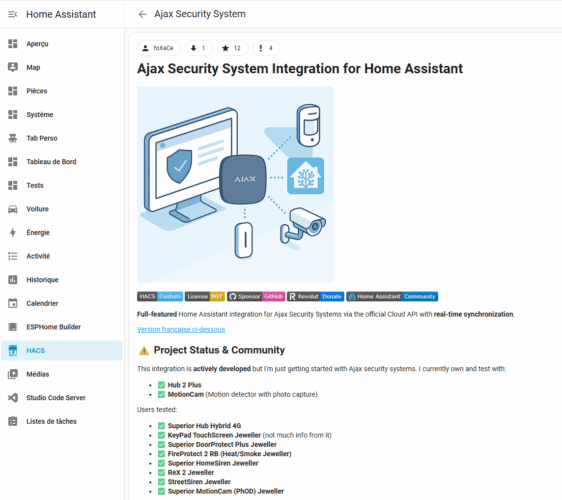
The first step is to declare the GitHub repository of the plugin in HACS. In the Home Assistant interface, open HACS, then the section dedicated to integrations. In the upper right corner, a button with three little dots opens the advanced menu. By choosing the “Custom repositories” option, you can add a new repository.
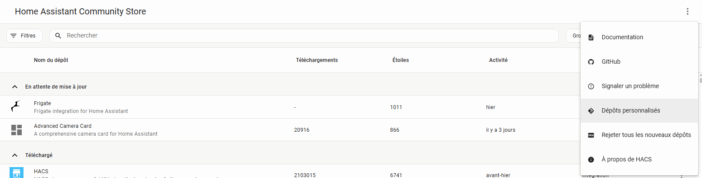
In the URL field, enter the address of the repository https://github.com/foXaCe/ajax-security-hass, and select “Integration” as the category. Validate and then close the window. The next time you search for an integration in HACS, “Ajax Security System” will appear in the list.
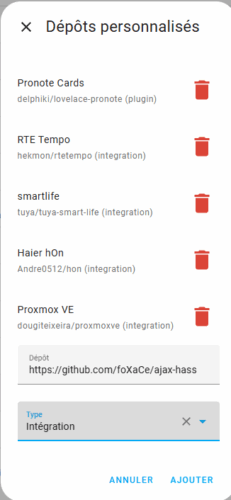
Still in HACS, search for “Ajax Security System”, open the corresponding card, and then install it.
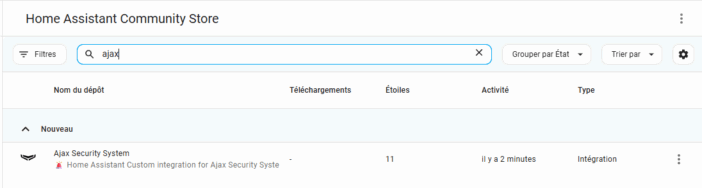
HACS will download the ajax-hass component and place it in the custom_components/ajax folder of your Home Assistant installation.
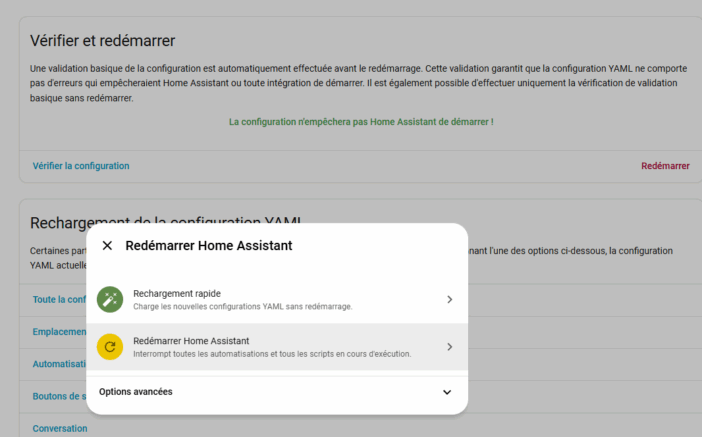
Once the installation is complete, a restart of Home Assistant is necessary to load the new integration.
Adding the Ajax Home Assistant integration in Home Assistant
Once Home Assistant has restarted, we can move on to the configuration. Everything is done from the interface, no YAML is required, which is nice!
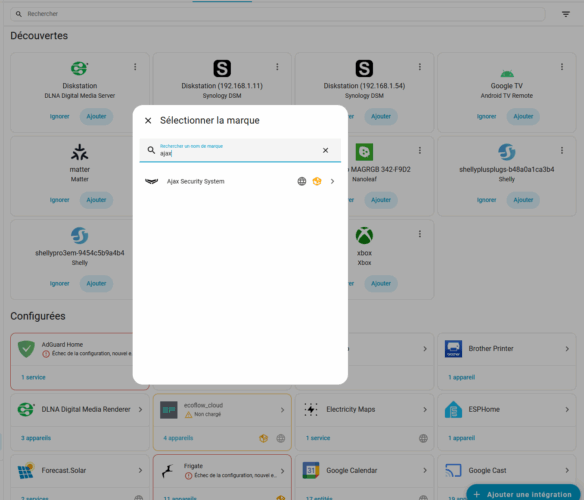
Open the “Settings” menu, then “Devices and Services”. At the bottom of the page, use the “Add an integration” button. In the search box, type “Ajax”. You should see “Ajax Security System” with the corresponding icon. Select it to launch the configuration wizard.
The integration will then ask for your Ajax account credentials, namely the email address and password used in the official app. The plugin does not need the local IP address of the hub, nor any exotic ports; everything goes through the Ajax Cloud.
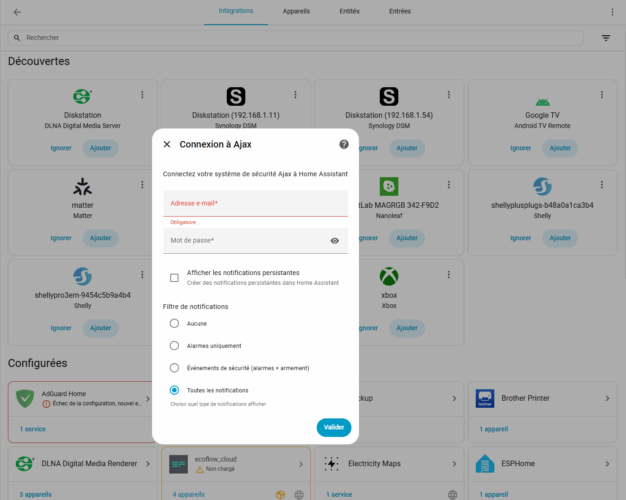
Next comes a very practical setting: the notification filter. You can choose not to forward any notifications to Home Assistant, only intrusion alarms, security events (arming/disarming, technical alerts), or absolutely everything, including sensor events in real time. If you plan to create many Ajax Home Assistant automations, it is often interesting to start with at least the security events and then adjust.
Validate, wait a few seconds: the integration contacts the Ajax Cloud and retrieves the list of your hubs. Here I have, for example, 3 different Ajax systems: I can add them all or select only the one that interests me, like “Home” only.
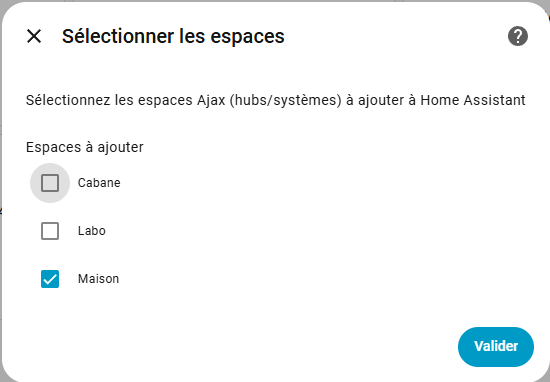
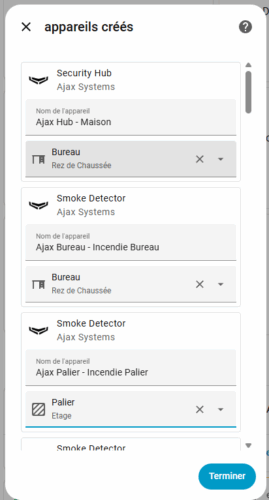
We confirm. The system then retrieves the groups and all the devices from the selected hub(s), then creates the corresponding entities in Home Assistant. You can then assign a room to them if you want:
What you find in Home Assistant after integration
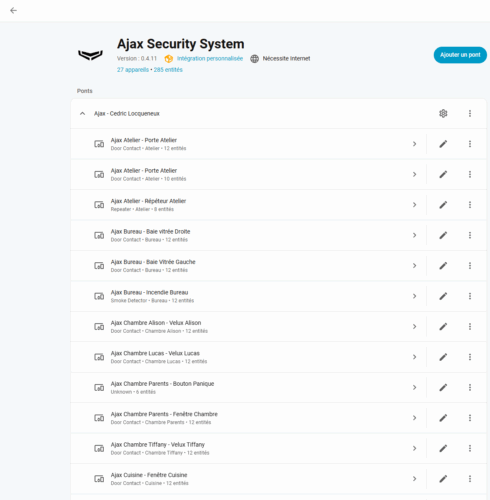
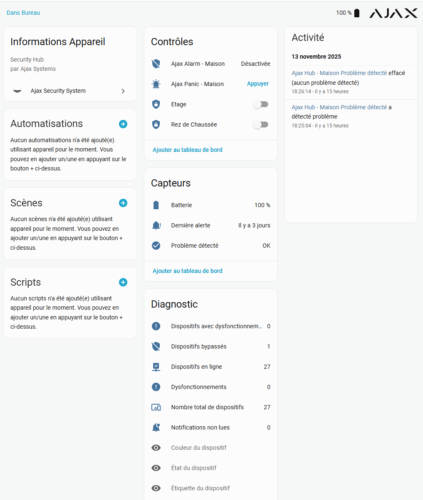
Once the Ajax Home Assistant integration is in place, a quick look in “Devices and Services” allows you to visualize the result. Each Ajax Hub appears as a device, with a main alarm panel and a set of sensors and actuators.
The alarm panel, exposed as an entity alarm_control_panel, allows for full home arming, night mode switching, disarming, and using partial arming by group if you configured it in the Ajax app. This entity becomes the central point of your security scenarios.
Motion detectors are exposed as classic binary_sensor, which turn to “on” when detection occurs and revert to “off” after the rest period. Door and window contacts also appear as binary sensors, perfect for triggering scenarios such as shutting off heating if a window remains open too long.
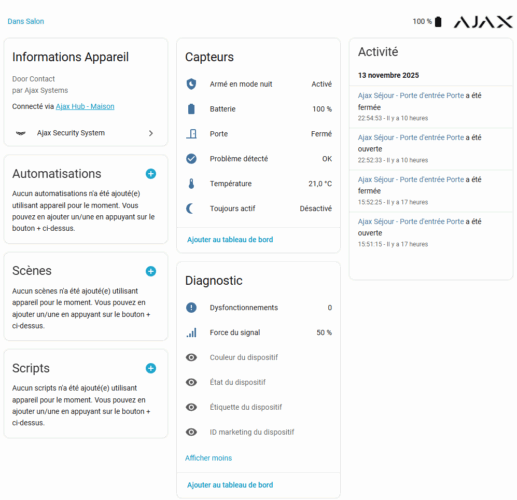
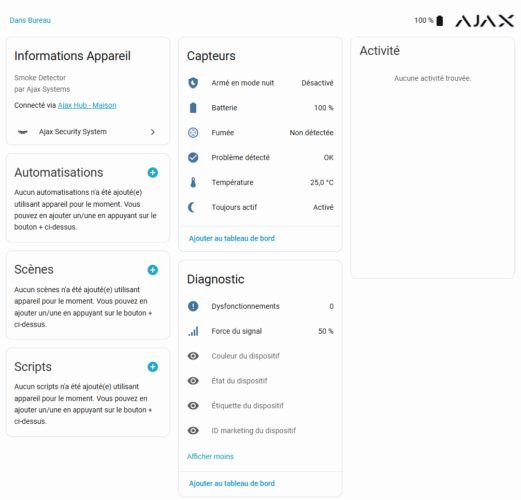
Smoke, carbon monoxide, or flood detectors also become directly exploitable entities.
The Ajax plugs and relays appear as switches or actuators, with the possibility of controlling them from Home Assistant. For example, you can command Ajax relays to cut off power to a device in case of an incident.
For the more detail-oriented, a whole range of “technical” sensors also appears: battery level, radio signal strength, temperature, connection status, etc. These provide a good basis to create a “Ajax system health” dashboard in Home Assistant.
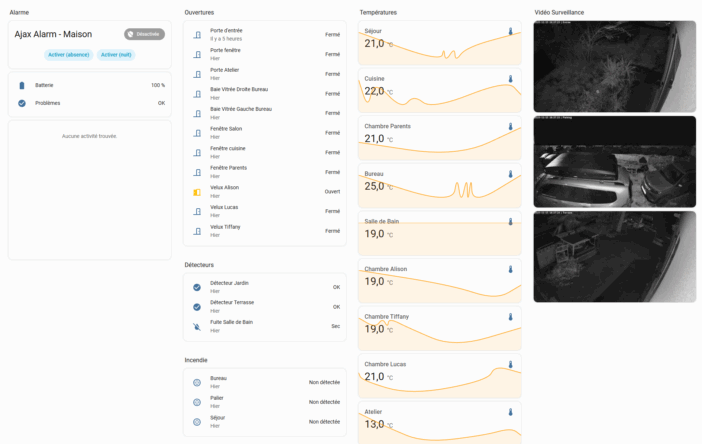
Examples of Ajax Home Assistant scenarios in action
Once everything is integrated into Home Assistant, the most interesting part begins: automations. The strength of this Ajax Home Assistant integration is precisely the responsiveness of event updates and the ability to control the alarm.
A first very useful scenario consists of automatically arming the alarm when everyone leaves the house. We use the presence of people via the Home Assistant mobile app or another presence system, and we trigger total arming as soon as the last person is marked as “not_home”.
A minimalist example in YAML might look something like this:
automation:
  - alias: "Arm Ajax when everyone leaves"
    trigger:
      - platform: state
        entity_id: group.family
        to: "not_home"
    action:
      - service: alarm_control_panel.alarm_arm_away
        target:
          entity_id: alarm_control_panel.ajax_alarm_home
We can imagine the reverse upon return: automatic disarming when the first person arrives, along with softly turning on a few lights and disabling certain simulated presence scenarios.
Another common use case concerns heating. The Ajax opening sensors reported in Home Assistant allow for cutting off electrical heating or air conditioning as soon as a window remains open for more than five minutes, then reactivating the system when the window is closed. No need to multiply Zigbee or Z-Wave sensors to work well on openings.
Ajax motion detectors can also participate in lighting management. We might decide that, only at night, passing in front of a detector in the hallway triggers a night light or LED strip at the foot of the bed, at low intensity, for a few minutes. The alarm isn’t triggered, but we reuse the infrastructure for comfort. This is part of the small pleasures of well-integrated home automation.
Finally, the Ajax panic button exposed as a “button” entity can be placed on a dashboard reserved for adults, or even hidden behind a password-protected card, and used to trigger a general alert: sirens, exterior lighting at 100%, sending notifications to smartphones, or even automatically calling a relative via a third-party service. In such a scenario, it’s better to test in real conditions but inform everyone beforehand…
Security and best practices with Ajax Home Assistant
Integrating Ajax into Home Assistant via this plugin means Home Assistant becomes another piece in the security chain. The developer has taken care of privacy: the credentials are stored in the encrypted system of Home Assistant, the password is hashed before being sent to Ajax servers, communications are via TLS, and no data is sent to third-party services. The integration is open source and auditable, which is reassuring for a security system.
However, it is essential to maintain a few reflexes. An exposed Home Assistant on the internet becomes an entry point to your alarm system. Therefore, it is crucial to lock external access, keep Home Assistant and the Ajax integration updated, and avoid multiplying administrator accounts. Forced arming, in particular, should be used sparingly, as it allows arming the system even in the presence of open or faulty sensors.
Last point: this plugin relies on the Ajax Cloud. If your internet connection fails or if the Ajax servers are inaccessible, the hub will continue to protect the house, but the real-time link with Home Assistant will be interrupted.
In practice, why adopt this Ajax Home Assistant plugin
To summarize, we move from a “hacked” integration, dependent on a second home automation system, to a dedicated Ajax Home Assistant plugin, maintained and very comprehensive in managing equipment. Installation is done via HACS, configuration is solely from the interface, and you gain complete control of the alarm, with almost instant event updates.
In everyday life, this means smarter scenarios, real coherence between security and comfort, and less duplication of sensors throughout the house. For installers, it’s also a strong argument to present to customers already equipped with Ajax, who dream of a global control of their home with Home Assistant.
And the most pleasant part of the story is that for once, “more comprehensive” does not rhyme with “more complicated.”

Please remain courteous: a hello and a thank you cost nothing! We're here to exchange ideas in a constructive way. Trolls will be deleted.