


Résumer cet article :
October, the pumpkins arrive, the spirits knock at the door, and in the world of home automation, it’s Home Assistant making a strong impact with its version 2025.10. With pragmatic improvements, sleek integrations, and features that flirt gently with AI, this release smells of autumn… and software maturity! Get ready to turn your scenarios upside down, chat with your voice assistants in all languages, and transform your dashboard into an ultra-smart predictive brain!
A redesigned automation editor for organization enthusiasts (and CTRL+Z followers…)
Doing home automation is often a bit like cleaning out a garage: there’s always something to move, improve, or retrieve from the bottom of a YAML box. The Home Assistant team understands this well and takes editing comfort to another level. Now, the famous sidebar of the automation editor is resizable on the fly. No more acrobatics on a cramped screen!
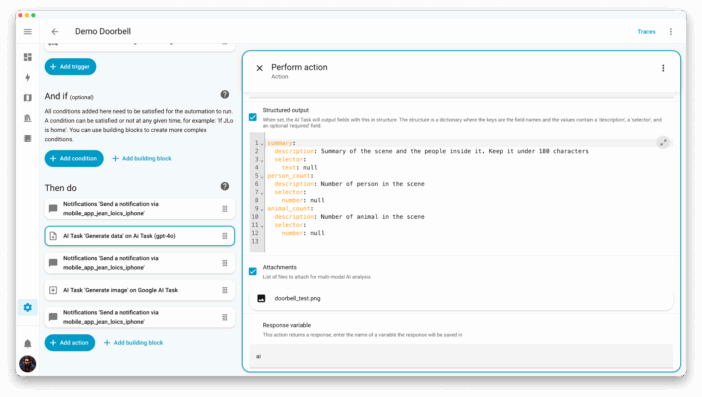
Even the most talkative YAML blocks will no longer be scary. For the absent-minded, the grand return of the magical duo CTRL+Z / CTRL+Y allows you to undo or redo up to 75 actions back in your scenario creation. A true flexibility of a tightrope walker, even to catch that one too many blunder after 11 PM… Just click, we restart, it’s almost too easy.
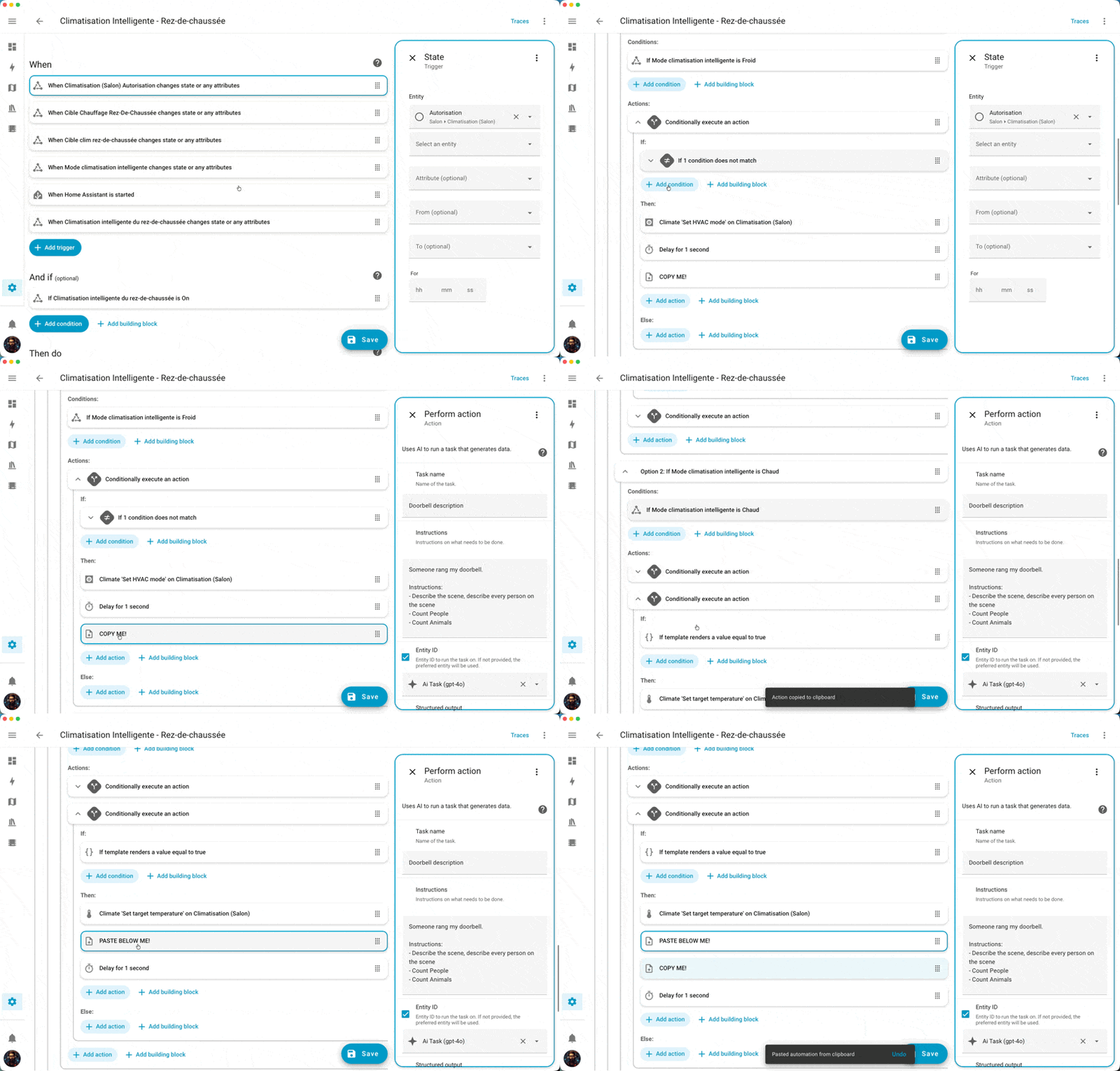
As a cherry on top, shortcuts for copy/pasting an automation block (trigger, condition, action) have been simplified. You select, press CTRL+V, and everything pastes exactly where it needs to be, at lightning speed. Handy when it comes to duplicating energy-saving logic across each room, or even transporting a brightness scenario from the bedroom to the family office.
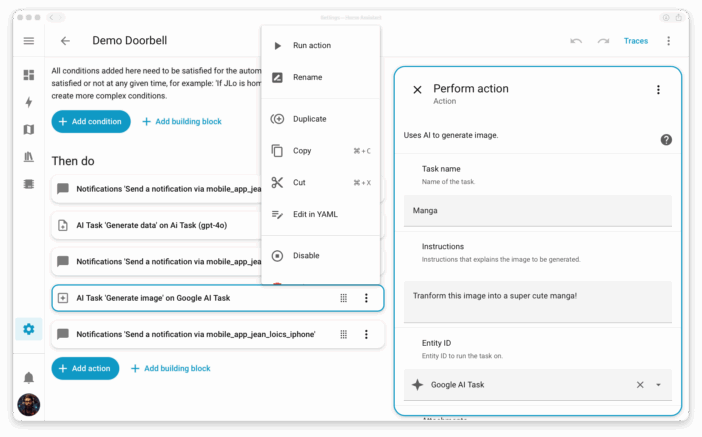
A little nod to the community: the overflow menu (that famous “⋮” that groups advanced options) returns to where we expected it. Test, deactivate, delete… everything is accessible again with one click, directly on the main stream. Sometimes, it’s the little returns that make all the difference.
Repetition in home automation is no longer a headache – it becomes musical!
It is said that repetition is learning… At Home Assistant, it was sometimes a significant headache! The logic of scenario repetitions (blocks “repeat”) was as convoluted as a conductor’s sheet music after a sleepless night. No more: the function has been clarified and divided into four blocks with clear logic.
- Repeat multiple times: to turn a string of lights on/off every 30 seconds, precisely five times (achieving the “connected guinguette” ambiance).
- Repeat until: for example, send a notification every 10 minutes until the fridge door is closed (goodbye forgotten yogurt!).
- Repeat while: perfect for keeping the hallway light on as long as motion is detected (even on returns from parties).
- Repeat for each: to go through a list of lights and turn them off one by one, like a conductor finishing their symphony.
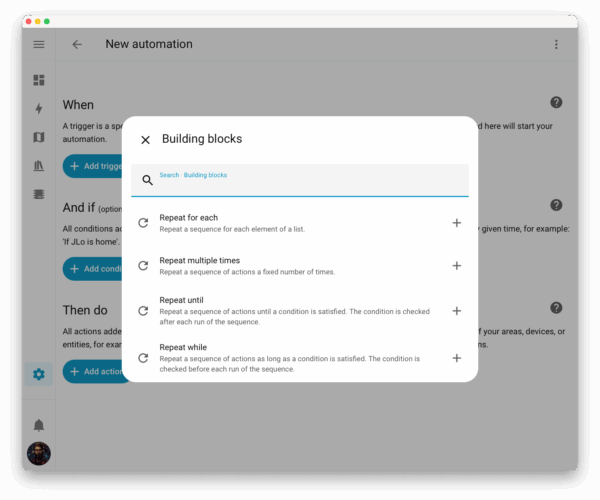
Tip for the experts: all this remains a cosmetic evolution, the YAML does not change. Your home scripts will run as before, but editing is much smoother.
Home Assistant takes on the role of Madame Irma (and this is not a joke)
The grand “Home” dashboard recently introduced is stepping up. Now, it intelligently suggests which entities to display based on your recent habits. The system is smart enough to distinguish morning actions (hello, coffee machine) from evening ones (hello, dimmed lamps), and only shows you what is relevant at that moment. Nothing more, nothing less. This marks the beginning of a “smart by default” dashboard that doesn’t even need manual customization… and honestly, it’s a significant breath of fresh air for those allergic to repetitive drag-and-drop.
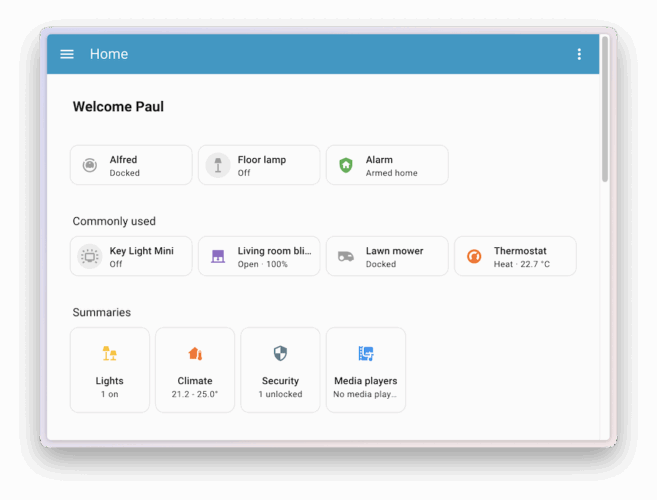
An example? The user who leaves their office every evening naturally sees the control for turning off appear on the dashboard at dusk. On Sunday morning, it’s the coffee maker that pops up at the top of the list. In other words, Home Assistant is starting to guess your needs, sometimes even before you express them…
Voice actions: double the dose (including multilingual) and clever sound confirmation
If you juggle between several voice assistants or if the house vibrates between multiple languages, the update is a real treat. Several wake words (“Okay Nabu”, “Hey Jarvis”…) are finally supported for each voice device. Handy for triggering different assistants based on context, or simply separating the management of local and cloud. Bilinguals, French/English families, or geeks wanting to compartmentalize their voice streams: everyone finds their place.
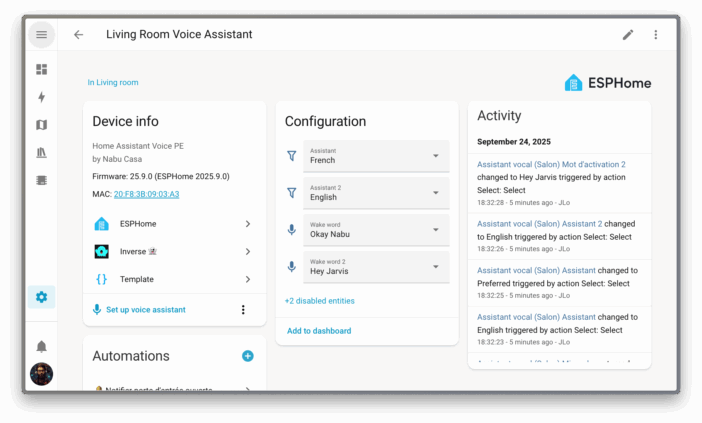
A little nod to Alexa fans: voice command confirmations now sometimes happen with a simple beep sound! If the action takes place in the same room as the assistant, no need for lengthy speeches – a short signal, and you know the request has been understood and executed. It’s discreet, minimalist: everything a fan of well-crafted home automation could love.
AI arrives to generate… images in your connected home!
Did you think that artificial intelligence was reserved for writing poems or forecasting the weather? Wrong: Home Assistant now invites AIs to “draw” for you! Imagine a scenario where, every time someone rings the doorbell, a caricature image from the front door camera is sent to your mobile. Turning a simple intercom into a living cartoon (also useful for detecting whether it’s the mailman or your teen coming home from a party…).
The example is striking (and should inspire some creators of crazy automations): the trigger “someone rings the doorbell” initiates a notification “processing image…”, then the AI provides you with a tailored description of the scene, counts the number of people or animals present, and crowns it all with a manga-style illustration. To mix with all your home automation creativity as necessary…
Explosion of integrations and refinements everywhere
This 2025.10 release is also a festival of integrations (yes, even more!). Notable new additions include Droplet to monitor water consumption, Cync for GE bulbs, Victron for solar or battery monitoring, and backup systems via SFTP (handy to avoid unpleasant surprises on backups). Philips Hue owners can finally enjoy MotionAware sensors on the new Hue Bridge Pro: the bulbs become true motion detectors (when will we get the psychoanalyst bulb…?). And the cherry on top: Portainer arrives for the control and monitoring of Docker containers – a must for anyone who likes to manage their home automation like a server.
A special mention goes to ultra-local weather sensors, enhanced energy management (LG ThinQ), and improved Reolink cameras, which become true video Swiss army knives.
Welcome refinements: logbook, widgets, tables, and more…
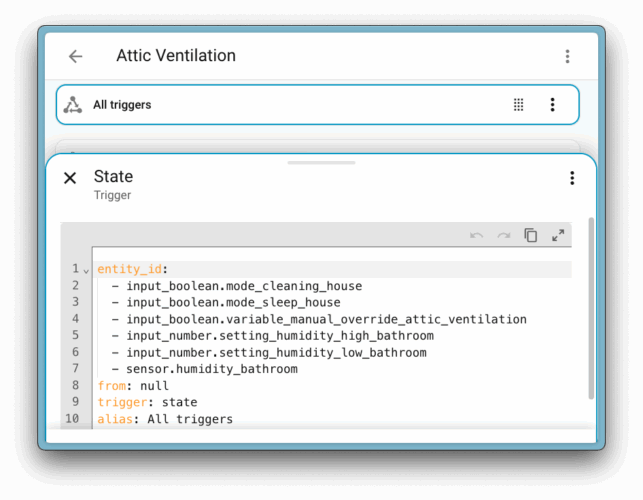
The Logbook section is renamed to Activity (“Activité” in good French), a more intuitive way to follow the history of events in the house. Thermostat cards manage water heaters, graphic configuration of add-ons is more complete, history displays synchronized charts during zoom, and code editors (template/YAML) now get a little toolbar with Undo/Redo and quick copy. A little tip: the Home Assistant mobile app now shows its version in “About”. No more excuses for not monitoring your updates!
Updates: a few points of attention
Home Assistant does not break your old automations, but be careful with some subtleties around labels for targeting entities, with the evolution of Tibber to pricing by 15-minute intervals, or with the abandonment of Zabbix 5.0 support (if this name resonates with your youth as a system admin, it’s time to migrate).
We can never emphasize enough: always back up before diving headfirst into the update. Yes, even an old backup stored in a corner of your NAS can save your Monday morning if your favorite scenario decides to sulk!
Conclusion
We could end on a classical note, but frankly, home automation in 2025 is anything but linear. Version after version, Home Assistant proves that coding your home is no longer reserved for early nerds. Experimentation is at the heart of the project, and you can feel the community’s touch in every new brick.
A little usage recommendation, as grandma would say: have fun, test, dare to create automations that go off the beaten path. This month, make your alarms speak with polyglot beeps, have fun generating mangas from your doorbell, or optimize your custom dashboards. You never know when a brilliant idea might strike at midnight, between two herbal teas or an electrical wiring crisis. Come on, to your scenarios, and don’t hesitate to share your new scenario ideas in the comments!



Please remain courteous: a hello and a thank you cost nothing! We're here to exchange ideas in a constructive way. Trolls will be deleted.