



Résumer cet article :
I have been using a Screenbar-type light bar above my screen for several years, especially after testing the BenQ Screenbar Pro. The principle is simple yet remarkably effective: to illuminate the desk without glaring the screen or the eyes.
But with my switch to a curved iiyama ultrawide screen, the limitations of this classic type of lighting quickly became apparent. Poor light distribution, shadow areas on the sides, mounting not always suitable… in short, it was no longer as convincing.
This is where the Quntis Screenbar Curved model comes into play. Designed specifically for curved screens, it promises uniform lighting and better visual comfort. After several months of use, let’s see how it really stands up.
Unboxing and Overview of the Quntis Screenbar Curved
The Quntis Screenbar Curved arrives in a rather simple, yet well-protected packaging. Inside, you find the light bar, its mounting system designed for curved screens, a wireless remote control with batteries, and a USB cable for powering the lamp.

From the first handling, the product inspires confidence. The finish is neat, with a minimalist design that integrates perfectly into a modern setup. Nothing sticks out, nothing feels cheap.

The particularity of this model is undoubtedly its slightly curved shape. Unlike classic Screenbars which are perfectly straight, this one follows the curvature of the screen. It may seem anecdotal on paper, but in practice, it is precisely what makes all the difference.

The mounting system is also designed to adapt to curved screens, providing stable support without damaging the panel. And a pleasant surprise: installation requires no tools.
Why Use a Screenbar?
Before going further, a quick useful reminder. A screen light bar is not just for “looks.” It provides a real gain in visual comfort.
When working in a poorly lit room, the contrast between the bright screen and the dark environment quickly tires the eyes. This is even more true on an ultrawide screen used for several hours straight.
The Screenbar specifically illuminates the desk without creating reflections on the screen. The result:
- You reduce eye strain
- You improve overall readability
- You avoid shadow areas on the keyboard and desk
And above all, you achieve a much more pleasant working atmosphere (you quickly realize this once you’ve experienced it).
Installation and Setup of the Quntis Screenbar Curved
The installation is frankly simple.
The bar sits directly on top of the screen, thanks to its counterweight system. On a curved screen, that’s often where things get complicated… but here, everything is well thought out.

The support perfectly conforms to the shape of the iiyama ultrawide screen, without slipping or forcing. Once in place, the lamp remains perfectly stable.

Power is supplied via USB, allowing it to be connected directly to the PC, a hub, or even the screen if it has a USB port. This is indeed what I did with my iiyama screen, which thus reduces trailing cables.
In just a few seconds, everything is up and running.
Conveniently, the lamp has a platform for placing a webcam:

Daily Use Feedback
This is clearly where the Quntis Screenbar Curved makes the difference.
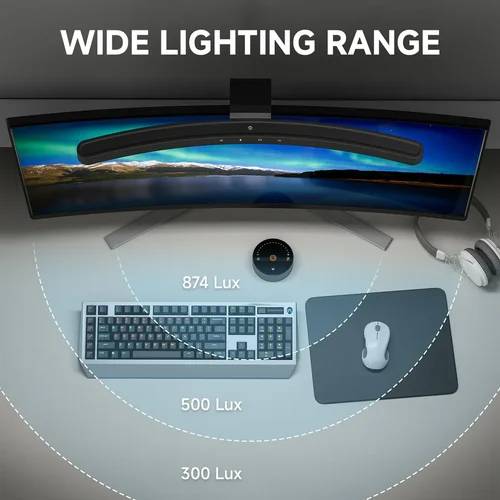
Where my previous Screenbar showed its limits, this curved model provides a much more uniform light distribution. The edges of the screen, often poorly lit before, benefit from here a balanced lighting.

The visual comfort is immediately noticeable.
Even after several hours of work, eye strain is reduced. The lighting is soft, without glare, and especially without reflections on the screen. This is exactly what we expect from this type of product.
Quntis had the good idea to offer two ways to control its Screenbar: directly on the lamp or via a wireless remote control. And in practice, it’s really convenient on a daily basis.

On the bar itself, we find touch controls. A simple touch allows you to turn the lamp on or off, adjust the brightness, or change the color temperature. The response is immediate, without latency, and you quickly get the hang of it. This is the kind of detail that makes a difference when you spend your days in front of the screen.

But the real comfort comes from the remote control (powered by batteries). Placed on the desk, it allows you to adjust the lighting without having to reach up to the screen. You can easily set the brightness, switch from a cool to warm light according to the time of day, or simply turn the lamp on and off with a gesture. It’s discreet, efficient, and frankly pleasant to use.

Another interesting point: the presence of an integrated light sensor. This analyzes the ambient lighting and automatically adjusts the lamp’s power to maintain a comfortable level. In practice, it avoids having overly harsh lighting in the evening or too weak during the day. Of course, you can manually override it, but this automatic mode works well enough to be used daily without thinking about it.
In the end, whether you’re the type to adjust everything to the millimeter or to let automation take over, everything is there to adapt the lighting to your environment without hassle. And that’s exactly what we expect from an accessory of this type.
The lighting effectively covers the keyboard and work area. Whether for typing, doing a bit of work on the desk, or even writing, everything remains clearly visible.
In daily use, you eventually find it hard to do without it. And that’s often a good sign.

A small appreciated detail as well: the discretion. Once installed, the bar is completely forgotten. It neither obstructs visibility nor aesthetics of the setup.

Conclusion
This Quntis Screenbar Curved perfectly addresses the problem I encountered with my ultrawide screen.
Where a classic bar reaches its limits, this model provides a simple and effective solution. The lighting is uniform, visual comfort is significantly improved, and installation poses no difficulties.
This is not a gadget. It’s a real comfort accessory, especially if, like me, you spend several hours per day in front of a curved screen. For around €70, I can only recommend it! Not only is it one of the few curved models on the market, but its price is also much more competitive than what we usually see.



Please remain courteous: a hello and a thank you cost nothing! We're here to exchange ideas in a constructive way. Trolls will be deleted.